PPC call tracking records which ad, keyword and campaign produced each phone call, then counts the calls that matter as conversions. Without it, a phone-led business sees calls arrive and cannot tell which paid clicks earned them.
This guide covers how pay per click call tracking works in Google Ads, the three native setups, number insertion, call length, and a test that catches the mistakes that inflate your numbers. The checks reflect Google’s help pages as of November 2026.
What is PPC call tracking?
It is the link between a paid click and a phone call, and ppc call tracking is the name for the setup that records it. Google’s guide to phone call conversion tracking lists 3 kinds: calls from your ads, calls to a number on your website, and calls imported from another system.
Good PPC call tracking answers 3 questions: which click led to the call, how long it lasted and whether it ended in a sale. The first two kinds use a Google forwarding number that sits between the caller and your real line. The third uses your own records. In each case you can set a minimum call length, so a wrong number that lasts 5 seconds is not a lead.
Not every business needs it. A store that sells only online can usually skip it. It matters for clinics, home services, dealers and any business where the sale is closed by phone, because the ad platform sees a click and never hears the call. With PPC call tracking in place, those calls show up next to form fills and orders in the same report.
Our general guide to PPC tracking covers clicks, sales and forms. This one stays on calls, because calls break in ways forms do not: a number can be swapped wrongly, counted twice or logged without a sale behind it.
How does pay per click call tracking work in Google Ads?
A forwarding number replaces your number, passes the call to your line and logs the details. Google’s call reporting page says it tracks duration, start time and whether the call connected, plus the caller’s number for calls over 15 seconds (India is the exception).
For ads, the starting point is a call asset. On a phone, people tap a call button under your ad. On a desktop, a “Call us” button shows your number or the forwarding number with a QR code. Clicks on it cost the same as a headline click.
For your website, Google’s website call tracking uses a phone snippet that swaps the number on your page for a forwarding number after someone arrives from an ad. That is how a call is tied to a keyword and campaign, not just to “Google”.
Pay per click call tracking also gives you a view that clicks alone cannot: call volume by hour and by campaign. If most calls arrive between 8 and 10 in the morning, you can match ad schedules and staffing to that window, and check that no paid calls ring out of hours.
Google notes that forwarding numbers can change or be reassigned, so never print one on a flyer or in a listing.
Which PPC call tracking setup should you use?
The one that answers the question you need answered: did the phone ring, was the call long, or did it sell. Most phone-led businesses end up running 2 or 3 of the setups together, and it is worth reviewing the mix every 30 days.
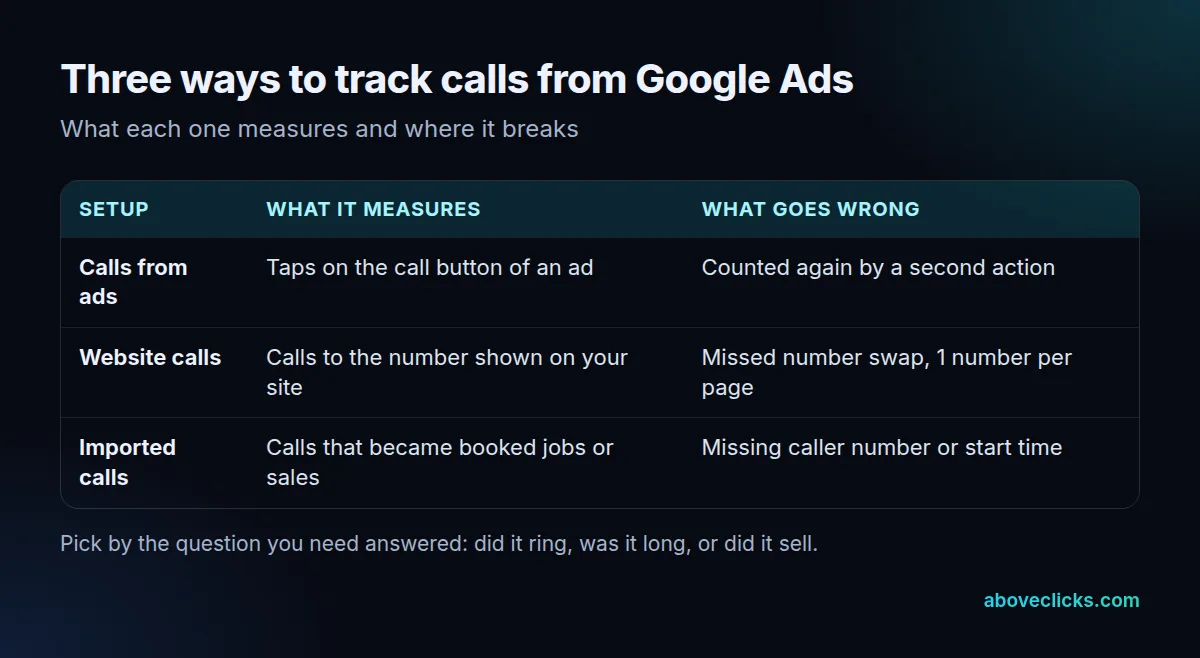
Match the setup to the weakest link in your reporting. Use calls from ads when you run call assets or location assets and want a quick count of taps. Use website calls when people read your site before dialing. Use imported calls when you record outcomes in a CRM, because Google’s import guide needs the caller’s phone number and the call start time for each row.
Two limits to know. The default tag tracks only one number per page, so a site with a sales line and a support line needs manual code or a call tracking tool. And the tag manager route is not recommended when a site uses number insertion or third-party call tracking.
Call tracking ppc setups fail in a few predictable ways, and the biggest mistake is double counting. Google says that once call reporting is on, new calls are counted under a default “Calls from ads” action that is included in the Conversions column. Add a second action for the same calls and one call becomes two conversions.
What is dynamic number insertion?
It is a script that swaps the phone number on your page for a different tracking number, depending on where the visitor came from. Google’s website snippet does this with one forwarding number; call tracking tools do it with a pool of numbers, so many visitors can be told apart at once.
The catch is verification. Google’s help page says its automated check cannot verify a phone number that is inserted by script, so you must verify your domain another way. Linking Search Console to Google Ads is the recommended route, and the link takes 24 hours to take effect. After that, resubmit your call assets for review.
If you use a third-party tool for ppc call tracking, test that the swap still happens after every theme change, because a script that fails silently leaves the real number on the page and the call untracked.
How long should a call be to count as a conversion?
Long enough to filter out wrong numbers and hang-ups, short enough to include real enquiries. Google leaves the choice to you: every call that lasts at least your minimum length counts as a conversion.
Google’s call reporting page gives an example of an advertiser who found that calls lasting more than 2 minutes tended to lead to sales, so they counted only those. Your threshold depends on the business: a booking line may need 30 seconds, a quote line several minutes.
A threshold that is too high hides real leads from bidding, and one that is too low trains it on noise. Set the PPC call tracking threshold from your own call log, not a rule of thumb. Listen to a sample, note the shortest call that was a real lead, and start slightly below it. Review it every quarter.
A long call still is not a sale. For that, import the outcome, as in the next sections.
How do you check PPC call tracking is accurate?
Make a real call from a real ad and follow it through the report. This takes about 10 minutes and catches most faults.
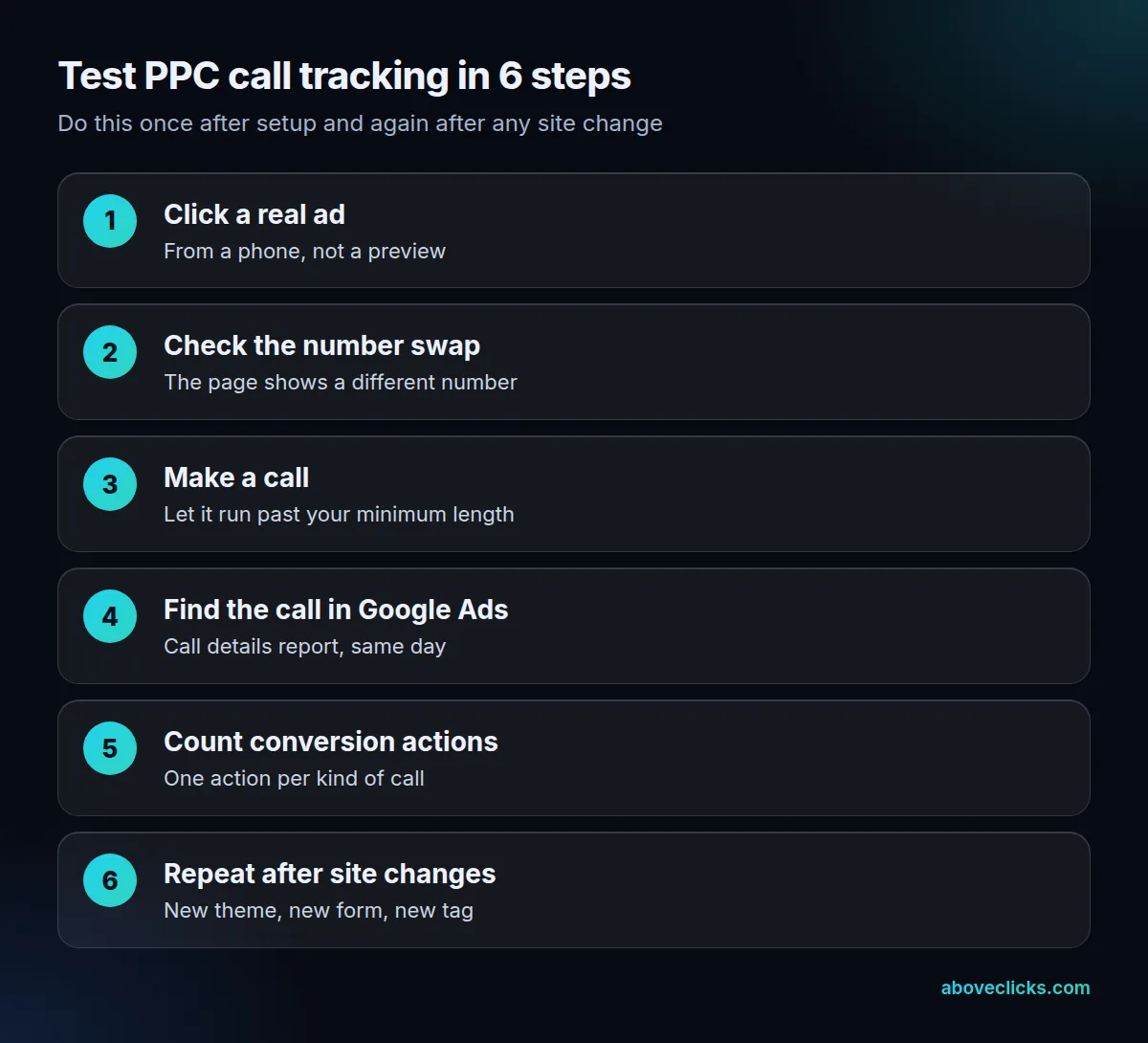
Good ppc call tracking is a habit as much as a setup, so put the test in your calendar. Start from a phone, search for one of your keywords and click your ad. Check that the number on the page is not the one in your footer. Call it and talk for longer than your minimum. Then find the call in Google Ads the same day.
Count your conversion actions next. One action per kind of call is the rule; a call that appears under “Calls from ads”, a website call action and an imported action may be counted three times if they are all primary. Google’s import page warns that wrongly set primary and secondary actions can stop Smart Bidding from optimizing well.
Three faults turn up again and again:
- A number that never swaps. A cached page, a pop-up form or a second theme template still shows the real number, so those calls are untracked.
- Two actions for one call. The default action plus a hand-made one count the same call twice.
- A minimum length set too low. Missed calls and hang-ups pass as leads and teach bidding to chase them.
Compare totals with your phone log once a month. If Google Ads reports 90 calls and your phone system shows 50, something is counting twice. Our guide to PPC conversion tracking covers the same audit for every other action, and Google Business Profile call tracking covers calls from your listing.
What should you do with the call data?
Judge campaigns by the booked job, not the call; that is the main reason to invest in PPC call tracking. A worked example shows why. This is an invented home-services business, not a client result.
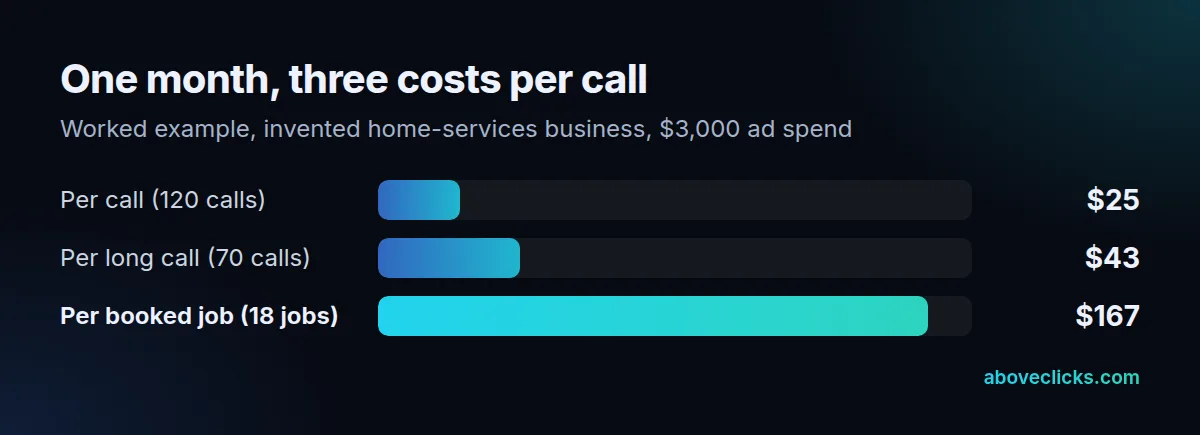
Suppose it spends $3,000 in a month and gets 120 calls. That is $25 per call ($3,000 ÷ 120). Seventy calls last longer than its 60-second minimum, so each long call costs about $43. The CRM shows 18 booked jobs, so each job costs about $167.
Which campaign looks best depends on the line you read. A campaign with cheap calls but few booked jobs would lose to a pricier one that books more. That is why importing booked jobs into Google Ads matters, and why a tracking audit starts with the CRM, not the ad account.
A second use is the call mix. If a campaign sends many short calls, the keywords may attract job seekers or people after a different service, and negative keywords can cut them. Listen to 10 calls a month from your worst and best campaigns; the pattern is usually obvious within minutes.
Once your call tracking ppc numbers hold up, feed bidding the long or booked calls only, and keep the raw call count as a secondary, observation-only action. For a second opinion on your setup, our free audit reads your account with view-only access. More guides are in measurement.