Sendlane vs Klaviyo comes down to what each bills on: Klaviyo counts active profiles and emails sent, while Sendlane advertises unlimited contacts and charges for sends. Check that unit first, then the Shopify data you segment on.
This Sendlane vs Klaviyo guide is for an online store. It covers how Sendlane pricing and Klaviyo billing differ, what the Sendlane Shopify sync brings over, which flows you can rebuild, what the Privy deal changes and how to move. Facts come from each vendor’s own pages as of November 2026; rates change, so we show the counting rules and leave out rate cards.
Sendlane vs Klaviyo: what is the difference?
Both send email and SMS for online stores, but they count and connect data differently. Klaviyo bills on profiles and emails; Sendlane bills on sends and has been bought by Privy.
As of November 2026, Klaviyo’s pricing page shows a free plan that covers up to 250 active profiles and 500 emails a month, with $5 of mobile messages. Sendlane’s pricing page lists campaigns, a drag-and-drop email builder, pop-ups and forms, trigger-based automation, Beacon website tracking and a Shopify data integration among the features in all plans.
So in a Sendlane vs Klaviyo comparison the feature lists overlap heavily, which is why they rarely settle the choice. The differences that do are the billing unit, what the Shopify sync carries over and who owns the company. In a klaviyo vs sendlane trial, test the same three flows in each. We could not read Sendlane’s answer to its own “free trial” question, so check what a test account allows before you plan around one.
How does Sendlane pricing compare with Klaviyo billing?
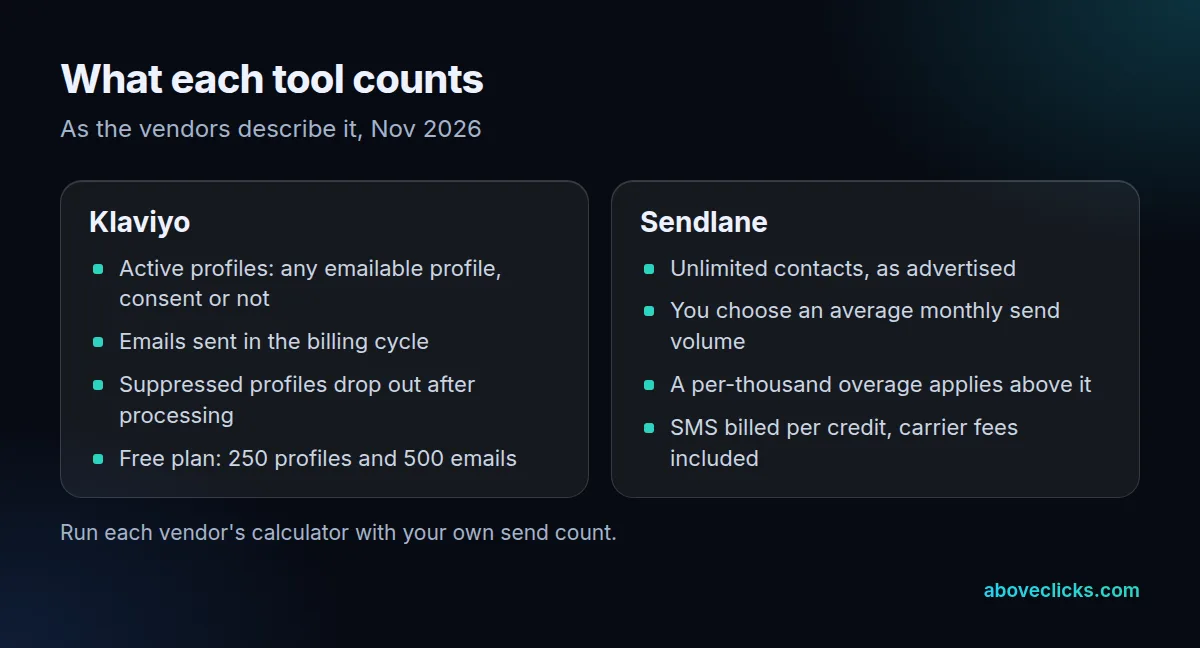
Klaviyo bills on two counts, active profiles and emails sent in the cycle; Sendlane says “pay for sends, not profiles”. The same list can therefore cost different amounts on each.
Klaviyo’s billing guide says a Profiles and Email plan must cover your active profile count and the emails you send in a cycle. An active profile is any profile that can be emailed, regardless of consent status, so someone who shared an address at checkout without opting in still counts. Email-suppressed profiles drop out once suppression is processed, and after a large cleanup the billing count can take up to 72 hours to refresh. On the free plan, going over the profile limit means you cannot send.
As of November 2026, Sendlane’s pricing page headlines “Unlimited Contacts” and has you choose an average monthly send volume, excluding seasonal peaks, with a per-thousand overage above it. The rates come from a calculator, so we do not quote Sendlane pricing here. The page also lists SMS from $0.009 per credit, carrier fees included, and 24/7/365 chat support.
What does the billing difference look like for one store?
It depends on who you email, not how many people you store. Under send-based billing the policy you set for your list changes the number you pay for; under profile-based billing it mostly does not.
Example: an invented fashion store has 30,000 active profiles, and 8,000 of them opened or clicked in the last 90 days. It sends 8 emails a month. The formula is sends = people emailed × emails each.
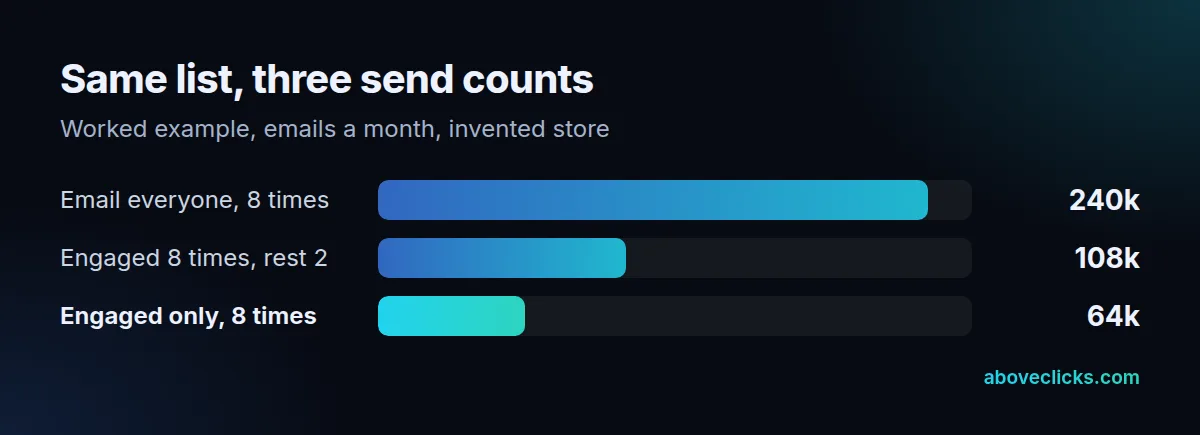
Emailing everyone gives 30,000 × 8 = 240,000 sends. Emailing the engaged 8,000 eight times and the other 22,000 twice gives 64,000 + 44,000 = 108,000. Emailing only the engaged gives 64,000. On Klaviyo, the 30,000 profiles stay billable under all three policies unless you suppress some of them.
Sendlane pricing and Klaviyo billing react differently to the same list policy, which is why a large list that is rarely emailed tends to suit send-based billing, while a store that mails the whole list often sees the gap narrow. Count your own sends over a normal month before comparing quotes, and leave out launch weeks.
List hygiene helps on both. Klaviyo’s billing guide says messages that leave the system, including bounced emails, count toward the plan limit, while skipped emails do not. So removing dead addresses lowers a Klaviyo bill, and on a send-based bill every unneeded send you stop is a send you no longer pay for.
Does the Sendlane Shopify sync match Klaviyo’s?
Both connect to Shopify through an app, but they differ in what they import and what you can segment on. The Sendlane Shopify setup is a short app install. Sendlane’s Shopify guide says it imports contacts with any Shopify activity in the past 12 months, then syncs automatically.
That guide adds two cautions. A free trial limits how many contacts sync, so upgrade before you connect. And Sendlane’s tags article says the only Shopify tags you can segment or trigger on are customer tags, not product, order or draft-order tags. If your segments rely on those, plan a workaround.
For Klaviyo, the Shopify guide has you choose what syncs from and to Shopify, and shows the progress of the initial data sync under Historical data. It also warns that a previous email platform still connected to Shopify can send double opt-in emails to your existing subscribers, so disconnect it first. That applies in both directions of a move.
Which Klaviyo flows can you rebuild in Sendlane?
In a klaviyo vs sendlane move, start with the four flows Klaviyo’s flows guide puts first, in priority order 1 to 4: welcome series, abandoned cart, post-purchase and winback. Rebuild those, then test each against the checks below.
| Flow | What to confirm before you move |
|---|---|
| Welcome series | New subscribers trigger it, and email and SMS opt-ins are handled separately |
| Abandoned cart | Cart contents appear in the message, and buyers leave the flow after ordering |
| Post-purchase | Order data and product fields you use are available |
| Winback | You can filter by purchase count and last order date |
| Back in stock | Needs Sendlane’s Shopify integration plus Beacon tracking, per its guide |
Segments matter as much as flows. Klaviyo’s segments guide says segments are dynamic and update in close to real time. Ask how any tool you test updates a segment, and try your three most-used ones in a trial rather than trusting a feature grid.
What did Privy’s Sendlane deal change?
Both vendors’ pages say Sendlane has been acquired by Privy. Neither says what changes for your plan, so treat what you cannot read as unknown rather than good or bad.
Sendlane’s pricing page carries a notice that it “has been acquired by Privy”, and Privy’s announcement promises faster feature development and one platform for email, SMS and on-site tools. Those are statements of intent, not changes you can check yet. Privy’s own tool is a different product, which we cover in Privy vs Klaviyo.
As of November 2026, Sendlane’s pricing page lists 24/7/365 chat support but says its dedicated support services are held for customers on an annual contract. Before you sign, ask in writing about the contract term, what support you get on a monthly plan, and how you export your data if you leave.
What do SMS and consent rules add?
They add records you must carry across. Klaviyo’s SMS compliance basics list 7 points, starting with express consent, which must be written for US marketing texts.
Keep a record of when and how each person agreed, and only text people who are currently opted in. The same page says consent for order-update texts does not subscribe someone to marketing messages. Collecting consent on Shopify is its own setup step in Sendlane, with a guide in its Shopify collection.
Email has its own rule. The FTC’s CAN-SPAM guide says opt-out requests must be honored within 10 business days, with penalties of up to $53,088 per email. So move your unsubscribes along with your subscribers. This is general guidance, not legal advice.
Which should you choose, and how do you move?
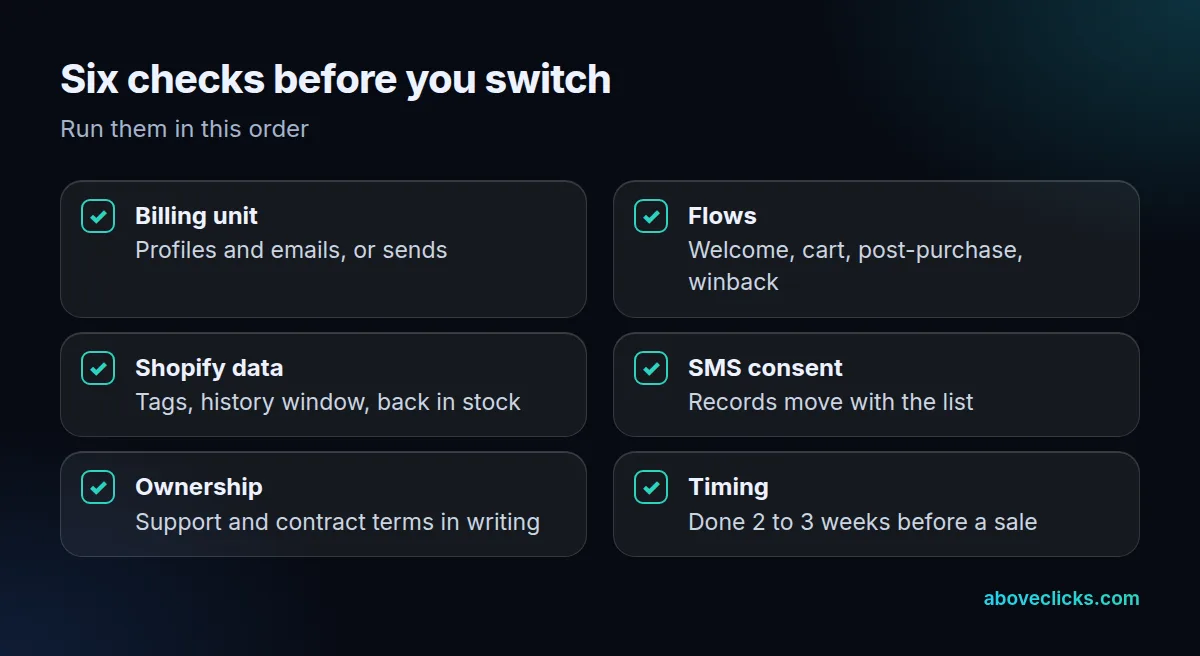
In the Sendlane vs Klaviyo decision, choose by need, then run the six checks. Give each tool the same 30-day window of real sends when you test, so the Sendlane vs Klaviyo numbers are comparable. If your bill is driven by a large, rarely mailed list, price Sendlane; if you rely on deep store data and many segments, price Klaviyo.
| Your situation | Lean toward |
|---|---|
| Large list, few emails per person | Compare Sendlane’s send-based billing |
| Many segments built on Shopify order and product data | Klaviyo, then confirm in a Sendlane trial |
| Heavy reliance on customer tags only | Either; test both |
| Worried about vendor ownership changes | Ask for terms in writing from both |
For the move, Klaviyo’s migration guide lists built-in integrations for Mailchimp, Campaign Monitor and Salesforce Marketing Cloud. Sendlane is not among them, so for a klaviyo vs sendlane move in either direction plan an export and import, and carry unsubscribes with it.
Here is the timing we publish for a Klaviyo migration: most store migrations take 2 to 4 weeks, and you should finish 2 to 3 weeks before a major sale so flows have run on real orders. A free audit comes first, with a fixed-scope plan within 2 workdays. See our Klaviyo email marketing service for the setup side, or compare more tools in Brevo vs Klaviyo and Klaviyo alternatives for Shopify. For a second opinion on your current setup, our free audit is the place to start, and more guides are in buying guides.