Klaviyo alternatives Shopify stores can use fall into four routes: Shopify’s own messaging app, another email platform with a Shopify integration, a send-based plan, or staying and trimming the list. Choose by the flows that earn money today, because the price table comes second.
This guide to Klaviyo alternatives Shopify owners can use explains what Klaviyo does for a Shopify store, sets out the four routes, shows how to test a switch with one formula and gives the order of steps that avoids double sends. For tool-by-tool rates, see our Klaviyo alternatives comparison.
How does Klaviyo work with Shopify?
Through an app that pulls customers and orders into Klaviyo and can push profiles back to Shopify. The Klaviyo Shopify integration is what an alternative has to replace, not just the email editor.
Klaviyo’s Shopify setup guide lists what the Klaviyo Shopify integration does: it brings in customer and order data, adds customers who accept email marketing at checkout to a list, and can sync Klaviyo profiles back to Shopify. If you choose all profiles for outbound syncing, Klaviyo creates Shopify customers for profiles that came from imports and other integrations too.
Flows run on that data. Klaviyo’s flows guide names 6 triggers: list, segment, metric, date property, price drop and low inventory. A replacement must cover the triggers your live flows use. This is where most Klaviyo alternatives Shopify owners shortlist go wrong: they compare editors and rates, then discover in week 3 that a price-drop or low-inventory flow has no equivalent.
Predictive fields are part of what you give up. Klaviyo’s lifetime value guide says predicted lifetime value needs at least 500 customers with orders and 180 days of order history, so a smaller store loses little by moving. A larger one should check whether its segments depend on those fields.
Write down four things before you compare tools:
- Which lists feed your welcome flow.
- Which flows use order or product events.
- Whether profiles sync back to Shopify.
- Which sign-up forms and tracking snippets sit on your theme.
That list is your shopping brief for any of the Klaviyo alternatives Shopify offers.
Does Shopify do email marketing without Klaviyo?
Yes. Shopify Messaging, formerly Shopify Email, sends campaigns and automations from the Shopify admin, and every store on a paid plan gets 10,000 free emails a month.
Shopify’s email rules give the numbers, as of November 2026: the 10,000 free emails are shared across campaigns and automations, extra emails cost $1 per 1,000 up to 300,000, and abandoned checkout emails are always free. Our Shopify Email vs Klaviyo guide covers that billing contrast in full.
The automation list is wider than many guides say. It includes abandoned product browse, abandoned cart, abandoned checkout, welcome, thank-you, upsell, win-back and birthday automations. For custom logic, Shopify points to its Flow app. For a store whose Shopify email marketing is campaigns plus those standard flows, that may be everything it needs.
Which Klaviyo alternatives Shopify stores can use
Four routes cover almost every case: Shopify Messaging, another platform with a Shopify integration, a send-based plan, or staying on Klaviyo with a trimmed list.
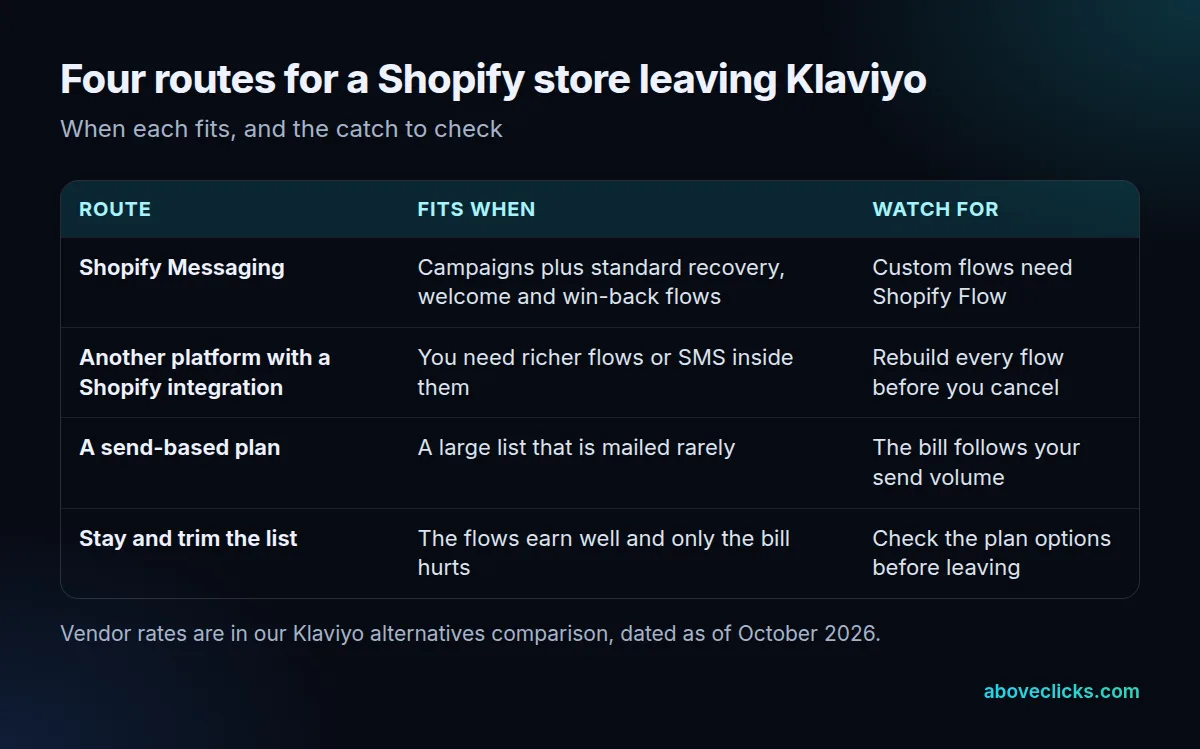
Match your row, not a brand, and keep Shopify email marketing in the mix as route one. Every one of these Klaviyo alternatives Shopify owners compare has a catch, and the table names it. A store with 800 subscribers and three standard flows usually belongs on the first route. A store that texts inside every flow and splits paths by behavior belongs on the second, where you rebuild everything and pay for the platform’s depth. For a head-to-head on one such platform, see Omnisend vs Klaviyo.
Each route also changes what happens to the Klaviyo Shopify integration. Routes one to three replace it with a new connection, so the old sync has to be switched off first; route four keeps it, but you should review which profiles it syncs back to Shopify.
The third route suits a large list that hears from you twice a quarter. The fourth is often the right answer when the flows earn well and only the bill hurts: look at Klaviyo’s own plan options before you leave, because it documents downgrading to free, canceling a plan and closing an account as three separate actions.
Which of your flows must an alternative keep?
The ones that earn revenue today. List every live flow, note its trigger and last month’s revenue, then mark it keep, rebuild or drop.
Flows usually carry most of the email revenue, so they decide the switch. On our Klaviyo email marketing page we publish one anonymous US skincare store on Shopify: in September 2026, automated flows produced $68,975.42 of $93,842.76 in email-attributed revenue, or 73.50%. Checkout recovery alone brought $24,684.32. We run seven core flows for stores like it.
Apply a three-part test to each flow:
- Keep: the trigger exists in the new tool, such as abandoned checkout or welcome.
- Rebuild: the flow splits on behavior or uses a price-drop or low-inventory trigger, so it needs hand-building.
- Drop: it has sent fewer than 10 emails a month, or no one can say what it is for.
Do the abandoned-cart flows first, because they pay fastest. If you are weighing a klaviyo cheaper alternative on Shopify, this inventory is also the honest cost estimate: 4 flows to rebuild is an afternoon, 15 is a project. Our abandoned cart recovery service shows what a well-built version contains.
Is a cheaper Klaviyo alternative worth the switch?
Only if the monthly saving repays the rebuild within a period you are comfortable with. Divide the cost of rebuilding by what you save each month.
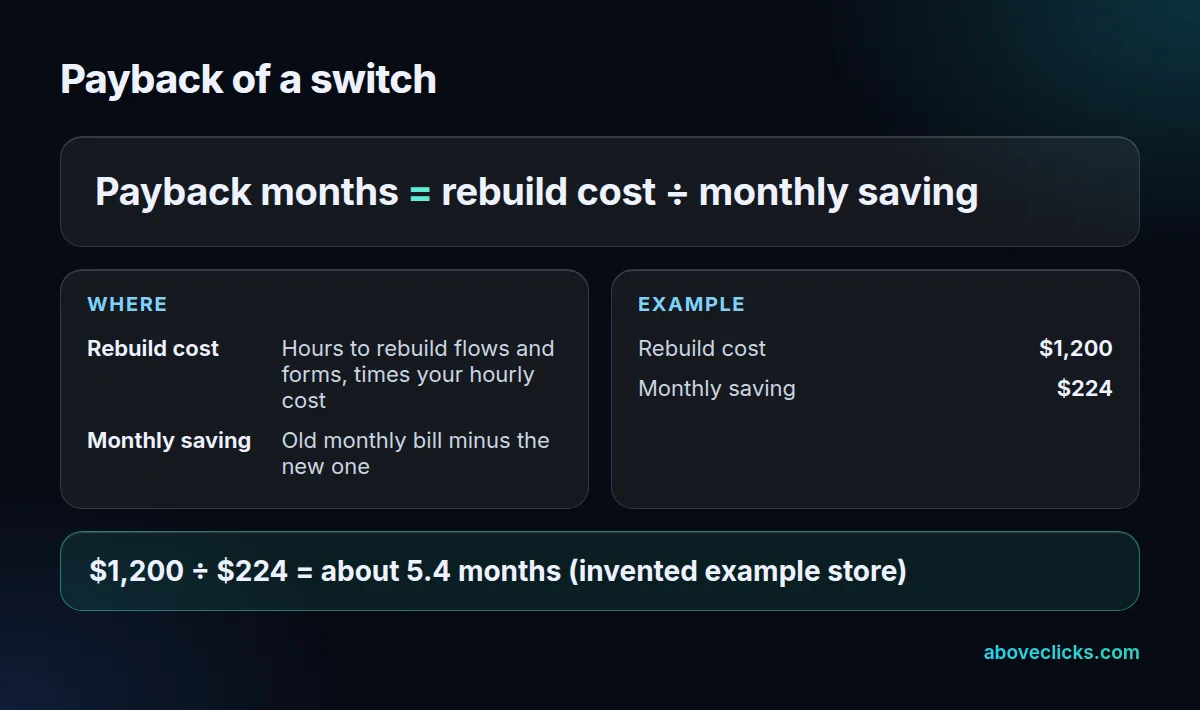
Worked example, invented store, using Shopify’s published email rate as of November 2026: 12,000 subscribers, 3 campaigns a month, so 36,000 emails. That is 10,000 free plus 26,000 at $1 per 1,000, or $26 a month. If the old bill is $250, the saving is $224. Rebuilding the flows and forms takes 20 hours at $60 an hour, or $1,200, so payback is about 5.4 months.
That arithmetic ignores lost revenue, so protect it. Treat the saving as real only after the new flows have matched the old ones for a full month. A klaviyo cheaper alternative on Shopify that drops your recovery flow for two weeks can erase months of saving. If payback runs past a year, the better move is to trim the list or review the plan instead.
How do you switch from Klaviyo without losing consent?
To switch from Klaviyo, export first, build and test second, and turn the old tool off only when the new one is sending. Consent records travel with the export; flows do not.
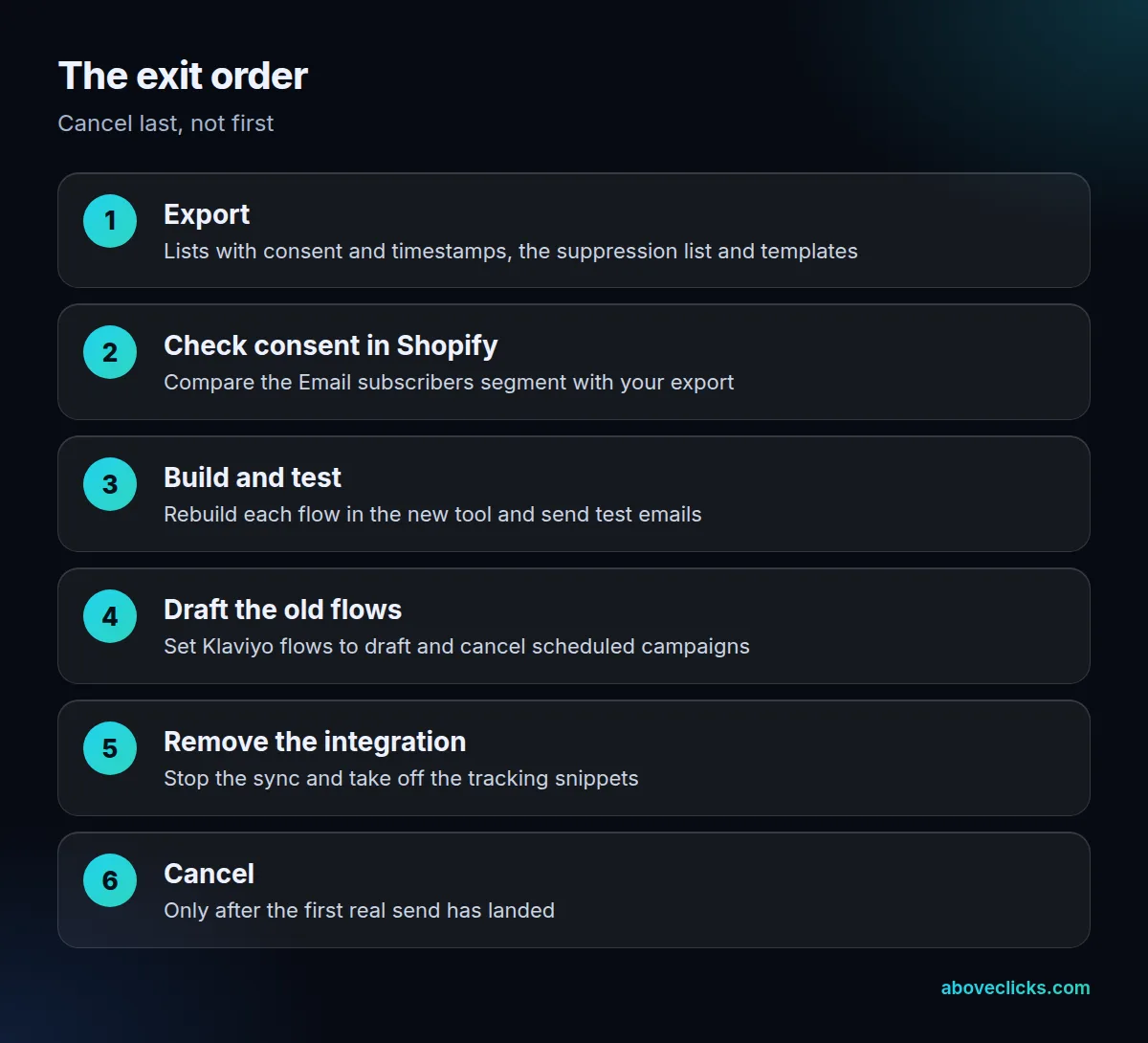
Klaviyo’s migration checklist covers the export. Include each profile’s email consent and consent timestamp, export the suppression list so opt-outs carry over, and save template HTML. Exports stay in Settings, Other, Downloads for 30 days. Set flows to draft rather than deleting them, because deleted flows cannot be recovered.
Shopify holds its own record. Per Shopify’s subscriber guide, customers who accepted marketing appear in the Email subscribers segment, and unsubscribes, spam complaints and bounces are removed or suppressed. Compare that segment with your export before you import anything.
To switch from Klaviyo safely, do three more things, in this order. Remove the Klaviyo integration before you cancel, which stops the sync. Take off any manual tracking snippets. And connect the new tool to Shopify only after the old sync is off, as Klaviyo advises when an old platform is still connected.
Plan the calendar as well as the tools. Pick a quiet fortnight, not the weeks before a sale, and keep both tools connected to a test address while you compare. Send the same welcome, cart and post-purchase messages to yourself from each tool and check the timing, the discount codes and the links. Most switch mistakes are small, such as a code that expired or a cart email that shows the wrong product, and they are cheap to catch before real customers see them.
Give the new setup a full month before you judge it. Compare flow revenue and unsubscribe rates against the same month in the old tool, and only then count the saving from your payback formula as real.
What should you check before you cancel Klaviyo?
Check that the new tool has sent at least one real campaign and each kept flow has fired once. Then cancel, because canceling is not easily undone.
Klaviyo’s cancel guide is explicit: canceling all plans disables sending, sign-up forms and integrations, and closing the account starts data deletion. Run this list first:
- Test emails received and links work.
- Unsubscribe link tested on one real address.
- Suppression list imported.
- Forms on the store point to the new tool.
- Scheduled Klaviyo campaigns canceled.
Shopify email marketing rules are the same as anywhere else: only people who agreed to marketing should be mailed. The unsubscribe test is a legal check as well as a practical one. The FTC’s CAN-SPAM guide says you must honor an opt-out within 10 business days, so a gap during a switch is not a defense.
If you want a second pair of eyes on the flows before you move, our free audit reviews your current setup. More guides are in e-commerce SEO.