Sendinblue is the former name of Brevo, the email and SMS platform renamed in May 2023. If you still run Sendinblue email marketing under that old login, check three things: what the plan costs now, what the daily send cap allows, and whether the account meets today’s sender rules.
This guide explains the rename, what the tool includes, what plans cost as of November 2026, how the free plan’s cap plays out on a real list, six traps on an inherited account, and when a store should move to a platform built around store data.
Is Sendinblue email marketing now called Brevo?
Yes. The company announced the new name on May 4, 2023, in its own rename post. Sendinblue email marketing now runs under the Brevo brand, from the same company.
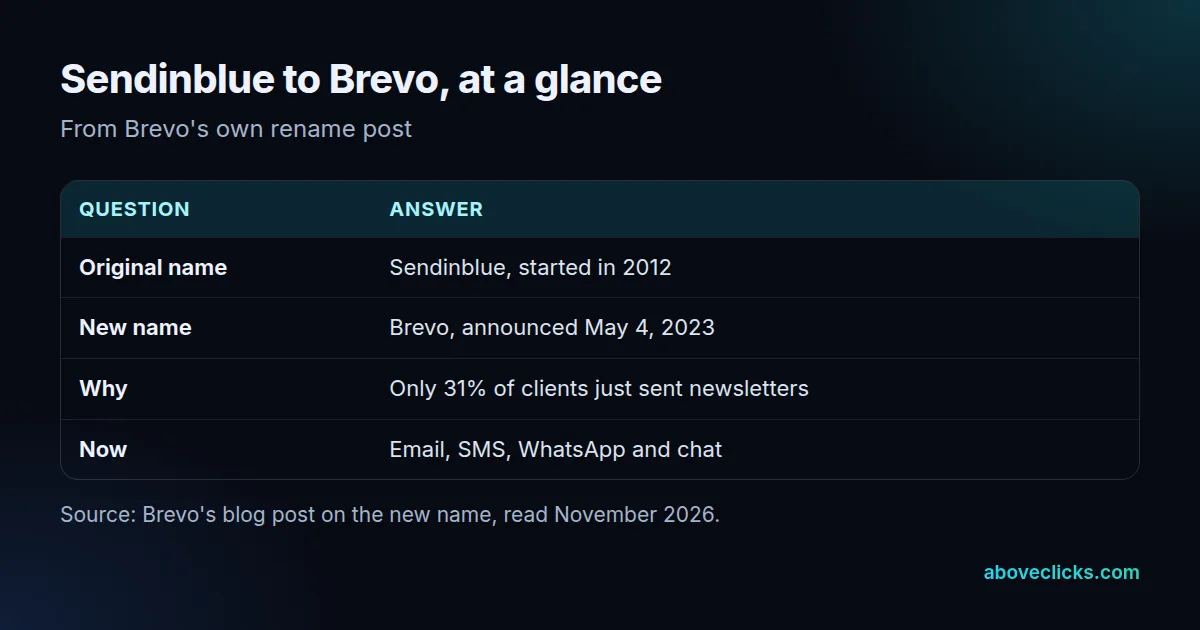
Brevo’s post gives the reason: Sendinblue started as a newsletter service, but only 31% of its clients were focused solely on sending newsletters. The “Send” in the old name had become too narrow for a platform that also handled SMS, chat and sales tools.
So if an old bank statement, a plugin setting or a ten-year-old tutorial says Sendinblue, it points to the same company. Search results still mix both names, which is why advice written before 2023 can look right and still show screens that no longer exist.
One practical point: a search for “Sendinblue login” can lead to look-alike pages. Type the Brevo address yourself, or use the link inside a dashboard you already trust.
What does Sendinblue email marketing include?
Email campaigns, automation, forms, segmentation, SMS and a drag-and-drop editor, plus sales tools sold separately. In 2026 that is the Brevo platform, and its pricing page lists the features per plan.
Brevo says it connects with 150+ digital tools, Shopify among them, as of November 2026 on its integrations list. For a store, the parts that matter most are:
- Campaigns: one-off emails built in the editor, with templates.
- Forms: sign-up forms that trigger a follow-up email when someone joins.
- Segmentation: filters on demographics, website activity and campaign engagement.
- Automation: multi-step workflows, which are not on the entry plan (see the next section).
- SMS: sold as separate credit, so it adds to the monthly bill.
Sendinblue email marketing was not built around a store’s order data the way some ecommerce platforms are. It connects to a store through an integration, and what it can do with an order depends on that connection. For a simple newsletter and a welcome email, that is plenty; for flows that start from a specific product or a cart value, it is worth testing before you commit.
What does Sendinblue email marketing cost now?
As of November 2026, Brevo’s pricing page lists Starter at $9 a month for emails from 5,000 a month, and Standard at $18 a month. Standard adds unlimited multi-step automation and A/B testing. Plans scale with the number of emails you send.
Three details change the real bill, as of November 2026, according to the same pricing page:
- Volume steps: the monthly email volume is chosen on a slider, from 5,000 up through steps such as 10,000, 20,000 and 100,000, and the monthly cost rises with it.
- Logo removal: as of November 2026, taking the “Sent with Brevo” footer off costs an extra $10.80 a month on Starter, per the pricing page.
- SMS: credit is sold separately and priced by volume and destination.
As of November 2026, the pricing page shows 10% off for paying yearly, which brings Starter to about $8.08 a month. That is a small saving on a small plan, so only commit for a year once you have sent two or three campaigns and know your volume.
Brevo also offers a pay-as-you-go option where credits do not expire, aimed at senders who mail rarely. Prices move, so treat every number here as a snapshot and read the live page. For how this compares with other tools, see our email marketing cost guide and the side-by-side Brevo vs Klaviyo guide.
Is there still a Sendinblue free plan?
Yes, under the Brevo name. Every new account starts on a free plan, and once Brevo approves the account for sending, it can send up to 300 emails per day, according to the FAQ on the pricing page.
The free plan is tied to a daily limit, not a monthly one. That sounds generous until you divide your list by 300, which the next section does.
Removing the “Sent with Brevo” footer is a paid add-on on the Starter plan, so check what your emails show before customers see it. If they go to people who know your store, that line can look off-brand.
How many emails can a free account really send?
300 a day, which is about 9,000 in a 30-day month if you send every day. The catch is that one campaign to a big list cannot go out in one day.
The formula is simple: days to reach the whole list = contacts divided by 300.
Worked example (an invented store): a store has 12,000 contacts and sends one campaign. At 300 emails a day, 12,000 divided by 300 is 40 days. The last subscribers would get a “48-hour sale” email more than a month late.
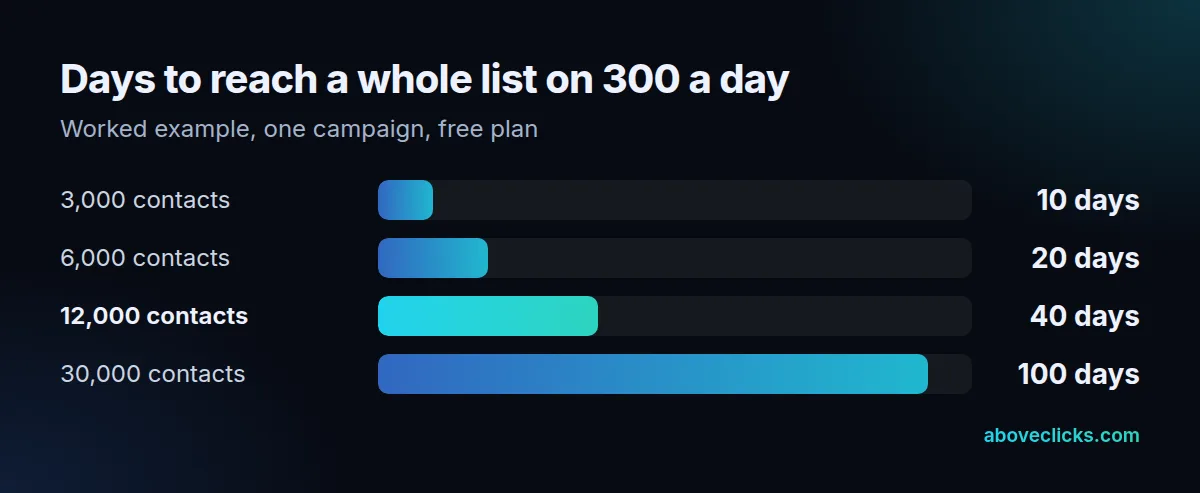
If the same store mails twice a month, the free plan cannot keep up at all: two campaigns need 24,000 sends, against a ceiling of about 9,000 in 30 days. That is the point where a paid volume tier, or another tool, stops being optional.
Automations add a second limit to watch. A welcome email triggered by sign-ups uses the same daily allowance as your campaigns, so a busy sale day can push welcome messages into the next day.
Which sender rules apply to an old Sendinblue account?
The same as for any sender, and old accounts are where the gaps hide. Google, Yahoo and the FTC each set rules that apply whatever tool sends the email.
Google’s sender guidelines say that anyone sending more than 5,000 messages a day to Gmail accounts must set up SPF, DKIM and DMARC, support one-click unsubscribe and keep the spam rate under 0.3%. All senders need SPF or DKIM. Yahoo’s sender best practices also ask for a spam rate below 0.3% and a list-unsubscribe header that supports one-click unsubscribe.
In law, the FTC’s CAN-SPAM guide requires a valid postal address in each commercial email and an opt-out that you honor within 10 business days. The opt-out must keep working for at least 30 days after the message goes out.
When we look at an inherited email account, we check in this order: authentication first, then unsubscribe handling, then where the list came from. Six traps come up most often:
- Missing authentication: the domain has SPF but no DKIM or DMARC record.
- No one-click unsubscribe: only a link in the footer, with no header.
- A rising spam rate: nobody has opened Google Postmaster Tools for months.
- No postal address: the footer was never filled in after the rename.
- Stale consent: an old import with no record of how people signed up.
- Brevo branding: the “Sent with Brevo” line still appears on store emails.
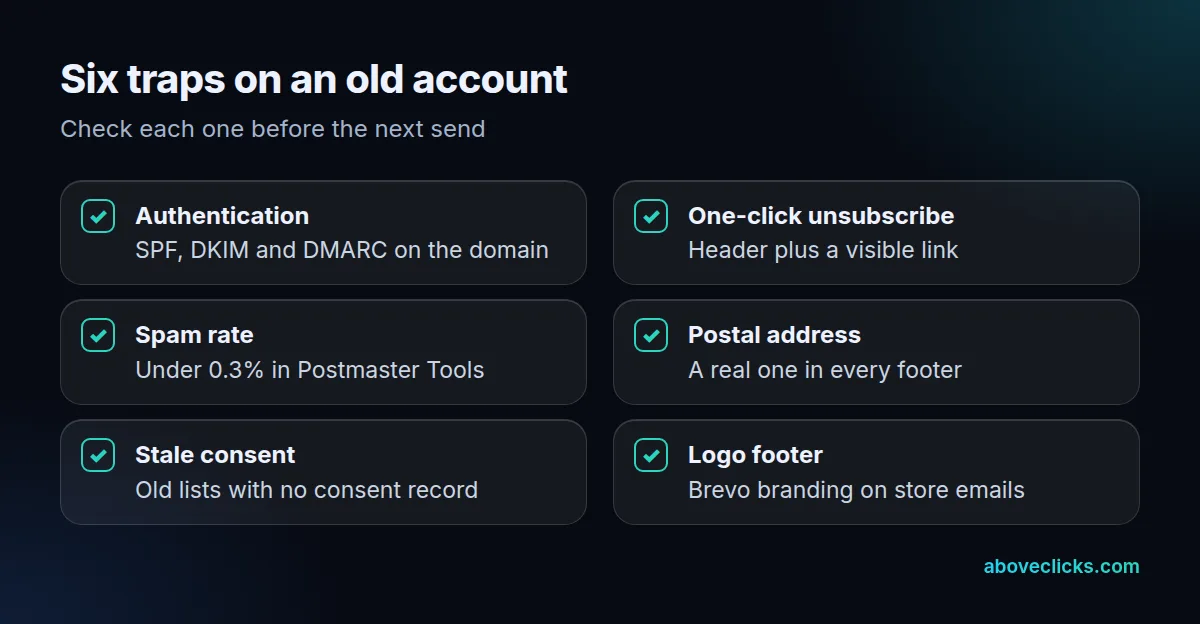
Fix the first three before the next send. In practice, authentication takes an afternoon: the sending tool shows the DNS records to add, and your domain host or developer pastes them in. Then send a test to a Gmail address and look at the original message headers for SPF, DKIM and DMARC “pass” results. If any says “fail”, stop and fix it before you send to the list.
Fix order matters because the rest depends on it. They affect whether your email reaches the inbox at all, and a rising spam rate puts your Gmail delivery at risk.
When should a store move from Sendinblue to Klaviyo?
When your emails should start from what customers did in the store: viewed a product, left a cart, bought twice. Stay if you send a simple newsletter to a small list on a set schedule.
A simple way to decide is to price three numbers on your own account: contacts, emails per contact per month, and the share of revenue that comes from automated emails. Example: an invented store with 8,000 contacts, 3 emails each a month, sends 24,000 emails monthly. That is well past the free plan’s ceiling of about 9,000, so it needs a paid tier whichever tool it picks. If most of its email revenue comes from a welcome email and a cart reminder, flow quality matters more than the plan’s monthly cost.
| Situation | Better fit |
|---|---|
| A small list, a monthly newsletter, a welcome email | Stay on Brevo |
| A list over 10,000 with several campaigns a month | Compare volume tiers first |
| Flows based on orders, products or browsing | Move to a store-data platform |
| SMS and email in one customer journey | Compare both on your own numbers |
| An old account with unknown list origins | Clean the list before any move |
For stores, the move usually pays off through automated flows such as abandoned cart, so read our abandoned cart flow guide before you decide. We set up and migrate Klaviyo accounts for online stores through our Klaviyo email marketing service, so we know that side best. We still say plainly when staying on Brevo is the cheaper choice for a small list.
If you do move, export every contact with its consent status, rebuild the main flows before turning off the old ones, and re-check authentication on the sending domain. Our Klaviyo alternatives guide and the Omnisend vs Brevo comparison cover the other options. Not sure what your account needs? Our free audit looks at your email setup too. More guides are in buying guides.