The main Omnisend vs Brevo difference is the meter each one bills by: Omnisend sizes its plans by contacts, while Brevo sizes them by emails sent. Test your own list against both before comparing features, because the same list can land on very different tiers.
A note before we start: we set up and migrate Klaviyo accounts for online stores. This Omnisend vs Brevo comparison uses only each vendor’s own pages, dates every limit, and says where each tool is the better choice.
Omnisend vs Brevo: what’s the real difference?
In an Omnisend vs Brevo match-up, both send email and SMS for online stores, but they were built for different jobs. Omnisend is a store-focused email, SMS and web push tool; Brevo is a wider platform that adds a CRM, chat and WhatsApp to email and SMS.
In a Brevo vs Omnisend comparison, the headline features look alike: sign-up forms, segmentation, automation and templates on both. What changes your bill and your workload sits lower down:
- Billing meter: contacts on one side, sends on the other.
- Free plan: a tiny list with a monthly cap against a large list with a daily cap.
- Reach: Omnisend stays with email, SMS and web push; Brevo reaches into sales and chat.
- Support: Omnisend says 24/7 live chat and email support apply to every plan, free included.

So the honest answer to “which is better in Omnisend vs Brevo?” is that it depends on the shape of your list. The sections below take that in order, from cost to sending rules.
Omnisend vs Brevo at a glance
In Omnisend vs Brevo terms, a store with a few hundred contacts that mails every week usually fits Omnisend, because its tiers follow list size. A store with tens of thousands of contacts that mails once or twice a month often fits Brevo, because its tiers follow send volume. The rest of this guide shows how to check that on your own numbers.
How much does Omnisend cost?
Omnisend prices by the number of contacts, which is the first half of any Omnisend vs Brevo cost check. As of October 2026, its pricing page lists a Free plan at $0 monthly with 250 contacts and 500 emails, then Standard, Pro and a custom plan.
On the same page, the Standard plan at 500 contacts includes 6,000 emails a month and shows $11.20 monthly when you pay 3 months upfront for a 30% offer. The struck-through total of $48.00 for those 3 months implies $16 monthly without the offer. That is a derived figure, so check the slider yourself.
Three more Omnisend rules matter for your bill. As of October 2026, the Omnisend pricing page says you are billed for subscribers and non-subscribers who received automated messages, while unsubscribed contacts are not billed. It lists unlimited monthly emails on Pro, with SMS from $0.007 per message at high US volume, and a free account expert for anyone paying at least $400 monthly.
Prices move, so treat any figure in this Omnisend vs Brevo guide as a dated snapshot rather than a quote.
What do Brevo’s pricing plans include?
Brevo prices by email volume, which is the second half of the Omnisend vs Brevo cost check, with features that arrive by tier. As of October 2026, its pricing page lists Starter at $9 monthly, Standard at $18 monthly, Professional at $499 monthly and Enterprise from $2,499 monthly.
Here is what each tier adds, according to that page:
- Starter: from 5,000 emails a month, a drag and drop editor, segmentation, forms and basic reporting. SMS credits are sold separately.
- Standard: adds multi-step marketing automation, A/B testing, send time optimization and web and event tracking.
- Professional: from 150,000 emails a month, with WhatsApp, popups and push, 10 seats, and ecommerce features such as back-in-stock alerts.
- Enterprise: adds multi-account management, a dedicated IP, SSO and tailored onboarding.
As of October 2026, the Brevo pricing page shows the $9 and $18 figures at its starting volume of 5,000 emails and 500 contacts on monthly billing, with yearly billing 10% lower. The price rises with the email volume you pick on the slider, and that slider is where a busy small store feels Brevo’s meter in an Omnisend vs Brevo test.
On that page, removing the “Sent with Brevo” sticker costs $10.80 monthly extra on Starter and is included from Standard.
What are the Brevo free plan limits?
Brevo’s free plan has no time limit but caps sending at 300 emails a day, stores up to 100,000 contacts, and always shows the “Sent with Brevo” sticker. Those limits come from Brevo’s help article on the Free plan, read in October 2026.
The daily cap is the one stores trip over. If you send a campaign to more than 300 recipients, only 300 receive it on the scheduled day, and you must resend the campaign to reach the rest. Brevo also limits the free plan to 2,000 unique contacts entering active automations, and a single user.
Omnisend’s free plan caps differently: 250 contacts and 500 emails a month, according to its pricing page as of October 2026. So the Omnisend vs Brevo free-plan choice is simple:
- Omnisend free: enough to build and test a welcome flow on a tiny list.
- Brevo free: enough to hold a large imported list, but slow to mail it.
Neither free plan in the Omnisend vs Brevo pair suits a store that mails every week to a few thousand people.
Omnisend or Brevo: which meter will your list hit first?
The one that matches how you send. A list that mails often outgrows Brevo’s volume tiers, while a big list that mails rarely outgrows Omnisend’s contact tiers. Run the Omnisend vs Brevo formula below on your own numbers.
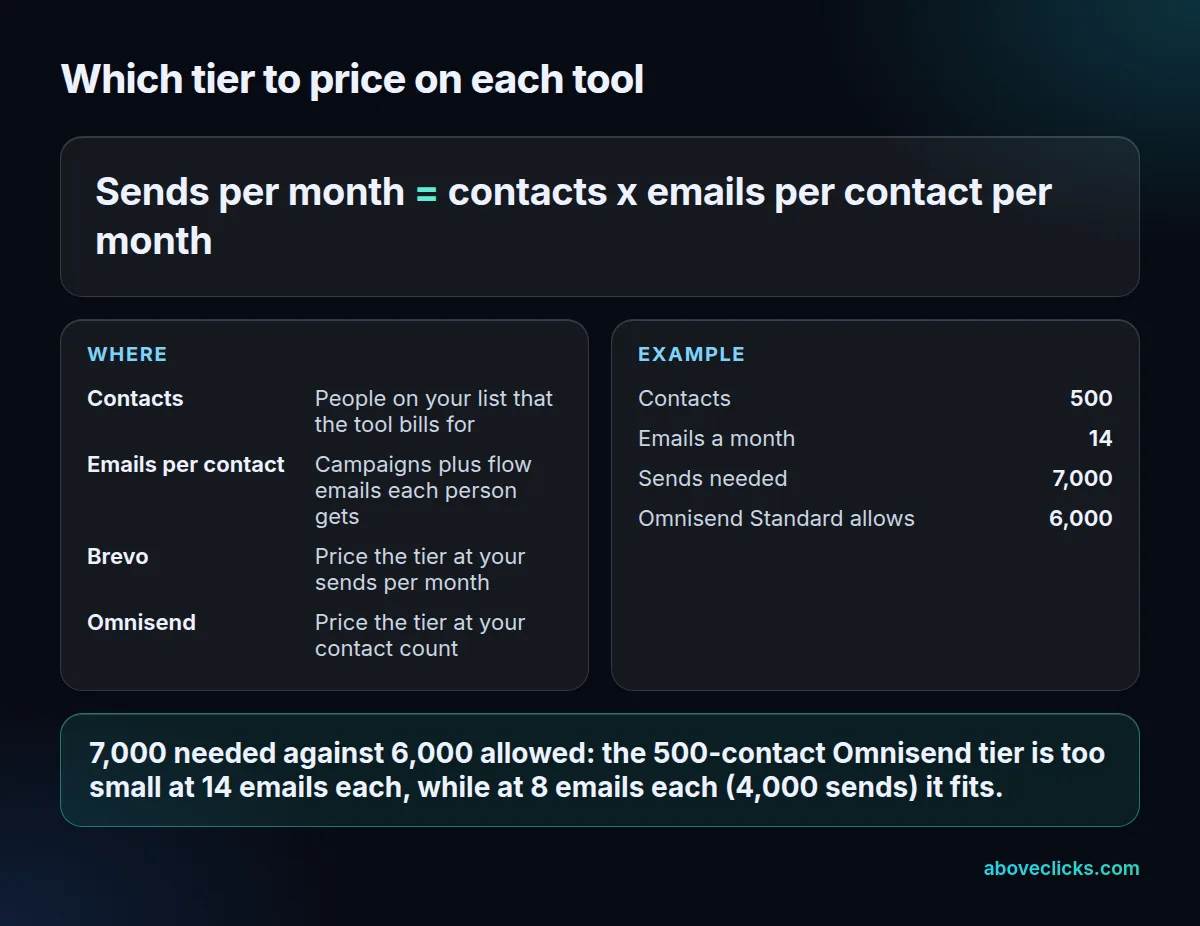
The worked example is an invented store, not a client. It holds 500 contacts and sends 14 emails each per month, counting campaigns and flow emails: 7,000 sends. Omnisend’s Standard tier at 500 contacts includes 6,000 emails a month, so that store would need a bigger tier, while at 8 emails each (4,000 sends) it fits. On Brevo, the same 7,000 sends would be priced above the 5,000 starting volume.
To run the Omnisend vs Brevo check on your list:
- Count the contacts the tool would bill, excluding unsubscribed ones.
- Add up the emails each person receives in a month, flows included.
- Multiply the two, and price that figure on Brevo and the contact count on Omnisend.
- Re-run it for the list you expect in 6 months.
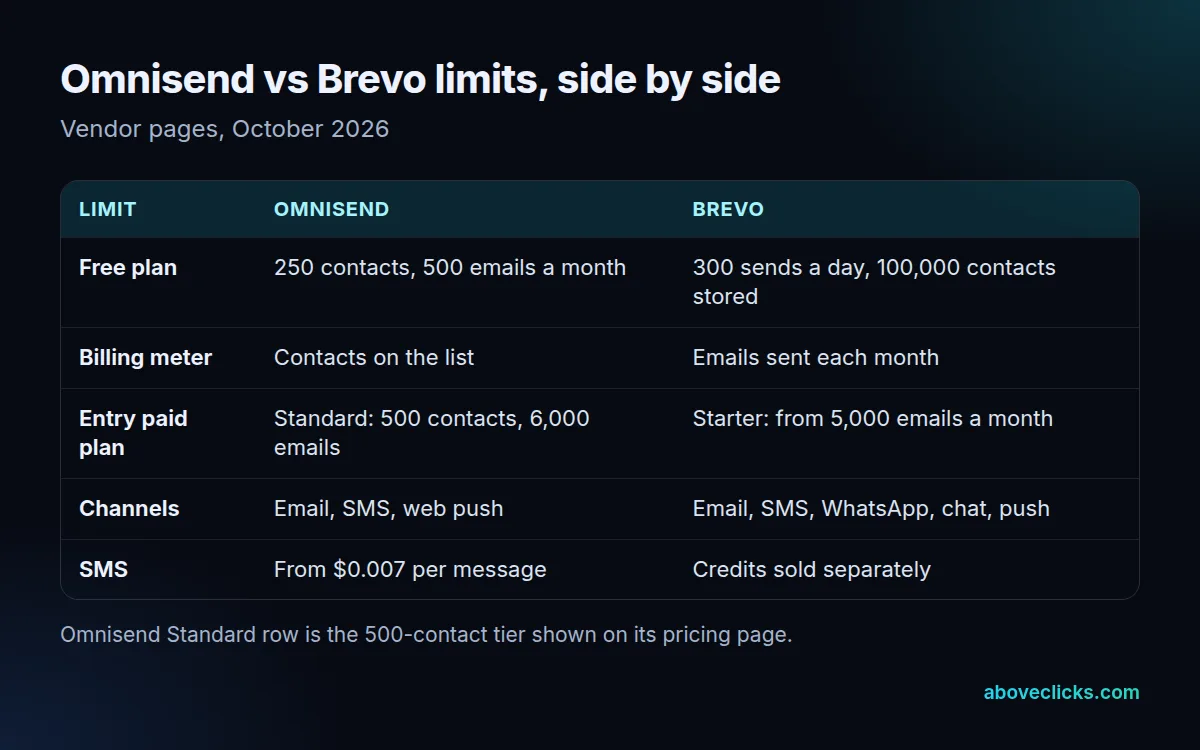
Compare the Omnisend vs Brevo results at the same list size and the same sending plan. A tool that looks cheaper at 500 contacts can flip at 5,000, which is why this check beats reading a price table.
Which one fits a Shopify store better?
In Omnisend vs Brevo for Shopify, both connect and sync customers, orders and products. Brevo’s Shopify page lists real-time sync of customer data, purchase history and order status, plus abandoned cart and post-purchase flows.
Omnisend is built around the store: its Shopify app lists a free plan and focuses on email, SMS and popups. What matters for revenue is how fast and how well the abandoned checkout flow runs. Per Shopify’s help center, a checkout counts as abandoned after more than 10 minutes without payment once the customer has given an email address, as of October 2026. Recovery works only for the Online Store and Buy Button channels, not POS.
Test three things on either tool before you settle Omnisend vs Brevo:
- How soon the first abandoned checkout email can go out.
- Whether product blocks and discount codes pull from the live catalog.
- Whether SMS consent is captured separately from email consent.
What sending rules apply to both tools?
The same legal and mailbox rules apply to Omnisend vs Brevo, whichever you choose. Your platform sends the email, but you are responsible for consent, a clear opt-out and a clean list.
Check these against the sources, not the sales pages:
- Opt-outs: the FTC’s CAN-SPAM guide says you must honor an opt-out request within 10 business days and explain how to opt out.
- Bulk sender rules: Google’s sender guidelines require SPF, DKIM and DMARC and a spam rate below 0.30% if you send more than 5,000 messages a day to Gmail accounts.
- One-click unsubscribe: the same guidelines require it for marketing messages, and RFC 8058 defines how the header works.
Ask each vendor how it sets up your sending domain, because a shared domain and a verified one behave differently in the inbox. Our email deliverability service covers the set-up if you want it done for you.
When should you leave both for Klaviyo?
When your revenue depends on segmenting by order and browsing history, when you run many flows, or when you need more integrations than a simpler tool offers. Neither side of Omnisend vs Brevo is the deepest option for a large catalog.
Our Omnisend vs Klaviyo guide covers the billing difference and the free plans, and Omnisend vs Mailchimp covers the other common starting point. For a wider list of options, see Klaviyo alternatives, and for the money side, email marketing cost explains what stores usually pay as lists grow.
If you do move, order the work so consent comes first:
- Export contacts with their subscription status and consent date.
- Rebuild the welcome, abandoned checkout and post-purchase flows first.
- Warm up sending in steps, from your most engaged contacts.
- Run both tools side by side for 30 days, then switch the forms.
We run that as a Klaviyo email marketing setup and a Klaviyo migration. For a second opinion on your current setup first, our free audit reads it with read-only access. More guides are in buying guides.