SMSBump is the former name of Yotpo’s SMS product, while Klaviyo runs SMS, email and app messaging in one platform. The SMSBump vs Klaviyo choice is mostly about consent, billing and what you still use, not a feature race. Read it as a Klaviyo vs SMSBump checklist for your own store.
A note before we start: we set up and migrate Klaviyo accounts for online stores, so we know that platform best. This guide draws on each vendor’s own pages, dates every detail, and says plainly where we could not confirm something about SMSBump.
What is SMSBump, and what happened to it?
SMSBump is the older name of Yotpo’s SMS marketing product for online stores. Yotpo’s own SMS page, archived at the end of 2023, describes it as “Formerly SMSBump”.
Here is what we found when we checked on 10 November 2026. Yotpo’s old SMS page now redirects to its home page, where the product list shows Reviews and UGC, Loyalty and Referrals, and Discover. We found no SMS product listed there. The old SMSBump listing on the Shopify App Store also returned a “page doesn’t exist” message that day.
That does not prove the product is gone. Yotpo’s home page still talks about notifying loyalty members across SMS and email tools, and Klaviyo’s help center still names a Yotpo email and SMS admin. But it does mean that anyone searching for a SMSBump alternative, or comparing Yotpo SMS vs Klaviyo, should first ask Yotpo what their plan includes today.
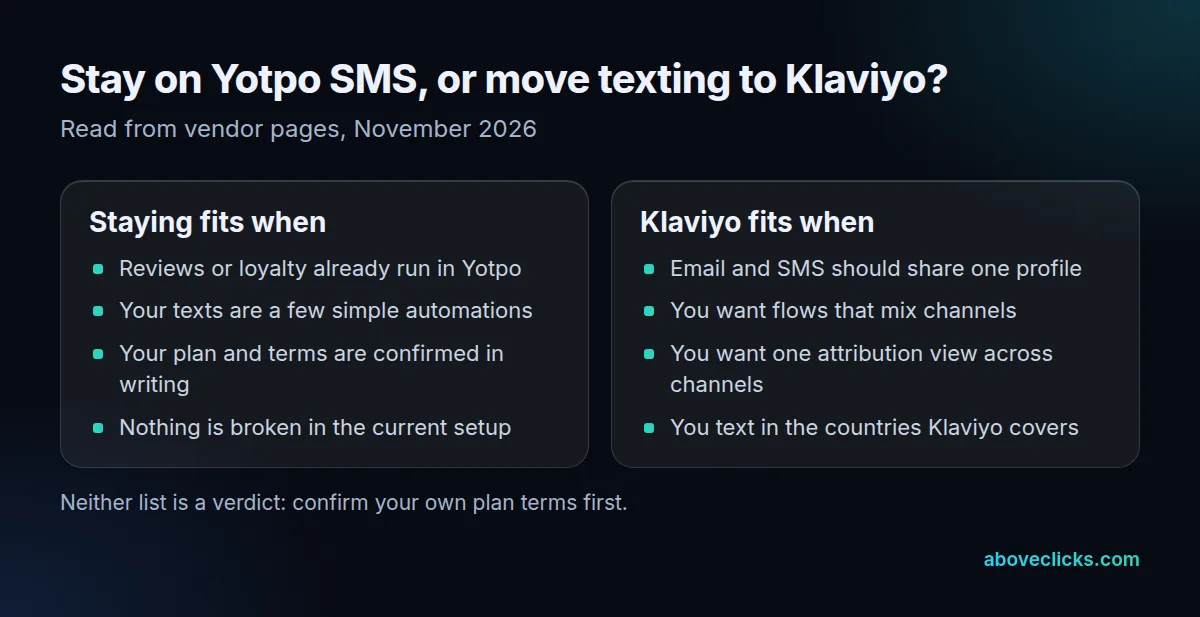
So SMSBump vs Klaviyo is really two questions: can you rely on the current setup, and would one platform for email and texting serve you better? The rest of this guide helps you answer both.
How does SMSBump vs Klaviyo compare on features?
In a Yotpo SMS vs Klaviyo comparison, on the points we could read from vendor pages, the two overlap on automations and sign-up tools, and differ on channels and reporting. Where a current SMSBump page was not available, the table says so.
| Feature, as of November 2026 | Yotpo SMS (formerly SMSBump) | Klaviyo |
|---|---|---|
| Current product page | None found on 2026-11-10 | Klaviyo SMS |
| Automations | Event-based texts such as abandoned carts (archived page) | Flows, including multi-channel flows |
| Sign-up tools | Keywords, QR codes, native-text sign-up, Shopify POS (archived page) | Forms, checkout consent, keywords |
| Channels | SMS, with email in the same admin | SMS, email and mobile app messaging |
| Attribution | Not confirmed | Last-touch across email, SMS and mobile messaging |
| Consent types | Not confirmed | Marketing and transactional collected separately |
The “archived page” entries come from the end-of-2023 version of Yotpo’s SMS page, so treat them as what the product did then, not what it does now.
In Klaviyo vs SMSBump, the strongest case for Klaviyo is a shared profile: a customer’s emails, texts and orders sit in one place, so a flow can pick the channel. According to Klaviyo’s SMS page, its reporting counts a sale once, for the last engaged channel. That matters if you currently compare email and text revenue in 2 separate dashboards.
The case for staying is simpler: if your reviews and loyalty already run in Yotpo and your texts are 3 or 4 basic automations, moving buys you less. Our SMS platform roundup and the Attentive vs Klaviyo guide show the same trade-off for other tools.
How does SMS pricing work in SMSBump vs Klaviyo?
In SMSBump vs Klaviyo, Klaviyo charges per message segment, per recipient, and the rate depends on country and number type. We can’t state SMSBump’s current rates because no current plan page was available, so this section gives you the arithmetic to run on either bill.
According to Klaviyo’s rates guide, as of November 2026, one SMS segment holds 160 characters, or 70 if the text has an emoji or special character. Once a text is longer than that, it splits into several segments of 153 characters (67 with an emoji). Each segment is billed. A picture message (MMS) is billed as one message rather than split into segments.
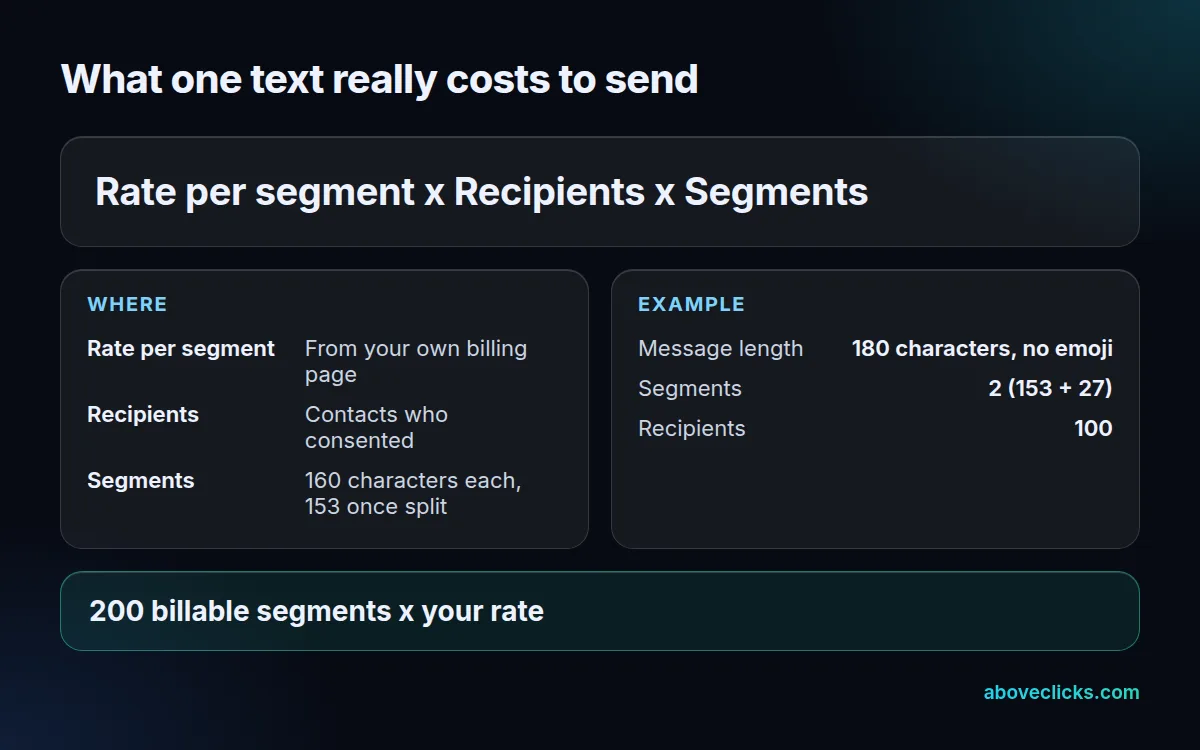
Take a 180-character text with no emoji sent to 100 subscribers. It needs 2 segments, so you pay for 200 segments. Cut the text to 160 characters and the same send is 100 segments, half the billable volume. Add one emoji to the short version and it becomes 2 segments again, because the limit drops to 70.
Run the same sum on your last campaign in your current tool, whichever side of Klaviyo vs SMSBump it sits on. If the number of billed messages is higher than your recipient count, long texts or emojis are the likely cause. Klaviyo’s guide also says unused plan spend does not roll over from month to month, so check your usage page before you size a plan.
What counts as SMS consent when you switch?
Explicit permission to receive texts from your brand, collected separately from email. A phone number alone is not consent, and neither is an email opt-in, according to Klaviyo’s consent guide.
In the US, the FCC says commercial texts sent with an autodialer need the recipient’s prior written consent, and that people can opt out in any reasonable way, even after saying yes. Email has its own rules: the FTC’s CAN-SPAM guide requires a valid postal address and a clear way to opt out in marketing email.
Klaviyo’s guide adds 3 rules that matter in any SMSBump vs Klaviyo move:
- Consent for SMS cannot be bundled into a general “agree to marketing” box.
- Lead-generation, affiliate and purchased lists are not valid consent.
- In the US, any cart abandonment text needs double opt-in, which is a carrier requirement.
For the import file, Klaviyo’s upload guide asks for a status on each row:
| Status in your CSV | What Klaviyo does | Use it for |
|---|---|---|
| Subscribe | Adds consent for that SMS type | People currently opted in |
| Unsubscribed | Removes consent for that SMS type; email consent is untouched | People who opted out |
| Never subscribed | Leaves consent unchanged | People who never opted in |
There are 2 consent columns, SMS Marketing Consent and SMS Transactional Consent, so a file of 100 rows can carry up to 200 separate consent entries to check. Marketing consent also allows transactional texts, but transactional-only consent does not allow promotions. Whatever the old tool exports, the opt-outs have to arrive as “Unsubscribed”, or you may text someone who asked you to stop.
Which countries can you text with Klaviyo?
Klaviyo SMS covers 23 countries as of November 2026: 3 in North America, 18 in Europe and 2 in Asia-Pacific, according to its availability list. Outside that list you cannot collect consent or send through Klaviyo.
That list is the quickest SMSBump alternative check for a store with international customers. Before you import, count your subscribers by country code. Anyone in a country that is not on Klaviyo’s list can’t be imported as an SMS subscriber, so that part of your audience stays with the old tool or goes to email only.
Klaviyo also needs a sending number for each country you import. Some number types need registration before they are active, and branded sender IDs cannot receive replies, so keywords and two-way conversations need another number type. Check this early, because a number must be active before you can send to that country.
How do you move from SMSBump to Klaviyo?
Set up SMS and sending numbers in Klaviyo first, rebuild forms and flows, then export and import consent with a status for each person. For an SMSBump vs Klaviyo move, Klaviyo documents a Yotpo Email and SMS Migration integration for the transfer.
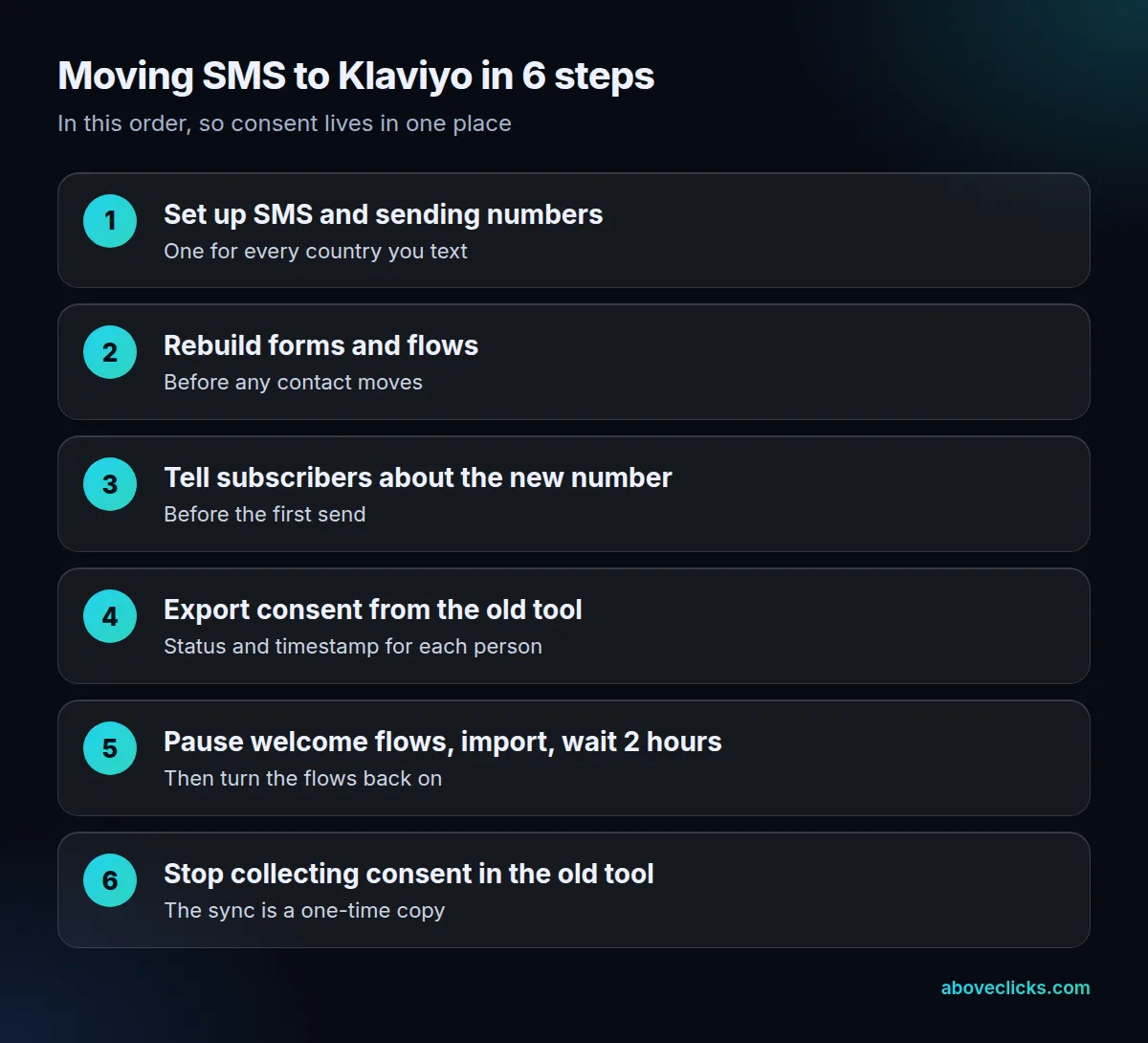
Our order for SMSBump to Klaviyo matches Klaviyo’s guidance, with a few habits from client work added. We rebuild the welcome, abandoned cart and post-purchase flows before moving a single contact, so there is no gap in messaging. We export consent with timestamps where the old tool has them. And we send a notice about the new number before the first text goes out.
Three points from Klaviyo’s guides deserve special care:
- The sync runs once. Klaviyo says anyone who subscribes or unsubscribes in Yotpo after the sync is not transferred automatically, so keeping 2 consent lists risks both compliance and lost subscribers.
- Pause welcome flows. Imported contacts can enter flows triggered by the consent metric or the list, so set them to manual first and wait at least 2 hours after the import before you turn them back on.
- Check the first sends. Text yourself and a colleague from the new numbers before the first campaign, and confirm that STOP replies show up as unsubscribed.
If you want a second pair of eyes, our Klaviyo migration service covers this order, and our ecommerce SMS marketing page explains the texting side.
Should you switch from SMSBump to Klaviyo at all?
Switch if you want email and texting in one profile and your countries are covered, which is where Klaviyo vs SMSBump tips toward Klaviyo. Stay if your plan is confirmed, your texts are simple and Yotpo already holds your reviews or loyalty program.
A quick SMSBump vs Klaviyo test, using what you can check today:
- Can Yotpo confirm in writing what your SMS plan includes, and until when? If not, plan the move.
- Do 90 percent or more of your subscribers live in countries on Klaviyo’s list? If not, keep the rest where they are.
- Do you build flows that mix email and texts? If yes, one platform saves rework.
- Is your consent record complete, with statuses and dates? If not, fix it before any import.
Yotpo SMS vs Klaviyo does not have to be either-or: many stores end up with a mixed setup, with reviews or loyalty in Yotpo and messaging in Klaviyo, which Yotpo’s integrations list shows is a supported pairing. That works, provided one tool owns consent. Whatever you pick, put the SMSBump vs Klaviyo decision in writing, with the consent owner named. Our Klaviyo email marketing service sets up that kind of split. For an outside view of your current texting setup, our free audit reads it with read-only access. More comparisons are in buying guides.