PPC tracking is the practice of recording what happens after someone clicks a paid ad, so that every click can be tied to a sale, a lead or a phone call. It tells you which keywords and campaigns earn money, and a broken setup makes a weak account look strong.
This guide shows how pay per click tracking works, what to count, the order to set it up in, how call tracking fits, and a monthly check that catches double counting.
What is PPC tracking?
It is the link between an ad click and a business result. Without it, an ad account reports clicks and spend; with it, the account reports the purchases, sign-ups and calls those clicks produced.
Google’s help pages describe conversions as the actions you identify as valuable, such as a purchase, a sign-up or a phone call. Bidding, budgets and reports all depend on that definition, so tracking ppc campaigns well starts with deciding what counts, not with installing code.
Google’s conversion page lists website, app, phone call and offline conversions as the places to measure, and its default window for crediting a click is 30 days.
Two things are easy to confuse. Ad-platform tracking records the results of paid clicks inside Google Ads, Meta or Microsoft. Web analytics, such as Google Analytics, records all visits and can import chosen events back into the ad platform. Most accounts need both, and their PPC tracking should agree with each other and with your own order records.
How does pay per click tracking work?
A click ID travels from the ad to your site and back to the platform. On Google Ads, auto-tagging adds that ID, called a GCLID, to the landing page URL, and your tag stores it while the visit continues. The window can run from 1 to 90 days, so the ID has to survive that long in the account’s records.
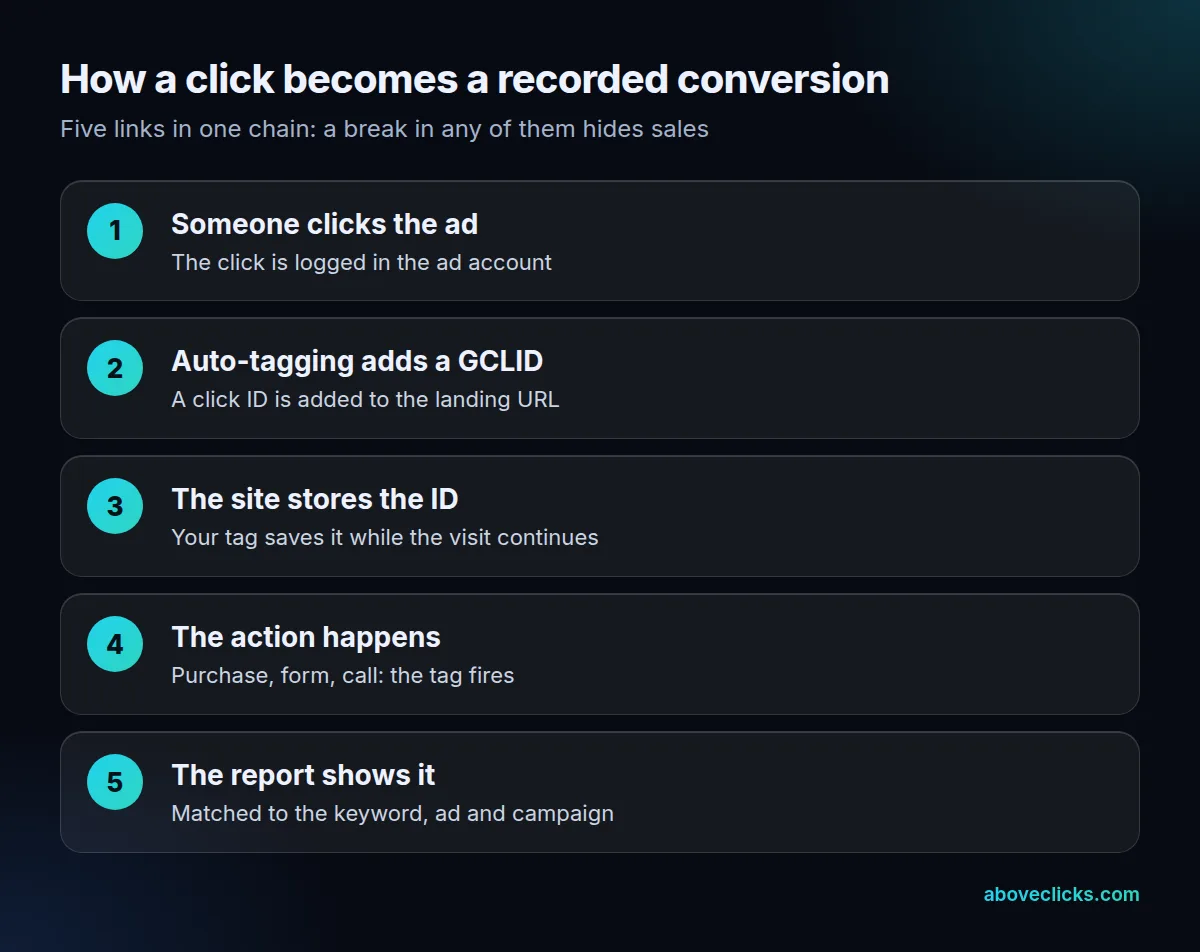
When the visitor buys or submits a form, the tag sends the conversion with the stored ID, and the platform matches it to the keyword, ad and campaign. That is the whole mechanism, and it explains most failures:
- Redirects that drop the ID. Google says that if your site uses redirects, the GCLID must be passed to the final landing page, or the conversion can’t be tracked.
- Sites that reject URL parameters. A small share of sites show an error page when auto-tagging is on, so test one real click.
- Auto-tagging switched off. Google lists it as needed to track conversions on all browsers. It is on by default for new accounts, but older accounts may have it off.
PPC tracking on Meta works the same way in spirit, with the Meta Pixel in the browser and the Conversions API from your server. Our guide to Meta Conversions API on Shopify covers that side in detail.
What should you track in PPC campaigns?
Track the actions that earn money, and nothing that only looks busy. Good PPC tracking counts a handful of actions, not forty. A purchase, a qualified lead and a call of useful length are conversions; a page view or a scroll is not.
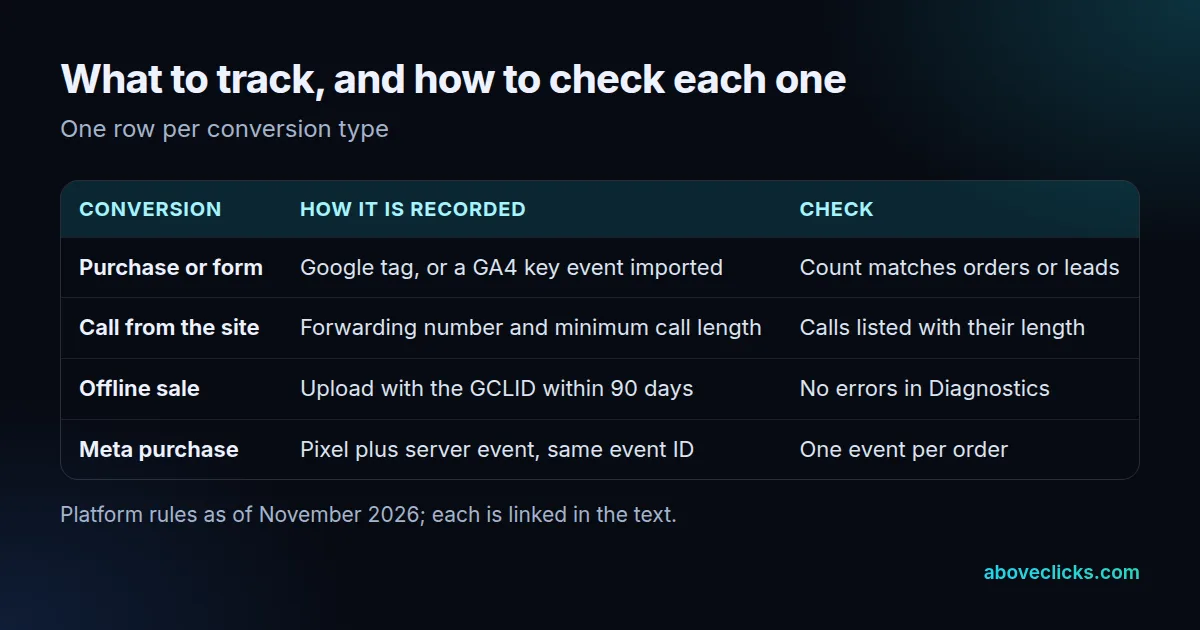
Offline sales matter if leads close by phone or in a shop. For those, Google allows offline conversion imports, but the click ID has to be within 90 days and processing takes 24 to 48 hours, so upload on a schedule instead of once a quarter.
Then decide which actions are primary and which are secondary. Google explains that primary actions are biddable and secondary ones are observation only, and that setting this wrongly stops Smart Bidding from optimizing well. A newsletter sign-up can be a secondary action; the sale or lead you pay for should be primary.
If you use Google Analytics, any collected event can become a key event. Importing it into Google Ads is a choice, so import the final action, not every step on the way.
How do you set up PPC tracking for conversions?
Work in a fixed order: auto-tagging, data source, conversion actions, window, then a test. Skipping ahead is how accounts end up with a tag that fires but no conversions that count.
- Turn on auto-tagging and click your own ad once to see the GCLID in the address bar.
- Choose the data source. Google suggests Analytics if you already use it, and the Google tag if you want a signal built for Google Ads bidding. You can use both.
- Create one conversion action per business result, with the right category and a value where you have one.
- Mark primary or secondary for each action.
- Set the window. The default click-through window is 30 days, and you can choose 1 to 30, 60 or 90 days for Search and Display, depending on the conversion source. Check the time lag report before changing it, because a change applies only to conversions from that day on.
- Test with a real order or lead, then look for it in the account.
Then leave it alone. Google says Smart Bidding needs a standard learning phase of 7 to 14 days and that frequent changes to targets or conversion goals reset it. Good PPC tracking is set up once and checked on a schedule, not fiddled with every week. After linking Analytics to Google Ads and marking an event as a key event, allow 24 to 48 hours before the import options appear.
If you want better matching in your PPC tracking, enhanced conversions send first-party data such as an email address in hashed form (SHA256), which can improve the accuracy of conversion measurement.
How does PPC call tracking work?
A call becomes a conversion when it lasts longer than a minimum length you set. Short calls, such as wrong numbers, are then filtered out of the results. Google attributes call conversions to the date of the ad click, so a call made 3 days later still appears under the click’s date, as its conversion guide explains.
On a website, Google’s method swaps your number for a Google forwarding number using a small snippet, so you can see which keywords, ads and campaigns led to calls. The help page notes two limits worth knowing: forwarding numbers are only offered in certain countries, and the default tag tracks only one number on a single page.
Set the minimum length to match your business. A locksmith’s useful call may last one minute; a solar quote may take ten. Check the call details report once a month and compare it with the calls your team actually logged. If the two lists disagree by a wide margin, the number swap is probably missing from some pages.
How do you check PPC tracking is accurate?
Add up what each platform claims and compare the total with your own order or lead count. If the platforms claim more than you really sold, the same sale is being counted more than once.
Here is a real case from our tracking and analytics work, as published on that page for September 2026. One store’s paid reports showed Meta with 14 orders and Google with 19, which sums to 33. Five of those orders were claimed by both platforms, so the distinct number was 28. Nothing was broken: each platform counts a sale it influenced. But a team that reads the sum would believe it won 33 sales, and the cost per sale would look about 15% better than it is.
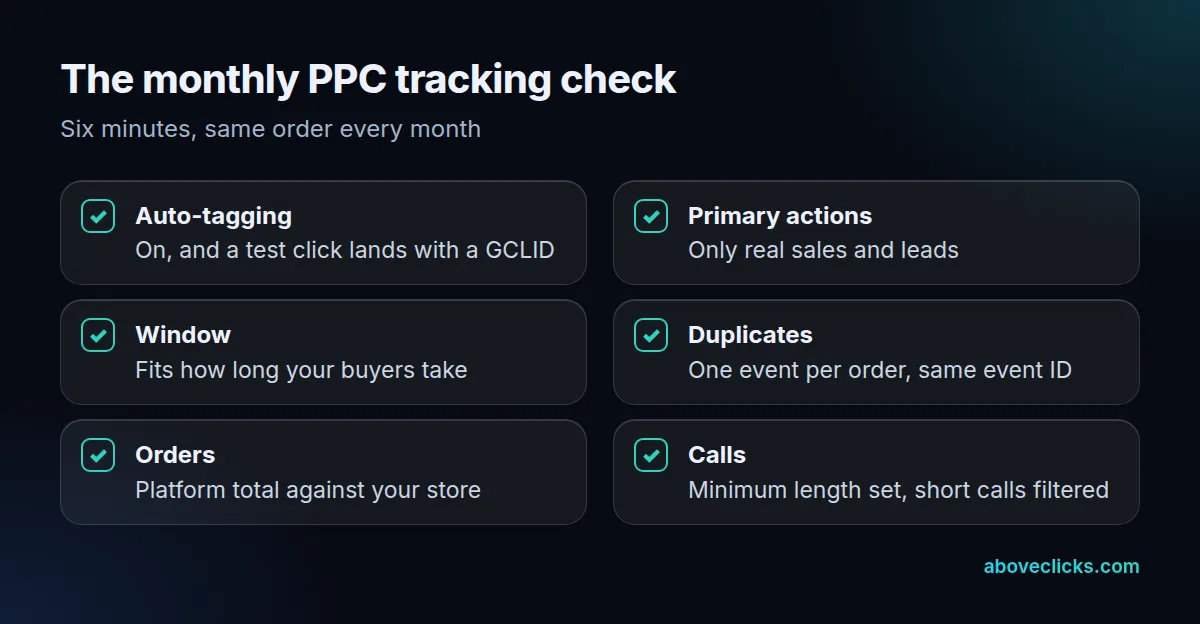
The monthly check above is built to catch exactly that, and it is the part of PPC tracking most accounts skip. Three points deserve a note:
- Duplicates. If you send the same event from the browser and from your server, Meta only removes the copy when the event name and the event ID are identical in both. A missing ID means two purchases for one order.
- Orders against platforms. Use the store’s order count as the anchor. Platform totals can overlap, but they should never be far above it for long.
- Primary actions. If a “conversion” count suddenly doubles, look for a new secondary action that was made primary by mistake.
Not sure where your numbers stand? Our free audit checks the tag setup and sends the gaps within 2 workdays, and the GA4 audit goes deeper into the analytics side.
Which tools does PPC tracking need?
Four pieces cover most PPC tracking setups: the ad platform’s own conversion tracking, a web analytics property, a tag manager, and a server-side route if browsers block too much. You rarely need more than that to start.
- The ad platform’s tag. The Google tag for Google Ads; the Meta Pixel for Meta.
- Google Analytics 4. It gives you one neutral count of visits and key events, to compare with each ad platform. Imports and uploads can take 24 to 48 hours to process, per Google, so compare complete days only.
- A tag manager. It keeps every tag in one place, so one person can audit it. Our post on server-side GTM explains when to move tags to a server.
- Call tracking. Google’s forwarding numbers are the simplest start; paid call tracking tools add features for teams with many numbers.
Ignore pay per click tracking dashboards that merge every platform into one pretty chart until the basics above agree with your store. A tracking tool can’t fix a chain that is broken at the click ID, the primary action or the duplicate event. If you are still weighing what to spend on ads themselves, the PPC pricing guide covers that, and more measurement guides sit under measurement.