What does GTM stand for? In tracking and advertising it means Google Tag Manager, and in business, sales and product work it means go-to-market. The words around the term tell you which one: tags and triggers point to Tag Manager, and plans and launches point to go-to-market.
This guide lists the four meanings you are likely to meet, gives a four-question test to sort them, and shows the first steps in Tag Manager for an online store.
What does GTM stand for?
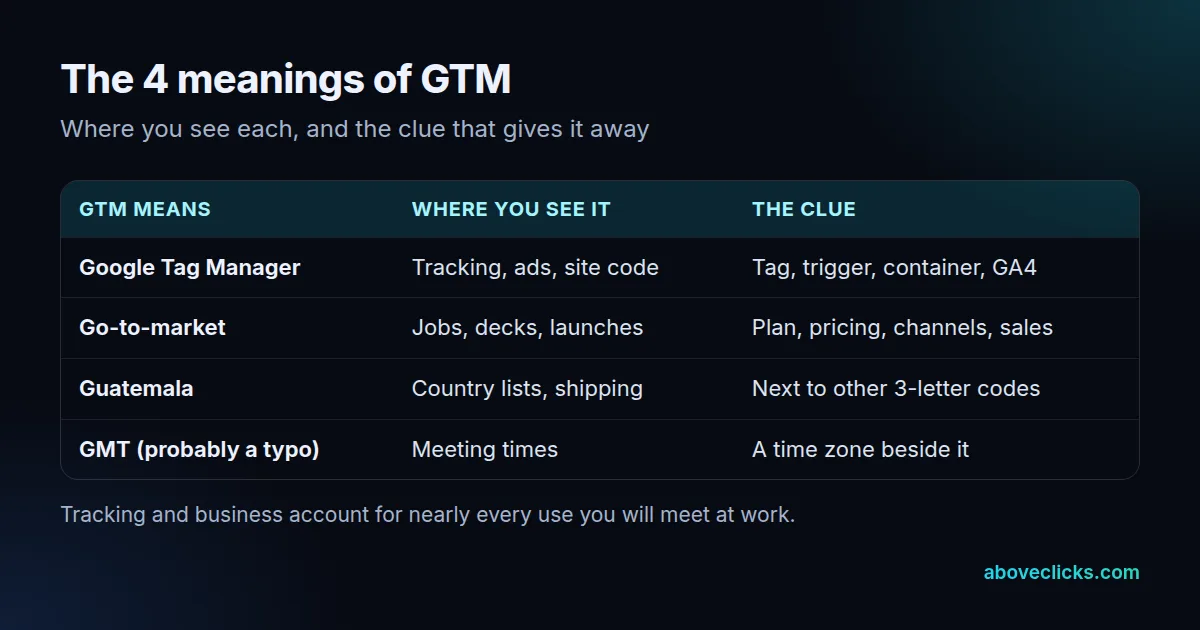
Two meanings cover almost every case: Google Tag Manager and go-to-market. Two more turn up now and then: the country code for Guatemala, and a typo for GMT, the time standard.
Search behavior follows that split. Google Autocomplete (checked 1 November 2026) returned 10 suggestions for “what does GTM stand for”. Seven of the 9 added endings are work contexts: business, marketing, sales, tech, job title, recruiting and finance. The other 2 are a caravan and time. So “gtm stands for” is a question about context more than about a single answer.
The same pattern shows up in the questions that come right after it. Someone who asks “what does GTM mean” in a sales meeting wants the business sense, while someone who asks “what is GTM” in a store’s analytics account wants the tool.
If you work on an online store, the likely meaning depends on who sent the message. A developer, an ad agency or an analytics report means Tag Manager. A founder, a sales lead or a recruiter means go-to-market.
What does GTM stand for in marketing and tracking?
Google Tag Manager, a free tool that lets you add and change tracking tags on a site without editing its code. This is the meaning behind a “GTM-” code in a page’s source.
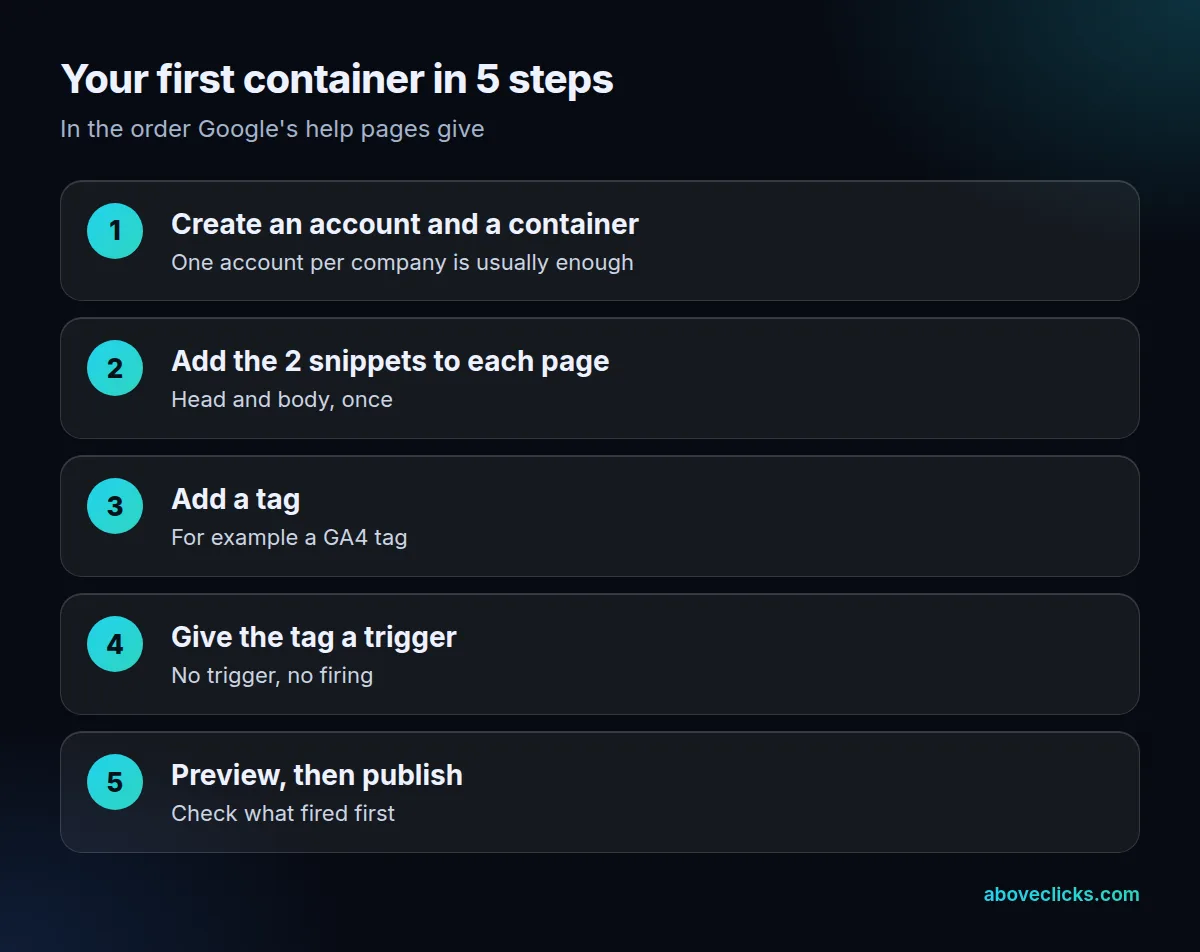
Google’s introduction to Tag Manager says you add 2 snippets of code to each page, and then manage your tags from the Tag Manager website. A container holds four kinds of things:
- Tags: the pieces of code that send data, such as a GA4 tag or an ad conversion tag.
- Triggers: the events that tell a tag to fire, such as a page view or a button click.
- Variables: values the tags and triggers read, such as a product price or a page URL.
- The container: the collection of all three, installed on one site or app.
In this setting, GTM stands for Google Tag Manager and nothing else. Here is how that looks in a store. A “purchase” tag sends the order value to GA4. Its trigger is the purchase event that the store pushes into the data layer, and its variable is the order total. Change the trigger in Tag Manager and the site’s code stays untouched.
Many stores meet this tool through GA4. In our own check of 17 store containers on 18 October 2026, 14 held at least 1 GA4 measurement ID, as we note in the Google Tag Manager glossary entry. If you want the full definition, that page has it. For a store whose container has grown messy, our Tag Manager setup and clean-up page explains what we fix, and we answer the free container review within 2 workdays.
What does GTM mean in business and sales?
Go-to-market, the plan for how a company takes a product or service to its customers. In a job title, a deck or a board update, that is almost always what GTM means.
Anyone asking “what is GTM strategy” is asking about this plan, and a deck that says “what does GTM mean for us” is asking for the same thing. Wikipedia’s entry describes it as a plan to deliver a unique value proposition to customers, and its steps run in 5 parts:
- Define the target market.
- Settle the value proposition after researching the product.
- Choose the pricing approach.
- Pick the distribution and marketing channels.
- Decide how to promote the product.
So what is GTM strategy for a small store? It is a one-page answer to who the buyer is, what you charge, where you sell and how you tell them. Tracking enters this meaning of GTM at the last two steps (channels and promotion), because a channel you cannot measure cannot be judged. Example (an invented store, not a client): a candle shop plans to launch a new line of 600 hand-poured candles in November. The go-to-market plan names two channels, paid social and email.
To judge the launch, the shop needs 3 events recorded: a view of the new collection, an add to cart and a purchase. Those are the three tags the owner then builds in Google Tag Manager. So the two meanings meet: the go-to-market plan says what to measure, and Tag Manager records it.
Because every channel needs its own events, a plan that skips this step ends up reporting launch results from memory. A short list helps: for each channel in the plan, write down the 1 event that shows it worked, and who will check it 7 days after launch. For a store on Meta, our guide to the Conversions API on Shopify shows how purchase events reach Meta when browsers block the pixel.
What else can GTM mean?
Guatemala is the main one. GTM is its three-letter code in the ISO 3166-1 alpha-3 list of country codes.
The ISO 3166-1 alpha-3 list gives GTM for Guatemala. Outside work, that is the short answer to what does GTM mean. You will see it in shipping forms, country dropdowns and trade documents, next to codes such as USA and CAN.
The other case is a typo. Autocomplete also offers “what does GTM stand for in time”, and the neighbors “GMT” and “GTM” share the same letters, so the time standard (Greenwich Mean Time) is probably what that searcher meant. If a meeting invite says “3 pm GTM”, read it as GMT and confirm the time zone.
So what does GTM stand for when the sentence has no website, product or time in it? Treat it as unknown and ask.
Rarer uses exist, such as a model code or a company’s own abbreviation. For those, ask the sender, or look for the full name on the first page of a document.
How can you tell which GTM someone means?
Read the words around it, and ask four questions in order. The first question that gets a yes gives you the meaning.
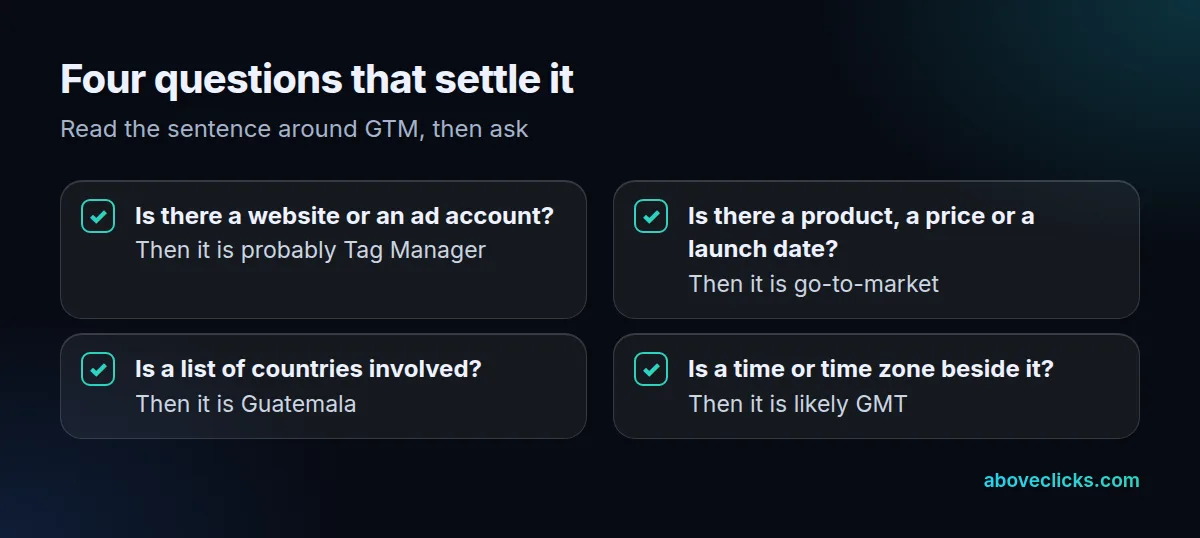
Here are five sample lines and how the test sorts them. Three of the 5 lines (60%) settle on the first two questions, and no line needs more than 4:
| Line you read | Meaning | Question that settles it |
|---|---|---|
| “Add the GTM container to the checkout page” | Google Tag Manager | 1: a website is involved |
| “Our GTM plan for the spring launch” | Go-to-market | 2: a launch is involved |
| “Ship to GTM, 2 parcels” | Guatemala | 3: a country is involved |
| “Call at 3 pm GTM” | Probably GMT | 4: a time is involved |
| “Hiring a GTM lead for the new product” | Go-to-market | 2: a product and a team |
Still asking what does GTM stand for after the test? When a message uses a term you cannot place, three habits settle it, and they answer “what is GTM” for the rest of the thread too:
- Check where it appears. In a site’s source code or an analytics report, it is Tag Manager. In a job post, a pitch deck or a sales plan, it is go-to-market.
- Look at the neighbors. “GTM container”, “GTM preview” and “GTM tag” are Tag Manager. “GTM motion”, “GTM team” and “GTM plan” are go-to-market.
- Ask once, in writing. A one-line reply such as “Do you mean Google Tag Manager or go-to-market?” costs nothing, and it avoids a week of work on the wrong thing. If the answer is Tag Manager, ask which container ID, so you open the right one.
One more clue: the tool’s container ID starts with “GTM-“, followed by letters and digits. The data layer page in Google’s docs shows the snippet with an ID in that form.
How do you start with Google Tag Manager?
If your answer to “what is GTM” is Tag Manager, the first job is simple: create a container, add its 2 snippets to your pages, then build tags with triggers and test them in preview mode before you publish.
Both Tag Manager and the Google tag (gtag.js) are free, according to Google’s comparison of the two. The difference is scope. gtag.js sends data to Google products only, while Tag Manager also handles third-party and custom tags, so it suits a store that runs ads on more than one platform.
Google’s introduction gives two pieces of guidance on scope. It says the best practice is to migrate all your tags at once, though that is not required, and that you will typically need only 1 Tag Manager account per company or organization.
Two rules from Google’s help pages prevent most first-week mistakes:
- Every tag needs at least 1 trigger. Google’s page on custom event triggers says every tag must have a trigger in order to fire, so a tag built without one never runs.
- Test before you publish. The preview and debug mode lets you browse your site as if the current draft were live, and shows which tags fired and in what order. Google adds that the debug interface is not visible to your regular visitors.
One trap sits in the custom event trigger. Google warns that the regex wildcard .* makes the trigger run on all detected events, including the ones Tag Manager and the Google tag send automatically, so use a narrower pattern.
Google also documents the wider platform: web pages, Android and iOS apps, and server-side tagging, which moves tag code off the site and into the cloud (About Google Tag Manager). Our server-side tagging glossary entry explains when a store needs that extra step.
More guides on measuring ads and orders are in our measurement guides. If you would rather have a second pair of eyes on what you built, our free audit covers your tracking setup, and the wider tracking and analytics service covers GA4, Tag Manager and ad-platform events together.