Omnisend vs Mailchimp vs Klaviyo comes down to what each one bills for: Omnisend suits small stores wanting email, SMS and web push, Klaviyo suits stores that segment on order data, and Mailchimp suits newsletters. Compare the contacts each counts on your own list first.
This omnisend vs mailchimp vs klaviyo guide runs one invented store export through all three billing rules, puts the free plans in one table and ends with a one-week test. A note before we start: we set up and migrate Klaviyo accounts for online stores, so that is the platform we know best. Every limit below comes from each vendor’s own pages and is dated.
Omnisend vs Mailchimp vs Klaviyo: which one fits which store?
It depends on how big your list is, how much of your email runs on automated flows, and which channels you want. All three offer a free plan of 250 contacts, as of November 2026, so the free tier rarely settles omnisend vs mailchimp vs klaviyo for a store.
The omnisend vs klaviyo vs mailchimp question starts with where each tool came from, because the three grew from different starting points. Mailchimp began as a newsletter tool and now sells tiers that differ in sends, audiences and flows. Omnisend was built for store email and SMS and lists web push on its plans. Klaviyo was built around store data, so its segments start from orders and browsing.
For depth on any single pair, we have separate guides: Omnisend vs Klaviyo, Mailchimp vs Klaviyo and Omnisend vs Mailchimp. This omnisend vs klaviyo vs mailchimp guide is for the shortlist stage, when all three are still on the table. If you search klaviyo vs mailchimp vs omnisend, expect the same answer: it depends on your count, your flows and your channels.
How does each one count the contacts you pay for?
Mailchimp counts subscribed, unsubscribed and non-subscribed contacts. Omnisend counts subscribers plus non-subscribers, and Klaviyo bills active profiles it can reach. In omnisend vs mailchimp vs klaviyo, the same list therefore produces three different bills.
Here are the three rules, each from the vendor’s own page:
- Mailchimp: subscribed, unsubscribed and non-subscribed contacts all count, while archived, cleaned and deleted contacts do not.
- Omnisend: billable contacts are subscribers plus non-subscribers, the customers who gave an email through an order or abandoned cart without opting in. Only unsubscribed contacts are excluded.
- Klaviyo: billing is based on reachable contacts, and unsubscribed and suppressed contacts do not count.
Now a worked example with an invented store. Its export has 6,000 rows: 4,200 subscribed, 1,100 unsubscribed over the years and 700 buyers who never opted in.
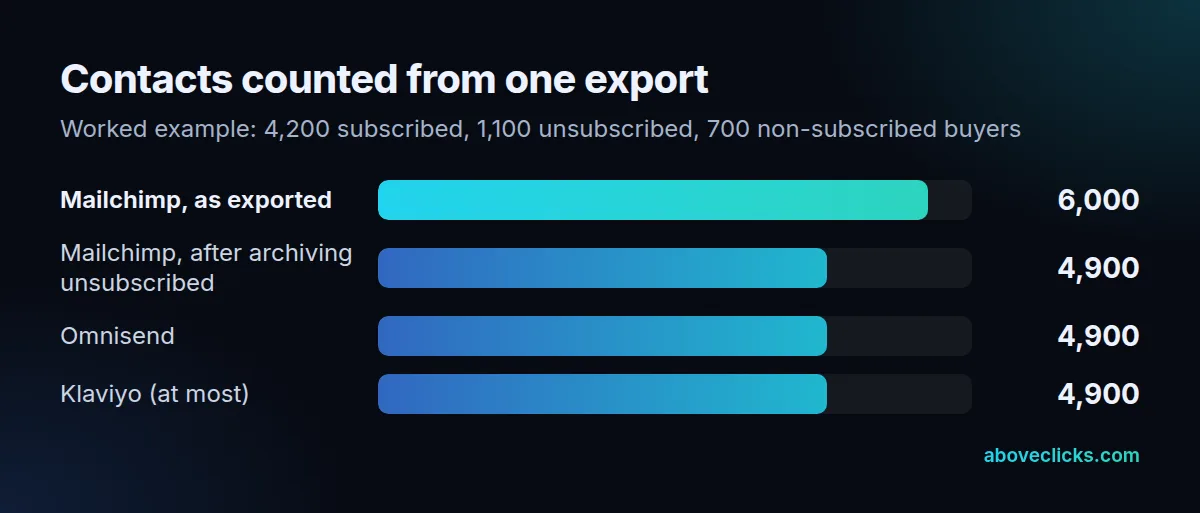
Exported as is, Mailchimp counts all 6,000. Archive the 1,100 unsubscribed contacts first and it counts 4,900, the same as Omnisend. Klaviyo excludes the 1,100 as well, so 4,900 is its ceiling. Whether the 700 buyers are reachable depends on their consent, and Klaviyo’s help page says someone who ordered may share an email without explicitly consenting.
A second trap sits in the 700 buyers. Omnisend bills non-subscribers because they still receive automated messages such as order confirmations and cart reminders, so a store with many guest checkouts can pay for people it may never market to. Check that group before you sign up, and ask whether your Omnisend vs Mailchimp vs Klaviyo shortlist treats it the same way. In our experience the guest-checkout group is the one owners forget to count.
The trap is comparing quotes taken before a clean-up. A 6,000-contact quote on one tool next to a 4,900-contact quote on another compares two different counts. Count first, then price all three at the same number; that is the fairest omnisend vs klaviyo vs mailchimp test there is.
How do the three free plans compare?
Almost identically on contacts and emails, and differently on flows and support. Each allows 250 contacts and 500 emails a month, as of November 2026, but only Klaviyo and Omnisend let a free account run automations as a store needs them.
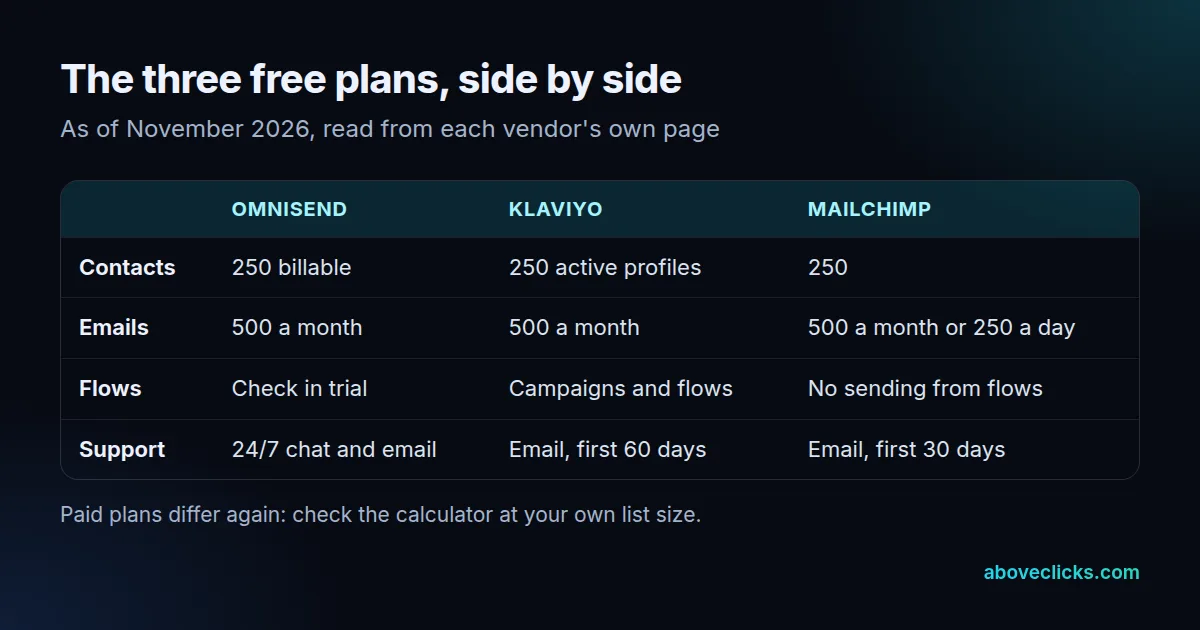
As of November 2026, Klaviyo’s pricing page lists campaigns and flows on the free plan, with email support for the first 60 days. Omnisend’s pricing page gives free accounts 500 emails, 500 web push notifications and 24/7 live chat and email support. Mailchimp’s plan comparison caps free sends at 500 a month or 250 a day, lists email support for the first 30 days and shows sends from flows as not included.
Mailchimp has another limit that the other two do not advertise in the same way: monthly sends as a multiple of contacts. Its comparison lists 10 times your contacts on Essentials, 12 times on Standard and 15 times on Premium. In a klaviyo vs mailchimp vs omnisend comparison this is the limit people miss. Take the invented store at 4,900 contacts. Sending 8 emails a month to each contact needs 39,200 sends, which fits inside Essentials’ 49,000. At 12 emails a month it needs 58,800, which needs Standard’s 58,800 exactly. A store that mails often can outgrow a send cap before it outgrows its contact tier.
Is Klaviyo better than Mailchimp, and is Omnisend better than Klaviyo?
Klaviyo is the better fit when flows run on order data, Omnisend when you want a simpler all-in-one setup for a small store, and Mailchimp when the list is mostly newsletter readers. In any omnisend vs mailchimp vs klaviyo shortlist none wins for every store, so match your situation to the list below.
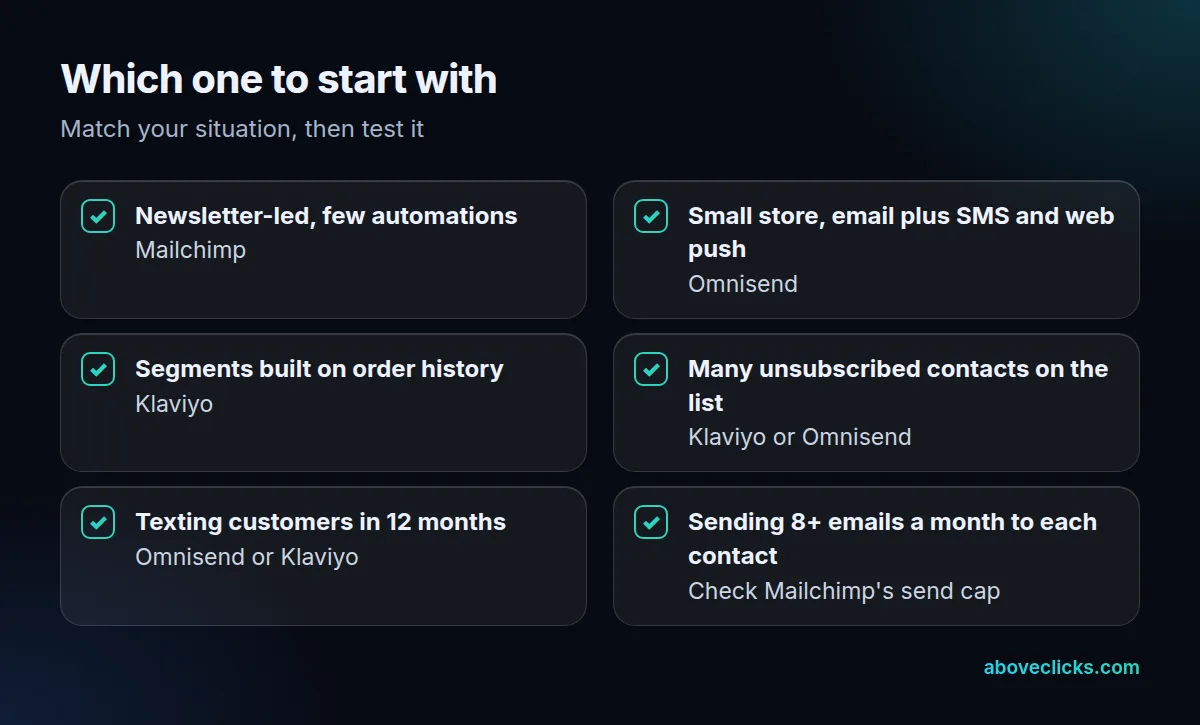
Three differences carry most of the decision:
- Flows. On the free plans, Klaviyo includes flows while Mailchimp does not send from them. A store that wants a welcome and an abandoned-checkout email from day 1 will outgrow Mailchimp’s free plan quickly.
- Support. Omnisend says 24/7 live chat and email apply to every plan, free included. Klaviyo’s free support runs for 60 days and Mailchimp’s for 30.
- Channels. Omnisend lists web push, Klaviyo lists SMS and more channels on its pricing page, and Mailchimp sells SMS as an add-on to paid plans in select countries, according to its comparison.
When you weigh omnisend vs klaviyo vs mailchimp for a list full of unsubscribed contacts, remember that Mailchimp counts them until you archive them. That alone can make Mailchimp look 20% dearer on a long-lived list, as in the example above (6,000 against 4,900 contacts).
What does each one cost beyond the plan?
Texts, extra sends and list clean-up. We don’t state paid-plan dollar figures here because all three vendors’ calculators change with list size and offers, so read the numbers at your own count.
For omnisend vs mailchimp vs klaviyo costs beyond the plan, what we can state, as of November 2026, is the one number Klaviyo publishes for texts: SMS starting at $0.007 per message for high-volume US sends, with the rate varying by country and volume, on its pricing page. Omnisend charges SMS separately from its email plan too, and Mailchimp’s SMS credits are bought in blocks that expire each month.
Three questions put the three vendors on the same footing, whether you are comparing klaviyo vs mailchimp vs omnisend or just two of them:
- Which contacts do you count, and have you cleaned the list first?
- What happens when you pass the send allowance: an upgrade, an overage or a paused campaign?
- What do texts cost on top, and can you leave them off?
Our email marketing cost guide covers the wider picture, including agency and freelancer fees.
Does omnisend vs mailchimp vs klaviyo change your deliverability?
Much less than your setup does. Gmail’s rules for bulk senders apply whichever of the three sends the mail, so authenticate your domain before volume grows.
Google’s sender guidelines say that anyone sending more than 5,000 messages a day to Gmail accounts must set up SPF, DKIM and DMARC and keep the spam rate reported in Postmaster Tools below 0.3%. In the US, the FTC’s CAN-SPAM guide adds that opt-out requests must be honored within 10 business days. Each platform gives you the tools to meet both; none of them does it for you, so in omnisend vs mailchimp vs klaviyo the deliverability gap is mostly yours to close.
How do you move between them without losing subscribers?
Disconnect the old email app from Shopify first, carry consent across with every contact, and rebuild flows before turning the old ones off. Skipping the first step is the costly one.
Klaviyo’s Shopify guide says to disconnect your prior email provider before connecting, because leaving the old integration live could send double opt-in emails to your existing subscribers. Shopify keeps its own subscriber list of customers who accepted marketing and supports importing customer lists, which helps you check that consent moved with the contacts.
Omnisend advertises a free migration of contacts, data and segments, on its pricing page, and a klaviyo vs mailchimp vs omnisend switch in either direction follows the same sequence. For a move to Klaviyo, our Klaviyo migration service covers the sequence above, and the Klaviyo email marketing service covers the build.
Watch the abandoned-checkout flow in particular. Shopify treats a checkout as abandoned after 10 minutes without payment once an email is given, so a gap of even a day during a switch means lost recovery emails.
How do you test omnisend vs mailchimp vs klaviyo in one week?
Over 7 days, load the same contacts into all three trials and compare the counted contacts, the time to build one flow and the first test send. Seven days is long enough to see how all three behave, and each platform’s trial covers a 250-contact test. Omnisend lists a 5-day free migration as of November 2026, so a trial import is also a fair test of that offer.
- Day 1: export your list and archive unsubscribed contacts. Note the row count.
- Day 2: import the same file into each trial and write down the contact count each one reports.
- Day 3: build a welcome email and an abandoned-checkout email in each, and time yourself.
- Day 4: check how each handles your non-subscribed buyers.
- Day 5: send a test to a Gmail and a work address and check authentication.
- Day 6: price the plan each tool shows for your count, and the SMS rate you would use.
- Day 7: pick the one with the clearest bill and the shortest build time. That is how to settle omnisend vs mailchimp vs klaviyo with your own numbers instead of a feature grid.
If you want a second opinion on your current setup before you choose, our free audit reads it with read-only access. More guides are in buying guides.