The main Omnisend vs Mailchimp difference is focus: Omnisend builds email, SMS and web push plans around online stores, while Mailchimp is a general marketing platform with tighter limits at its lower tiers. Compare the plan limits first, because they decide which tool fits.
A note before we start: we set up and migrate Klaviyo accounts for online stores. This Omnisend vs Mailchimp comparison uses only each vendor’s own pages, dates every limit, and says where each tool is the better choice.
Omnisend vs Mailchimp: what’s the real difference?
Omnisend is built for store email and SMS with automation on every plan; Mailchimp started as a newsletter tool and now sells tiers that differ mainly in sends, audiences and flows. Both reach online stores, but they limit different things.
As of October 2026, Omnisend’s pricing page shows a Standard plan at 500 contacts with 6,000 emails a month and unlimited web push. Mailchimp’s plan comparison sells Essentials, Standard and Premium, each with a different cap on audiences, flow steps and monthly sends.
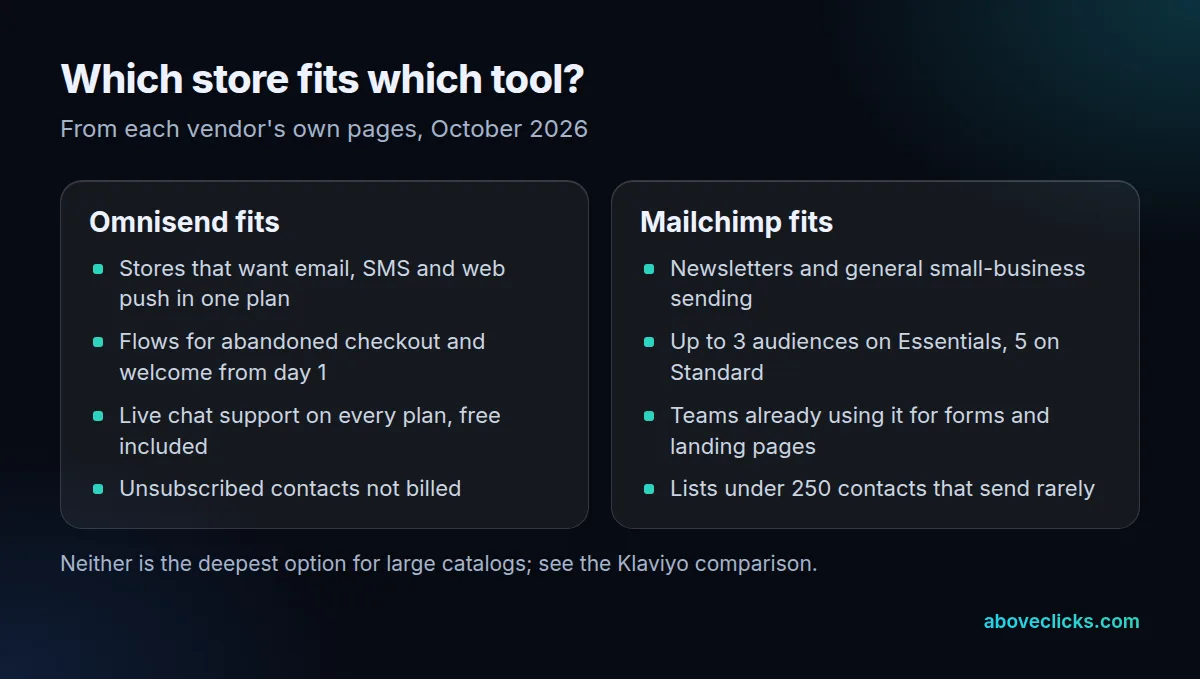
Support is the quieter difference. As of October 2026, Omnisend says live chat and email support run 24/7 on every plan, free included. Mailchimp’s comparison page lists email support for the first 30 days on its free plan and 24/7 email and chat on Essentials and Standard.
When people ask Mailchimp vs Omnisend, they usually mean one of three things: which is cheaper at their list size, which handles abandoned carts better, or whether leaving Mailchimp is worth the work. The sections below take those in order, so you can decide Omnisend or Mailchimp from your own numbers instead of a feature grid.
How do the Omnisend and Mailchimp free plans compare?
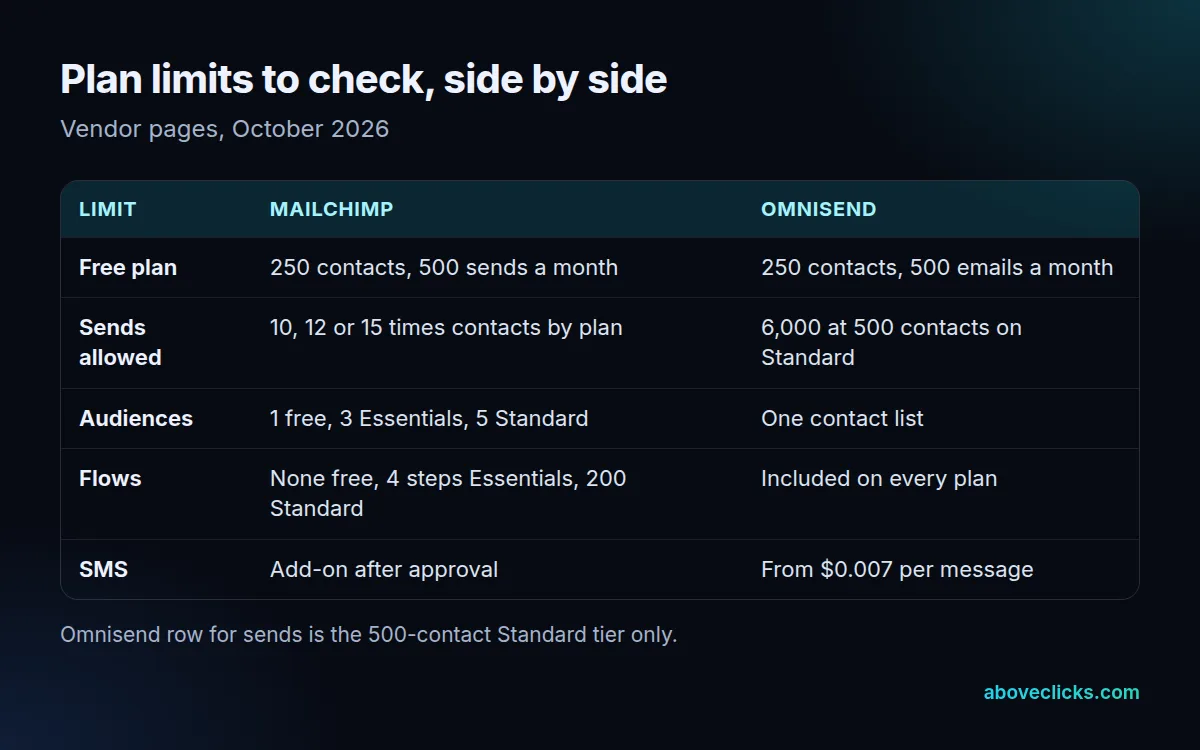
Almost identically on contacts: both cap the free plan at 250 contacts, as of October 2026. Omnisend allows 500 emails a month and adds 500 web push notifications; Mailchimp allows 500 sends a month or 250 a day.
The gap is in what is switched off. Mailchimp’s comparison shows the free plan with no automation flows and no A/B testing, so a free account cannot run a welcome series or an abandoned-cart flow. Omnisend’s pricing page lists flows as part of its tools on every plan and says 24/7 live chat and email support apply to all plans, free included.
For a store with fewer than 250 contacts, either free plan is enough to test the sign-up form and one campaign. For a store that wants automation from the first week, the free Mailchimp plan is the more limited of the two, which is why many owners comparing Omnisend vs Mailchimp at the free tier pick Omnisend.
How much does Omnisend cost compared with Mailchimp?
It depends on list size, and only Omnisend shows a small-list figure we could verify. As of October 2026, its Standard plan at 500 contacts shows $11.20 a month under a 30% offer for paying 3 months upfront.
Mailchimp’s cost at small list sizes sits behind a JavaScript calculator, so we do not state one. As of October 2026, its comparison page publishes the top of each tier: Essentials reaches 50,000 contacts at its $385 a month tier, and Standard reaches 100,000 contacts at its $800 a month tier.
How each tool counts contacts changes the bill as much as the plan. Mailchimp’s plan terms say subscribed, unsubscribed and non-subscribed contacts all count, while archived, cleaned and deleted contacts do not. Omnisend bills subscribers plus non-subscribers who receive automated messages, and does not bill unsubscribed contacts. We cover that rule in more detail in Omnisend vs Klaviyo, and the wider cost picture in our email marketing cost guide.
So an unsubscribe-heavy list costs more on Mailchimp than on Omnisend until you archive those contacts. Clean the list before you compare quotes, because Mailchimp vs Omnisend costs diverge most on lists with many unsubscribed contacts.
Take an invented store with 3,000 contacts in its export: 2,200 subscribed, 500 unsubscribed and 300 who bought without opting in. On Mailchimp’s rule all 3,000 count until you archive the 500. On Omnisend’s rule the 500 are free, and the 300 count only if they receive automated messages such as cart reminders. Run your own export through the same three groups.
Three questions settle most Omnisend or Mailchimp cost comparisons, whichever list size you have:
- How many of your contacts are unsubscribed or have never opened an email in 12 months?
- How many emails does each contact get in a typical month, flows included?
- Do you need SMS, and in which countries?
Which Mailchimp vs Omnisend plan limits will you hit first?
Usually monthly sends, then flows. Mailchimp caps sends at a multiple of your contacts: 10 times on Essentials, 12 times on Standard and 15 times on Premium, as of October 2026, and each email to each contact counts as one send.
Mailchimp’s plan terms give the counting rule: one email to 500 contacts equals 500 sends, and test and transactional emails count toward the limit. A flow that emails every new subscriber 4 times adds to the same total as your campaigns, so count flow emails in the formula below, not only campaigns.
Use this formula to test your own list before you choose between Omnisend and Mailchimp.
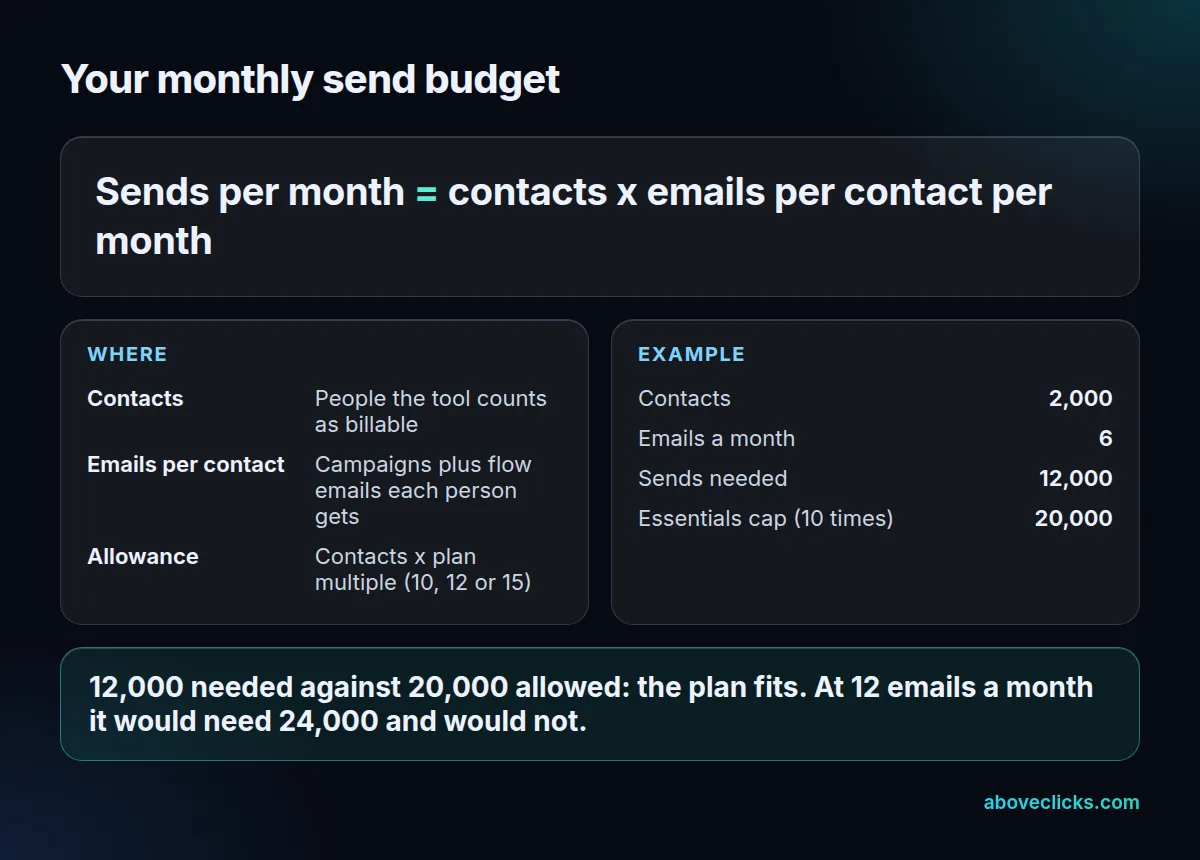
Example for an invented store: 2,000 contacts receive 6 emails a month, so it needs 12,000 sends. Essentials allows 20,000 at 10 times its contacts, so the store fits. If it grows to 12 emails a month it needs 24,000 and has to move up to Standard at 12 times.
Audiences are a limit people overlook. As of October 2026, Mailchimp allows 1 audience on Free, 3 on Essentials and 5 on Standard. Its plan terms define the contact total as contacts stored across all of your audiences, so splitting a list into wholesale, retail and event audiences does not lower what you pay. Use tags and segments inside one audience unless you truly need separate sender details.
Flows are the second limit. In a Mailchimp vs Omnisend test, flows show the gap first. Mailchimp’s comparison lists up to 4 flow steps on Essentials and up to 200 flows on Standard. A store with a welcome series, an abandoned-cart flow and a post-purchase flow can pass 4 steps quickly.
Is Omnisend better than Mailchimp for a Shopify store?
Is Omnisend better than Mailchimp for most stores that rely on automated flows and text messages? Yes, because those are included in its plans. For a store that mostly sends a monthly newsletter to a short list, Mailchimp can be enough.
Start with abandoned checkouts, since they are where store email earns money, and where the Omnisend vs Mailchimp gap is easiest to test. Shopify’s help center says a checkout counts as abandoned after 10 minutes without payment once the customer has entered an email. Shopify can send a basic recovery email itself, so the question is whether a paid tool adds enough to justify its cost.
On this point the Omnisend or Mailchimp decision comes down to limits. Omnisend includes flows on every plan, while Mailchimp ties flow steps to the tier, as the table above shows. A store that wants a 3-step cart flow on Mailchimp’s Free plan simply cannot build it.
SMS works differently too. As of October 2026, Mailchimp sells SMS as an add-on to a paid plan, and you must submit an application and be approved before you can buy credits. Omnisend lists SMS from $0.007 per message at high US volume, with the rate varying by country and volume. Either way, plan for the approval and registration steps before a sale, not during it.
Before you pay for a year, list the 3 automations you want live in the first 30 days, such as welcome, abandoned cart and post-purchase. Build each one in the free trial or free plan where the tool allows it, and test it with a real order.
Should you stay on Mailchimp, move to Omnisend or pick something else?
Asking whether to choose Omnisend or Mailchimp is really asking what you will send in the next 12 months.
Stay if you send fewer than a few thousand emails a month and do not need flows; for that store Mailchimp vs Omnisend is a tie, and moving costs more than it saves. Move to Omnisend if flows, SMS and live support matter. Look at Klaviyo when you need deeper segmentation, as in our Klaviyo alternatives guide.
If you move, order the work so consent data goes first:
- Export contacts with their consent status and sign-up source from Mailchimp, including unsubscribed ones, and import them as unsubscribed on the new tool.
- Rebuild the welcome and abandoned-cart flows in the new tool and test them with a real order.
- Set up SPF, DKIM and DMARC on your sending domain. Google’s sender guidelines require them, plus one-click unsubscribe, for senders above 5,000 messages a day to Gmail, with spam rates under 0.30%.
- Disconnect the old Shopify app only after the new flows are live, so no customer gets two cart emails.
- Honor every opt-out within 10 business days, as the FTC CAN-SPAM guide requires, and keep your postal address in the footer.
Penalties under CAN-SPAM reach $53,088 per email, so the import of unsubscribed contacts in step 1 matters more than any template.
To sum up the Omnisend vs Mailchimp choice: pick Omnisend when automation and SMS drive your revenue, pick Mailchimp when newsletters do, and pick neither when your catalog and segments are large. If neither tool fits, our Klaviyo email marketing service handles set-up and migration. For a second opinion on your current setup, the free audit is a read-only review. More comparisons are in buying guides.