An LLM SEO check is a short audit of whether AI search engines can reach, read and cite your pages. Run ten pass/fail tests in order and fix the first failure before the next.
This guide gives you the LLM SEO check as a ten-item LLM SEO checklist, shows which robots.txt rule controls which bot, scores a worked example, and says what to fix first.
What is an LLM SEO check?
A pass/fail audit of your site against what AI search products need: access, indexing, readable text, clear answers and a way to measure them. It is classic SEO viewed through AI search.
Google is direct about this. Its AI features guide says there are no additional requirements for AI Overviews or AI Mode, and that a page must be indexed and eligible to be shown with a snippet. So no extra technical steps exist on Google’s side, and the check is mostly the basics, done carefully. Each test scores 1 point out of 10 points in total, which keeps the audit short enough to finish in an afternoon.
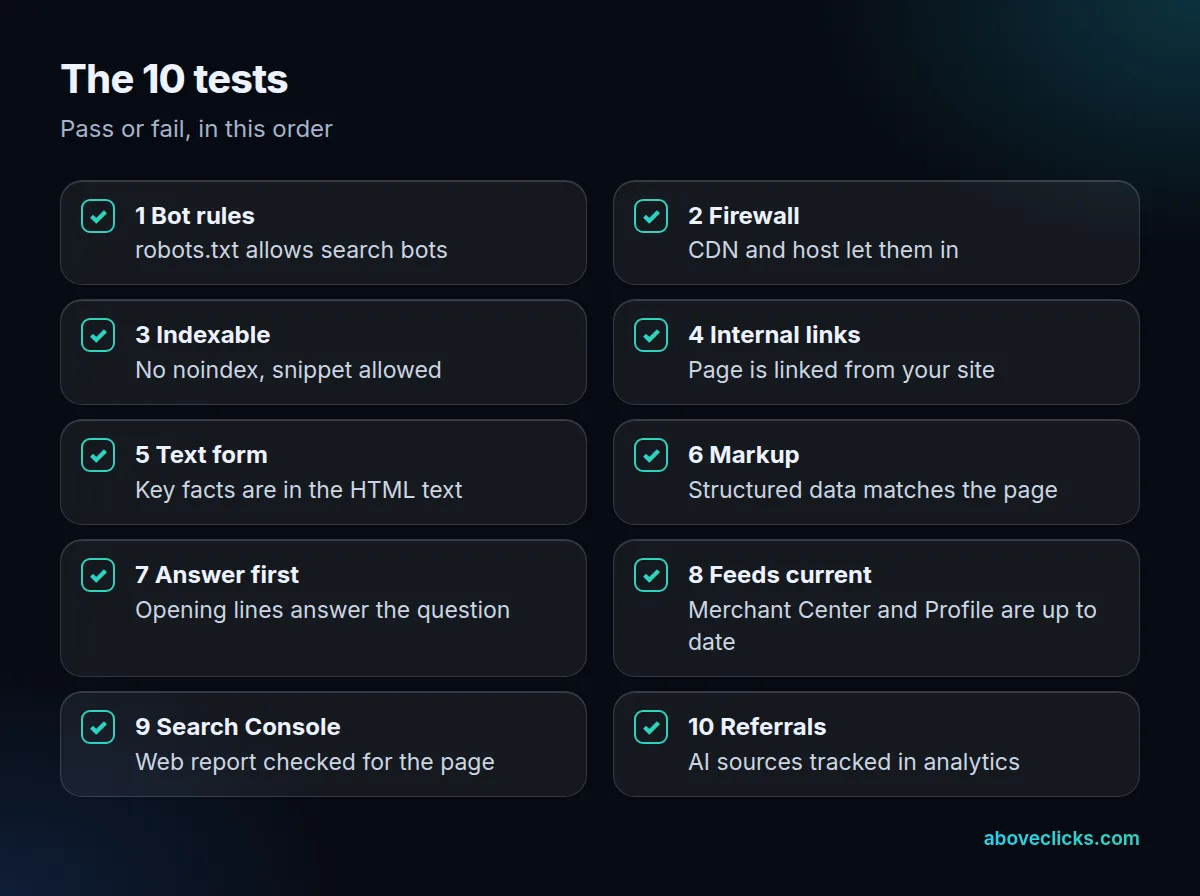
The ten tests below form the LLM SEO checklist, in five groups of two:
Why bother when the basics are unchanged? Because the basics fail quietly. A firewall rule added last spring, a template that gained a noindex tag or a size chart that loads late can each hide a page from every AI search product at once, and nothing in your sales report says why. A scheduled LLM SEO check catches these in minutes rather than months.
Any LLM SEO checker tool can run some of these, but you should know what each one means before you trust a score. Our guides on ranking in ChatGPT search and on AEO vs GEO cover prompt testing; this LLM SEO check looks at your site instead.
Can AI crawlers reach your pages?
Only if robots.txt and your firewall let the right bots in. Tests 1 and 2 check both, and a failure here makes every later test irrelevant.
Test 1, bot rules. Open yourdomain.com/robots.txt and read it bot by bot. OpenAI uses 3 agents with separate controls: OAI-SearchBot for search, GPTBot for training and ChatGPT-User for user requests. It says sites opted out of OAI-SearchBot won’t be shown in ChatGPT search answers, and that a site can allow OAI-SearchBot while disallowing GPTBot.
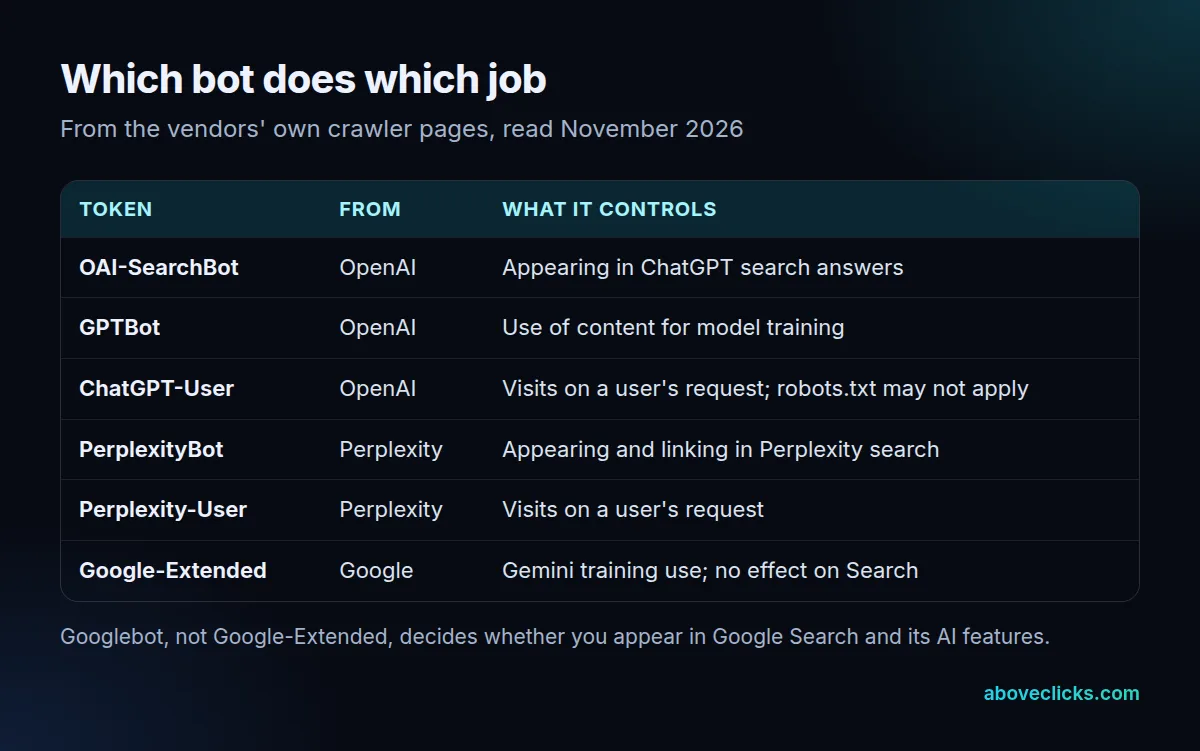
Perplexity works the same way: PerplexityBot surfaces and links sites in its search and isn’t used for model training. Google’s Google-Extended token covers Gemini training and has no effect on Search. A blanket Disallow: / for every unknown bot is the classic way to fail this test, so pass it only if the search bots are allowed.
Test 2, firewall. Google says crawling must be allowed in robots.txt and by any CDN or hosting infrastructure. OpenAI and Perplexity both publish IP ranges and recommend permitting them. Check your firewall or CDN bot settings and your server logs for refused requests from these user agents.
A minimal pattern that passes test 1 allows the search bots and leaves training to your own policy: one group for OAI-SearchBot and PerplexityBot with Allow: /, and a separate group for GPTBot with whatever rule you choose. Because each token is independent, writing one group never changes the others.
After a robots.txt edit, wait. OpenAI says its systems can take about 24 hours to adjust, and Perplexity says up to 24 hours.
Can AI search read and quote your pages?
Yes, if the page is indexable, linked and shows its key facts as text. Tests 3 to 8 cover this, and most real failures show up here.
Test 3, indexable. The page needs no noindex and must allow snippets. Google’s snippet guide explains that nosnippet, max-snippet and data-nosnippet limit what can be shown. Google’s robots.txt guide adds that robots.txt alone isn’t a way to keep a page out of Search; noindex is. Remember the reverse: a stray noindex on a template hides every page that uses it.
Test 4, internal links. Google lists internal links as a basic that still matters for AI features. If a page has no link from your own site, add one from a relevant category or guide.
Test 5, text form. Google says important content should be available as text. Fetch the page with curl and search the HTML for your price range, size chart or key claim. Google Search runs JavaScript with an evergreen Chromium, but we can’t verify from the vendor docs that every AI crawler does, so a fact only visible after scripts run is a risk.
Test 6, markup. Structured data must match the visible text. Google adds that there is no special schema you need for AI features, so don’t count missing markup as a failure; count mismatched markup.
Test 7, answer first. Read the first two sentences under each heading. Do they answer the heading’s question without a warm-up? This is our own editing rule, not a vendor requirement, and it’s the cheapest test to fix.
Test 8, feeds current. Google tells stores to check that Merchant Center and Business Profile details are up to date. A mismatch between your feed and your page is a fail.
How do you measure the result of an LLM SEO check?
With Search Console for Google and your analytics for the rest. Tests 9 and 10 turn the audit into a repeatable number.
Test 9, Search Console. Google says traffic from AI features is counted in the Performance report under the “Web” search type. There is no separate AI report to find, so check the page’s queries and clicks over 3 months against the same months last year.
Test 10, referrals. Check whether your analytics tool separates visits from AI chat and search products in its referral or source report. Pass this test only if you can tell those visits apart from “direct”. If you can’t, add a saved report before anything else.
Add the result of each LLM SEO check to the same sheet. Our sample report shows the layout we use for monthly reporting.
How do you score an LLM SEO checklist?
One point per pass, ten points in total. Score each group of two as a share, then read the lowest group first.
Example: an invented store with 40 products ran the ten tests on its top collection page. It passed 6 of 10.
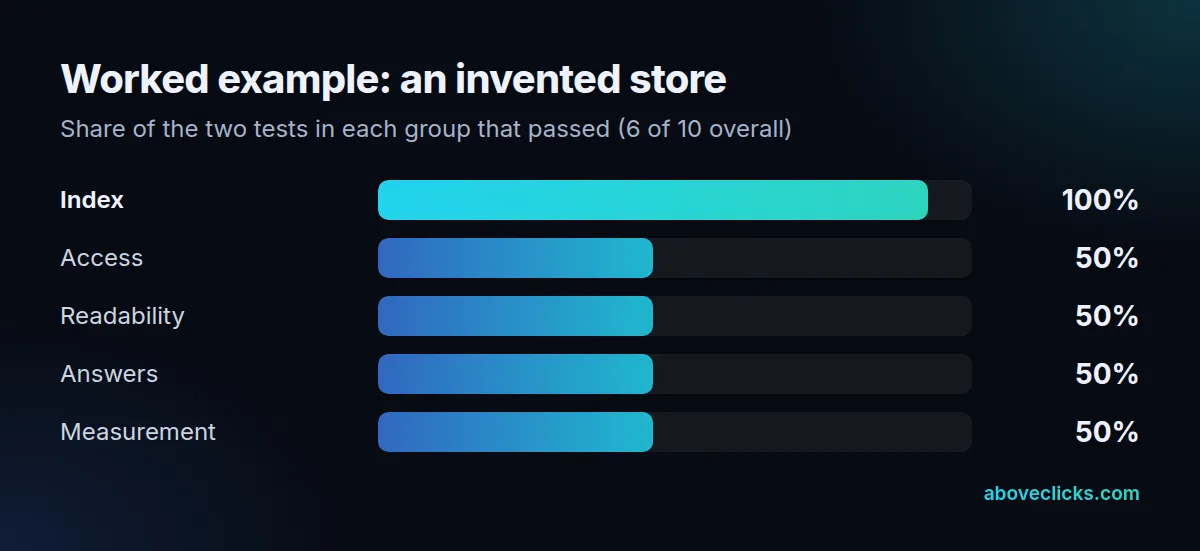
Its failures were test 2 (the CDN blocked an unknown bot), test 5 (the size chart loaded by script), test 8 (a stale shipping policy in Merchant Center) and test 10 (no AI source in analytics). The example is not a client result, and the score is not a ranking prediction.
What can an LLM SEO check not tell you?
Whether any engine will actually cite you. Google states that meeting every requirement and best practice doesn’t mean it will crawl, index or serve your content, and that indexing and serving can never be taken for granted. The same caution applies to every AI product.
So treat a 10 out of 10 LLM SEO check result as permission to compete, not a ranking. The check removes the technical reasons you might be missing, which leaves content quality, brand recognition and the question being asked as the reasons that remain. Those need the work in our guides, not another LLM SEO checker run.
Two limits are worth knowing before you share a score with your team. First, a pass today can turn into a fail after the next theme update or firewall change, so the number only describes the day you ran it. Second, the tests look at one page at a time, so run them on your 5 to 10 most valuable URLs rather than a single home page, and keep the results in one sheet that shows each page’s score and the date.
What should you fix first?
The earliest failed test. A page that can’t be reached can’t be read, and a page that can’t be read can’t be cited, so work down the list in order.
- Fix access (tests 1 and 2) the same day, because it is usually an edit in one file or one setting, and a clean LLM SEO check starts there.
- Fix indexing and text form (tests 3 to 6) next in your LLM SEO checklist, template by template, not page by page.
- Rewrite opening lines (test 7) on your 5 most valuable pages.
- Set up measurement (tests 9 and 10), then re-run the whole LLM SEO check after 24 hours to a week and again at 3 months.
Keep the changes small and dated. If a page’s visits move after an edit, you can then tell which test caused it, and you can undo a single rule without losing the rest of the work. An LLM SEO check is only useful when each pass or fail can be traced back to one change that someone made on a known date.
If you’d like a second pair of eyes, our AI search optimization service runs this check and a fix list for you, and the free audit is a lighter first look. More guides are in ecommerce SEO.