Shopify website SEO is the set of settings and fixes that help Google crawl, understand and rank the pages of a Shopify store. Shopify handles the basics for you, so your time goes into titles, content, redirects and a few theme edits.
This guide to Shopify website SEO maps each job to where it lives, gives the limits Shopify documents, works through a title example and shows how to check that a change reached Google.
What is Shopify website SEO?
It is the work of making product, collection, blog and other pages easy for Google to find and worth showing. Shopify website SEO splits three ways on any store: fields in the admin, code in the theme, and defaults Shopify sets itself.
Most owners only ever touch the first group. Shopify’s own keyword guide names four places to add keywords: page titles, meta descriptions, image alt text and the body content of a page. All four are plain fields, and the title field takes up to 70 characters, so none of them needs code.
The second group is smaller and riskier, because one theme file runs on every page. The third group needs no work, only awareness. A typical example is the cart page, which Shopify already asks crawlers to skip. Knowing which group a problem belongs to saves hours of hunting through the wrong screen, and it is the first skill of good Shopify site SEO.
This split is also why Shopify store SEO advice online feels contradictory. A tip about the title tag template is a code change, while a tip about meta descriptions is a field. The map below keeps them apart.
Is Shopify good for SEO?
Yes for the basics, with limits. Shopify website SEO needs no developer at the start, because Shopify ships a preconfigured robots.txt file, editable titles and descriptions, a redirect tool and alt text fields, so a store can rank without any developer. Rankings still depend on content, links and speed.
Shopify’s help page on hiding pages says every store has a preconfigured and optimized robots.txt.liquid template, and that the cart page is already asked not to be crawled. You don’t need to change it unless you have a specific reason. The same help set caps the title field at 70 characters and the redirect tool at 100,000 redirects, so the defaults leave plenty of room.
What the platform can’t do is write your titles, decide which page should rank for which search or produce content. It also can’t clean up the extra URLs that apps and filters create. Our own Shopify store SEO work, described on the Shopify SEO service page, fixes those problems at the source, in the theme’s Liquid code and settings.
On duplicate URLs, Google ranks its own signals. Its canonical guide calls a redirect a strong signal, a link a strong signal and sitemap inclusion a weak one. Shopify sets canonical tags for you, so check the result rather than rebuilding it.
For a platform-versus-platform view, see Shopify vs WooCommerce SEO. The wider picture sits in our ecommerce SEO guides.
Where do the Shopify SEO settings live?
Shopify SEO settings live in three places: admin fields for titles, descriptions, alt text and redirects; theme files for the title tag template and robots.txt; and Shopify’s own defaults for cart crawling. The table lists eight jobs and the limit for each.
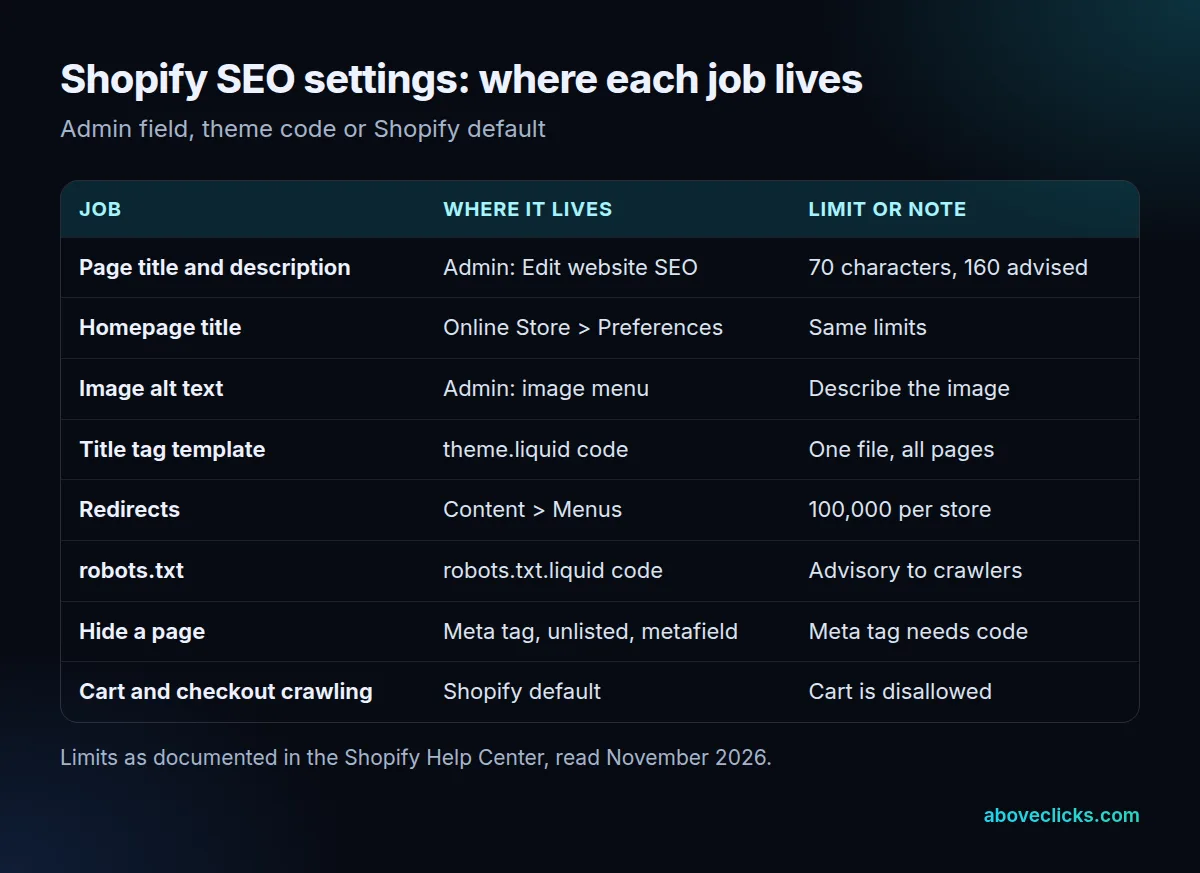
Before you edit anything, note that three of the eight jobs need theme code: the title tag template, the robots.txt rules and hiding a page with a meta tag. Shopify’s help pages say the title tag sits in one file, theme.liquid, and that there’s no FTP access to individual pages. Back up the theme before you touch any of them.
The other five are fields. Page titles and descriptions are set under each page’s “Edit website SEO” option, and the homepage’s under Online Store > Preferences. Redirects are under Content > Menus.
One more number worth knowing: Shopify advises at least 250 words of descriptive text on every page and at least 500 words on informational pages and blog posts. Treat those as Shopify’s floor, not a target to pad toward.
If you want the full to-do list in order for Shopify website SEO, use our Shopify SEO checklist. This map is for deciding where a fix belongs.
What should a Shopify SEO title and description say?
Name the page’s subject in plain words, put the most important term near the front, and stay under about 60 characters. The title field accepts up to 70 characters, and the description field works best at around 160.
Those numbers come from Shopify’s SEO guide. Google adds that it has no fixed limit for a title element but shortens titles to fit the device width, and that repeating the same words doesn’t help (Google’s title link guide).
Example: an invented candle store has three possible titles for one product page. “Candles” is 7 characters and says nothing about the page. “Soy Candles for Small Spaces | North Pine Candle Co.” is 52 characters. A third version that adds “Hand-Poured, 40-Hour Burn” and “Online Store” runs to 92 characters.
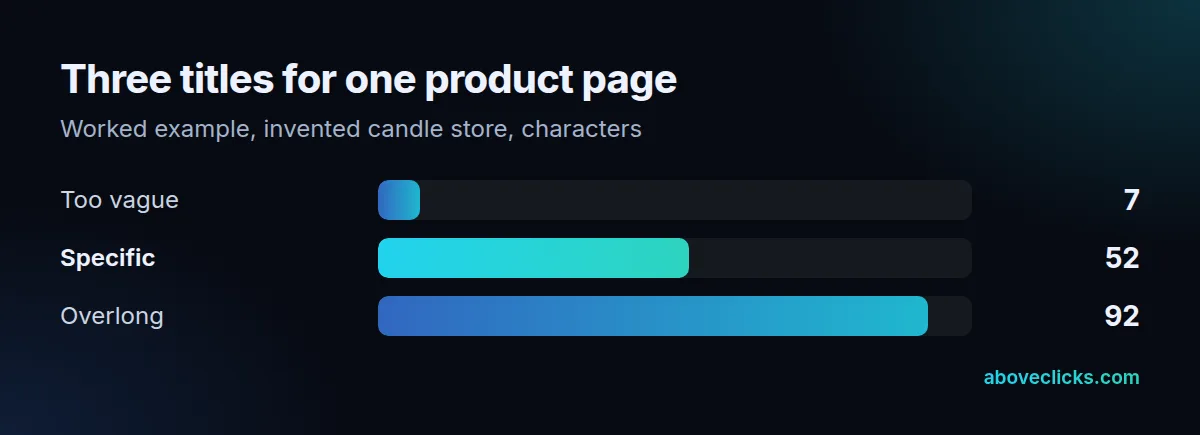
The 92-character version is over the 70-character field limit, so the end would be cut off. The 52-character version names the product, the use and the brand with room to spare.
Shopify also builds the page’s H1 from whatever you type in the title field, so a good title helps twice. Alt text is the quiet fourth field. Shopify says to use readable phrases that describe what the image shows, with words from the page, and to set it for product images, collection images and blog featured images. It also helps shoppers who use screen readers.
Write the title for a shopper first. Use the description to add one concrete reason to click, such as a material, a size or a shipping detail.
How do you improve Shopify website SEO without breaking anything?
Change one thing at a time, redirect only what is broken and leave the default robots.txt alone unless you have a reason. Most damage to Shopify store SEO comes from large edits made without a rollback.
Four edits cause most of the trouble:
- Redirects that can’t work. Shopify can’t redirect URLs that start with /apps, /application, /cart, /carts, /orders, /services or /shop, or the fixed paths /products, /collections and /collections/all. A redirect also only works from a URL that returns a 404. A store can hold up to 100,000 redirects, or 20,000,000 on Plus (Shopify’s redirect guide).
- A robots.txt rewritten from scratch. Shopify recommends adding or removing rules with Liquid so the file keeps updating, and notes that robots.txt rules are advisory, since not every crawler follows them.
- Hiding the wrong way. An unlisted product disappears from search, the sitemap, collections and store search. A meta tag in the theme hides a page from search engines but leaves it in storefront search.
- Heavy apps. Google’s Core Web Vitals targets are an LCP under 2.5 seconds, an INP under 200 milliseconds and a CLS under 0.1. Each app that loads a script can push you past them.
Example: you delete a discontinued candle. Its old URL now returns a 404, so you can redirect it to the closest candle in the same scent, the case Shopify’s own guide uses for deleted products. Pointing it at the homepage sends shoppers somewhere unrelated.
Product data is the other area to check. Google separates product snippets from merchant listings, and a page where customers can buy should use the merchant listing properties. Ask whoever maintains your theme which one it outputs.
How do you check that a Shopify SEO change worked?
Check the page source first, then ask Google to recrawl, then wait. Good Shopify website SEO is measured, not assumed. A change can be live on your store and still take days or weeks to show in search.
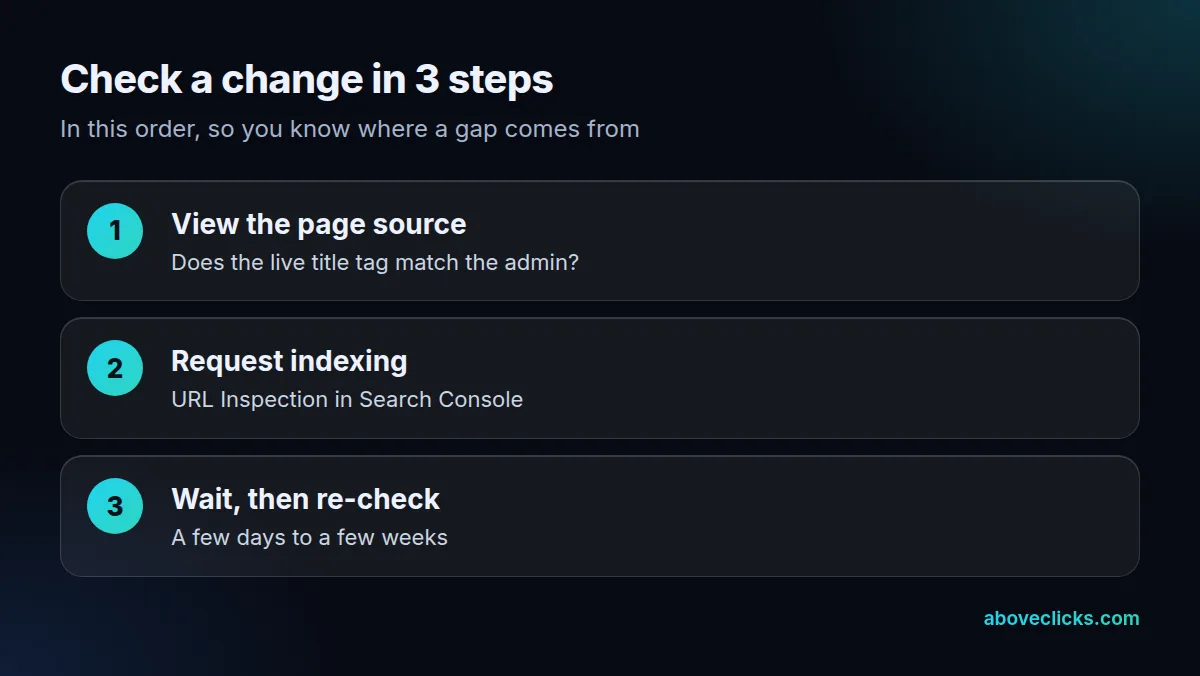
Shopify’s keyword guide explains step 1: open the page, view the page source, and look for the title tag and the meta description near the top. If they match your admin entry, the store is correct, and any difference in search comes from Google, which can rewrite both.
Step 2 uses the URL Inspection tool in Search Console to request indexing. Google says crawling can take anywhere from a few days to a few weeks, and a request doesn’t promise a listing.
Step 3 is the discipline for any Shopify SEO settings change. Change a batch of related pages, note the date, and compare clicks for those pages in Search Console 4 weeks later. Changing a title on Monday and a redirect on Tuesday makes it impossible to say which one moved the numbers. Keep a simple log with the date, the URL and what changed, so a drop or a gain can be traced back to one edit.
How much does Shopify SEO cost, and when do you need help?
Most Shopify website SEO settings in the table cost nothing but time. Paying for help makes sense when a problem needs theme code, spans hundreds of pages or has stopped improving after a few clean-up rounds.
Count the jobs in the map: 3 of the 8 need theme code. If your problems are all in the other 5, you can likely handle them yourself with the Shopify SEO checklist and the broader ecommerce SEO guide.
We don’t publish a market range here, because fees vary too much with store size to quote honestly. If you want a second opinion first, our free audit sends a PDF report within 2 workdays, and a video meeting is optional. For done-for-you work on a Shopify website, see our Shopify SEO service, where the starting price cards are listed.
Whichever route you choose for Shopify website SEO, keep the Search Console and analytics accounts in your own name, so your Shopify site SEO history stays with the store.