A Squarespace to Shopify migration moves products, customers and orders with CSV files or an app, and everything else by hand. Plan around what the export leaves out, then protect your rankings with redirects.
This guide to a Squarespace to Shopify migration lists the gaps, gives the order to work in and explains the domain move. If you would rather hand it over, see our Shopify migration service.
What is a Squarespace to Shopify migration?
Moving a store’s products, customers, orders and content from Squarespace to a new Shopify store. Shopify’s guide to migrating from Squarespace names the data to consider: products, customers, historical orders, reviews, blog posts and pages.
Treat a Squarespace to Shopify migration as a clean-up too. The same guide notes that a migration can be a good time to purge old, low-performing content. Every product or page you drop is one less line to rebuild, map and test.
Most owners search for this move because Shopify is built for selling, while a Squarespace site started as a page builder. That is a reason to move, not a reason to rush: a Squarespace to Shopify migration done in a hurry is where lost links and missing images come from.
There are four routes, from least to most technical: copy and paste, CSV import, a third-party migration app, or a Shopify Partner. For a few pages, copy and paste is enough; for a catalog of 250 products, Shopify says a CSV file or an app is likely needed.
How do you migrate from Squarespace to Shopify?
In six steps: crawl the old site, import products, copy what can’t export, map the redirects, test, then move the domain. The order matters because orders attach to products and customers.
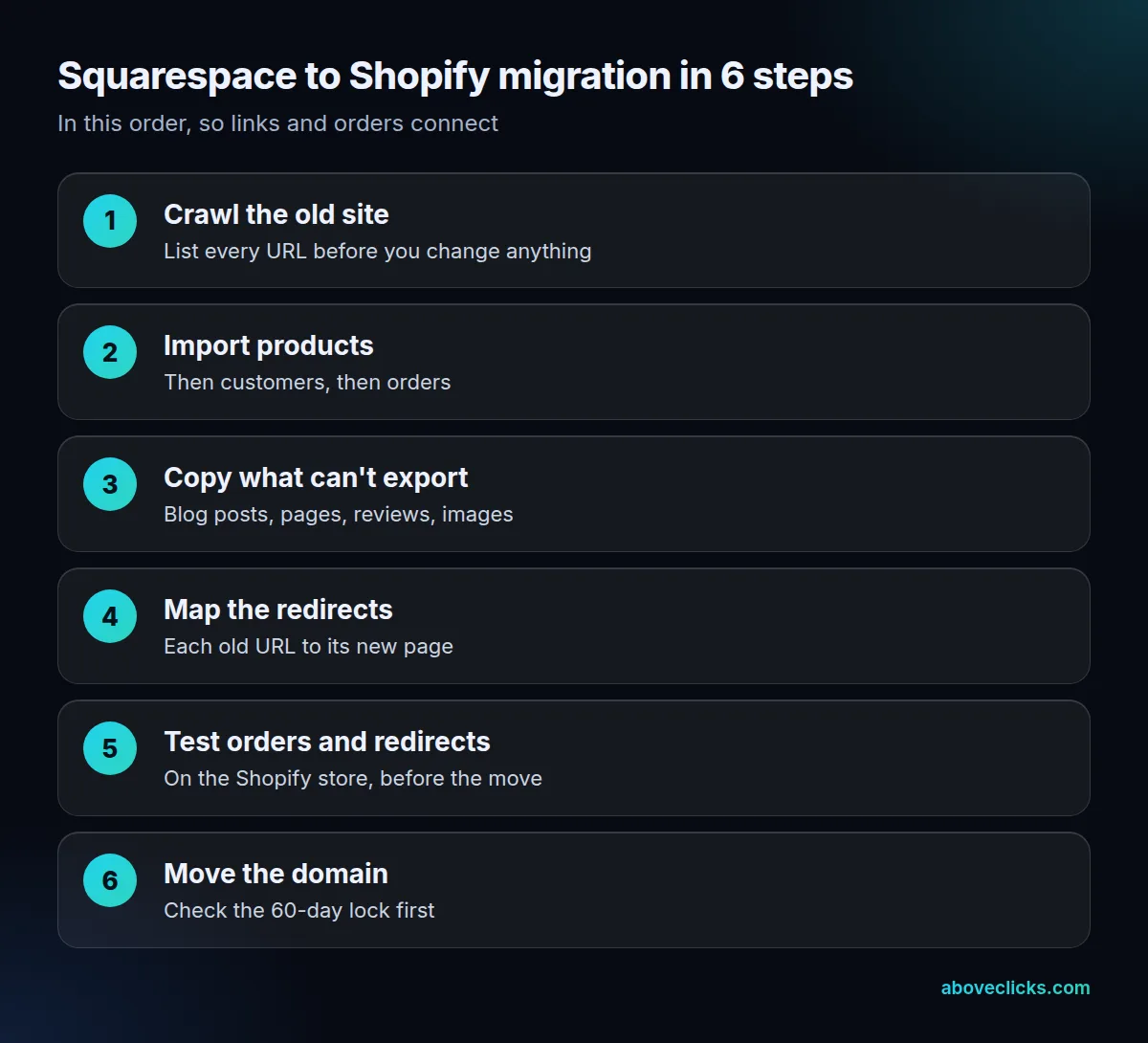
Start by listing every URL on the old site, because that list becomes your redirect map later. Then, in Squarespace, open Products & Services, click Products and export. Shopify’s guide says to name the file SquarespaceProductDownload.csv, then edit it to match Shopify’s product CSV template.
Shopify’s migration overview is firm about sequence: import products first, then customers, then historical orders, so products and customers connect to the orders. Importing orders also sends a new-order email to each staff member set to receive them, so switch those notifications off first.
Two limits catch people out in a Squarespace to Shopify migration. A product CSV can’t exceed 15 MB, so split a large file. And a file sorted in a spreadsheet editor can detach products from their image links, so edit in a copy and keep the original row order.
Before you import anything, decide what stays behind. Old discontinued products, thin pages and test posts do not need a place on the new store, and every item you keep adds a row to the gap table below and a line to the redirect map. A short list also makes the Squarespace to Shopify migration easier to test.
Set a freeze date for your Squarespace to Shopify migration too. Orders, customers and stock keep changing on the live Squarespace site while you build, so choose a day after which you stop editing products there, or note every change in a shared sheet. Re-export customers and orders close to launch so the Shopify store starts with current data, and place a handful of test orders on the new store before any real customer sees it.
Squarespace stores one product URL in the first row of a product with variants. Copy that value into every variant row as the URL handle, or Shopify will import the rows as separate products.
What does Squarespace not export?
Reviews, images, alt text and importable blog posts. Shopify’s guide says Squarespace exports up to 10,000 physical and service products, but featured images, variant images, image alt text and customer reviews are not included.
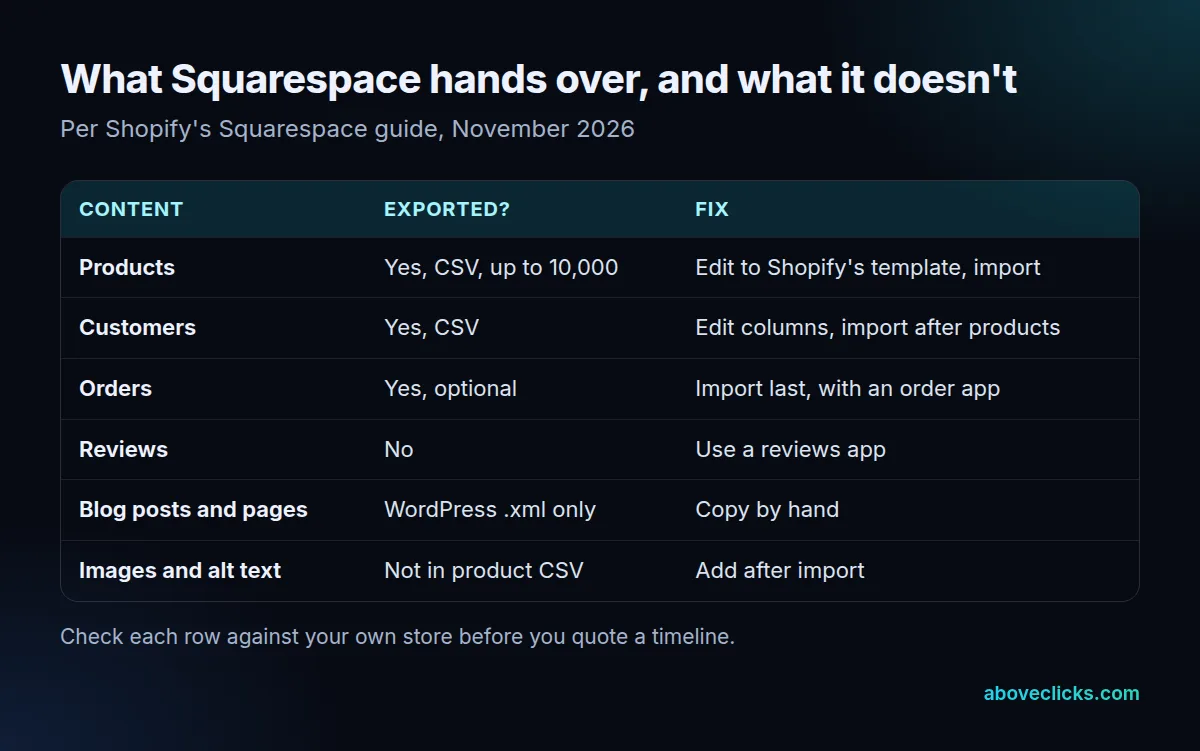
Blog posts and pages are the biggest gap. They export only to a WordPress .xml file, with one blog page included, and Shopify can’t import that file. Budget time to copy them by hand, and to rebuild each post’s title, headings and internal links.
Categories need work as well. Squarespace exports them as URL paths such as /clothing/blouses, so replace each with one product type like Blouses, then create collections after import to group products the way categories did.
Reviews can’t be exported at all. Use a product reviews app to collect new ones; some apps import a CSV you build from reviews you saved yourself.
Image work deserves its own pass. Because the product CSV leaves out featured images, variant images and alt text, plan to upload them again and to write the alt text as you go. Keep the originals in one folder named by product handle, so you can match files to products later. Treat this as the part of a Squarespace to Shopify migration that takes the longest per product.
Plan the blog separately from the store in a Squarespace to Shopify migration. A blog with dozens of posts can take longer than the whole product import, and each copied post needs its title, headings, images and internal links checked. Start with the posts that bring search traffic and leave the weakest for last, or drop them and redirect their addresses to a related page.
Count the rows in this table before you ask anyone for a Squarespace to Shopify migration timeline. A store with 40 products and no blog is a short job; a store with 40 products and 120 blog posts is mostly copy work.
How do you move a Squarespace domain to Shopify?
Connect or transfer it after the store, redirects and test orders are ready. If the domain is registered with Squarespace, Shopify’s guide says you can connect it or transfer it, but Squarespace might lock a domain for 60 days after you register it or change its contact details.
Check that date early in your Squarespace to Shopify migration plan. A locked domain can’t be transferred until the lock ends, which can push a launch back by weeks if you left it to the end. Connecting the domain, without transferring the registration, avoids the wait in many cases.
Disconnect the domain from Squarespace before you point it at Shopify, because Shopify warns that you might otherwise hit SSL certificate errors. Then set the Shopify domain as primary so it is the one shown in search results and on social media.
How do redirects protect rankings when you move from Squarespace to Shopify?
Each old URL gets a permanent redirect to its closest new page. Shopify says its link structure likely differs from your old platform’s, so old links to specific pages likely won’t load unless you redirect them.
Build the map for your Squarespace to Shopify migration in four steps:
- Export the crawl list of old URLs from step 1.
- Match each to its new Shopify address: products to
/products/, pages to/pages/, posts to/blogs/. - Load the map as redirects in Shopify. A store can have up to 100,000 redirects, and redirects only work from URLs that no longer load a valid page.
- Test the top 50 old URLs by sales or traffic.
For example, an invented store with 250 products and 30 posts needs at least 280 redirects plus its category and page URLs. If 12 of them fail the test, you find out before launch instead of from a drop in traffic.
Google’s site-move advice says to use server-side permanent redirects such as 301 or 308, avoid chains and redirect straight to the final destination. It also says to keep the redirects for as long as possible, generally at least 1 year, and to expect temporary fluctuation in rankings.
After launch, watch Search Console for a few weeks. Google says the time it needs to process moved URLs depends largely on how many URLs you have and how fast your server is. If a page you redirected does not show up, check the redirect first, then the sitemap. A calm, boring first month is the goal of a good Squarespace to Shopify migration. Our SEO migration page and Shopify SEO checklist cover what to check after launch.
Google’s guide to redirects explains the types.
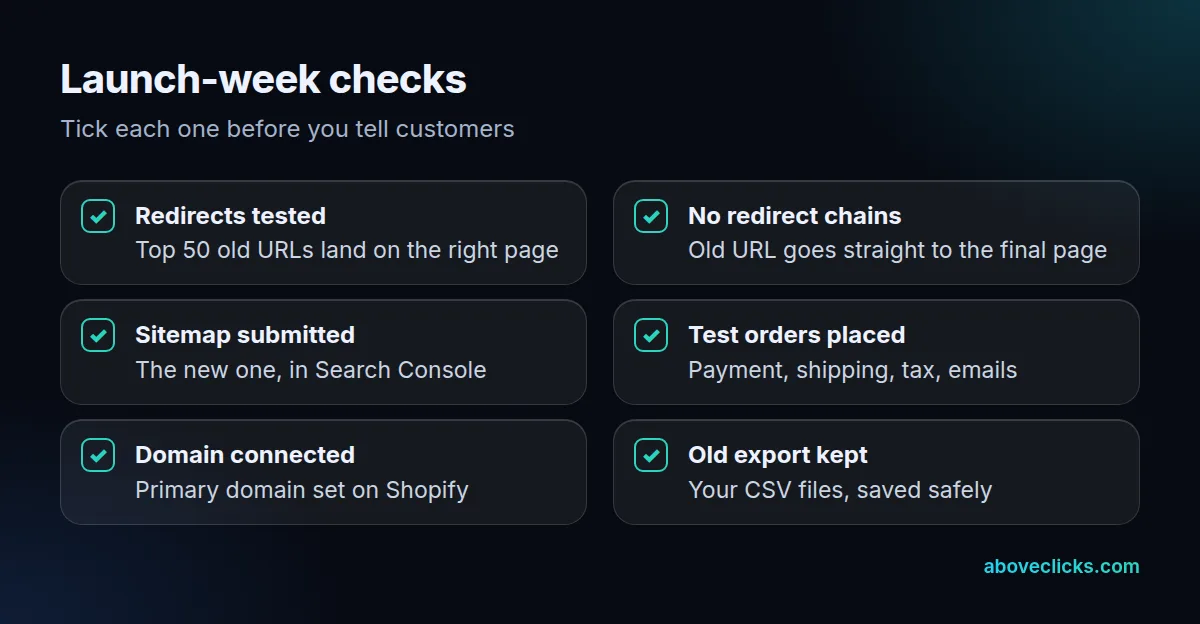
Before launch week, run through the checks below, and add a Squarespace to Shopify migration owner who signs each one off. Each check catches a problem that is cheap to fix before customers see it and costly after. Keep your original Squarespace exports and image folders safe until the Shopify store has taken real orders. Shopify’s guide to product CSV imports lists the common errors to look for, such as unpublished products and missing variants.
Do you need Squarespace to Shopify migration services?
Only if the manual rows in the gap table are large or the site earns steady search traffic. A small catalog with a few pages is a reasonable do-it-yourself job with the CSV steps above.
Use this test for your Squarespace to Shopify migration. Call for help if the store has more than a handful of blog posts to copy, if any single page brings much of your search traffic, or if nobody on your team can map redirects. Ask any provider to show the redirect map and the test results, not just the launch date.
When you compare quotes for a Squarespace to Shopify migration, ask for 5 to 10 test orders and the redirect test results in writing. A provider who can show those has done the checks that protect your rankings; one who shows only a launch date has not.
Our Shopify migration service works to the order above. If you want a view of your current traffic before you decide, our free audit is a read-only start, and the Magento migration guide shows the same checks on a different platform. More guides are in ecommerce SEO.