Clavio email marketing is the common misspelling of Klaviyo email marketing: an ecommerce platform that turns store events into automated email and text flows. This guide explains how it works, what sets the bill and the five setup mistakes that cost the most.
What is Clavio email marketing?
It is how many people spell Klaviyo when they have only heard the name. Google’s own suggestions turn a search for clavio email marketing into “klaviyo email marketing” (checked November 2026), so the two searches point to the same product.
Klaviyo connects to an online store such as Shopify, records what shoppers do (view a product, start a checkout, place an order) and uses those events to send email and text messages. Clavio email marketing, as most people mean it, is that loop: a store event triggers a message, and the reply or the order feeds back into the next one.
Three shopper events drive most of it: a viewed product, a started checkout and a placed order. Those 3 events are enough to power a welcome series, a cart reminder and a post-purchase message, which is why Clavio email marketing usually starts with a store connection rather than a template.
If you are comparing it with another tool first, our Mailchimp vs Klaviyo and Klaviyo alternatives guides cover that choice. This page is for the step before: what you are getting into and what to set up first.
How does Klaviyo email marketing work?
It works in four parts: profiles hold the people, lists and segments group them, flows send automated messages from events, and campaigns send one-off emails. Most of the value in Clavio email marketing comes from the flows.
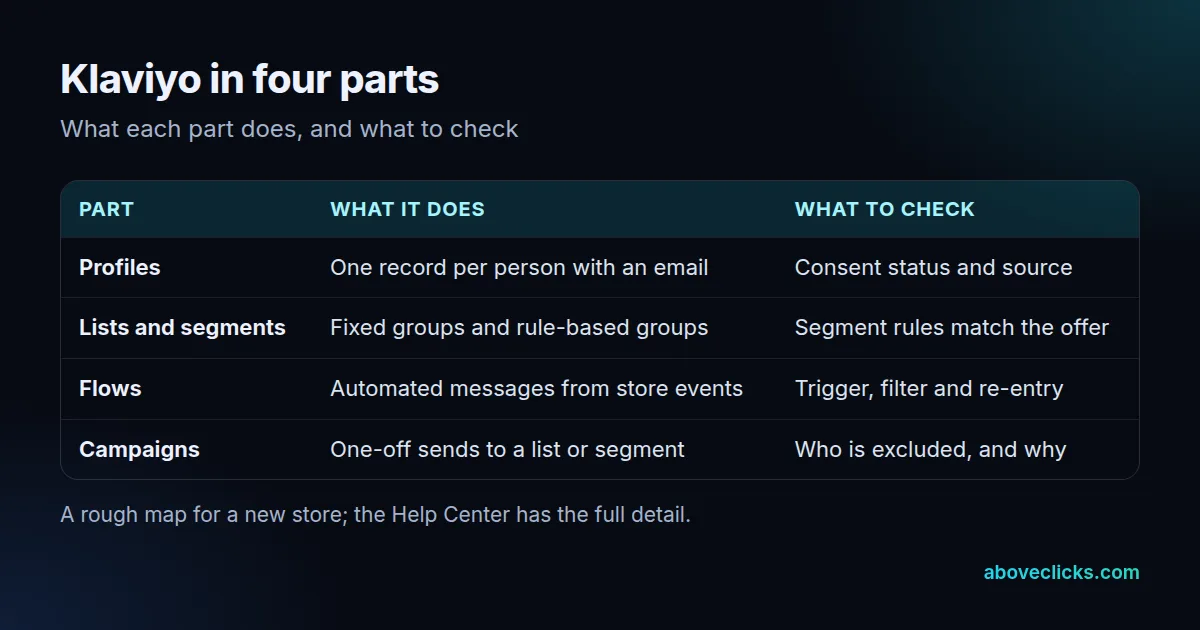
Flows are where Klaviyo email flows earn their place. A flow starts with a trigger, and Klaviyo’s flow trigger guide lists 6 types: an action such as placing an order, joining a list, joining a segment, a date property, a price drop or low stock on an item someone viewed, and a date on a custom object. A filter then narrows who gets in. An abandoned cart flow, for example, triggers on a started checkout and filters out people who already ordered.
Klaviyo rates its flow trigger guide a 10 minute read, and it is worth those 10 minutes before you build anything. It explains that a profile filter is checked when people enter the flow and again before each email or text, so someone who stops qualifying can still move on to the next step without receiving the message.
Campaigns are different: you pick a list or segment and send once. They suit launches and sales, while flows run all year without a new send each time.
Which Klaviyo email flows should you start with?
Start with a welcome flow, an abandoned cart flow and a browse abandonment flow. They sit closest to a purchase, and each uses a trigger you already collect once the store is connected.
- Welcome: triggered by joining a list, so every new subscriber gets the first message while the sign-up is fresh. Klaviyo’s guide describes an immediate first email followed by 2 to 3 more, each a few days apart.
- Abandoned cart: triggered by a started checkout, with a filter that removes people who ordered.
- Browse abandonment: triggered by a viewed product, for shoppers who looked but never started a checkout.
Before you switch any of them on, set the re-entry rule. Klaviyo’s help page offers 3 choices: let a profile enter only once, re-enter whenever they re-qualify, or re-enter after a minimum time. A welcome flow usually fits “only once”. An abandoned cart flow fits a minimum time, so the same shopper is not chased every day.
Our Klaviyo email and SMS service builds these flows for stores. Good Clavio email marketing is mostly these 3 flows done carefully, not 30 flows done fast.
How do you connect Klaviyo to Shopify?
Install the Klaviyo app from the Integrations tab, paste the store address in the format mystore.myshopify.com and approve the permissions in Shopify. The one step people miss comes before all of that: disconnect the old email app first.
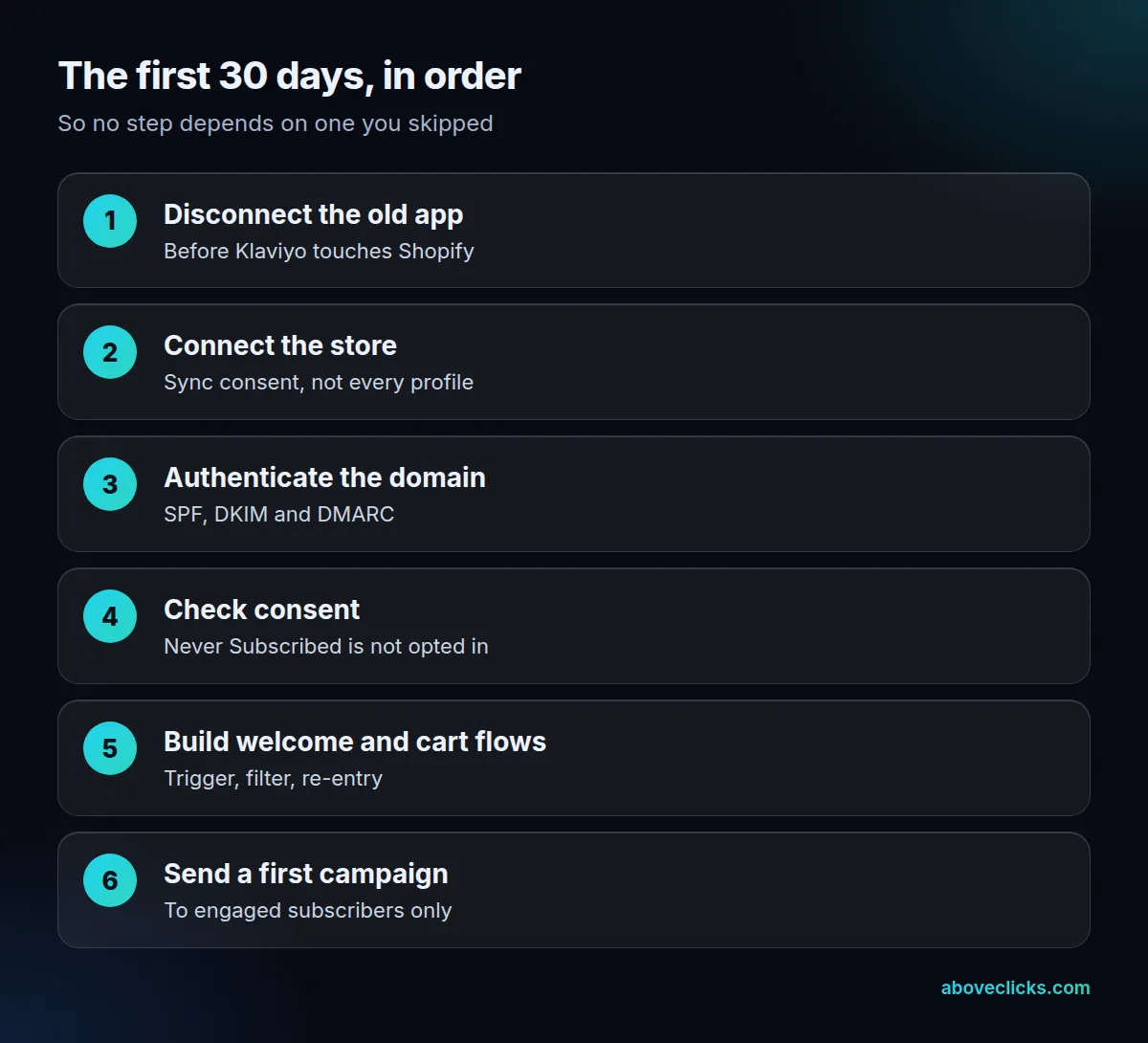
Klaviyo’s Shopify setup page (updated October 2026) warns that if another email provider is still integrated with your store, leaving it connected could send double opt-in emails to your existing subscribers. That is the first of the five mistakes below.
The same page asks you to review the sync settings before connecting. If you choose “All profiles” for outbound syncing, Klaviyo creates customers in Shopify for profiles that do not already exist there, including profiles from imports. Choose “Profiles that already exist in Shopify” if you only want to update existing customers. Klaviyo rates the page a 6 minute read, which is short for a step that decides who gets emailed.
A workable order for the first 30 days looks like this. In days 1 to 2, disconnect the old app and connect the store. In days 3 to 7, authenticate the sending domain and check consent on a sample of 20 profiles. In days 8 to 21, build and test the welcome and abandoned cart flows. In days 22 to 30, send a first campaign to engaged subscribers. This is our rule of thumb, not a Klaviyo requirement, and a store with a long approval chain may need more time.
When you are moving from another platform, our Klaviyo migration service handles the order of these steps.
What does Clavio email marketing cost?
It depends on how many active email profiles you have, not how many people subscribed. Klaviyo’s billing page (updated October 2026) says your plan must cover your active profile count and that it moves you up automatically at the end of a billing cycle if you exceed it.
That detail trips up new stores. An active profile is any profile that can be emailed, whatever its consent status, and that includes shoppers who gave an address at checkout without opting in. Klaviyo’s active profiles page says active does not mean subscribed or recently engaged.
A worked example, with invented numbers: a store has 4,200 active profiles, of which 1,200 have not opened anything in a year. If it suppresses those 1,200 and the count falls to 3,000, it may fit a lower plan. The billing page says the count shown can take up to 72 hours to refresh after a large cleanup, so check the new number before you pick the lower plan.
We do not quote plan prices here because they move; Klaviyo’s pricing page is the place to check them, and our email marketing cost guide explains what else belongs in a budget. Billing is monthly and in advance, so a plan change affects the next invoice.
To see where your own count comes from, work through three questions:
- How many profiles are subscribed, and how many are Never Subscribed?
- How many of the subscribed profiles have not opened or clicked in 12 months?
- Would a lower plan still cover the count after you suppress the inactive ones?
That check takes an hour and often matters more to the bill than any pricing page.
Who can you email, and what does the law require?
You can email profiles that can receive marketing, but that is a lower bar than having consent. Klaviyo’s active profiles page says a Never Subscribed profile, such as someone who started a checkout without opting in, can receive email, and Klaviyo recommends caution. Text messages need express consent.
Beyond Klaviyo’s own rules, two outside rules apply to Clavio email marketing in the United States:
- The FTC’s CAN-SPAM rules. Every marketing email needs accurate sender details, a valid postal address and a clear way to opt out, and you must honour an opt-out within 10 business days. The FTC’s compliance guide says each violating email can carry a penalty of up to $53,088.
- Google’s sender rules. Google’s email sender guidelines ask anyone sending more than 5,000 messages a day to Gmail to set up SPF, DKIM and DMARC, support one-click unsubscribe and keep the spam rate in Postmaster Tools below 0.30%. Smaller senders should still authenticate, because it helps delivery.
If your mail already lands in spam, our email deliverability service starts with these records.
Which Clavio email marketing setup mistakes cost the most?
Five, and each one is cheap to avoid before the first send and expensive to fix after it. They come from the Klaviyo, Google and FTC pages above.

What are the five costly Clavio email marketing mistakes?
- Leaving the old email app connected. Klaviyo says it could send double opt-in emails to your existing list. Disconnect it first.
- Emailing every active profile. Active is not the same as opted in. Send campaigns to subscribed, engaged segments, and keep never-subscribed profiles to transactional-style flows such as abandoned cart.
- Skipping domain authentication. Without SPF, DKIM and DMARC, Gmail may block or junk your mail, and senders of 5,000 or more messages a day to Gmail must have them under Google’s sender guidelines.
- Ignoring flow re-entry. A welcome flow that re-runs, or an abandoned cart flow that never does, turns a good trigger into noise or missed sales.
- Missing the legal basics. A working unsubscribe link and a postal address are required, and the FTC can penalise each non-compliant email by up to $53,088, as its guide says. Opt-outs must be honoured within 10 business days.
If you want a second pair of eyes on the setup, our free audit reviews the account with read-only access and gives you a written list of what to fix. Whether you search for Klaviyo or Clavio email marketing, the first month is where most of the avoidable cost sits. More guides like this are in our buying guides.