Klaviyo vs Constant Contact comes down to where your sales happen. Klaviyo is built on store events such as orders, product views and started checkouts, while Constant Contact is a general email and SMS tool for small businesses, priced by the contacts on your list.
This guide compares the 6 differences that decide it, works out how far each plan’s email sends go for a real schedule, and lists the steps for moving to Klaviyo without mailing anyone who already unsubscribed.
Klaviyo vs Constant Contact: what is the difference?
The data each one is built on. Klaviyo reads what shoppers do in your online store; Constant Contact keeps a list of contacts you mail campaigns to, with simpler automation on top.
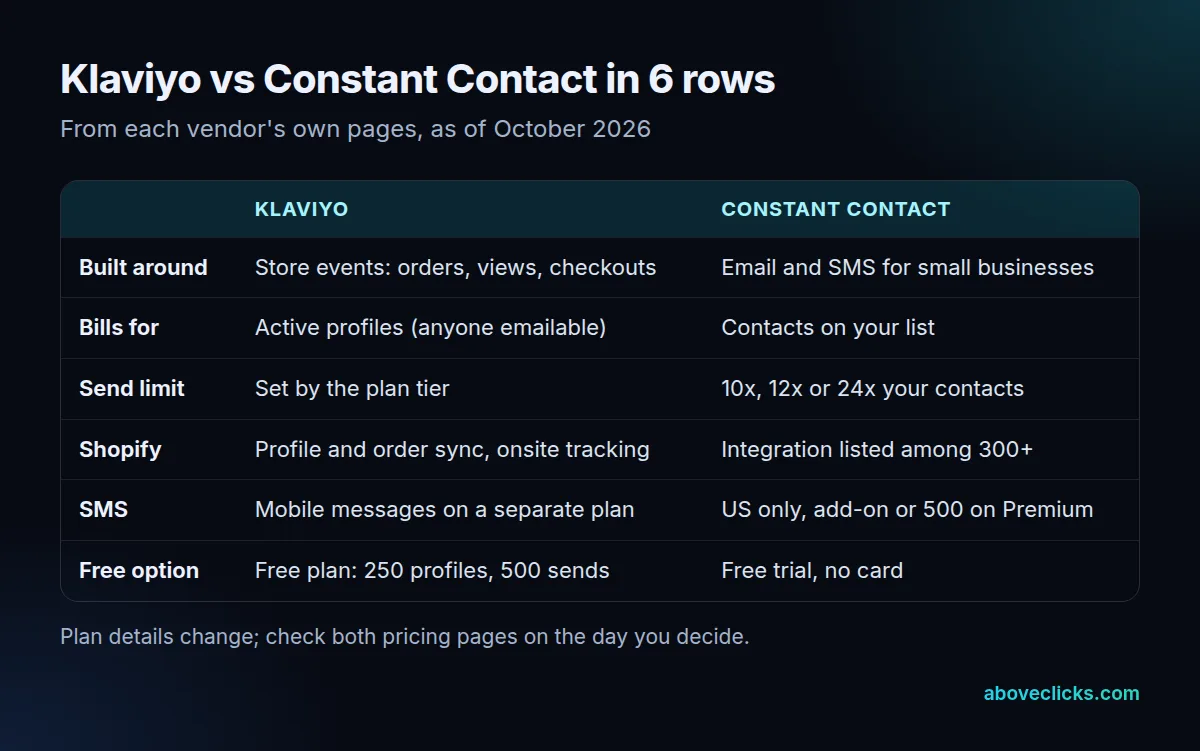
The billing row follows from that. Klaviyo counts active profiles, meaning anyone it can email, and its free plan allows 250 active profiles and 500 email sends a month, as of October 2026. Constant Contact counts contacts, and every plan’s send limit is a multiple of that number.
So the Klaviyo vs Constant Contact question is really a question about your business. A shop where most revenue comes through the checkout gets more from flows fired by carts and orders. A café, a club or a service firm that sends a monthly newsletter and the odd offer needs less of that, and a simpler tool may be the better fit.
What is Constant Contact good for?
Newsletters, event invites and offers for small businesses and nonprofits that want a simple editor and live support. Its plans add users, segments and automation as you move up a tier.
According to its pricing page, as of October 2026:
- Lite: 1 user, 1 automation template, 1 custom segment and basic reporting.
- Standard: 3 users, email scheduling, subject line A/B tests, resend to non-openers, 3 automation templates and 10 custom segments.
- Premium: unlimited users, unlimited custom automations and segments, ecommerce templates, dynamic content and revenue reporting.
Every plan includes live phone and chat support and more than 300 integrations. That breadth suits a business whose customer data lives in many places. The limit shows when you want flows that react to what a shopper viewed or left in a cart: on Lite and Standard the automation templates are counted, so most store behaviour goes unused.
How does Constant Contact pricing work?
By plan and by contact count. Lite starts at $12 a month, Standard at $35 and Premium at $80 on Constant Contact’s pricing page, as of October 2026, and each plan allows a fixed multiple of your contacts in email sends.
The same page sets the send limit at 10 times your contacts on Lite, 12 times on Standard and 24 times on Premium. Going over doesn’t stop your mail: extra sends are billed at $0.002 each, which is $2 for every 1,000. Prepaying for 12 months saves up to 15%.
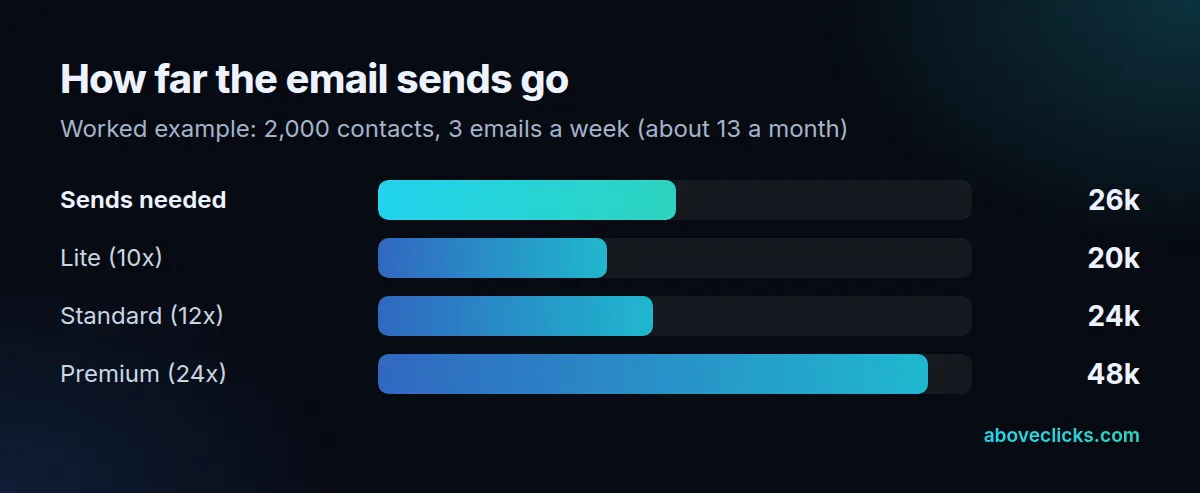
Here’s what that means for a real schedule. A store with 2,000 contacts that mails 3 times a week sends about 13 emails per contact a month, so roughly 26,000 email sends. Lite allows 20,000, which leaves 6,000 over, or $12 extra that month. Standard allows 24,000, so the overage drops to 2,000 sends, about $4. Premium’s 48,000 covers it with room for resends.
The trap is the busy season. A list mailed weekly most of the year can double its sends in November, and the overage lands on that month’s bill. Constant Contact pricing is easy to read on the plan card; run your own count and your peak month through those multiples before you compare it with anything else. Our email marketing cost guide covers the other costs, such as design and copy.
How does Klaviyo bill for active profiles?
By the number of profiles it can email, not by the number of people who opted in. A shopper who typed an email at checkout but never ticked the marketing box still counts.
Klaviyo’s help on active profiles describes 2 groups: subscribers who consented, and profiles added by engagement, such as someone who placed an order or abandoned a checkout. A Shopify connection adds both. Suppressed profiles, on the other hand, stop counting, which is why pruning long-inactive profiles is the usual way to keep the bill in check.
Two billing rules catch people out. According to How Klaviyo billing works, your plan must cover your active profiles at the end of each billing cycle, or Klaviyo moves you up a tier automatically. It doesn’t move you down when the count falls; you choose the lower tier yourself, unless auto-downgrade is turned on. Double opt-in confirmation emails don’t count toward your email sends.
Klaviyo’s own example is a plan with 500 profiles and 5,000 email sends, split however you like across those profiles. Check the allowance of the tier you’d need before you compare it with a Constant Contact quote.
The count also grows on its own. Every new checkout on a connected store can add an active profile, even when the shopper never subscribes, so a store with steady orders sees the number climb month after month. Set a review date, say every quarter, to look at profiles with no opens, clicks, visits or orders over a long stretch. Klaviyo’s help suggests weighing your buying cycle and a last win-back email before you suppress anyone, because a suppressed profile can’t be mailed again until it resubscribes.
Which works better with Shopify?
Klaviyo, for most stores. Its Shopify integration brings in customer profiles and order data, adds onsite tracking and sign-up forms, and can sync data back to Shopify.
Constant Contact lists Shopify among its 300+ integrations, which is enough for adding customers to a newsletter list. The gap is in what happens next: Klaviyo can segment on a product viewed, a checkout started or an order value, and fire a flow on each.
Consent travels with the data. In Shopify, a customer record has a marketing email setting that records whether the customer agreed to receive marketing emails, and that status is what decides who can be mailed after a sync. Klaviyo’s Shopify guide adds a warning for anyone switching: disconnect the old email tool from Shopify before you connect Klaviyo, or existing subscribers can get double opt-in emails.
How much does SMS cost on each?
Constant Contact SMS is for paid US accounts: Premium includes 500 messages a month, and Lite or Standard add it from $10 for 1 to 500 messages, as of October 2026, per its pricing page.
The same page says every SMS option includes text-to-join and SMS reporting. Klaviyo sells mobile messages as a separate plan alongside email, and its free plan includes a small monthly amount for testing. Both bill text messages separately from email, so add the two lines together when you compare.
For a store, the useful question is whether SMS and email share one customer profile. In Klaviyo they do, so a flow can send a text to someone who didn’t open the email. Ask any platform to show that on your own data before you pay for both channels.
Consent is separate for each channel. An email subscriber hasn’t agreed to texts, so a list that moves from one tool to the other needs its SMS opt-ins carried over as their own field, with the date and source of each one, rather than merged into the email list.
Is Klaviyo better than Constant Contact for ecommerce?
For a store where most orders go through the checkout, usually yes. For a business that mostly sends newsletters and event news, Constant Contact’s simpler plans may do the job for less effort.
Klaviyo fits when:
- Most revenue comes through an online checkout.
- You want segments built on orders, product views and cart value.
- Email and SMS should run from one customer profile.
Constant Contact fits when:
- You mail a list a few times a month, mostly news and offers.
- Several people need simple access and live phone support.
- Store behaviour plays a small part in what you send.
Whichever you pick, Gmail’s sender guidelines apply the same way: anyone sending more than 5,000 messages a day to Gmail accounts must authenticate the domain, offer one-click unsubscribe and keep the reported spam rate below 0.3%. The platform doesn’t do that for you. If you’re weighing other tools too, see Klaviyo alternatives and Klaviyo vs HubSpot.
How do you move from Constant Contact to Klaviyo?
By CSV, in a set order: unsubscribes before subscribers, and the old tool disconnected from Shopify before Klaviyo is connected. Skipping either step is how people get mailed twice or mailed after opting out.
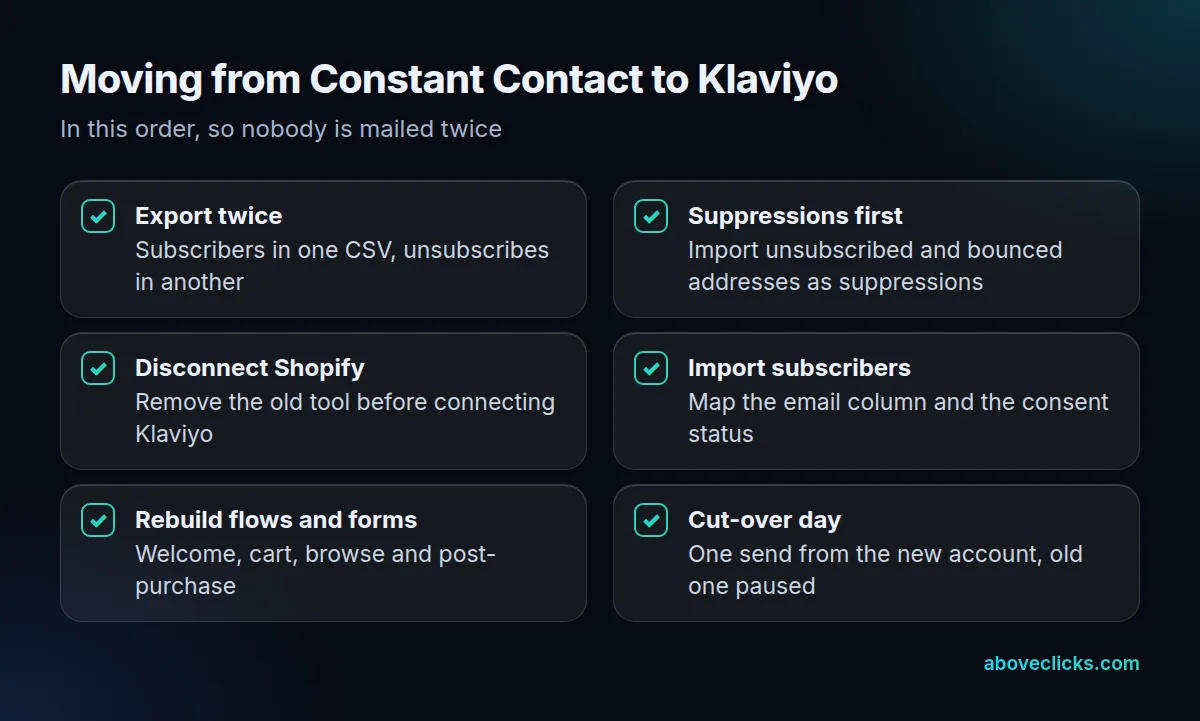
Klaviyo’s migration article says that for Constant Contact you export subscribers and unsubscribes separately and import both by CSV, keeping unsubscribed and bounced addresses out of the subscriber file. On the Constant Contact side, its knowledge base explains that unsubscribed contacts stay marked in your account as a record, so export them before you close it.
Here’s how we run a Klaviyo migration: you tell us your current platform and we send a free migration audit as a PDF within 2 workdays. The plan then agrees what moves, what gets rebuilt and the cut-over day. We move suppressions and consent first, then lists, flows and forms, and switch over on 1 day so nothing is sent twice.
The constant contact vs klaviyo decision also changes your flows. Constant Contact’s automation templates rarely map one-to-one, so plan to rebuild welcome, abandoned cart, browse and post-purchase flows rather than copy them. For help with the setup after the move, see our Klaviyo email marketing service, or ask for a free audit of your current account first. More comparisons are in buying guides.