To calculate a PPC budget, work backwards from the orders you want: orders divided by conversion rate gives clicks, clicks times cost per click gives monthly spend, and spend divided by 30.4 gives the daily figure. Then test the result against your margin.
This guide shows how to calculate a PPC budget in 4 steps with a worked example, how Google Ads turns a monthly amount into a daily budget, and how to check that the plan buys enough conversions and still makes money.
How to calculate PPC budget from a sales goal?
Start with the orders you want each month, then convert them into clicks and spend. The calculation uses 4 inputs: orders wanted, conversion rate, average cost per click and profit per order.
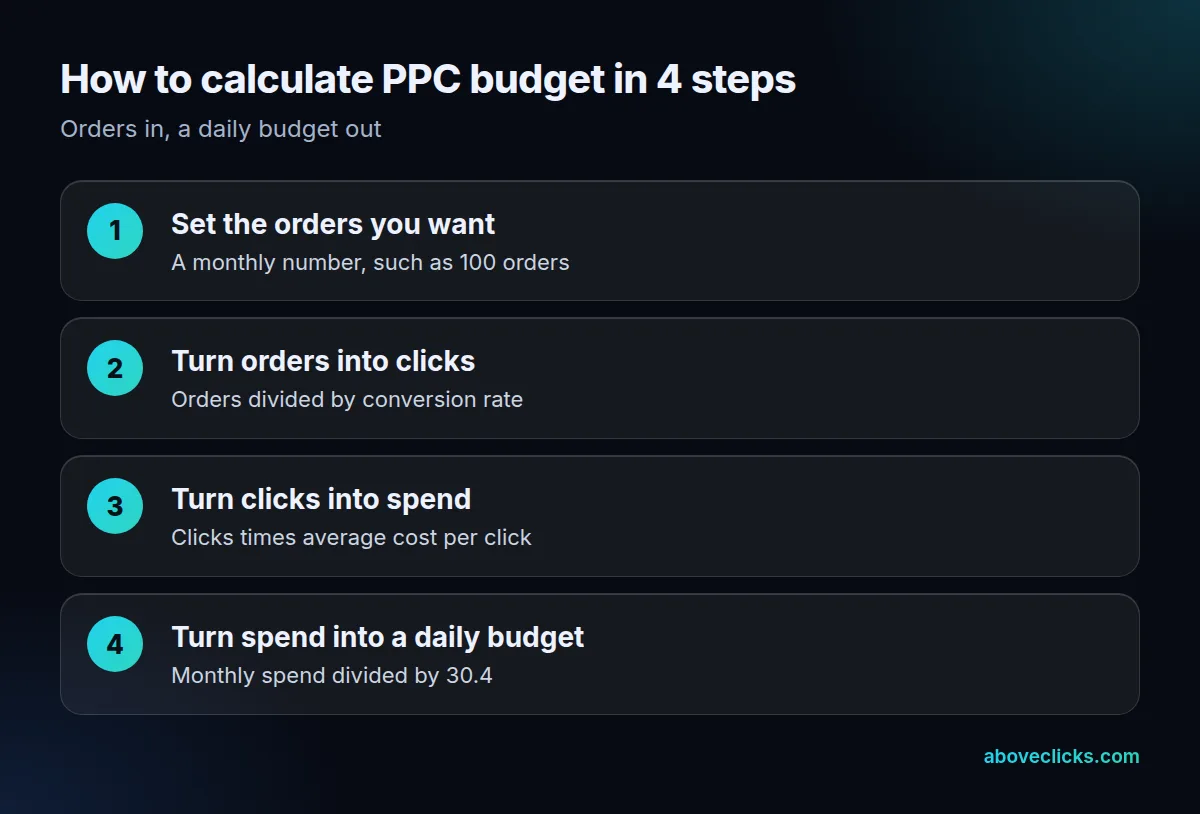
Here’s the whole method in one pass, using an invented store with an $80 average order and a 50% gross margin, so $40 of profit per order before ads. The store wants 100 orders a month from Google Ads and expects a 2.5% conversion rate and a $0.90 cost per click.
- Orders wanted: 100 a month.
- Clicks needed: 100 orders ÷ 0.025 = 4,000 clicks.
- Monthly spend: 4,000 clicks × $0.90 = $3,600.
- Daily budget: $3,600 ÷ 30.4 = about $118 a day.
That is the arithmetic behind every PPC budget formula. The rest of this guide is about picking honest inputs and testing the answer, because your PPC budget is only as good as the conversion rate and click price you feed in.
The same steps work for any Google Ads budget, whether the campaign is Search or Shopping. Only the inputs change, so keep one row of inputs per campaign type and redo the sum for each.
How do you work out the clicks and orders you need?
Divide the orders you want by your conversion rate. At a 2.5% conversion rate, 1 order takes 40 clicks, so 100 orders take 4,000 clicks.
Before you calculate a PPC budget, take the conversion rate from your own store’s recent data, not from a generic benchmark. A rate for one product line or one campaign type can be far from the store-wide figure, so use the figure for the traffic you plan to buy. If you have no history, run a small test first and treat the first month’s number as a guess.
Take the cost per click from the same place: your account if you have one, or Google’s Keyword Planner if you don’t. Our guide to the CPC formula explains how the average is worked out.
Work the PPC budget formula two ways. Forwards from a Google Ads budget you already have: a $3,600 spend at $0.90 a click buys 4,000 clicks, and at 2.5% that is 100 orders. Backwards from a goal, as above. If the two answers disagree by a lot, the goal or the budget needs to move, not the inputs.
A rough check on the inputs helps before you trust them. Three questions catch most bad numbers:
- Is the conversion rate from the same traffic you plan to buy, such as Search or Shopping clicks, not the whole site?
- Does the cost per click come from the same product category and country as the campaign?
- Is profit per order worked out after product cost, payment fees and shipping, not just after product cost?
If any answer is no, the PPC budget that comes out of the sum is a guess. Mark it as one, and plan a review after the first month of data.
What is the most a click can cost you?
Profit per order times conversion rate. At $40 of profit and a 2.5% conversion rate, the most a click can cost is $1.00, because above that each order costs more than it earns.
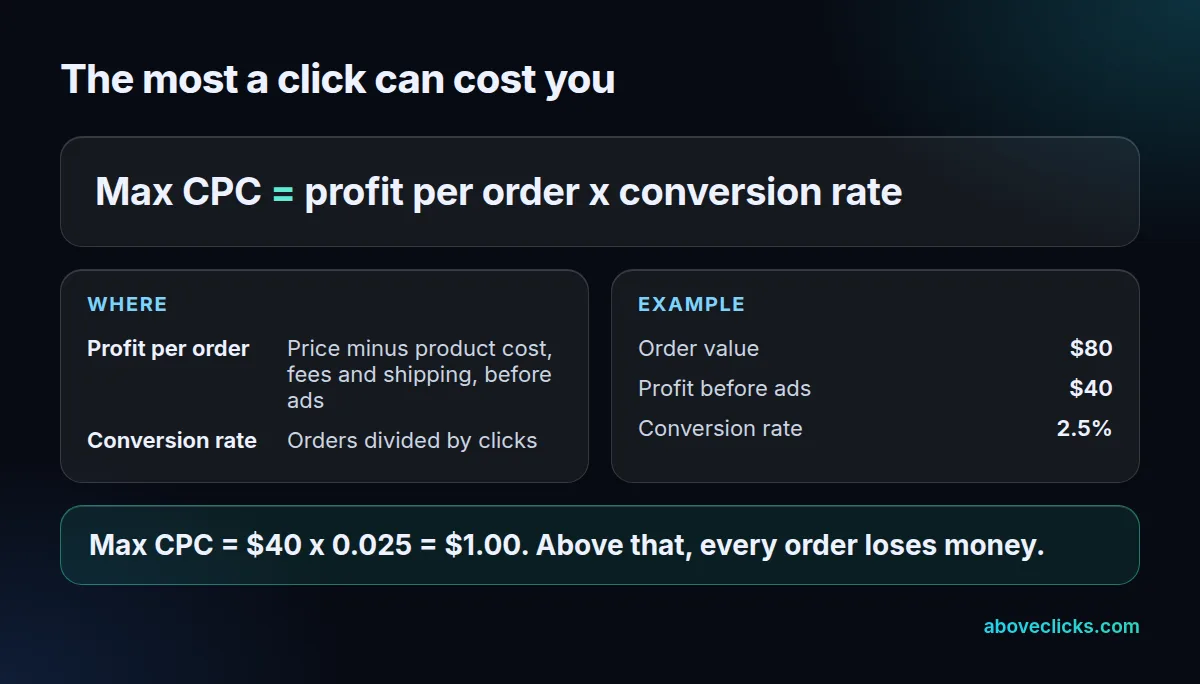
This is the step most budget guides skip, and it’s the costly trap in the title. The plan above works because $0.90 is under the $1.00 ceiling. Change one input and it stops working, as the table shows for the same 100 orders.
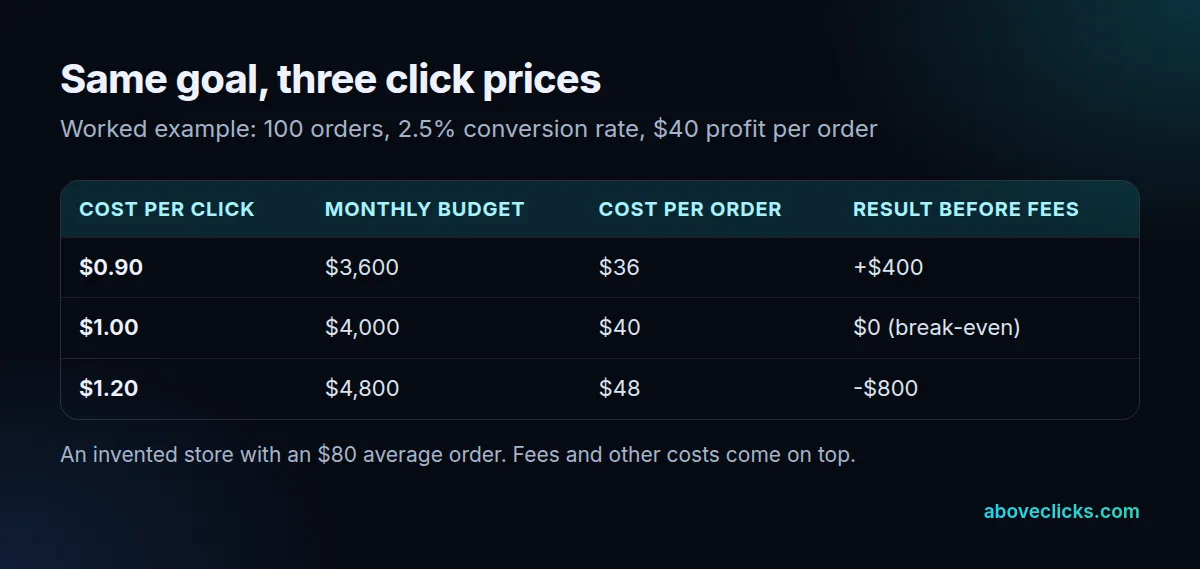
At $1.20 a click, the same goal needs a $4,800 budget, so each order costs $48 against $40 of profit, an $800 monthly loss before any fees. The ad platform reports the same 100 orders either way; only your margin shows the difference.
You can state the same limit as a return on ad spend. Break-even ROAS is 1 divided by your margin, so a 50% margin breaks even at 2.0, and the $0.90 plan returns $8,000 ÷ $3,600 = 2.22. That is the method behind the approach on our Google Ads service page: budgets follow margins, with break-even ROAS worked out from real margins in the audit.
If your numbers land above the ceiling, your PPC budget needs a rethink, and you have 3 levers: lower the cost per click, raise the conversion rate, or raise the order value. Cutting the goal only shrinks the loss. Google notes that slightly lowering bids in a campaign marked “limited by budget” could earn more clicks, but lowering them too far can lose them.
How do you turn a monthly budget into a daily budget?
Divide the monthly amount by 30.4, the average number of days in a month. Google’s own example, as of November 2026, turns a $304 monthly amount into a $10 average daily budget.
Google Ads sets budgets per campaign as an average daily amount. For most campaigns it will never charge more than 2 times that figure on a single day, or 30.4 times it over a month, as of November 2026. So a $118 daily budget can spend up to about $236 on a busy day and still stay inside the monthly limit.
That is why you divide by 30.4 and not by 30 or 31: the monthly limit is built from the same number. If you have several campaigns, split the monthly figure across them first, then divide each share by 30.4. Our guide to the Google Ads daily budget covers the 2x limit and what happens when you change it.
Is your budget big enough for the bidding strategy?
Check the conversions it buys. Google’s Target ROAS bidding on Search and Shopping campaigns requires at least 15 conversions in the past 30 days, as of November 2026.
The Target ROAS page sets that threshold, and the Target CPA page recommends judging performance over periods with at least 30 conversions. Both are volume tests, so run your budget through them.
In the example, a PPC budget that buys 100 orders a month clears both. A store that can afford only 10 orders a month would not, so it should expect noisy early results and judge by search terms and click quality until the volume builds. Splitting a small budget across 5 campaigns makes it worse, since each campaign then collects a fifth of the conversions.
Seasonality changes the inputs too. In a peak month the conversion rate and click prices can both move, so a plan built on January numbers can miss in November. Calculate a separate PPC budget for each season you sell in, using that season’s own conversion rate and click price from last year’s account data, and keep the 30.4 rule for every one of them.
How do you check the plan against Google’s forecast?
Put the same keywords and budget into Keyword Planner and compare the clicks. Forecasts refresh daily, are based on the last 7 to 10 days and are adjusted for seasonality, according to Google.
Open the Keyword Planner forecast page, add your keywords, and change the average daily budget to your figure. Then compare its clicks and cost with your own sum. If its cost per click is far above yours, your input was probably too hopeful.
Treat the forecast as a second opinion on your Google Ads budget, not a promise. Google says the result depends on your bid, budget, ad quality, location targeting and customer behavior in your industry, so a forecast that agrees with your plan within a rough range is a good sign, and one that is off by half is a reason to look again.
When should you change a PPC budget?
When the data from a full month gives you better inputs, or when the campaign is marked “limited by budget” while still beating break-even. Change it by the inputs, not by feel.
Google’s limited by budget guidance says recommended budgets are based on recent performance, the current budget, the keyword list and targeting, and that none appear if you rarely meet your budget or have little data. A campaign at 2.5 ROAS against a 2.0 break-even has room to grow; one at 1.6 does not, whatever the status says.
When you review a PPC budget, our own approach is to set a test range in the audit and adjust it once a month of real data is in, rather than moving it every few days. Redo the 4 steps with the real conversion rate and cost per click, and check the new cost per order against profit.
The agency fee comes on top of the budget, so read PPC pricing and the pricing models guide before you set a final monthly total. If you want a second pair of eyes on your numbers, the free audit reviews your account read-only, and more guides sit under Google Ads.