Adwords budget monitoring is checking your Google Ads spend against the two limits Google sets from your daily budget: 2 times it on one day and 30.4 times it in a month. Do it on a fixed rhythm and compare cost to date with what your budget implies.
This guide to adwords budget monitoring shows what to watch, where to see it, how to calculate whether spend is on pace, what to do when it is not, and what an agency’s budget report should contain. It builds on our guides to the Google Ads daily budget and to calculating a PPC budget, which cover setting the number. This one covers keeping an eye on it.
What is adwords budget monitoring?
It is the routine of checking that campaigns spend close to the budget you set, no faster and no slower than you planned. The aim of adwords budget monitoring is a month that lands near your plan, not a perfect day.
AdWords is the old name for Google Ads, so adwords budget monitoring and Google Ads budget monitoring mean the same job. Google announced the change in its blog post on the new advertising brands, and people still search for the old name. Our guide on whether AdWords costs money covers what is billed.
Monitoring matters because an adwords budget is an average. As of November 2026, Google’s help page says that for most campaigns your daily spending limit is 2 times your average daily budget, and your monthly limit is 30.4 times it. In adwords budget monitoring, a day that looks wrong may be fine for the month, and a month that looks fine can hide one campaign that took the whole budget.
What limits does Google Ads put on your spend?
For most campaigns, up to twice the daily budget on one day and 30.4 times the daily budget in a month. At the end of the month, spend per day averages out to your budget.
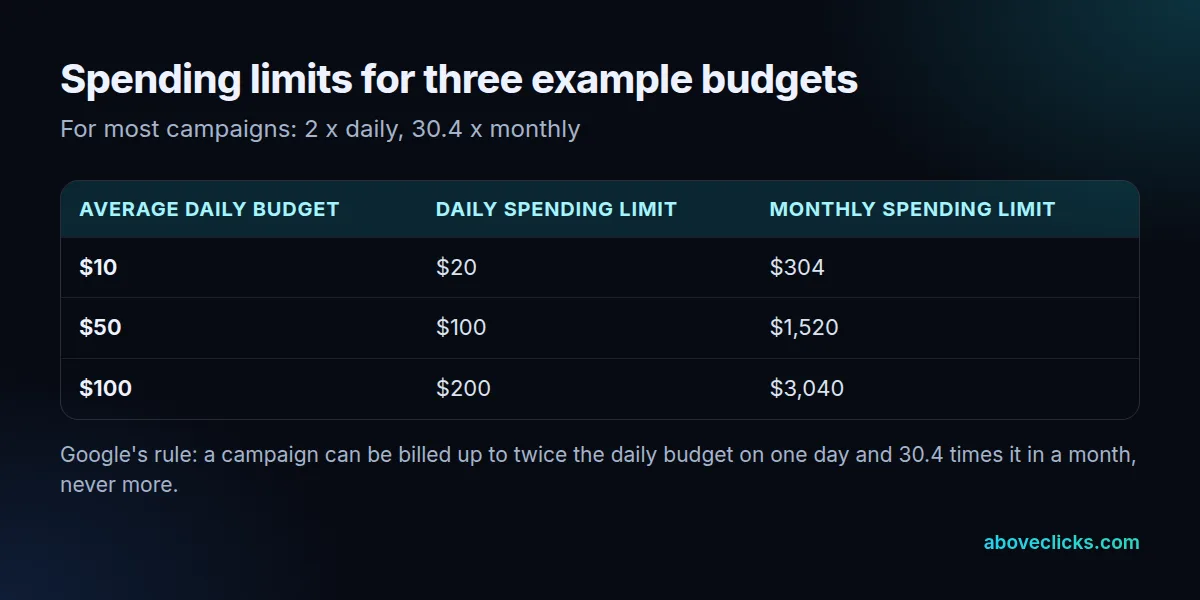
The table applies Google’s rule to three example adwords budget sizes. A $50 budget can be billed up to $100 on a busy day, and up to $1,520 in the month. The 30.4 comes from 365 days divided by 12 months, according to the spending limits page.
Two caveats before you build a routine on these numbers:
- The limit is a ceiling, not a target. Google spends more on days when clicks and conversions are more likely, and less on others.
- Other budget types differ. A campaign total budget runs for a fixed period of 3 to 90 days and has no daily 2x cap, according to Google’s page on how budget changes take effect.
How do you check your Google Ads budget?
Google Ads budget monitoring starts with the budget report, opened from the Budget column in the Campaigns page, and the Billed cost report for daily figures. Both show what you have spent and what Google expects you to spend.
The budget report shows cumulative monthly spend, your monthly spending limit, a monthly forecast with a confidence band, and cost to date. Google notes that Performance Max campaigns are not compatible with it. For daily figures, Google’s page on daily costs points to the Billed cost template in the Report editor, which lists daily costs per campaign for the most recent month.
How fresh is the data? As of November 2026, Google’s data freshness page says clicks, impressions and cost are refreshed hourly, under a freshness target of 1 hour. Conversions and impression share take longer, so a decision based on cost can be made within 1 day, while one based on conversions should wait.
How do you know if your budget is on pace?
Multiply your daily budget by the days that have passed, and divide cost to date by that number. The result is your pace, as a percentage of what the budget implies.
Here is a worked example with an invented store. It runs three campaigns at a $50 daily budget each. On day 10, expected spend is $50 x 10 = $500 per campaign.
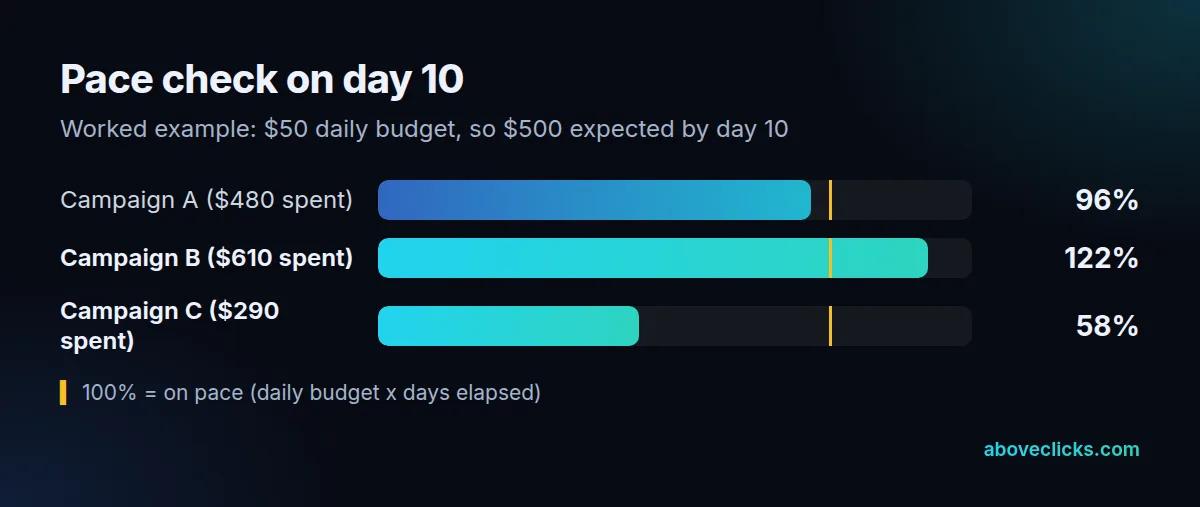
Campaign A has spent $480, which is 96% of expected. Campaign B has spent $610, or 122%. Campaign C has spent $290, or 58%. A and B can both be fine by month end, because Google paces towards the budget over the month, but B and C deserve a look.
Our own rule of thumb (not a Google figure) is to treat a pace between 0.8 and 1.2 times expected as normal, and to look into anything outside that band. A high pace is not a problem on its own, since the daily limit allows 2 times the budget, but a pace above 1.2 for several days means you are using up the month early. A low pace means ads are not being shown as often as you planned.
If a campaign uses ad scheduling, the same arithmetic holds. Google’s help page says the monthly limit stays at 30.4 times the daily budget and the system paces to reach it however many days the campaign is scheduled to run.
Why is Google Ads not spending your full budget?
Usually because the campaign is not eligible or competitive enough to be shown often: targeting is narrow, bids are low, ads are limited, or demand is thin. A low pace is a signal to check those, not to raise the budget.
Work through these in order:
- Status and policy. Check that the campaign and ads are active and approved.
- Targeting. Narrow locations, audiences or schedules cut the number of auctions you can enter.
- Bids and targets. A strict target CPA or target ROAS can hold back spend.
- Demand. Search volume moves with the season, so compare with the same weeks last year.
- Tracking. If conversions are not recorded, automated bidding has little to learn from. Our tracking and analytics page explains how we audit that.
Google’s page on setting a daily budget says to check your account regularly to find campaigns that are limited by budget or have leftover spend. Leftover spend is the other side of the pace check in Google Ads budget monitoring: the money did not go anywhere, so the plan may need a different campaign, not a smaller one.
In Google Ads budget monitoring, be careful not to judge an adwords budget by one day. Impression share for a Sunday, for example, is only ready by Wednesday 4 PM in San Francisco, about 3 days later, according to the data freshness table, so a weekly view says more than a daily one.
Can Google Ads spend more than your daily budget?
On one day, yes, up to 2 times the budget. Over a month, no: you will not be billed more than 30.4 times it. In rare cases the served cost can exceed the limit, but the billed cost does not.
Google’s page on overdelivery says that on a given day a campaign might spend up to twice its average daily budget, and that the month will not pass 30.4 times it. In its example of a $10 budget, the campaign receives $23 of clicks against a $20 daily limit. The billed cost is capped at $20 and Google covers the remaining $3.
To check for overdelivery in adwords budget monitoring, subtract billed cost from served cost in the Billed cost report. Do that once a month, and match the billed total to your invoice.
Mid-month changes can look like overspend, so log them in your adwords budget notes. Google’s page on budget changes gives this example: a $5 budget for November gives a monthly limit of $152 ($5 x 30.4). By November 24 only $103 has been spent. If you raise the budget to $10, the new monthly limit is $103 + ($10 x 7 days left) = $173. The daily limit for the day of the change uses the highest budget set that day.
Can a script do your budget monitoring?
Yes, a script can run a Google Ads budget monitoring check on a schedule and report or act on it. It is worth it when you manage many campaigns, but a manual routine comes first, because you need to know what a good pace looks like.
Google’s scripts overview says scripts can run Google Ads Query Language reports, adjust bids, budgets and status, and be scheduled hourly, daily, weekly or monthly. A single-account script has a 30-minute execution timeout. So a script for adwords budget monitoring can compare cost to date with budget times days elapsed every hour and send you a message when the pace leaves your band.
Two cautions on a Google Ads budget monitoring script. One: a script that changes budgets by itself can overspend as easily as it can save money, so start with a script that only reports. Two: the numbers it reads are the same hourly cost data, so it has no faster view than you do when you open the report.
Next steps: your five checks and what to ask for
Run the five checks of adwords budget monitoring in the routine below, keep a log of budget changes, and ask anyone who manages the account to report the same figures.
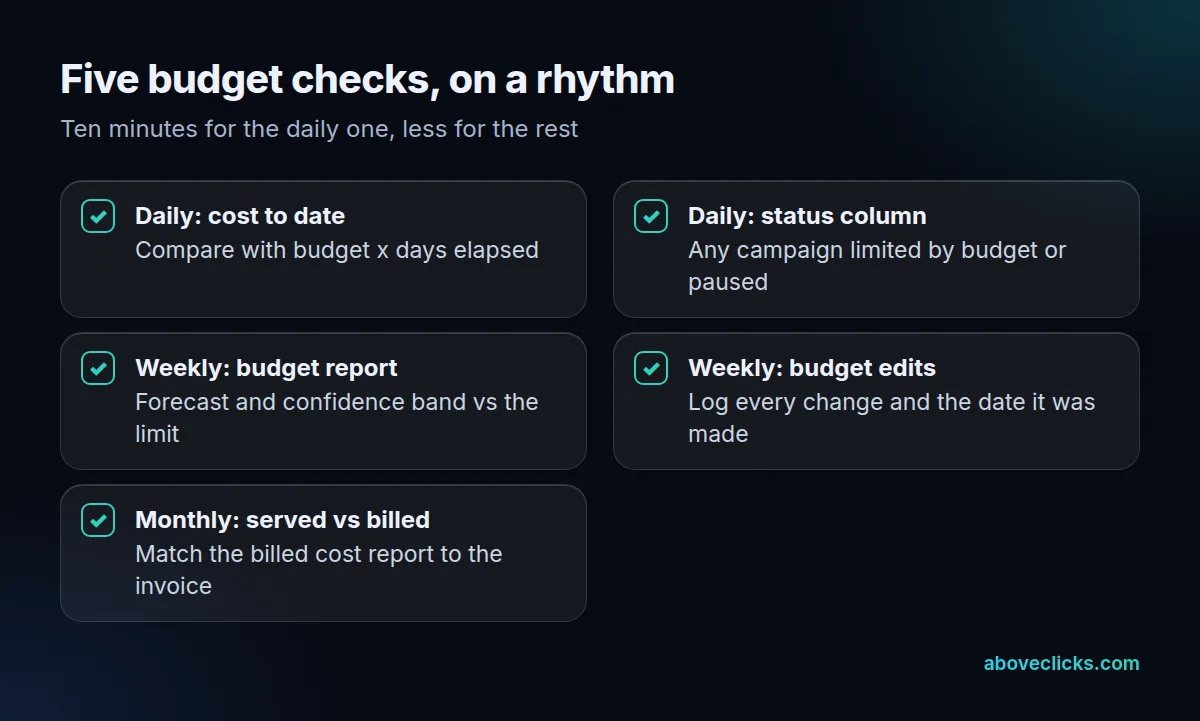
If an agency or freelancer runs your ads, ask each month for:
- cost to date and the pace for each campaign, against budget times days elapsed;
- the budget report forecast for the month;
- every budget change, with its date and the reason;
- served cost against billed cost, and the invoice total.
How that work is billed is a separate question, and our guide to marketing agency pricing models covers it. Our sample report shows the layout we use. For a second opinion on how an account spends, our free audit is a good start, and our Google Ads service page lists starting plans. More guides are in Google Ads.