Google Merchant Center Next is the current version of Merchant Center, the free Google tool where stores manage the product data behind Shopping ads and free listings. It replaced the classic interface for every retailer by September 2024.
So in 2026 there is no separate “Next” to sign up for: it is simply Merchant Center. The name lives on in old tutorials, which is the real problem. This guide maps the 9 changes from classic, where each old menu went, the login path we checked on 30 October 2026, and what changed for feed tools since.
What is Google Merchant Center Next?
It is the redesigned Merchant Center Google introduced in 2023 and made the only version for all retailers by September 2024. The tool’s job didn’t change; its layout, names and defaults did.
Google’s upgrade announcement from August 2024 says Merchant Center Next replaced the classic Merchant Center experience, with new insights reports, generative AI imagery tools and a simpler interface. What Merchant Center itself is, and the first account review it runs, is covered in our Merchant Center entry; this guide is about the switch.
Searches for Merchant Center Next login, or Merchant Center Next vs Merchant Center, usually come from people holding instructions written for the older screens. If a guide tells you to open Feeds or Diagnostics, it was written for classic Merchant Center, and the steps below translate it.
Some account rules carried over unchanged. Google’s getting-started page still allows one Merchant Center account per Google Account email, lets a single user join a maximum of 100 Merchant Center accounts, and says the country picked at setup can’t be changed afterwards. It also notes the new Merchant Center has a responsive mobile web version, so the account opens on a phone browser without an app. For an agency or a brand with 3 or 4 regional stores, that 100-account ceiling is far away; the country rule is the one that bites, because a store set up under the wrong country has to start a new account.
What changed from classic Merchant Center?
9 things, according to Google’s own comparison: new tools, new defaults, merged lists and renamed menus. The table puts each one next to how classic Merchant Center handled it.
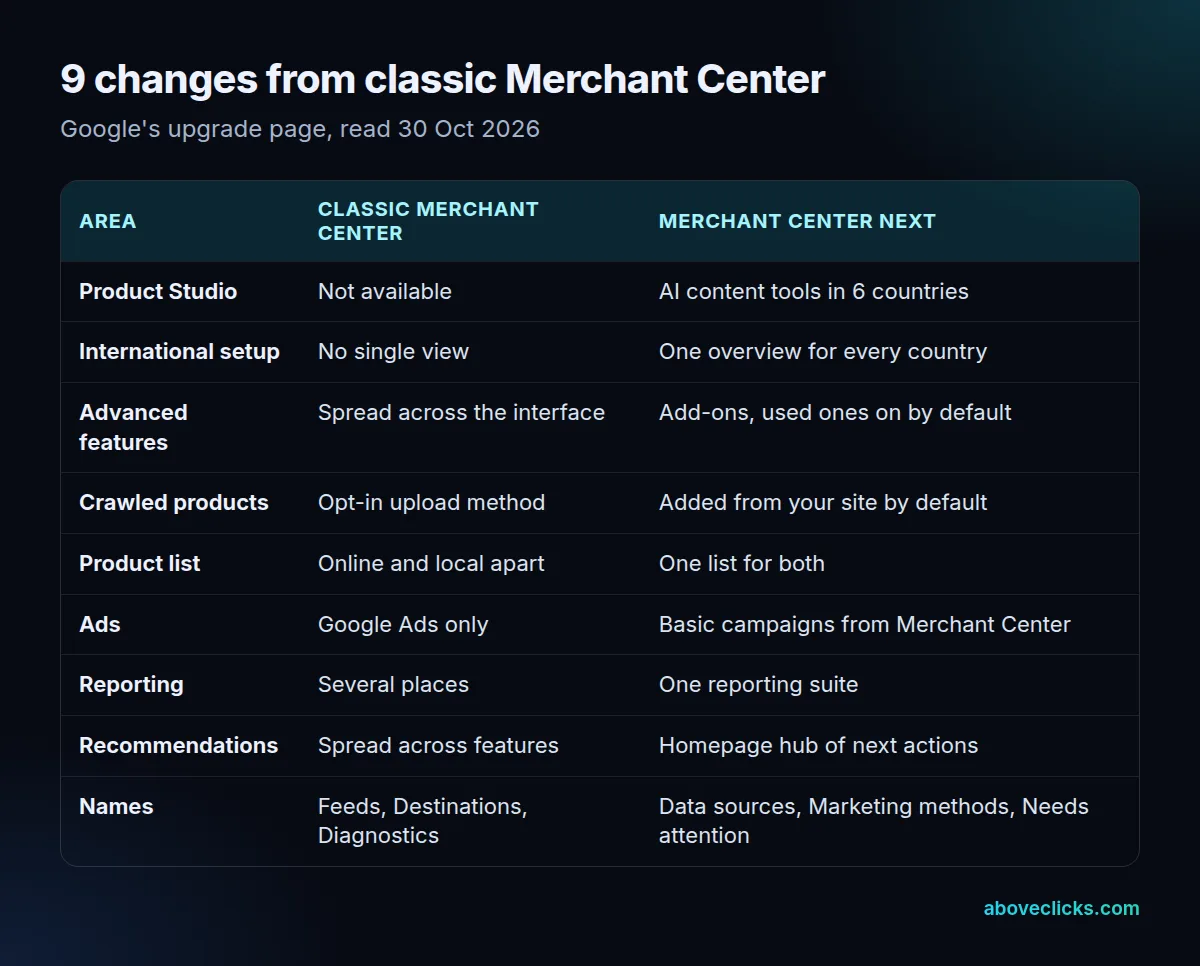
Two of the 9 change what lands in your account without you doing anything. Crawled products are now on by default: Google adds product data it finds on your website, both for new and existing merchants, next to the products you send yourself. And features you already used in classic Merchant Center were switched on as add-ons when your account moved.
Two more change daily work. Online and local versions of a product now sit in one product list with one editor, which matters for any store with a physical shop. And you can create basic automated ad campaigns straight from Merchant Center, though the full range of campaign settings is still in Google Ads.
Picture an example store with 400 products sold online and in 2 shops. Classic Merchant Center kept the online and local versions apart, so each change meant finding the same item twice. In the new list those 400 products appear once, each carrying its online and local data, and the diagnostics and performance reports follow the same omnichannel view.
Product Studio, the AI content tool, is limited by country. As of October 2026, Google’s upgrade page lists 6: the United States, the United Kingdom, Canada, Australia, India and Japan.
Where did the classic features go?
Mostly into renamed places: Feeds became data sources, Destinations became marketing methods, and the Diagnostics page became the Needs attention tab under Products. Supplemental feeds moved behind an add-on.
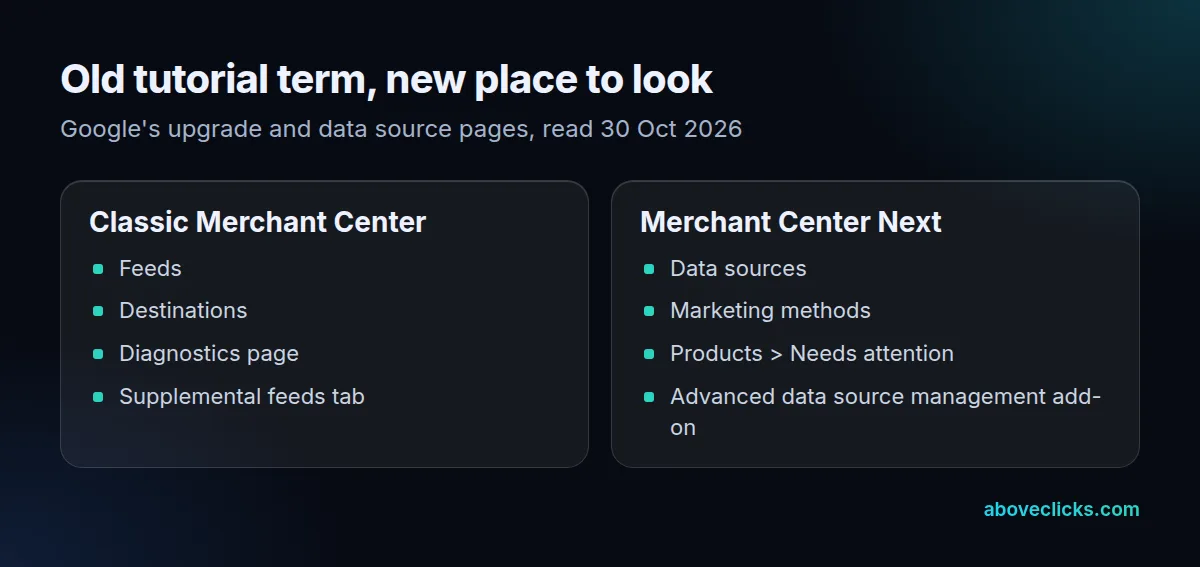
The supplemental move catches the most people. Google’s data source page says the supplemental sources tab is visible only after you enable the Advanced data source management add-on under Settings, then Add-ons. Without it, a tutorial’s “Supplemental feeds” step has nowhere to go. Our supplemental feed entry walks through that setup.
Feed rules survived too; Google lists them with supplemental feeds among the features that carried over. The same page still recommends one primary data source for all your products. Take a hypothetical classic account with 1,200 products split across 4 overlapping feeds, set up years ago for different campaigns: in the new interface those are 4 primary data sources, and the same item sent twice is a common cause of duplicate or conflicting listings. Merging them into 1 primary source, and moving any extra fields into a supplemental one, is worth doing while you are in there.
The rest of the layout follows the navigation guide: an Overview page with performance and product status, Notifications, a Products and store section for products, shipping, returns and Store Quality, and a Marketing section for the ways your products show on Google.
How do you log in to Google Merchant Center Next?
Sign in from Google’s Merchant Center start page with the Google Account that owns the account; there is no separate Next login. Old bookmarks still work as a way in, but not as shortcuts.
On 30 October 2026 we requested 8 Merchant Center URLs while logged out: merchants.google.com, its /mc/ start path, 5 classic deep links such as /mc/products/diagnostics and /mc/feeds, and Google’s older retail solutions address. All 8 ended on the same page, Google’s Merchant Center start page for the US, after 2 to 5 redirects. The address without the /us/ country path returned a 404.
So a classic deep link no longer opens the screen it names; it sends you to the front door. Signed in, Google may route you further, which we didn’t test. Once inside, find the old screen by its new name in the left menu rather than editing the URL.
If several people manage the store, check who holds access before you need it. Each person signs in with their own Google Account, so a former employee’s account can still be the only admin on an old Merchant Center.
What changed for the API and feed tools?
The Content API for Shopping is gone: Google made the Merchant API generally available in August 2025 and shut the old API down after 18 August 2026. Any feed app still on it needs to move.
Google’s Merchant API announcement says the Merchant API replaces the Content API for Shopping as the primary interface and gave access to the old API until August 18, 2026. As of October 2026, the Merchant API updates page adds that Content API requests have seen progressive errors since 1 September 2026. By then the Merchant API had been generally available for about 12 months, so a tool that still breaks today skipped a long warning.
The same updates page lists the October 2026 changes: offer-level video links, a warranty attribute open to every product rather than only vehicles, and account suspension issues shown on the offers they affect instead of one generic disapproval. If your feed comes from a Shopify app or another platform, ask the vendor which API version it uses; our API glossary entry explains the terms.
What is new in Merchant Center in 2026?
An AI assistant in beta, clearer product statuses and the API changes above. The assistant, Ask Advisor, is still closed to most stores.
Google’s Ask Advisor page describes a chatbot for performance insights, troubleshooting and product issues. As of October 2026 the beta is focused on selected US merchants with English accounts that have been active for at least 3 months, and those merchants get an email plus an Ask Advisor tab with a Beta label. Google warns it may give inaccurate answers, so check a suggestion before you accept it.
The products overview now does much of what classic Diagnostics did. Google’s products overview page shows a history graph across 4 statuses: approved, limited, not approved and under review. Its What to do next panel ranks the fixes for your account.
What should you check after the switch?
Five things, in this order: crawled products, data sources, add-ons, Needs attention and your API. Each one fixes a gap that classic habits leave behind.
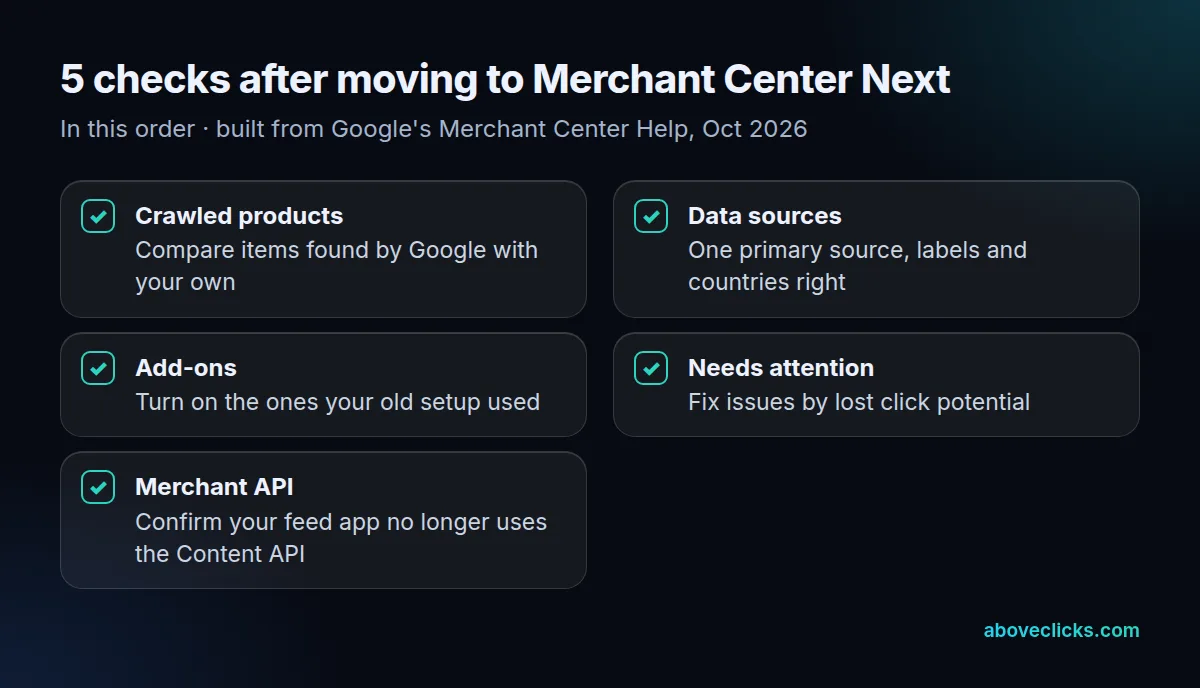
- Crawled products. In All products, compare items found by Google with items you send, and remove anything that shouldn’t be listed.
- Data sources. Keep 1 primary source where you can, with the right label, language and countries.
- Add-ons. Turn on the add-ons your old setup relied on, such as Advanced data source management for supplemental sources.
- Needs attention. Work through issues by their lost click potential, not in the order they appear.
- Merchant API. Confirm your feed app or script no longer calls the Content API for Shopping.
Take an example store opening a new account in 2026 with 2,000 products, a Shopify sync and a classic tutorial that adds product types through a supplemental sheet. Migrated accounts kept the add-ons they used, but a new account starts without them, so that tutorial stalls at step 3 until the add-on is on. Fix it there before you blame the sheet.
If you want the account checked or rebuilt, our Google Shopping agency does Merchant Center setup and feed work. The Google Ads for e-commerce guide covers the campaigns that use it, and the newsletter signup in the site footer sends the next change when Google ships it.