The Google Merchant Center Help Center is Google’s official support site for Merchant Center, at support.google.com/merchants. It offers 4 doors: help articles with a search box, a signed-in Contact us form, a public help community and a status dashboard.
Each door suits a different problem, and picking the wrong one costs days. On 30 October 2026 we ran 12 common problem searches through the Help Center, opened both contact pages while logged out and pulled the 2026 incident history from the status dashboard. Here is what each door does well, where it falls short, and what to prepare before you ask Google for anything.
What is the Google Merchant Center Help Center?
It is the documentation and support hub Google runs for Merchant Center, the free tool where stores manage product data for Shopping ads and free listings. Articles explain each setting, policy and error; the footer leads to the community and Contact us.
On 30 October 2026 the Google Merchant Center Help Center home listed 8 topic groups with 77 topic links between them: Get to know Merchant Center, Business settings, Upload your products, Market your products, Add-ons, Understand your performance, Troubleshoot and 3rd party platform integrations. The performance group alone held 24 articles, from analytics reports to the status dashboard.
The top bar has 3 tabs: Help Center, Community and Announcements. Announcements is where Google posts policy and product changes, so it is worth a look before you assume a new error is your fault. If you are new to the tool itself, our Merchant Center entry explains what it does and the first account review it runs.
Many articles still mention menus by their classic names. If a page tells you to open Feeds or Diagnostics, our Merchant Center Next guide maps those to the current data sources and Needs attention tab.
Does the Help Center search answer common problems?
Mostly, for errors: in our test of the Google Merchant Center Help Center search, 8 of 12 searches led straight to a usable fix article. It fails for contact questions, where all 4 searches about reaching Google returned something else.
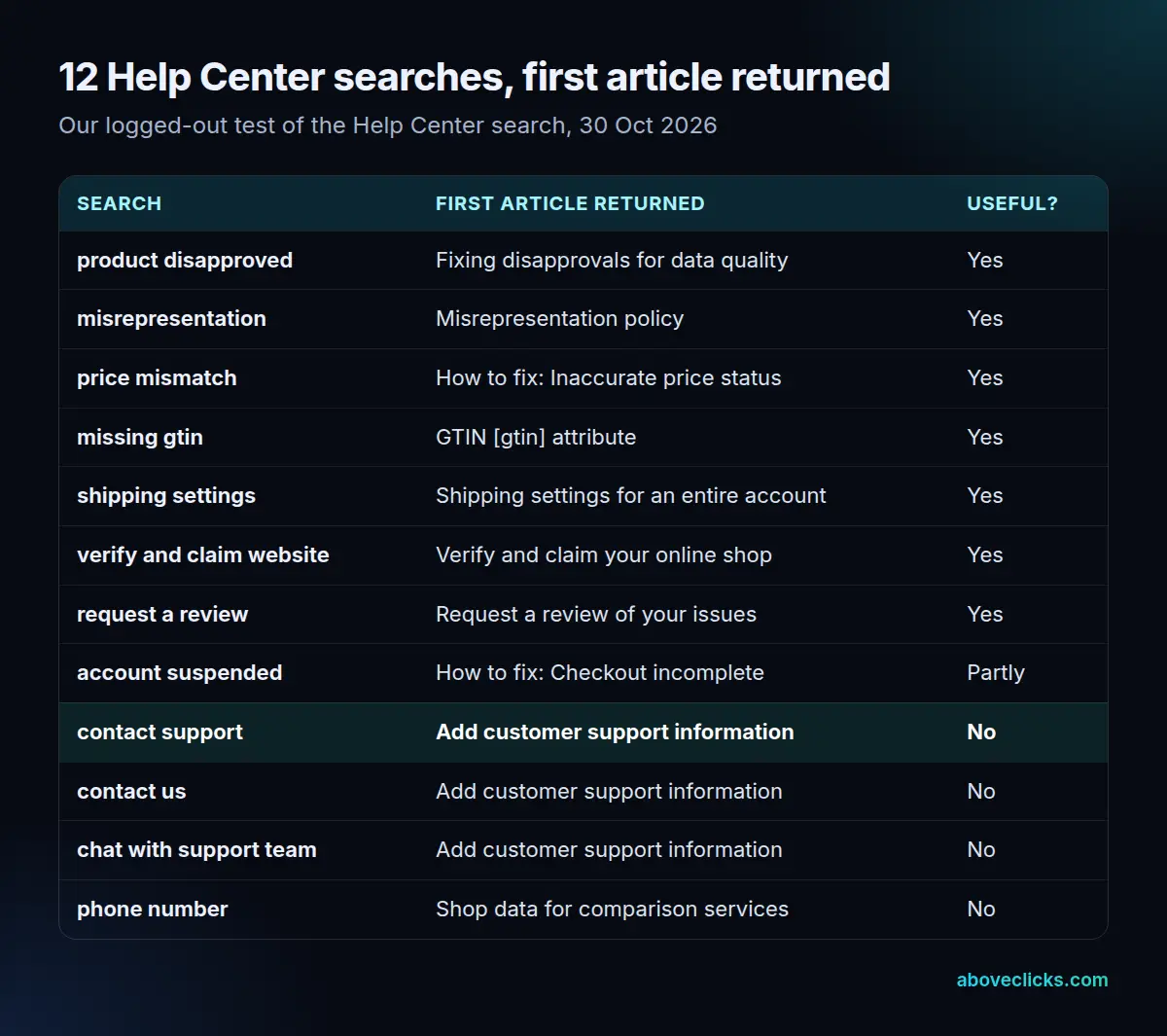
The error searches did well because Google names its articles after the issue text you see in Merchant Center. A search for “price mismatch” returned the inaccurate price status fix, “misrepresentation” returned the misrepresentation policy and “product disapproved” returned Google’s guide to fixing disapprovals for data quality. “Account suspended” was only partly useful: the first result covered one suspension type, an incomplete checkout, rather than suspensions in general.
The practical rule is to search with the exact issue name copied from the Needs attention tab, not your own description. Take an example store with 340 products flagged for a price that differs between the feed and the landing page. Searching “my products got rejected” gives you general reading; pasting the issue name shown next to those 340 products gives the one article that lists the fix.
How do you contact Google Merchant Center support?
Through Contact us at the bottom of any Help Center page, signed in with the Google Account that has access to your Merchant Center account. Logged out, it opens a Google sign-in page instead of a form.
We checked both contact pages on 30 October 2026. The general Contact us link and the separate suspension form that Google’s review article links to (support.google.com/merchants/contact/suspended) each redirected to Google Accounts sign-in when we were logged out. The options you see after signing in depend on the issue you describe, and we did not test the signed-in flow, so we won’t promise a channel.
Google support for Merchant Center is mostly about account and policy decisions, not campaign advice. For a suspension or a warning, the review article says to request a review from the issue itself, wait 7 business days for setup and policy reviews, and contact support only if you are unsure what the issue means or how to proceed.
Account access matters for Google Merchant Center support too. If the only admin on the account is a former employee or an old agency, fix the user list first, because support can only act for someone who can sign in to the account.
Is there a Google Merchant Center phone number or live chat?
We found no public Google Merchant Center phone number or chat link in the Google Merchant Center Help Center pages we read on 30 October 2026. Any phone or chat option would appear inside the signed-in Contact us flow, if Google offers one for your issue.
The searches explain much of the confusion. “Contact support”, “contact us” and “chat with support team” all returned Google’s article on how to add customer support information, which is about your own store. It asks for 4 things under Settings, then Business info: a customer service website URL, an email address, a phone number and a box to tick if you offer live chat. Those are details shoppers use to reach you. For “contact support” and “contact us”, the second result was the review article, which does link to the suspension contact form, so scroll past the top answer.
A “phone number” search returned an article about shop data for comparison shopping services, another miss. So if a page or video promises a Google Merchant Center support phone number open 24/7, treat it with care: it isn’t one we could find on any Google page, and Google’s own pages send you to the signed-in form.
How does the Merchant Center help community work?
It is a public forum where merchants post questions and volunteer Product Experts answer them. As of October 2026 the community’s about page counted 3,167 members.
The community is often faster than official support for “is it just me?” questions, and its pinned guides cover topics such as warnings, suspensions and shipping settings. Answers come from volunteers and other merchants, not Google staff deciding your account, so use them for diagnosis and keep the account decision for the review process.
When you post, leave out your account ID, email and anything private; the thread is public. Describe the exact issue name, what you changed and when, and link a product page so a Product Expert can check what Google’s crawler sees. A good thread with those 3 details tends to get a specific answer instead of a list of guesses.
Product reviews and seller ratings have their own rules and their own help pages. If your question is about star ratings, our guide to Google Merchant Center reviews covers the programs and fixes.
How do you check if Merchant Center is down?
Open the Merchant Center status dashboard at merchants.google.com/status. It shows live status for Merchant Center, the Merchant API and Feeds, with an incident history you can subscribe to.
Google’s dashboard article says all times are in UTC and uses 4 statuses: Available, Service information, Service disruption and Service outage. You can open past incidents through View history or follow them through an RSS feed. When we checked the Merchant Center status dashboard at 17:24 UTC on 30 October 2026, it showed no incidents across its 3 services.
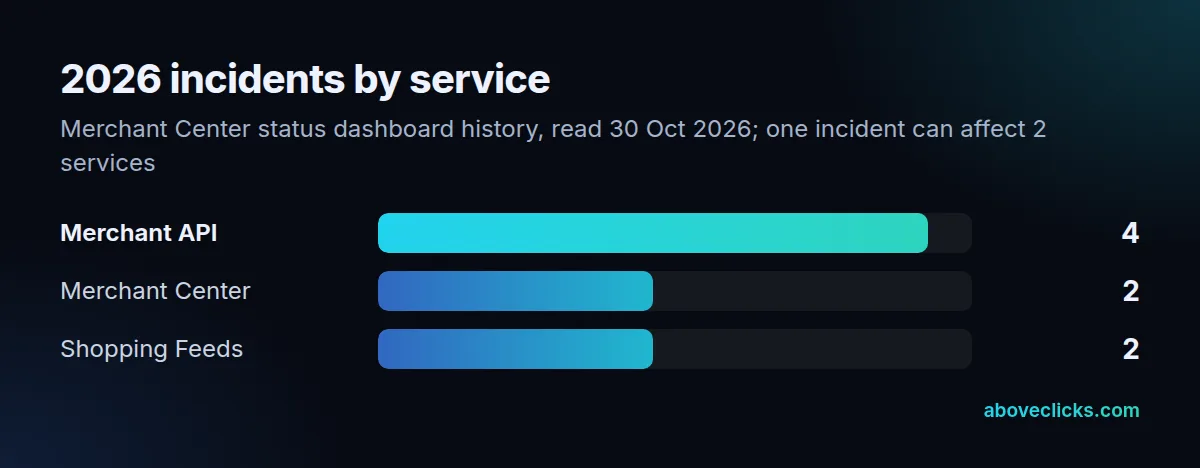
Its JSON history listed 5 incidents in 2026 as of 30 October, and 4 of them involved the Merchant API. The longest was a Feeds issue that ran for about 17 days, from 4 to 21 February 2026. So if feed uploads stall or an app sync fails, check the Merchant Center status dashboard before you rebuild anything. A known incident means waiting, not editing 2,000 products that were fine.
What should you prepare before you ask for a review?
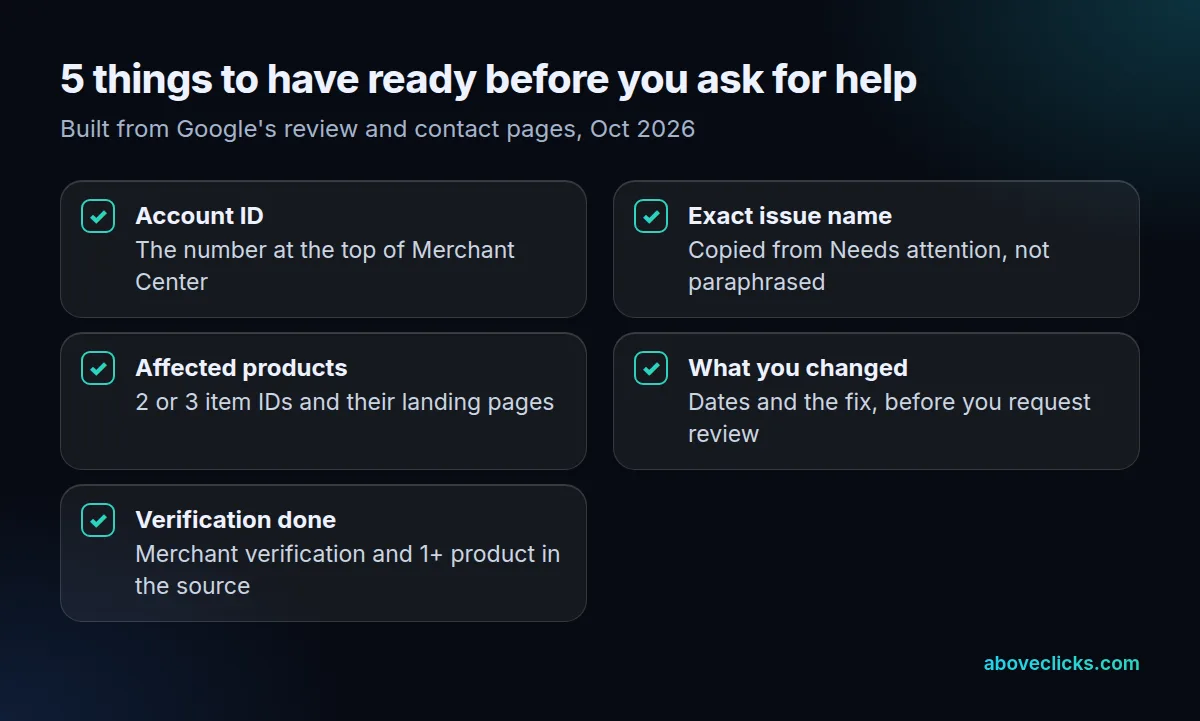
Five things: your account ID, the exact issue name, a few affected products, what you changed, and proof that merchant verification is done. Google’s review process is strict about order, so missing one can cost a review attempt.
As of October 2026, Google’s review article sets out the timings. A setup or policy review takes 7 business days and covers every issue for that country. During a warning period of 7 or 28 days you get one courtesy review. Some reviews can take up to 2 weeks, and if issues aren’t resolved by the second review attempt a one-week cool down may begin.
The same page lists what has to happen first. Complete any merchant verification request in Needs attention, keep at least 1 product in your data source, and for misrepresentation make sure your address, phone, email, shipping and return policies are visible on your site and match your settings. Choose I fixed the issue only when you have, and I disagree with the issue only when you can say why.
- Account ID. Copy it from the top of Merchant Center.
- Exact issue name. Paste it from Needs attention, word for word.
- Affected products. List 2 or 3 item IDs with their landing pages.
- What you changed. Note the date and the fix for each issue.
- Verification. Confirm merchant verification is done and the data source isn’t empty.
Picture an example store with a misrepresentation warning and a 7-day warning period. Using the courtesy review on day 2, before the contact page shows a business address, wastes it; fixing the site first and requesting on day 5 leaves one clean attempt.
If the Google Merchant Center Help Center hasn’t solved it and you want someone to work through a suspension or a disapproval backlog with you, our Google Shopping agency does Merchant Center audits, feed fixes and review requests. The Google Ads for e-commerce guide covers the campaigns that rely on a healthy account, and the newsletter signup in the site footer sends the next Merchant Center change when Google ships it.