Google Merchant Center reviews are the star ratings Google can show next to your products and your store on Shopping ads and free listings. There are two programs: product ratings for single items, and store ratings for the business as a whole.
A third meaning causes most of the confusion. “Under review” in Merchant Center is a status, not a rating, and it is covered in the last section. This guide gives the thresholds for both rating programs as of October 2026, what we found on 16 real Shopify stores, and 5 checks for when stars don’t show.
What are Google Merchant Center reviews?
They are two separate rating programs inside Merchant Center: product ratings rate one product, store ratings rate the shopping experience with your business. Each has its own threshold, data source and setup.
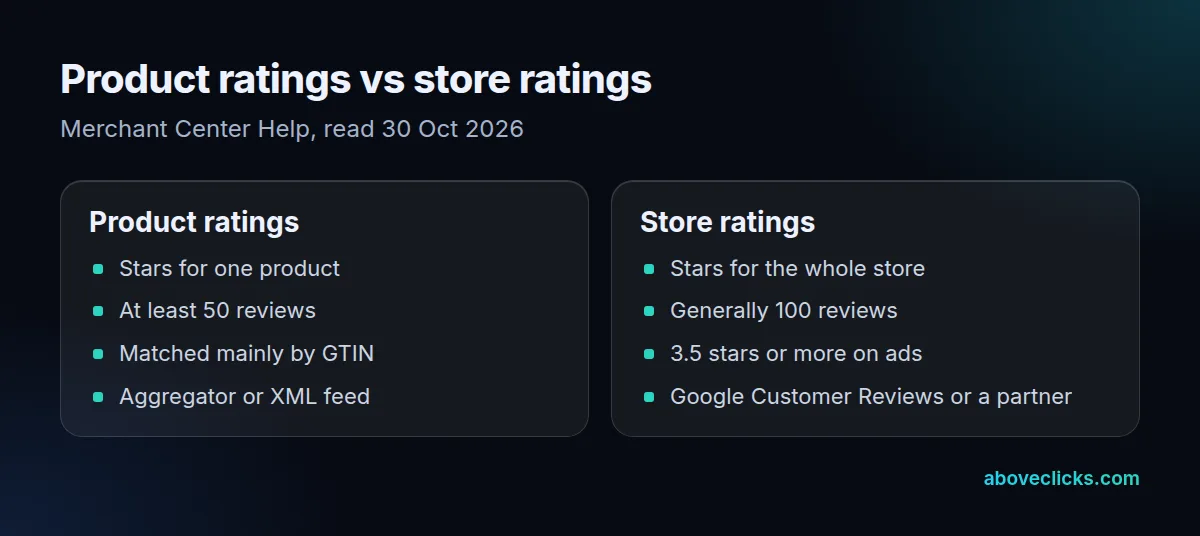
Product ratings are an add-on. Google’s Product ratings page describes 1 to 5 star ratings that also display the total number of reviews, compiled from businesses, review aggregators, review sites and Google users. They appear on the product, in ads and in free listings.
Store ratings describe the business. They come from Google Customer Reviews, from supported review partners, and from Google’s own evaluation of the shopping experience. A store can have one without the other: a new product line with no reviews can sit next to a store rating built over two years.
Page markup is a third, separate route. An aggregateRating in your product page code, set out in Google’s review snippet guide, can earn review stars in organic search, which our product reviews schema entry covers, but it does not feed the Merchant Center programs below.
How do product ratings work in Merchant Center?
You need at least 50 reviews across all your products, then a review partner or an XML file sends them to Google, which matches each review to a product by its identifiers. Stars show once the account is onboarded.
As of October 2026, Google’s Product ratings page says onboarding can take up to 2 weeks after you qualify, and newly uploaded reviews take up to 7 to 10 days to sync. The submission guide lists 2 ways in: an approved third-party aggregator that submits for you, or a product reviews data source you build and upload yourself. Either way you sign up through Google’s interest form first.
Matching decides most of the result. Google matches reviews mainly on globally unique identifiers such as the GTIN, and falls back to SKU, brand plus MPN, or the product URL. Google warns that those fallbacks often attach fewer reviews to the right products. The identifiers must also be the same in your product data and your reviews data.
The rules on what you send are strict. Google’s Product Ratings policies cover 5 areas: comprehensive updates, content, quality, ownership and user images. You must send the full reviews feed at least once a month, low-star reviews included, and you may not delete old reviews from it. A feed that stops updating is treated as stale and loses eligibility. Reviews bought with a gift card or discount can still show, but only when the incentive didn’t depend on the sentiment, and the feed must flag them with the is_incentivized_review attribute.
What does a store rating need?
Generally 100 eligible, unique reviews in one country, and an average of 3.5 stars or more before the rating shows on paid ads. Below 3.5, the stars stop appearing on ads until the score recovers.
Google’s store ratings overview adds 2 more rules, as of October 2026. Ratings are calculated separately for each country, so 300 reviews from US buyers do nothing for your UK ads. And reviews count within a rolling window: that page says 24 months, while Google’s Customer Reviews FAQ still says 12 months. Plan for the shorter one, since a steady flow of new reviews keeps you eligible under both.
The same page claims that store ratings on text ads drive a 2% average improvement in click-through rate on the Search network. Treat that as Google’s average, not a forecast for your account, and check it in the automated assets report in Google Ads, where seller ratings appear as an account-level asset.
Store ratings can show in 3 places: next to ads, next to your name on free product listings, and in rich results when shoppers search for your store. Once a store rating exists in a country, it shows on ads and listings by default.
How does Google Customer Reviews collect reviews?
It shows an opt-in on your order confirmation page, then Google emails each buyer who opts in a one-question survey after the estimated delivery date. The answers build your store rating.
Google’s Customer Reviews guide explains the difference from Business Profile reviews: anyone with a Google account can leave a Business Profile review, but only your verified buyers feed Google Customer Reviews. You turn it on under Settings, then Add-ons, sign the agreement and add the opt-in code to your checkout.
The Customer Reviews FAQ settles the setup questions. The survey has one question, and buyers get it a few days after the estimated delivery date you pass in the opt-in code, so a wrong date sends the survey before the parcel arrives. You must show the opt-in to every customer, not only shoppers who came from ads. The badge for your site is optional, and you don’t need to link Google Ads for the program to work. It also works for services, as long as you can give an estimated delivery date.
Check your market before you build it in. As of October 2026, the same FAQ lists 85 countries where Google Customer Reviews is available, including the United States, the United Kingdom, Canada, Australia and India. Placement matters too: Google says an opt-in at the bottom or on the right of the page usually gets fewer sign-ups than one in the center.
What did 16 Shopify stores show?
Most stores already collect reviews, but few expose the identifiers Google matches them on. On 30 October 2026 we read the newest product page of the 16 public Shopify stores from our 18 October feed survey.
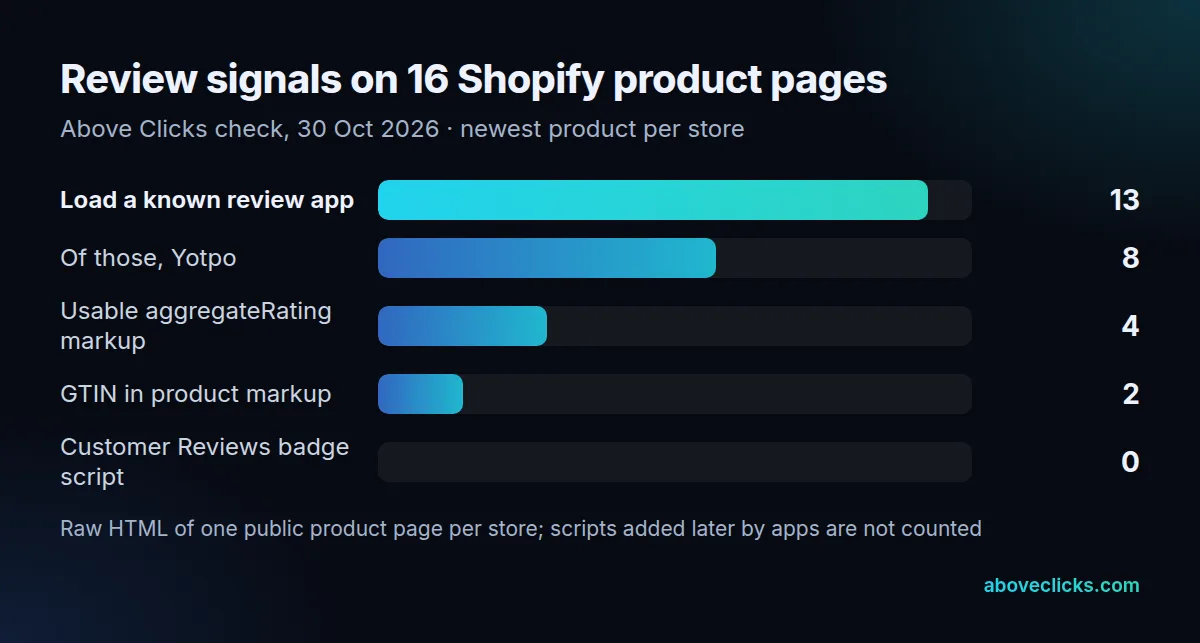
13 of the 16 pages load a known review app’s script: Yotpo on 8, Bazaarvoice on 3, Okendo on 2, and Trustpilot and Judge.me on 1 each. All 5 of those apps appear on Google’s list of supported review partners, so these stores could have their reviews sent to Google without building an XML file.
The weak spot is identifiers. Only 2 of the 16 product pages included a GTIN in their product markup, and none of the 16 public product files carried a barcode. That doesn’t prove the stores’ real Merchant Center feeds lack GTINs, because a feed app can add them, but it does show where to check first. 4 pages carried a usable aggregateRating, and 1 of those showed a count of 177,000 on a single dress, which reads like a store-wide total.
No product page loaded the Google Customer Reviews badge script. That is expected: the badge is optional and the opt-in lives on the order confirmation page, which we can’t see. Read these 16 pages as a sample of real setups, not as a verdict on any store.
Why are my Google Merchant Center reviews not showing?
Usually one of 5 things: too few reviews, identifiers that don’t match, a stale feed, a rating below the threshold, or not enough time. Check them in that order.
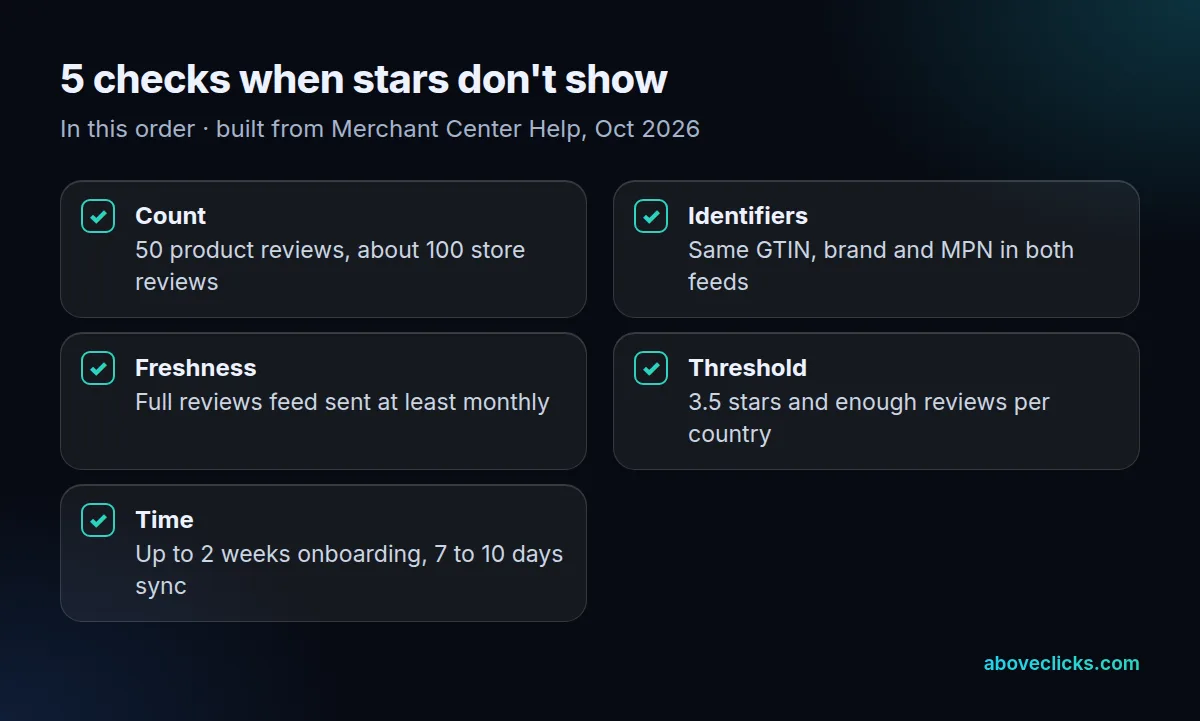
- Count. Product ratings need 50 reviews across your products; store ratings generally need about 100 in each country.
- Identifiers. The GTIN, brand and MPN in your reviews data must match your product data exactly. A review app keyed on its own product IDs can lose matches here.
- Freshness. Send the full reviews feed at least monthly; a feed that stops counts as stale.
- Threshold and country. Store stars need 3.5 or more for ads, and each country is rated on its own reviews.
- Time. Allow up to 2 weeks after onboarding and 7 to 10 days for new reviews to sync.
Even when all 5 pass, Google’s Product ratings page says stars are filtered for accuracy and relevance, and other annotations on an ad, such as “Special offer”, can take their place. So check over several days, not on a single ad.
What does under review mean in Merchant Center?
It is a status check on your account or products, not a customer review program. New accounts and edited products sit under review while Google checks them against its policies.
Our Merchant Center entry covers the first account review and what it needs. Products held back afterwards are covered in product disapproval, including how to request another review once you fix the cause. Product Ratings has the same route: the policies page says you can fix a disapproved reviews feed and request a review.
For account-wide setup and policy issues, Google’s Issues page says, as of October 2026, that a requested review can take up to 7 days to complete, and some violations limit how many reviews you can request. Fix the cause first, then ask once, rather than requesting again every day.
If you want reviews, identifiers and Shopping campaigns set up together, our Google Shopping agency does that work. The Google Ads for e-commerce guide covers the campaigns that show these stars, and the newsletter signup in the site footer sends the next Merchant Center change when Google ships it.