Quick answer
Neither wins for every business. MailerLite suits newsletter-led brands and small stores that want low cost, simple automations and a website builder in one place. Klaviyo suits stores whose revenue leans on flows built from order and browsing data, or that plan to add text messages. Run your own list through both billing rules before you compare cost.
| MailerLite | Klaviyo | |
|---|---|---|
| Billing unit | Active subscribers, plus a monthly email allowance | Active profiles, with send capacity included |
| Unsubscribed contacts billed? | No (bounced don't count either) | No (suppressed don't count either) |
| Free plan (as of Oct 2026) | 250 subscribers, 2,500 emails a month | 250 active profiles, 500 email sends a month |
| Automations on the free plan | 3 active automations, 5 steps each | Flows included |
| Text messages | Not in the marketing plans (separate MailerSend product) | SMS, MMS, WhatsApp, RCS on a separate text plan |
| Support on the free plan | Knowledge base | Email support for the first 60 days |
| Extras | Website, landing pages, digital products | Helpdesk, Composer, mobile app messaging |
MailerLite
- Billing unit
- Active subscribers, plus a monthly email allowance
- Unsubscribed contacts billed?
- No (bounced don't count either)
- Free plan (as of Oct 2026)
- 250 subscribers, 2,500 emails a month
- Automations on the free plan
- 3 active automations, 5 steps each
- Text messages
- Not in the marketing plans (separate MailerSend product)
- Support on the free plan
- Knowledge base
- Extras
- Website, landing pages, digital products
Klaviyo
- Billing unit
- Active profiles, with send capacity included
- Unsubscribed contacts billed?
- No (suppressed don't count either)
- Free plan (as of Oct 2026)
- 250 active profiles, 500 email sends a month
- Automations on the free plan
- Flows included
- Text messages
- SMS, MMS, WhatsApp, RCS on a separate text plan
- Support on the free plan
- Email support for the first 60 days
- Extras
- Helpdesk, Composer, mobile app messaging
Choose MailerLite if…
- Your email is mostly newsletters and a welcome series
- You want a website or landing pages in the same tool
- Your budget matters more than segment depth
Choose Klaviyo if…
- Flows built on orders and browsing drive much of your email revenue
- You want text messages next to email
- You segment on purchase history, not only tags
The core MailerLite vs Klaviyo difference is newsletter simplicity versus store-data depth: MailerLite is a low-cost email and website tool with an ecommerce add-on, while Klaviyo is built around order and browsing data. Decide by what each would charge for your list and how much revenue your flows bring in.
A note before we start: we set up and migrate Klaviyo accounts for online stores, so that is the platform we know best. This comparison uses only each vendor’s own pricing and help pages, puts a date on every plan detail, and says plainly where MailerLite is the better pick.
MailerLite vs Klaviyo: what’s the real difference?
In MailerLite vs Klaviyo, the two tools come from different starting points. MailerLite began as a newsletter tool and now bundles websites, landing pages and digital product sales; Klaviyo began as an ecommerce data platform and builds email and text messages on top of it.
Both send campaigns, run automations and sync with Shopify, so a feature checklist makes them look closer than they are. In a Klaviyo vs MailerLite decision, the gaps that matter day to day are:
- What you pay for: subscribers plus a send allowance on one side, reachable profiles on the other.
- Automation depth: a capped free tier on MailerLite versus flows driven by store events on Klaviyo.
- Text messages: outside MailerLite’s marketing plans, built into Klaviyo’s text plan.
- Extras: a website builder on MailerLite; a helpdesk and app messaging on Klaviyo.
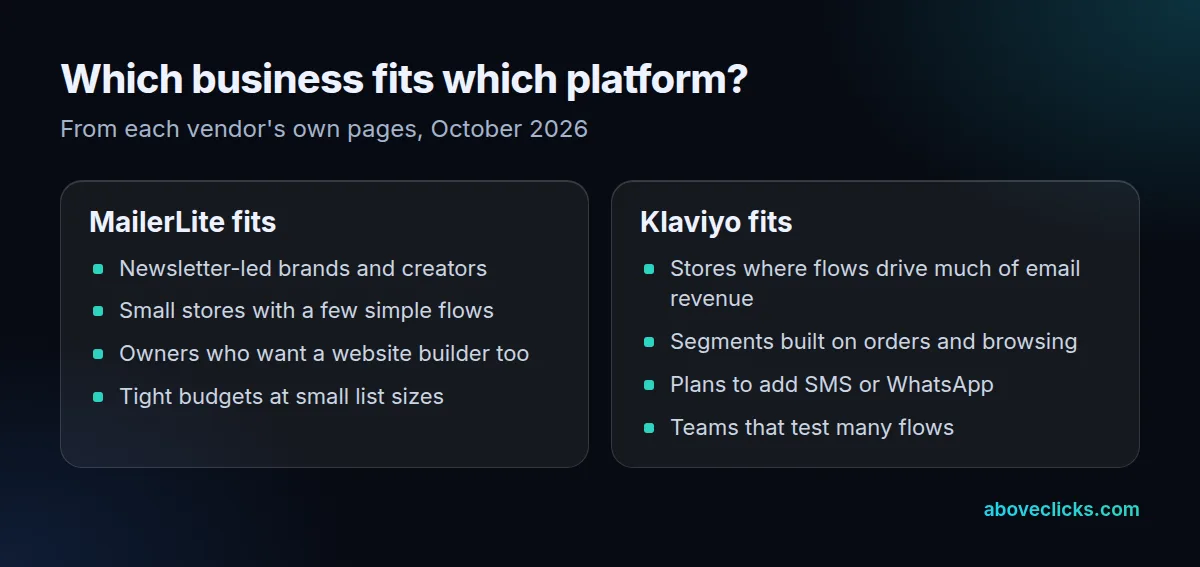
Start a MailerLite vs Klaviyo decision from your own business, not the feature grid. Write down how many subscribers you have, how much of last quarter’s email revenue came from automated flows, and whether you want to text customers in the next 12 months. Those answers settle most Klaviyo vs MailerLite choices before you compare a single plan.
How do the free plans compare?
Both stop at 250 contacts, but MailerLite allows 2,500 emails a month against Klaviyo’s 500, as of October 2026. Klaviyo’s free plan instead adds a small text allowance and fuller store data.
| Free plan, as of October 2026 | MailerLite | Klaviyo |
|---|---|---|
| Contacts | 250 subscribers | 250 active profiles |
| Emails | 2,500 a month | 500 sends a month |
| Automations | 3 active, 5 steps each | Flows included |
| Extra | 1 website and 1 landing page | $5 of mobile messages a month |
| Support | Knowledge base | Email support for the first 60 days |
As of October 2026, MailerLite’s pricing page lists up to 250 subscribers, 2,500 monthly emails and 2 user seats on its free plan, with 3 active automations of up to 5 steps, 3 active forms and knowledge base support. It also says that once a free account passes 250 active subscribers, campaigns and automations are locked until you upgrade or remove contacts.
As of October 2026, Klaviyo’s pricing page caps its free plan at 250 active profiles and 500 email sends a month, adds $5 of mobile messages a month, and offers email support for the first 60 days only.
So on the free tier of MailerLite vs Klaviyo, MailerLite gives you more sends and Klaviyo gives you more automation room. A store testing a welcome flow, a cart reminder and a post-purchase email already hits MailerLite’s 3-automation cap.
What drives the price on each platform?
MailerLite charges for active subscribers and limits how many emails you can send on its middle plan; Klaviyo charges for active profiles with send capacity included. Neither counts unsubscribed contacts, as of October 2026.
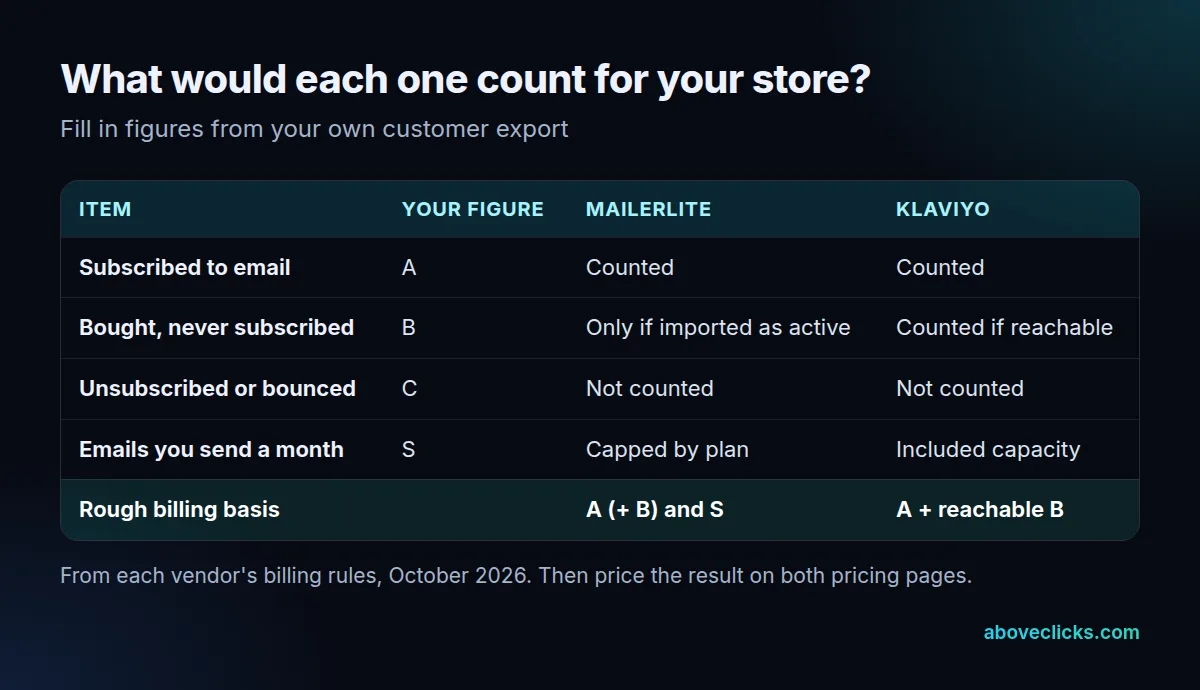
As of October 2026, MailerLite’s pricing FAQ bills the number of active subscribers and excludes those who unsubscribed or bounced. The count is cumulative within each billing cycle, so an address that was active at any point in the cycle counts even if you delete it later. Its Comfort plan starts at $12 a month and allows 10× the top of your subscriber tier in emails each month, so the up-to-1,000 tier sends 10,000 emails; the Power plan starts at $25 a month with unlimited emails under a fair-use policy.
As of October 2026, Klaviyo’s pricing explainer bills active profiles, meaning the customers you can reach, and states that unsubscribed and suppressed contacts don’t count. Every profile tier comes with a monthly email send capacity.
Take a store with 3,000 customers in its export: 1,200 subscribed, 1,500 bought without subscribing and 300 unsubscribed. Neither platform bills the 300. Whether the 1,500 count depends on whether you import them as active subscribers on MailerLite, and on whether Klaviyo can reach them. If you email the 1,200 subscribers 12 times a month, that’s 14,400 emails, more than the 10,000 that MailerLite’s Comfort plan allows at the 1,000 tier.
That’s why a MailerLite vs Klaviyo price check on list size alone misleads. Run your own export through the worksheet above, then price the result on both pages. A Klaviyo vs MailerLite cost check that uses your real send frequency is the only one worth trusting.
How deep do automations and segments go?
Both have visual automation builders, but they differ in what can start a flow and how fine your segments get. MailerLite caps active automations by plan; Klaviyo builds flows and segments on synced order and browsing events.
As of October 2026, MailerLite’s plan comparison allows 3 active automations on Free, 50 on Comfort and unlimited on Power, with up to 100 steps each on the paid plans. Multiple triggers in one automation are listed for Power. Its segments work on fields, groups (tags) and the store data its integrations sync.
On Klaviyo, the free plan already includes flows and basic segmentation, per its pricing page. The practical difference shows when you want flows like “bought product X, didn’t open the last 3 emails, browsed again this week”. That kind of condition is where Klaviyo’s store-event data earns its higher cost, and it is the row of MailerLite vs Klaviyo that most review sites skip.
If your automations are a welcome series and a monthly newsletter, this row barely matters in Klaviyo vs MailerLite, and MailerLite’s lower cost wins. If abandoned cart, browse abandonment and winback flows bring in a large share of your email sales, it matters most.
How do they connect to Shopify?
Both install as Shopify apps that sync customers, subscribers and orders, so the app itself rarely decides MailerLite vs Klaviyo. The trap is keeping two email apps connected; Klaviyo’s own guide says to disconnect the old one first.
MailerLite’s Shopify integration page says its app syncs customers and newsletter subscribers with order information, builds segments such as first-time customers and high spenders ($500 and more), tracks email revenue and sends abandoned cart emails. Add the app called “MailerLite Email Automation” and check that MailerLite is listed as its developer.
Klaviyo’s Shopify guide says to disconnect a prior email provider from Shopify before integrating, because leaving it connected can send double opt-in emails to existing subscribers. It also notes that, depending on your Shopify privacy settings, Klaviyo may not track onsite events from EU, EEA, UK and Swiss visitors until they consent.
Consent stays the store’s job on either platform. Shopify’s subscriber guide says to send promotional email only to customers who agreed to receive marketing, and warns that purchased lists damage sender reputation. After connecting either app, place 2 orders as a test, one with the consent box ticked and one without, and confirm each lands where it should. That check catches most MailerLite vs Klaviyo setup mistakes before customers see them.
Does deliverability differ between them?
Not in the way most reviews suggest: inbox placement rests on your domain authentication, list hygiene and complaint rate, and Gmail, Yahoo and US law apply the same rules whichever platform sends.
Google’s sender guidelines require anyone sending more than 5,000 messages a day to Gmail accounts to authenticate their domain, keep the spam rate reported in Postmaster Tools below 0.3% and support one-click unsubscribe. Yahoo’s Sender Hub sets the same 0.3% ceiling and asks senders to honor unsubscribes within 2 days.
The FTC’s CAN-SPAM guide says an opt-out link must keep working for at least 30 days after you send, and that each email in violation can bring penalties of up to $53,088, as of October 2026.
So in MailerLite vs Klaviyo, deliverability is mostly your setup, not the brand: moving platforms won’t cure a spam-folder problem by itself. The domain records and the list move with you. Our email deliverability service checks those settings on either platform before a move.
When should you move from one to the other?
Move when the tool no longer fits how you sell: your flows need store events MailerLite can’t use, you want text messages, or you pay Klaviyo for depth you never use. Avoid moving during your busiest sales weeks; a MailerLite vs Klaviyo switch needs a quiet month.
Going from MailerLite to Klaviyo usually makes sense once automated flows bring in a large share of email revenue and you want SMS next to email. Going the other way can make sense for a newsletter-led brand that sends 2 campaigns a month and uses none of Klaviyo’s segments. A Klaviyo vs MailerLite comparison from last year may be out of date, so re-check both pricing pages in the month you plan to move.
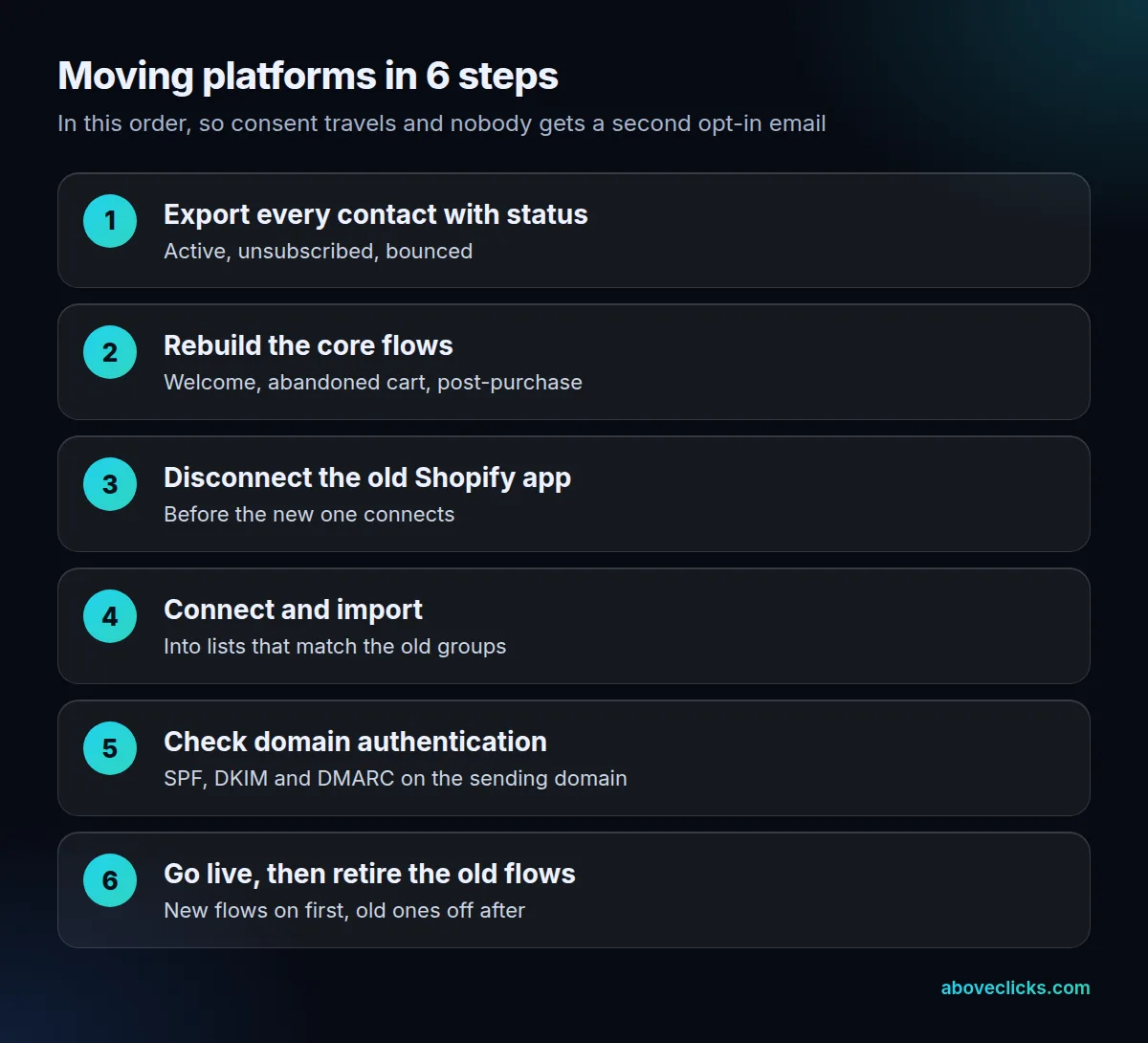
When we move a store between email platforms, we follow the checklist order: export every contact with its status, rebuild the welcome, cart and post-purchase flows on the new platform, disconnect the old app from Shopify, then connect the new one and import into matching lists. The old flows come off only after the new ones are live, so no customer misses a cart reminder or gets a second opt-in email. Keep the old account readable for 4 to 6 weeks so you can look up past consent records. Whichever direction your MailerLite vs Klaviyo move goes, that buffer costs little and answers any customer question about consent.
If you’re moving to Klaviyo, our Klaviyo migration service maps what has to move first, and our Klaviyo email marketing team builds the flows. Weighing a different pair? See Omnisend vs Klaviyo, or start with a free audit of your current setup. More comparisons are in buying guides.