Cost per acquisition Google Ads reporting is total ad cost divided by conversions, which your account labels “Cost / conv.” It tells you what one sale or lead cost, and it only means something next to the most you can afford to pay for one.
This guide shows how Google Ads builds its cost per acquisition, which conversions sit under it, how to find your break-even figure, and how to set a target and lower it. Every budget and result below is an invented worked example.
What is cost per acquisition in Google Ads?
It is the average amount you paid for each conversion, found by dividing total cost by the number in your Conversions column. Google Ads Help defines Cost / conv. as total cost divided by conversions, counting only interactions that can be tracked for conversions.
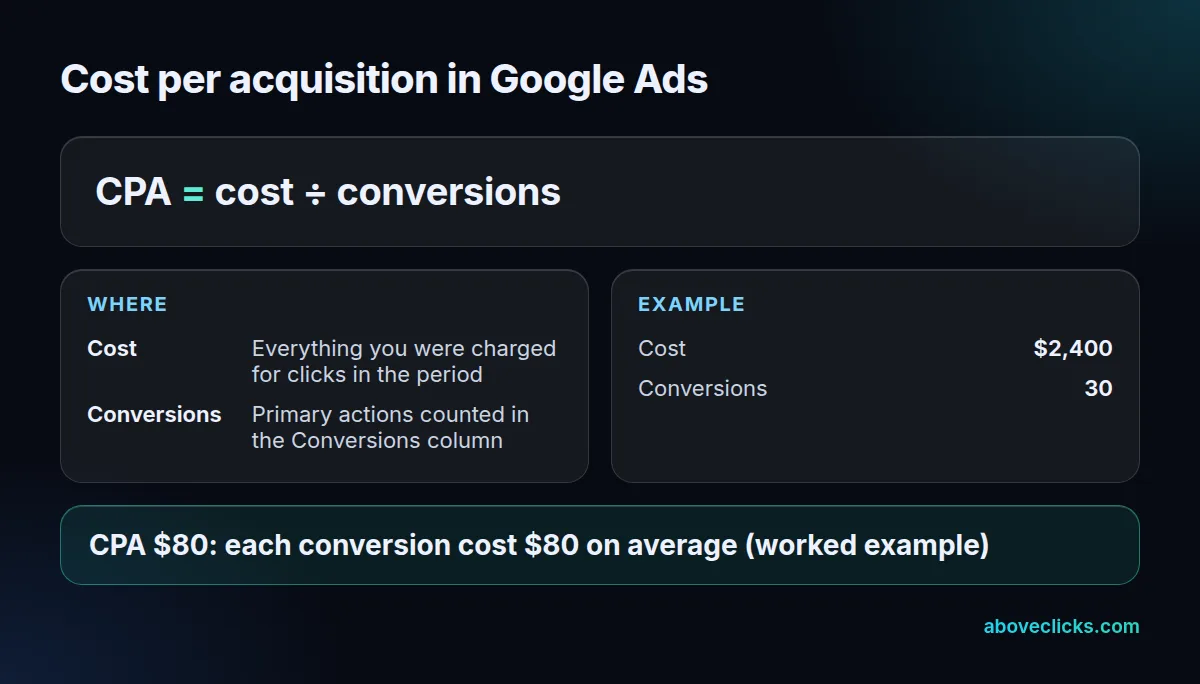
In the card above, $2,400 of spend over 30 conversions is a CPA of $80. An acquisition is whatever you decide counts: a purchase for a store, a booked call or a form for a lead business. That choice matters more than the Google Ads cost per acquisition formula, because the formula can only divide what you feed it.
Google Ads cost per acquisition is also called cost per action, and Google uses “CPA” in the Target CPA bid strategy for the same thing. In the account you will see the Google Ads cost per acquisition as Cost / conv. in the campaign table.
How do you calculate cost per acquisition?
To calculate cost per acquisition Google Ads style, divide what you spent by the conversions you got, or divide your cost per click by your conversion rate; both give the same answer.
Take an invented store that spent $2,400 in a month. It paid for 1,500 clicks, so the average cost per click was $1.60, and 30 of those clicks became orders, a 2% conversion rate.
- Cost ÷ conversions: $2,400 ÷ 30 = $80.
- Cost per click ÷ conversion rate: $1.60 ÷ 0.02 = $80.
The second version is the useful one, because it shows the two things that move the number: what a click costs and how many clicks convert. Google’s definition of cost per click notes that your actual CPC is often lower than your maximum bid, since you pay only what is needed to hold your position. Our guide to the CPC cost per click formula covers that side in full.
Cost per acquisition Google Ads shows by campaign
Read your cost per acquisition Google Ads figure per campaign, not only for the account. A branded search campaign and a prospecting campaign can sit at $15 and $140, and the blended $80 hides both. Sort the campaign table by Cost / conv., then check the conversions behind each row before you act on it.
Which conversions does your CPA count?
Only the ones marked primary, counted the way your counting setting says, and dated by the click. Three settings decide what sits under your cost per acquisition Google Ads number, and each one is a trap.
The same $2,400 month can give three different answers:
- Primary vs all conversions. The Conversions column holds your primary actions and feeds bidding. The All conversions column adds secondary actions and view-through conversions. If 18 add-to-cart events join the 30 orders, Cost / all conv. becomes $2,400 ÷ 48 = $50. It looks like a better CPA, but you have not sold anything more.
- Every vs One counting. Google suggests “Every” for sales, so each purchase counts, and “One” for leads, so a refreshed thank-you page does not count twice. If a lead form is set to Every and 10 refreshes get counted, 30 real leads read as 40 and the CPA drops from $80 to $60.
- Click date, not conversion date. The main conversion columns report on the day of the click. A click last week that converts this week is credited to last week, so recent days look worse than they will end up. Google also expects gaps of up to 20% against analytics tools, because the attribution models differ.
When we audit an account, the first thing we compare is the Conversions column against the All conversions column, then the counting setting on each action. A Google Ads cost per acquisition that falls overnight is usually a counting change, not a better campaign.
What is a good cost per acquisition?
A good cost per acquisition Google Ads account can show is one below the most you can afford to pay for a conversion, called the break-even CPA. There is no useful industry average, because margins and close rates differ too much between businesses.
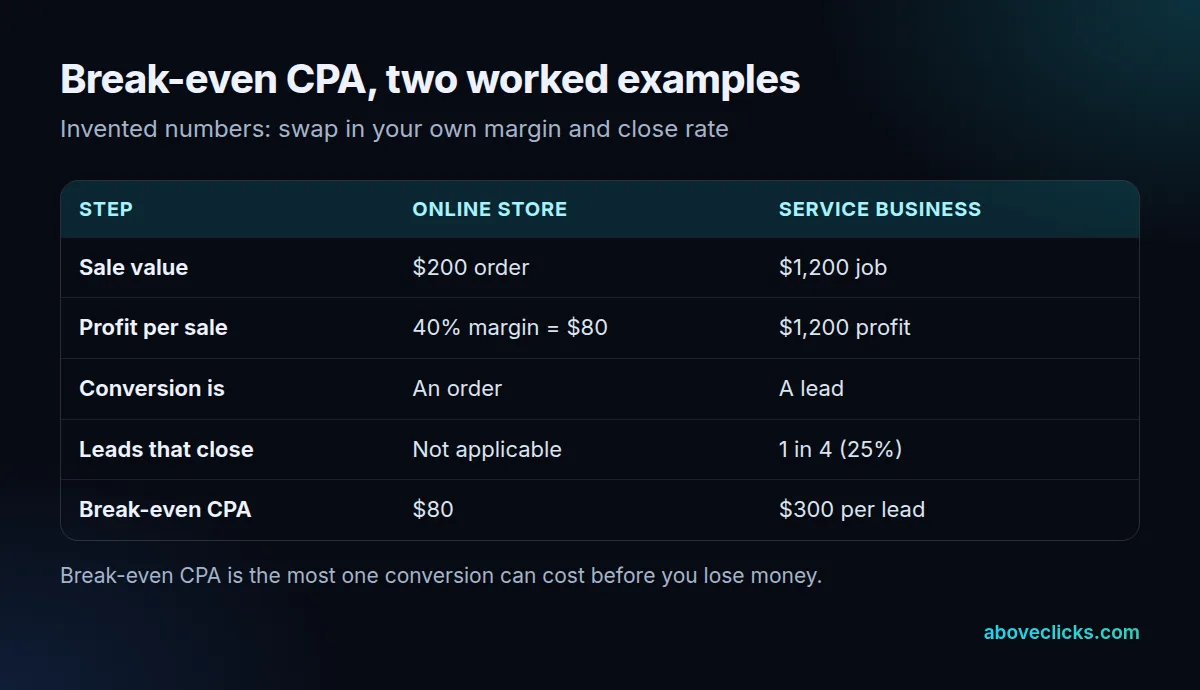
For a store, break-even CPA is the profit on an order before ad cost. A $200 order at a 40% margin leaves $80, so any CPA above $80 loses money. The month above sat exactly at break-even. For a lead business, multiply the profit on a job by your close rate: a $1,200 job closing 25% of leads supports a CPA of $300 per lead.
Then decide the profit you want. If the store wants $20 of profit on each order, its target CPA is $60. That is the number to give Google, not the break-even figure itself.
A margin that ignores returns, shipping and payment fees flatters the result, so use contribution margin after those costs, or your cost per acquisition Google Ads target will sit too high. Our target ROAS guide turns the same margin into a return target, and the MER vs ROAS guide shows how to check it against the whole business.
How do you set a target CPA in Google Ads?
To set a cost per acquisition Google Ads target, start from your current average and move in small steps; Google recommends the average CPA of the last 30 days, adjusted for conversion delays. Target CPA is a Smart Bidding strategy that sets each bid to get as many conversions as possible at the average cost you choose.
Google’s Target CPA page gives the rules that matter:
- It is an average. Some conversions cost more than the target and some cost less. The target is not a cap on any single conversion.
- Too low costs conversions. A target set too low may make Google forgo clicks that would have converted, so you get fewer conversions in total.
- Compare with the average target. Judge the result against the average target CPA column, not the number you typed, because device adjustments and ad group targets change what the system aimed for.
- Budget room matters. Be comfortable spending up to 2 times your average daily budget on a day, and no more than 30.4 times the daily budget in a month, as of November 2026, per Google’s budget rules.
- Changes reset learning. Frequent manual changes to budgets or targets reset the standard 7 to 14 day learning period, per the conversion columns page.
A routine that follows those rules: set the cost per acquisition Google Ads target at your 30-day average, wait two weeks, then move it by about 10% toward your goal. Do not move it again until the next two weeks are in. Since August 17, 2026, Google has also changed how budget-limited campaigns using Target CPA are served, so review old targets set before that date.
Target CPA suits stores whose orders cost about the same, and lead businesses where every lead has similar value. If order values vary a lot, a return target fits better.
How do you lower cost per acquisition?
To lower cost per acquisition Google Ads accounts can do two things: make clicks cheaper or make more of them convert. Because CPA equals cost per click divided by conversion rate, those are the only two levers, and each is worth testing alone.
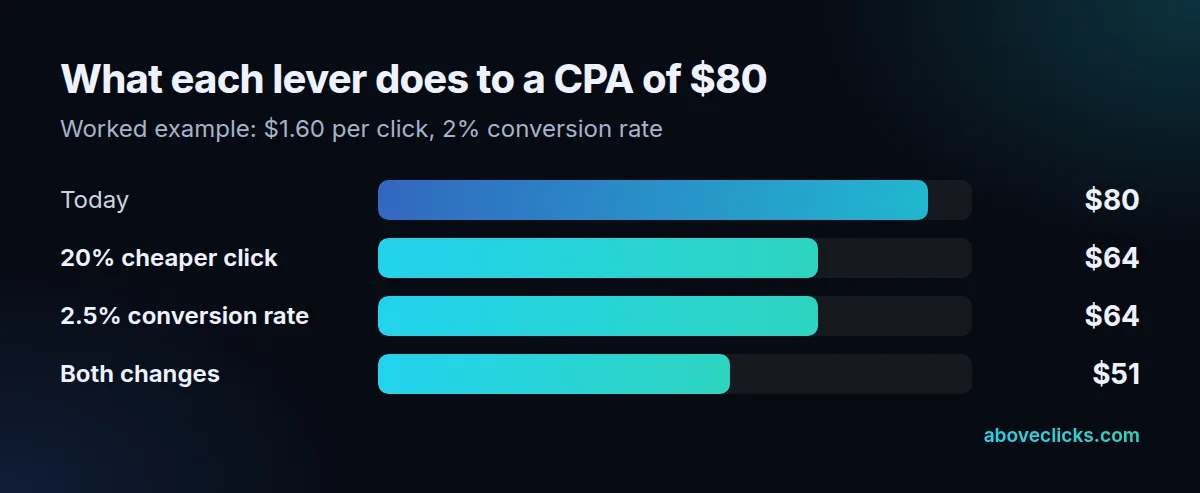
Using the worked month ($1.60 per click, 2% conversion rate, $80 CPA), a 20% cheaper click of $1.28 gives $1.28 ÷ 0.02 = $64. Lifting the conversion rate from 2% to 2.5% gives $1.60 ÷ 0.025 = $64. Doing both gives $1.28 ÷ 0.025 = $51.20. Against a break-even CPA of $80, that moves the store from zero profit to about $28.80 of profit on each order.
Ways to pull each lever on a cost per acquisition Google Ads account:
- Cheaper clicks: add negative keywords for searches that never convert, tighten match types, and fix ad relevance and landing page experience so your cost per click falls at the same position.
- More conversions per click: match each ad group to one page, speed up the page, show the delivery cost early and shorten the form or checkout.
- Cleaner counting: remove duplicate counting before you celebrate a drop, as the section on counting traps shows.
Cutting the targeting to the cheapest searches can also cut volume, so check conversions and revenue, not only the cost per acquisition Google Ads reports, after every change.
Should you manage by CPA, CPC or ROAS?
Manage by CPA when each conversion is worth about the same, by ROAS when order values vary, and treat CPC as a diagnostic. CPC tells you what traffic costs; CPA and ROAS tell you whether it paid.
A store with a narrow range of order values, or a business that sells leads at a similar value, can run target CPA. A store selling $20 and $400 items on the same campaign is better served by a return target, because a $20 order and a $400 order are not the same conversion.
Whichever you pick, keep all three next to your Google Ads cost per acquisition in the report, so you can see which one moved first. If CPA rises while CPC is flat, the problem is conversion rate. If CPA rises and CPC rises, look at competition and relevance first. If you want a second pair of eyes on your cost per acquisition Google Ads setup, our Google Ads management starts with an audit of exactly these settings, and the free audit is the quickest way to ask. More guides are in the Google Ads topic.