Google ads for realtors are paid listings that show when someone searches for a property service in your area, and you pay for a click or, with Local Services Ads, for a lead. Run them as a 60-day test with a stop rule, not an open-ended bill.
This guide covers the choice between Search and Local Services Ads, the five settings that decide most of the waste, a spend limit worked from your commission and a day-60 test. For campaign structure, keywords and housing rules, our guide to PPC for real estate goes deeper.
What are Google ads for realtors?
Ads that appear above or below the normal results when someone searches for a home valuation, a buyer’s agent or a listing in your area. You choose the searches, the area and the daily budget, and you can stop at any time.
There are 2 main formats for google ads for real estate agents. Search ads are text ads that you build keyword by keyword and pay for per click. Local Services Ads are lead-based listings with a Google Verified badge. The next sections compare them.
Google ads for realtors suit an agent or small team that sells in a defined area, has a page that matches the search and can answer a lead within minutes. They suit a brand-new agent with no page and no time to reply much less.
Throughout this guide we use one invented example: an agent with an $8,000 average commission. The rates are made up to show the arithmetic, so replace them with your own. Our real estate marketing work starts the same way, from the commission and the target, before any ad is written.
Do Google ads work for realtors?
They can, when leads are answered fast and the account is checked weekly; they fail when nobody follows up. Whether Google ads for realtors work for you is something to measure in 60 days, not argue about.
Google Autocomplete (November 2026) shows people asking “do google ads work for realtors” and “are google ads worth it for real estate agents”. Nobody can say whether Google ads for real estate agents work in your city without data, because the result depends on your area, your commission, how fast you reply and how many agents bid on the same searches.
So treat it as a test, and decide before you spend what “working” means. Spend a fixed amount over 60 days, count leads and signed agreements, and compare them with the limit you set before you started. In the worked example below, 60 days at $30 a day gives a test of about $1,824, and the answer comes from the cost per lead, not from opinion.
The most common reason Google ads for real estate agents fail is not the ad. A lead that waits until the next morning has often spoken to another agent by then. On our own real estate marketing page we judge results on site visits and bookings, not on cost per lead, for exactly that reason.
Should a realtor use Search ads or Local Services Ads?
Start with Search if you want control over the searches and the landing page. Consider Local Services Ads if your city is covered, because you pay when a lead gets in touch rather than for each click.
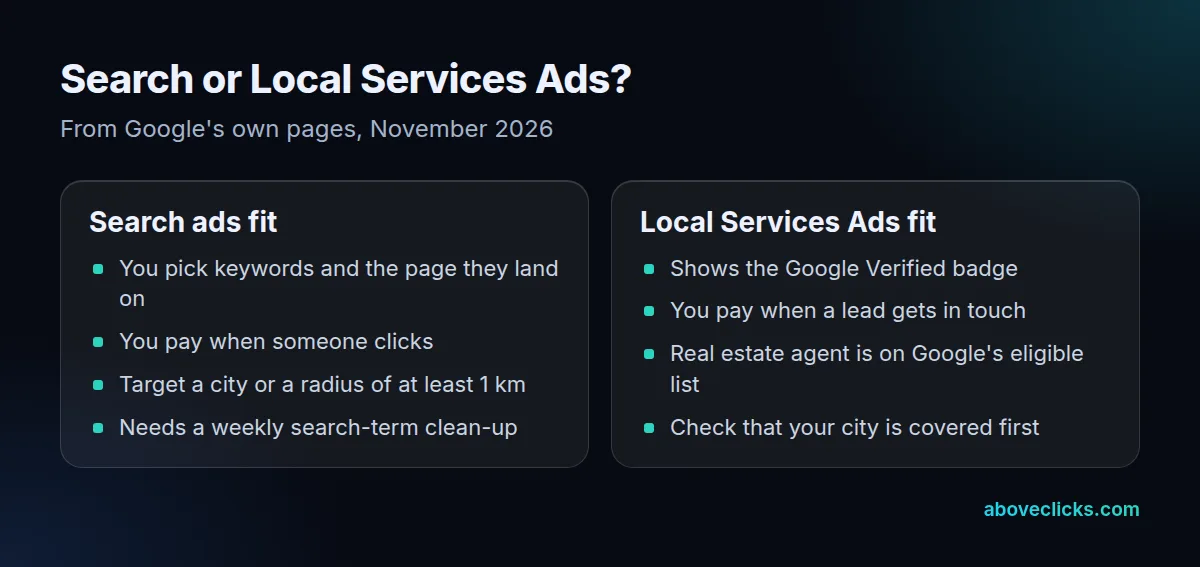
Google’s Local Services Ads page lists “Real estate agent” among the business services eligible for the Google Verified badge and says you pay when potential clients get in touch, not for clicks (as of November 2026). It does not say which countries or cities are covered, and we haven’t verified that for your area, so open the sign-up flow and check before you plan around it.
If you are weighing Google local service ads for realtors against Search, a fair test is to run one for 60 days and compare the cost per lead of each. The two formats can run side by side, because Local Services Ads sit in their own account section. Note that a lead you pay for is not yet a client, so apply the same follow-up rules to both.
Search is the format most guides on Google ads for realtors cover, and it gives you the search terms report, which shows what people actually typed. That report is the main learning tool of the test.
How do you set up Google ads for realtors?
Check five settings before launch: the location option, the budget limit, the ad text, the ad schedule and the search terms report. They decide most of the wasted spend when you run Google ads for realtors on a small account.
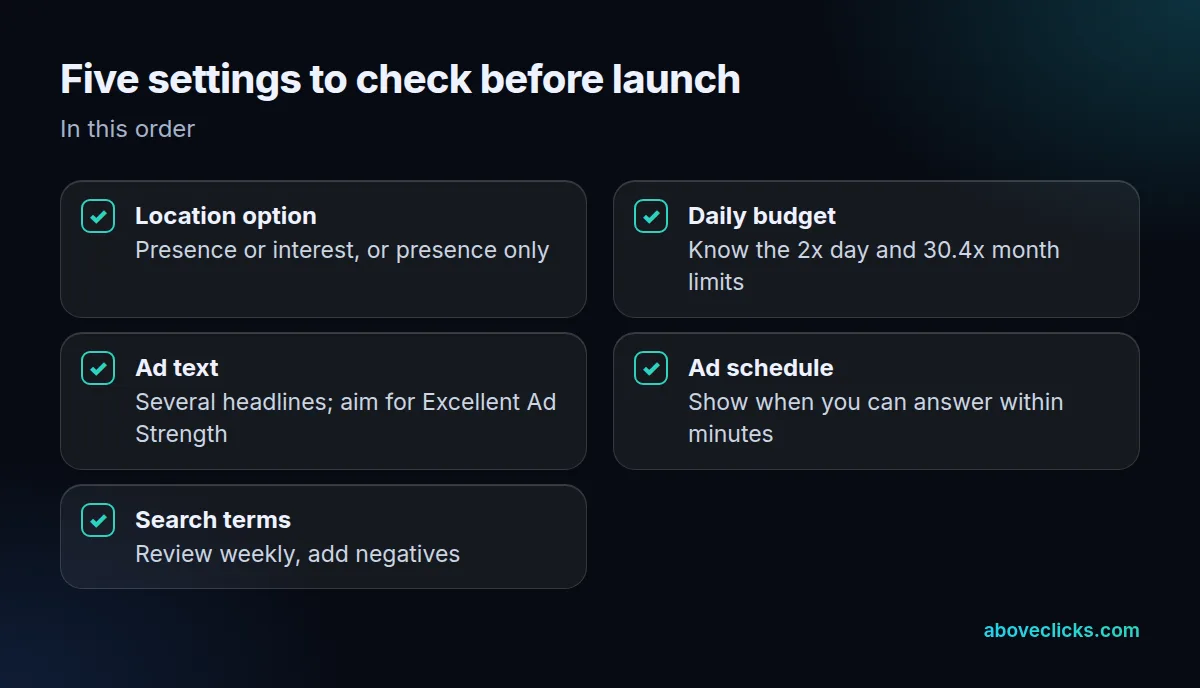
- Location option. Google’s location targeting guide recommends “Presence or interest” as a Search best practice and says advertisers in Travel, Real Estate and Education who switched from “Presence” saw 5% more conversions (Google data from 2022). It also says to consider “Presence” when you only want people physically in the area. A radius needs at least 1 km, and a very small area may show your ads only now and then.
- Budget limit. As of November 2026, Google’s budget guide says that for most campaigns the daily spend can reach 2 times your average daily budget, and the monthly limit is 30.4 times it. A $30 budget can spend $60 on a busy day.
- Ad text. Google’s responsive search ad advice says advertisers who raised Ad Strength from Poor to Excellent saw 15% more clicks and conversions on average. Write several different headlines, each with a distinct message: the service, the area, the next step.
- Ad schedule. The ad schedule lets you show ads only on certain days and hours and adjust bids by day and time. Show them when you can reply within minutes, not at 2 a.m.
- Search terms. Open the search terms report every week and add irrelevant searches, such as jobs, courses and rentals, as negative keywords.
The wrong location option and a missing weekly review are the two costly mistakes we see most often in an agent’s first account. Both are fixed in minutes. If you want a second pair of eyes before launch, our free audit reads the account with read-only access.
How much should a realtor spend on Google ads?
Work backwards: pick the share of commission you will pay per closing, turn it into a maximum cost per lead, then size the budget so the test can show a pattern. There is no market-wide figure that fits every city.
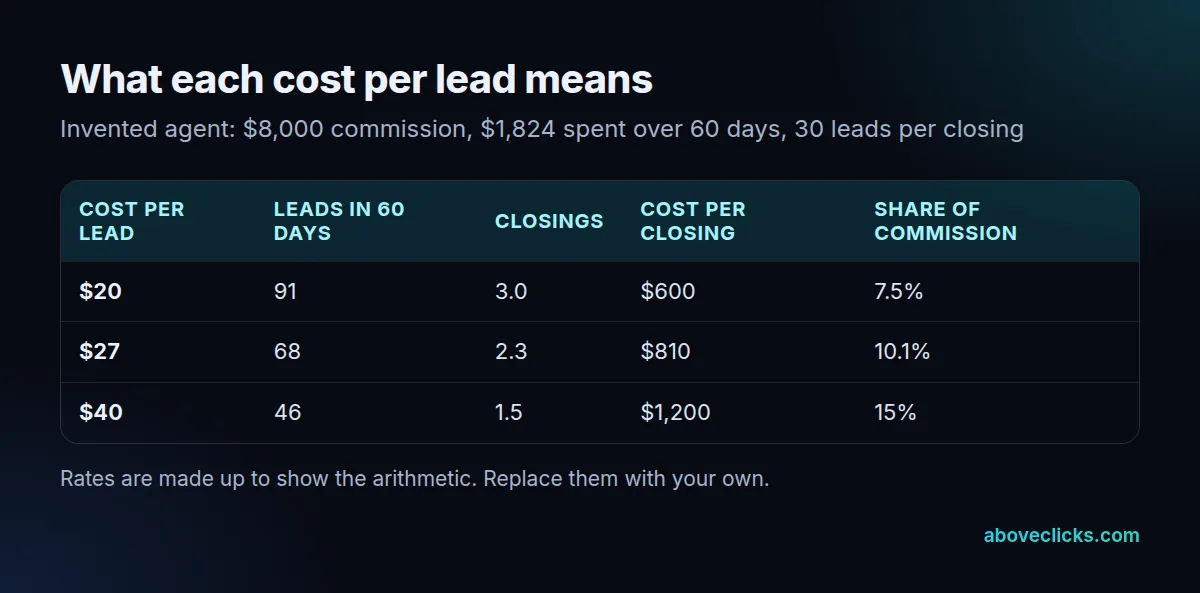
Example: an agent with an $8,000 average commission will pay up to 10% of it, $800, to win one closing. In the example, 1 lead in 10 becomes a signed agreement and 1 agreement in 3 becomes a closing, so it takes 30 leads per closing. The highest cost per lead is then $800 divided by 30, about $27.
For the budget, set $30 a day. Under the 30.4 times rule above (as of November 2026), the monthly limit is $912, so 2 months is at most about $1,824. The table shows what 3 different costs per lead would mean on that spend.
At $40 a lead the same $1,824 buys 46 leads, about 1.5 closings, and each closing costs $1,200 or 15% of the commission. That is over the limit, so the account needs fixing or stopping. Our guide to cost per acquisition in Google Ads shows how to work the same figure from a different starting point.
Keep the test small enough to survive being wrong. The same sums work for Google ads for real estate agents in any city. A good test of Google ads for realtors uses one or two campaigns and one landing page per service. Money split across several campaigns gives each too few clicks to read. If you are also weighing social ads, the Facebook ads for realtors guide uses the same logic.
When should you stop or keep running Google ads for realtors?
At day 60, with 3 questions about the numbers you set before you started. Continue if the cost per lead is under your limit, fix if only the follow-up is weak, and stop if the numbers stay over after fixes.
Use this day-60 test for Google ads for realtors:
- Is the cost per lead at or under your limit? In the example, $27 or less. If yes, continue and consider raising the budget slowly.
- Were leads reached in minutes, and did some become signed agreements? If leads are cheap but never answer, fix the follow-up, not the ads.
- Did the search terms report show real searches? If most clicks came from irrelevant searches after you added negatives, change the keywords before spending more.
Write the three answers down on day 60 and date them. A note such as “day 60: $31 a lead, 41 leads, 3 signed agreements, follow-up under 10 minutes” lets you compare the next test with this one, and it stops a hopeful month from rewriting the rules afterwards.
If the cost per lead is still above your limit after 2 rounds of fixes, stop and move the money to a channel that works for your market. Closings lag by weeks or months, so at day 60 judge leads and signed agreements, and check closings later.
For the wider plan around the ads, the real estate digital marketing page shows how we connect Google Search, follow-up and reporting. More guides are in Google Ads.