Does Google AdWords cost money? Yes, but you pay per click on your ads, and Google sets no minimum ad spend. Before you set a budget, work out the most you can afford to pay for one click.
AdWords is the old name for Google Ads, so the rules below apply to both. This guide sorts the Google Ads cost into what is billed and what is not, shows how your daily budget caps the bill, and gives you a formula for a break-even click price.
What is Google AdWords, and is it the same as Google Ads?
It is the same product under its old name. Google announced on June 27, 2018 that Google AdWords was becoming Google Ads, a brand for its advertising across Search, YouTube, Maps and partner sites.
The announcement said Google had launched AdWords nearly 18 years earlier. People still search for the old name, which is why guides and forum threads mix the two. When an older article quotes AdWords prices, treat the numbers as dated and check them against your own account.
Does Google AdWords cost money, or is it free to use?
It costs money to run ads, and the charge follows the clicks. Google’s how-it-works page says there is no minimum ad spend and that you can set a daily or monthly cap that suits your business.
As of November 2026, the same page describes standard search ads as pay-per-click, where you pay when someone clicks your ad. So with Google AdWords, an ad that is shown and ignored bills nothing, and a new account does not have to commit to a spending level to start.
So does Google Ads cost money before the first click? As of November 2026, per Google’s how-it-works page, you choose the cap yourself: for example, $10 a day or $300 a month. Your Google Ads cost then depends on how many clicks arrive and what each one costs, so the Google AdWords cost for a month is the clicks multiplied by the price.
That answers the question, but not the budget. Is Google Ads free? Not for clicks, and a guide that only says “pay per click” leaves you guessing, so the next sections show what the bill is made of and where it stops.
How does Google Ads charge you?
Per click on search ads, at a price set in an auction. As of November 2026, you enter a maximum click bid, and the actual cost per click is often lower, because you pay only what is needed to beat the ad ranked just below yours.
The Google Ads auction runs on every search. Google lists six factors that decide whether your ad shows and where:
- Your bid.
- The quality of your ad and landing page.
- The expected effect of ad assets and formats.
- The Ad Rank thresholds.
- The context of the search, such as location and device.
- How competitive the auction is.
Google also says a more relevant ad and page can win a better position at a lower price, even against a competitor who bids higher. The same page names 6 factors, so no single number, such as your bid, fixes the result.
For example, if your maximum bid is $2.00 and the ad ranked just below yours would have needed $1.40 to hold its place, you pay about $1.40 plus a small margin, not $2.00. That is an invented illustration of the rule above, not a market price. That is why two stores bidding on the same keyword can pay different amounts for the same click, and why the Google Ads cost on your account is never a fixed rate card.
What is free in Google Ads, and what is not?
Being shown is free on search; being clicked is not. Everything else depends on who you pay: Google for clicks, an agency for its work, and your own vendors for tracking and pages.
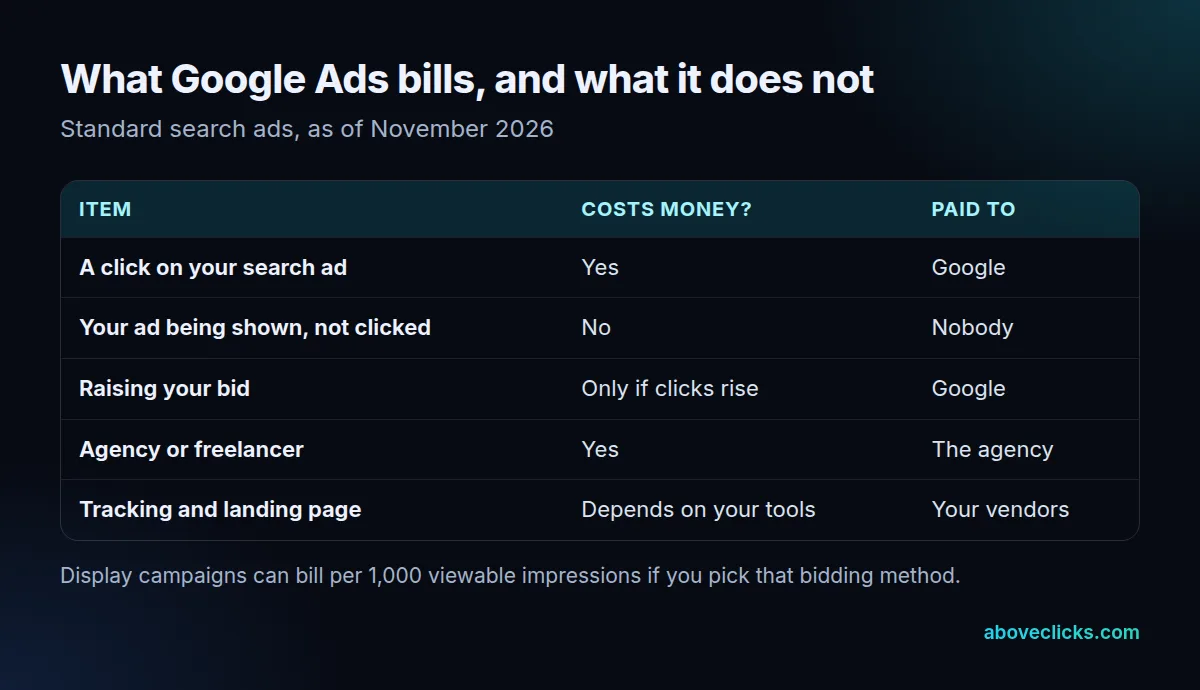
An ad shown 1,000 times with 0 clicks bills $0 on search, while the same ad with 10 clicks bills 10 times its actual click price. The table keeps three separate bills apart, and mixing them is the usual way a quote gets confusing. Google’s page states the clicks rule, as above. The agency and vendor rows are your choices, not Google rules.
As of November 2026, Google’s pages describe charges for clicks, not a separate fee for the account. If you hire help, ask for the agency fee and the ad spend as two lines. Our marketing agency pricing models guide explains how those fees are structured. For the fee questions on a new account, see the PPC account fee guide, which covers what Google does and does not charge at sign-up.
Is Google Ads free to use after setup? Not once a campaign gets clicks, because each click is billed, so treat “free to start” and “free to run” as different claims.
How much can Google Ads cost per day and per month?
As of November 2026, no more than the limit you set, with one daily exception. Google’s spend guide says your daily budget is an average, and on a busy day spend can reach 2 times it. The monthly charging limit is 30.4 times the daily budget.
The guide gives the maths: a $10 daily budget means at most $304 in a month. Google also separates the served cost, which is every click received, from the billed cost, which is what you owe after adjustments such as overdelivery and invalid activity.
Google’s budget page gives the same 30.4 rule for converting a daily figure to a monthly one, and adds a tip: start small and check the account daily after you change a budget. For typical click prices and budgets, read our PPC pricing guide, because averages move and we do not quote them here.
What is the minimum budget for Google Ads?
There is none. Google says there is no minimum ad spend, so the real floor is set by your own numbers: the most a click can cost before an order loses money.
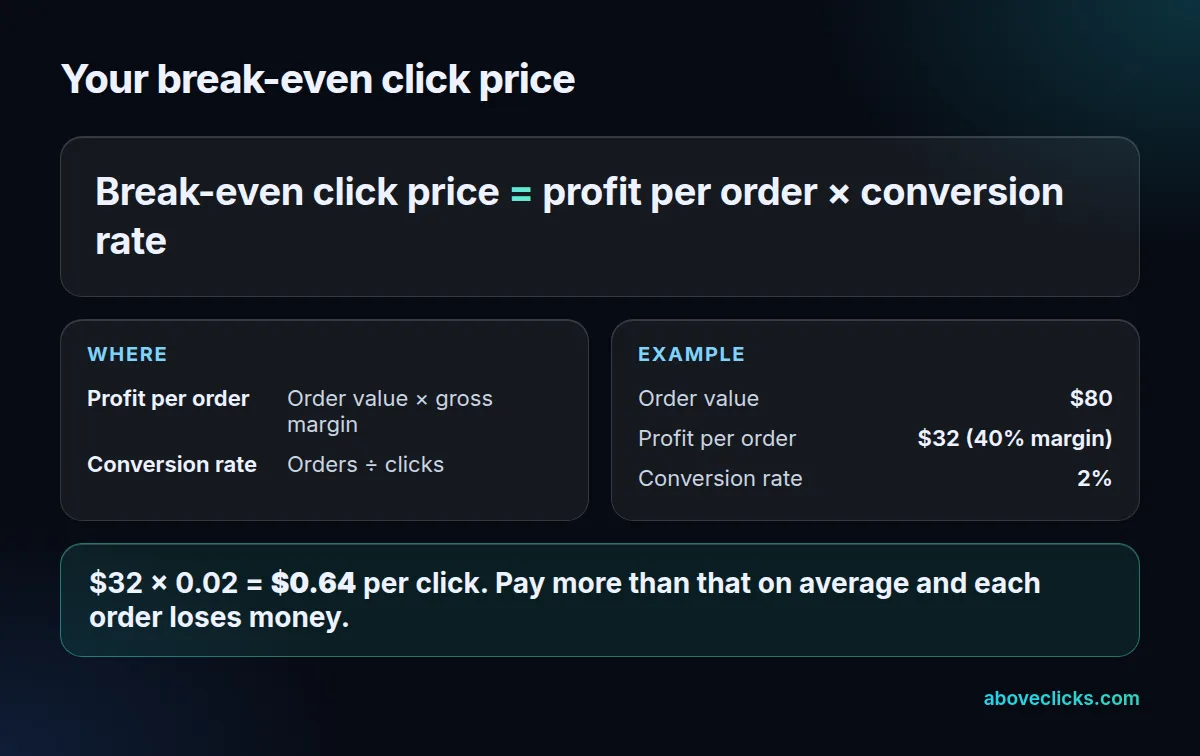
Here is a worked example with an invented store. It sells an $80 order at a 40% gross margin, so each order leaves $32 before ads. If 2 in every 100 clicks become orders, one order takes 50 clicks, so the Google Ads cost of an order is 50 clicks at whatever each click costs, and $32 × 0.02 = $0.64 per click is the most it can pay.
Now add a budget. At $20 a day, the monthly limit is $20 × 30.4 = $608. At $0.64 a click that buys 950 clicks, which at a 2% conversion rate is 19 orders and $608 of profit before ads. That equals the spend, so the store breaks even and learns its real numbers.
Change one input and the answer moves. At a 1% conversion rate the same store can pay only $0.32 per click, and at 4% it can pay $1.28. Our cost per click formula guide shows how to measure each input from your own account.
What is a Google Ads charge on my credit card?
It is the billed cost of the clicks your campaigns received. Google’s spend guide points to the billing Summary page for current charges and payment details, and to the Billed cost report for daily costs by account or campaign.
A $10 daily budget, for example, can bill up to $20 on one busy day, but never more than $304 in the month. Use those two screens to check a charge. Compare the billed cost with the served cost, which counts every click received, because the billed figure is lower when adjustments such as overdelivery or invalid activity apply. If a charge looks wrong, a campaign you thought was paused is the first thing to check.
The same screens settle a common worry: does Google Ads cost money when you are not looking, and does the Google AdWords cost carry on after you stop? Only for clicks that arrive while a campaign is live. A paused campaign receives no new clicks, so it adds nothing to the next bill.
How do you know if Google Ads is worth paying for?
When your billed cost per order stays below your profit per order, once you have enough clicks to trust the numbers. Judge the Google AdWords cost over weeks, not over one day, because a handful of clicks proves nothing.
Here is a first-month routine that keeps the Google Ads cost small and the lessons clear.
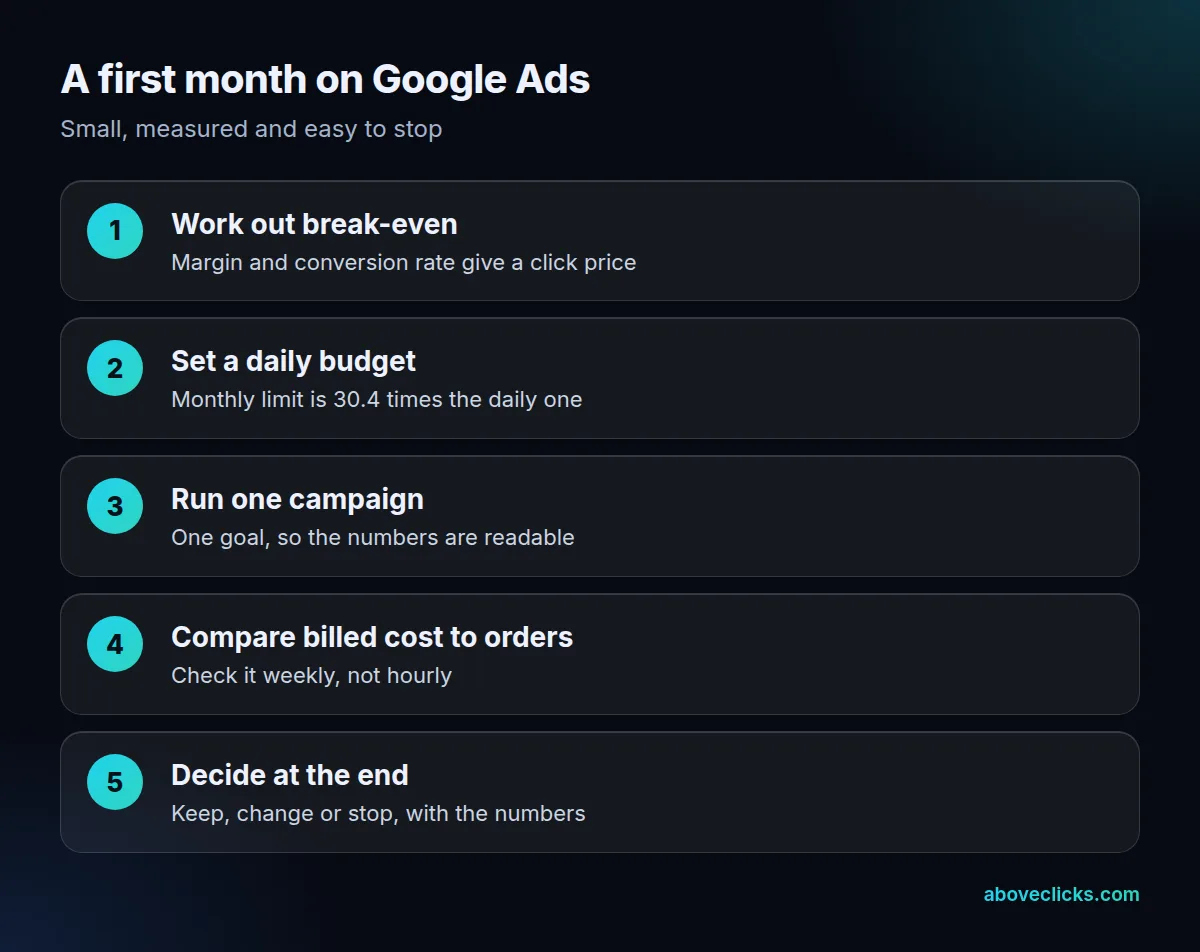
Does Google Ads cost money in a first test month? Yes, but the cost is capped. At $10 a day, the cap is $304 for the month, so you know the worst case before you start.
Pick a bidding goal that matches what you want. Google’s spend guide lists conversions-focused strategies for purchases and sign-ups, a clicks-focused strategy for traffic, and viewable-impression bidding for Display only.
Three traps make the Google Ads cost higher than it needs to be:
- No break-even number: you cannot tell a good week from a bad one.
- Judging too soon: a few clicks and no orders says little when only 2 in 100 clicks convert.
- Mixing agency fee and ad spend: you cannot see what the clicks cost.
We run Google Ads with an audit first, a written plan, and a monthly report, and the Google Ads service page shows how it works and its price cards. If you want a second opinion before you spend, our free audit reads your account and gives you a PDF. More guides are in Google Ads guides.