Geek real estate marketing means running property marketing as a measured system: every lead logged by source and stage, pages that load fast, and targeting that stays inside the housing rules. Start by logging, not by buying more ads.
This guide sets out what geek real estate marketing covers, the six data layers worth keeping, how to track a lead from the first click to a closed deal, the speed and targeting limits, and a 30-day sprint to put it in place. In short: 6 data layers, 4 lead stages and about 30 minutes a month to review them.
What is geek real estate marketing?
It is the measurement-and-systems side of property marketing: deciding in advance what you will log, wiring that logging into your website and ads, and reviewing the numbers every month. The creative work, such as photos and listing copy, still matters, but it sits on top of the data.
Searches for the phrase often lead to one vendor’s lead-generation platform. This guide is about the method, not a product. Geek real estate marketing works with a spreadsheet, a CRM or a bought platform, and the method is the same for an agent, a broker or a developer.
The idea behind geek real estate marketing is simple. Most property businesses can say how many enquiries arrived last month; far fewer can say which of them were qualified, which were worked and which became clients. Take a worked example, with illustrative numbers: 40 enquiries last month, 12 qualified, 6 worked within 2 days and 2 closed. Without the stages, the owner only ever sees the 40. Geek real estate marketing closes that gap, and it does so with data you already generate. For the tactics themselves, see our guides to real estate marketing techniques and real estate marketing programs; this guide covers what you measure underneath them.
Which real estate marketing data is worth tracking?
Six layers cover most of what an owner needs: search visibility, site speed, lead capture, lead stages, ad data and the local profile. Each one should have a number you can check, not just a dashboard.
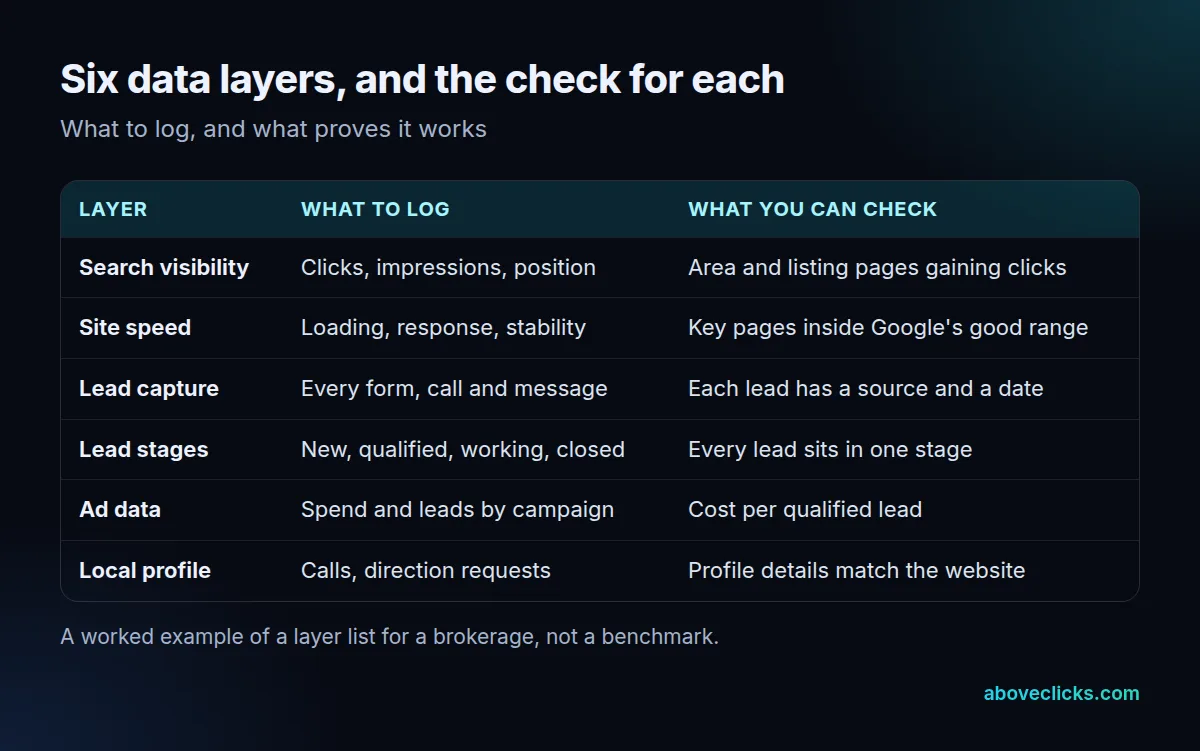
Real estate marketing data gets noisy fast, so keep it small. All 6 layers fit on 1 page and take about 30 minutes to review once a month. Start with search visibility. Google’s Performance report in Search Console gives 4 metrics: clicks, impressions, click-through rate and average position. Look at them for your area pages and listing pages, not just for the whole site, because the sitewide average hides what matters.
The other five layers follow the same rule: one number each, looked at monthly.
- Site speed: whether your key pages sit in Google’s good range (see below).
- Lead capture: a count of forms, calls and messages, each with a source and a date.
- Lead stages: where every lead sits, from new to closed.
- Ad data: spend and qualified leads per campaign, not just clicks.
- Local profile: calls and direction requests, and whether the details match your website.
On the last point, Google’s Business Profile guidelines ask for a precise address or service area, and say a virtual office is not eligible for a profile. If your profile and website disagree on the address or area, fix that before you read anything else into the numbers.
How do you do real estate lead tracking from click to close?
Give every lead one source and one stage, and move it along four stages: generated, qualified, worked and closed. Real estate lead tracking fails when leads are counted once, at the form, and never again.
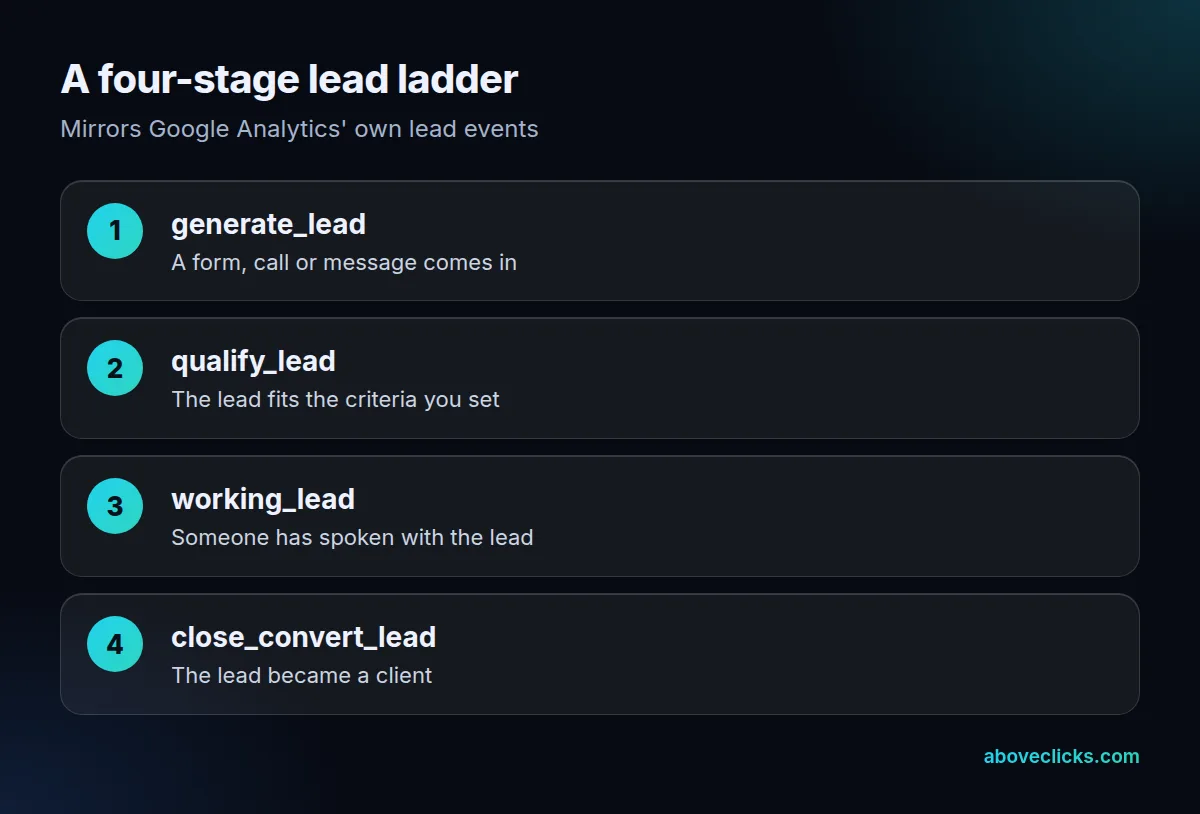
Google Analytics already has a vocabulary for this. Its recommended events include 4 lead events: generate_lead when someone submits a form or information offline, qualify_lead when the lead is marked as fitting your criteria, working_lead when a representative contacts or is contacted by them, and close_convert_lead when the lead becomes a customer. Using those names means your reports match how Analytics and Google Ads talk about leads.
Here is the practical version:
- Fire generate_lead on every form, click-to-call and message button, and record the source and the page.
- Decide what qualified means in one sentence, such as “budget confirmed and area matches”, and write it down.
- Mark leads as working when someone has spoken to them, so slow follow-up becomes visible.
- Mark closed leads with the source that first brought them in.
Without the third step in your geek real estate marketing setup, you cannot tell a weak source from slow follow-up. With the fourth, you can finally compare sources by closed clients rather than by raw enquiries. For the ad side of this, our guide to PPC conversion tracking explains how to pass conversions back to the ad platforms.
In the worked example above, 12 of 40 enquiries qualified, so a source that sends 10 leads and 0 qualified ones is a source to question, not to scale. If you do not yet have a CRM, a sheet with source, date, stage and outcome is enough for real estate lead tracking in the first months. Keep the same four stages when you move to software.
Does website speed matter for a real estate site?
Yes, for the pages people land on: listings, area pages and enquiry forms. Google publishes three thresholds, and a property site with large photo galleries is the usual place to miss them.
Google’s Core Web Vitals guide says to aim for Largest Contentful Paint within 2.5 seconds, Interaction to Next Paint under 200 milliseconds and Cumulative Layout Shift under 0.1. The Core Web Vitals report in Search Console shows which pages pass.
A practical rule for geek real estate marketing is to test the 5 pages that bring the most visitors first: the home page, the main area page, the top 2 listing templates and the enquiry page. Photo-heavy listing pages tend to fail on the first one, because the biggest image is also the slowest. Resize photos to the width they display at, give every image a set height so the page does not jump, and load the gallery images below the first screen later. Then check the report again after a month, because real-user data takes time to update.
Speed is also a lead-capture issue, and a core part of geek real estate marketing, because slow pages quietly cut the number of enquiries you can count. A form that shifts as the page loads or lags on a phone loses enquiries that never show up as lost.
Where does real estate marketing automation fit?
After tracking, not before it. Real estate marketing automation, such as an email sequence for new enquiries or a monthly note to past clients, only helps if you can see which messages lead to qualified leads.
Automating the wrong step makes bad data faster, so geek real estate marketing puts the tracking first. Set up the four lead stages first, then automate the handoffs between them: an instant reply when a lead is generated, a reminder when a qualified lead has not been worked within 1 to 2 days, and a check-in after a closing.
Three automations are enough for most small teams doing geek real estate marketing:
- A reply to every new enquiry, with a clear next step.
- A task for a person when a qualified lead has not been contacted.
- A monthly update to past clients and open enquiries.
A reply inside 24 hours is a sensible target to write down, whatever tool sends it. Each should write its result back to the lead’s stage. If an automation cannot do that, it will not improve your real estate marketing data, however polished it looks.
A short note on reading the numbers. With under 30 leads a month, read each lead rather than the averages: one large enquiry can swing a percentage by 10 points or more. Compare sources only when each has enough leads that a single unusual one no longer changes the picture, and compare by qualified leads, not by raw enquiries. That is the discipline that separates geek real estate marketing from a dashboard full of charts.
Which rules limit data-driven targeting in real estate?
Housing is a restricted category. In the United States and Canada, Google’s personalized advertising policy does not allow age, gender, marital status or parental status to be used for housing ads, and ZIP code location targeting is not allowed either.
That matters because the data-led approach makes it tempting to slice audiences as finely as the data allows. The rules say where to stop. Use location areas other than ZIP codes, and describe the property and the area, not the person you imagine living there.
The law behind this is broader than any platform policy. HUD lists the Fair Housing Act protected classes as race, color, national origin, religion, sex, familial status and disability. Check ad copy, images and audience choices against all 7, and keep a record of what you ran. This is general information, not legal advice; ask your broker or counsel about your own market.
Two habits help. Review every new campaign against the rules before it goes live, and keep the targeting settings in the monthly report so a change is visible. We suggest keeping 12 months of ad records, so you can show what ran if anyone asks. The Google rules were checked as of November 2026; policies change, so recheck the linked page before a big launch.
How do you run a 30-day measurement sprint?
One job per week for four weeks, ending in a one-page report. A sprint turns geek real estate marketing from a list of ideas into a working habit.
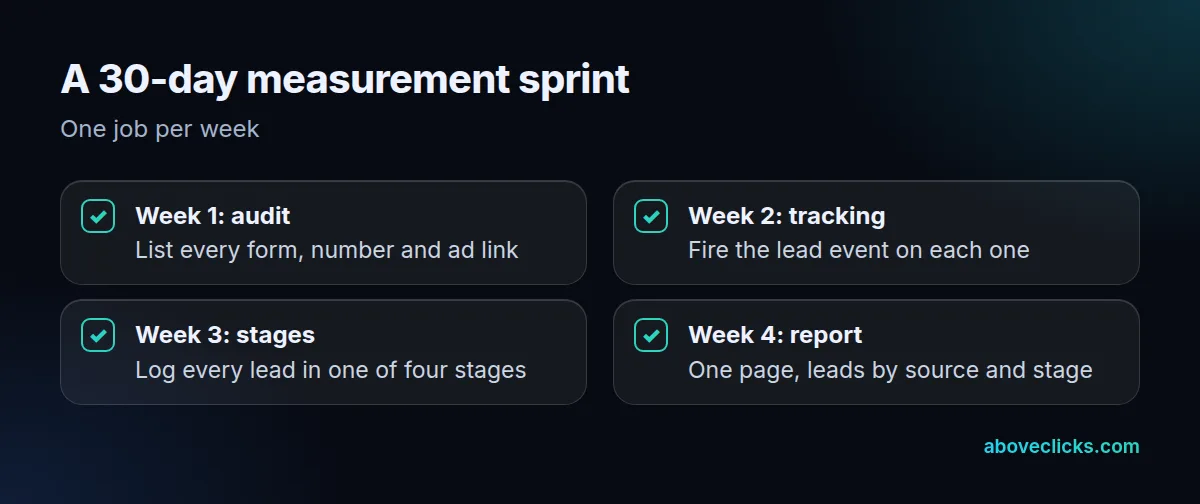
Week 1 is the audit: list every form, phone number, ad link and profile that can produce a lead. Week 2 adds tracking: fire the lead event on each one and test it by submitting 5 dummy enquiries, 1 per form or number. Week 3 sets up the stages: put every open lead into one of the four, and write down the qualified definition. Week 4 produces the report: leads by source and stage, search clicks for your area pages, and the speed status of the key pages.
After 30 days of geek real estate marketing you have a baseline. Repeat the sprint every 6 months. The costly traps are almost always the same 4:
- A form or number that never fires an event, so its leads show as direct traffic.
- No definition of qualified, so every source looks equally good.
- A profile address that differs from the website.
- Ad targeting that nobody reviewed against the housing rules.
If you want a second pair of eyes on your setup, our real estate marketing service and real estate industry page describe how we build the lead report, and the free audit reads your tracking and search setup with read-only access. More guides are in industries.