Ecommerce technical SEO is the site-level work that lets Google crawl, understand and index every product and collection page on a store, without wasting time on duplicate or filtered URLs. This guide gives 7 checks, in the order to fix them.
Ecommerce technical SEO suits a store that sees products missing from Google, or a Search Console report full of “not indexed” labels. Each check says where to look and which official page backs it. For the rest of the topic, see our ecommerce SEO guide.
What is ecommerce technical SEO?
It is the work that decides which of a store’s URLs Google can reach, which it should treat as the main version and which it should ignore: URL structure, filters, canonical tags, status codes, structured data and speed.
Ecommerce technical SEO sits next to content and links, not instead of them. Technical SEO for ecommerce differs from a brochure site because three things multiply URLs: filters, product variants and pagination. A store with 300 products can show Google thousands of addresses, so ecommerce technical SEO starts with counting them.
Size matters less than people think. Google’s crawl budget guide is written for sites with 1 million+ unique pages that change about weekly, or 10,000+ pages that change daily, and it calls those numbers rough estimates. A 500-product store sits far below that. The usual damage there isn’t running out of crawl time. It is duplicate URLs competing with real pages, and new products being found later. Our crawl budget entry explains the term.
Which ecommerce technical SEO checks should an online store run first?
Start with the checks that waste the most crawling and index space: filters, duplicate URLs and the sitemap. Then check that every product can be reached, then markup and speed.
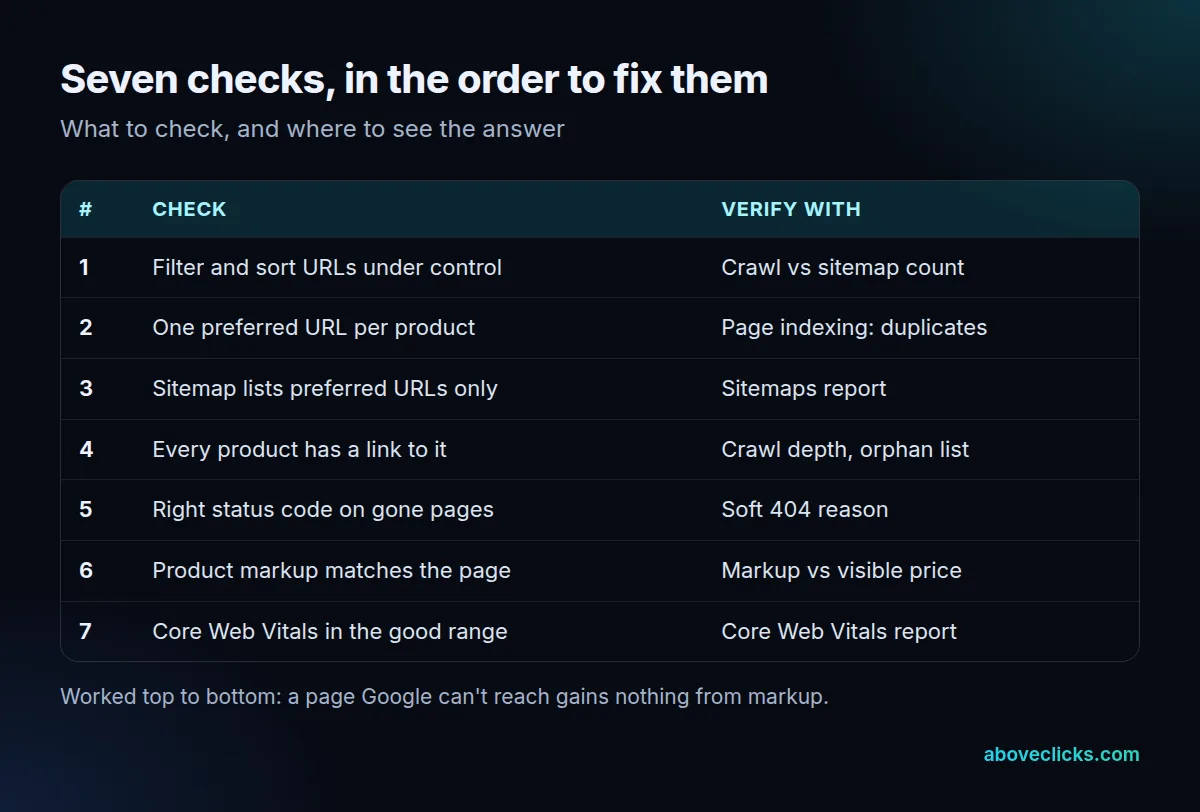
The table is the whole ecommerce technical SEO method: seven checks, each with the place to verify it. Before starting, compare three counts: the URLs a crawler finds on your site, the URLs in your sitemap and the URLs Google reports as indexed. These ecommerce technical SEO counts should be close, once you allow for pages that shouldn’t be indexed.
Example: a store with 300 products and 20 collections has 320 real pages. A crawl finds 7,860 URLs, the sitemap lists 320 and Search Console shows 290 indexed. The gap between 320 and 7,860 is filter URLs, which is check 1. The gap between 320 and 290 is 30 real pages that Google left out, which checks 2 to 5 explain. The store is invented; the arithmetic is the point.
If you’d rather have the counts done for you, our technical SEO audit runs 25 checks and sends a PDF report within 2 workdays.
How do filters and faceted navigation hurt an online store?
Each filter combination can become its own URL, so a few filters create thousands of near-copies of a collection page and slow Google’s discovery of the pages that matter.
Google’s guide to faceted navigation URLs says the common URL-parameter setup can generate infinite URL spaces, and names two harms: overcrawling, and slower discovery of new, useful URLs.
Filters come first in this order because the arithmetic shows how quickly they multiply URLs. Here’s the example store. Each collection offers 8 colors, 6 sizes and 5 price bands. With “any” as an option for each filter, that is 9 x 7 x 6 = 378 states per collection. Take away the unfiltered page and 377 filtered URLs remain. Across 20 collections that is 7,540 filtered URLs next to 320 real pages, about 24 for every real page. A sort option such as ?order=price can make each of them exist in more than one version.
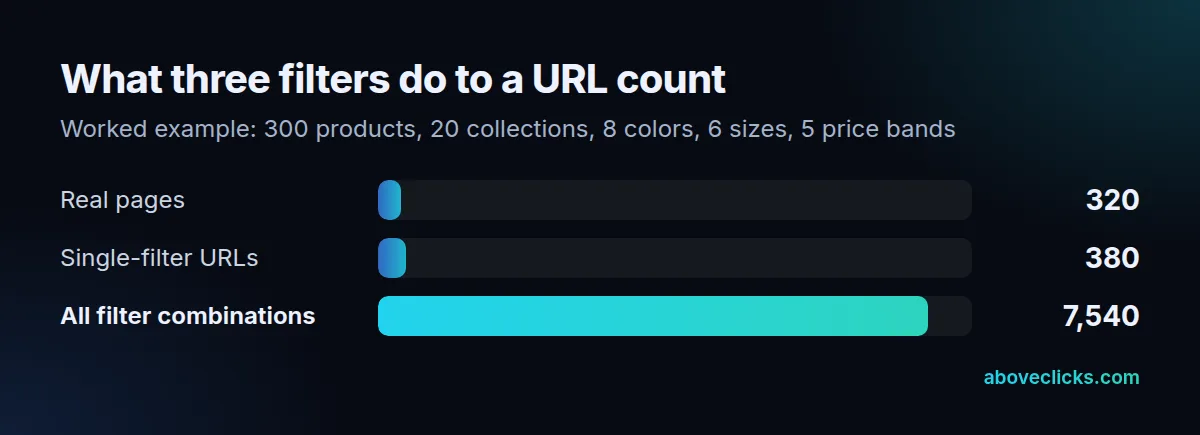
Google lists these ways to handle filter URLs, strongest first:
- Disallow crawling in robots.txt when filtered pages don’t need to appear in search. The guide’s example blocks parameter patterns such as
/*?*color=and allows one unfiltered listing. - Use URL fragments such as
#color=greenfor filters. Google Search generally doesn’t support fragments for crawling and indexing, so those filters have no crawl effect. - Add canonical tags or nofollow links. The guide calls these generally less effective in the long term. A canonical may, over time, reduce how often the other versions are crawled.
On Shopify, the robots.txt file is generated by default and works for most shops. A robots.txt.liquid template lets you customize it when your filters need more rules.
A robots.txt block stops crawling, not indexing. Google’s robots.txt introduction says a disallowed page can still be indexed if other sites link to it. To keep a URL out of results, use a noindex tag or a password.
If filtered pages do need to be indexed, the same guide asks for the standard & separator, a fixed filter order in path-based filters, and a 404 status for combinations with no results.
Decide filter by filter, as any technical SEO ecommerce review should. A filter that matches a real search, such as a color within a collection, can become a proper collection page with its own title and copy; our collection page SEO guide shows how. The rest stay out of the crawl. Good ecommerce technical SEO treats each filter as a decision, not a default. The faceted navigation entry defines the term.
How should canonical tags, redirects and sitemaps work together?
Every product should have one preferred URL, and the canonical tag, redirects, internal links and sitemap should all name that same address.
Google’s guide to duplicate URLs ranks the signals. Redirects and rel="canonical" are strong signals, sitemap inclusion is a weak one, and the methods add up when they agree. If you give none, Google chooses the version itself, and it may not be the one you’d pick.
Variants are a common trap in technical SEO for ecommerce stores. Google’s URL structure guide for ecommerce notes that /product/black-t-shirt and /product?sku=1234 may return the same page, and Google can’t tell from the URLs alone. Example: a product in 3 colors and 4 sizes has 12 variants. If the platform gives each one its own indexable URL, 300 products become 3,600. Point each variant’s canonical at the main product URL.
Pagination needs different treatment. Google’s pagination guide says each page needs its own URL, such as ?page=2, and that page 1 shouldn’t be the canonical for the whole sequence. It also says Google no longer uses rel="next" and rel="prev".
Keep the sitemap clean: only preferred, indexable URLs. A redirected, noindexed or filtered URL in it sends the weak signal in the wrong direction.
Can Google reach every product and collection page?
Only if links lead to them. This is the part of ecommerce technical SEO that most often goes wrong quietly. Collection pages should link to every product with plain <a href> links, and removed products should return a real 404 status.
Google’s ecommerce site structure guide describes the path: menus to categories, categories to subcategories, subcategories to products. If category pages don’t link to all products, Googlebot might not find them by crawling alone, and it generally doesn’t submit searches in a search box. Where linking every product isn’t possible, use a sitemap or a Google Merchant Center feed.
Take a collection with 310 products and 24 per page. That is 13 pages (310 / 24 = 12.9, rounded up). Google’s pagination guide says its crawlers don’t “click” buttons and generally don’t run JavaScript that needs a user action. If the only way to see more is a Load more button with no link behind it, Google sees 24 products, and 286 depend on the sitemap or other links.
Removed products are the other leak. A page that says “sorry, not found” but returns a 200 status is what Search Console calls a soft 404. Google recommends a 404 status for pages that are truly not found. The same goes for filter combinations with no results.
What does technical SEO for ecommerce need beyond crawling?
Product markup that matches the visible page, and Core Web Vitals inside Google’s good range: targets of 2.5 seconds for LCP, 200 milliseconds for INP and 0.1 for CLS, measured at the 75th percentile of visits.
Ecommerce technical SEO also covers markup. Google’s product structured data documentation separates product snippets from merchant listings. It says that providing both page markup and a Merchant Center feed maximizes visibility. It also notes that Google works out price drops itself and may not show them.
The practical check is simple: the name, price and availability in the markup must match what a shopper sees. Our product schema markup guide covers the fields.
For speed, web.dev’s Web Vitals set the three targets above and judge them at the 75th percentile, so three in four visits need to meet them. Test one collection page and one product page: each template shares its problems across hundreds of URLs.
How do you know an ecommerce technical SEO fix worked?
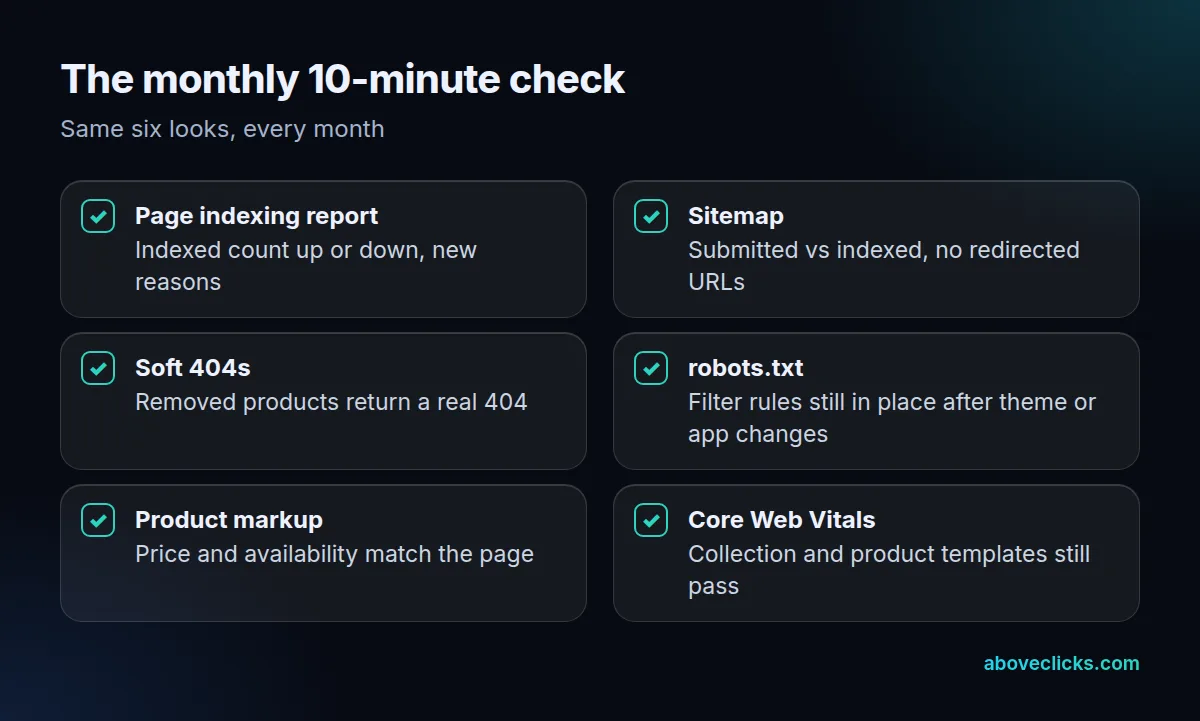
Check the Page indexing report for the affected URLs after Google has recrawled them, and compare the indexed count before and after. Don’t judge a fix by rankings in the first week.
Google says crawling can take a few days to a few weeks after a change. Log the date of every fix and look again once that window has passed.
A good ecommerce technical SEO fix leaves a trail in Search Console. Its Page indexing report tells you what to aim for: the canonical version of every important page indexed, and duplicates and alternates not indexed. Not every URL should be indexed. Two limits matter:
- Labels such as “Duplicate without user-selected canonical” aren’t errors in themselves, and the live URL Inspection test doesn’t check duplicate or canonical conditions, so a pass there doesn’t prove a duplicate fix.
- “Discovered – currently not indexed” means Google found the URL but rescheduled the crawl, usually because it expected the crawl to overload the site.
Our ecommerce technical SEO work follows the same order: the audit within 2 workdays, the fixes in 1 to 2 weeks depending on store size, and a re-check once Google has crawled the changes. You can see the scope on our technical SEO for ecommerce page, as part of our ecommerce SEO work. To see how your own store scores on these checks, ask for a free audit. More guides on ecommerce technical SEO and the rest of the topic are in e-commerce SEO.