Ecommerce paid search is advertising on search results that a store pays for by the click, aimed at people already looking for something it sells. Most store accounts hold four layers of it, and the return only makes sense when each layer is judged on its own.
This guide explains how ecommerce paid search accounts work, lists the four layers, shows with a worked example how a blended return hides a weak layer, and gives an order for adding layers. It uses Google Ads, where we work; the layers are the same idea anywhere. If you only need the setup steps, our launch guide linked below covers them.
What is ecommerce paid search?
Ads shown on search results pages, paid for by the click, for a store’s products or brand. A shopper types a query, an auction runs, and the winning ads appear with the unpaid results.
Searchers already have a need, which is why paid search for ecommerce is often the first paid channel a store tries. Paid social, by contrast, shows ads to people who weren’t searching. That difference decides how you should judge each channel, and we come back to it below.
Unlike text-only ads, Shopping ads display a product photo, title and store name, so a shopper sees the product before the click. That is a large part of why ecommerce paid search suits a catalogue: a feed of 500 products can become 500 ads without writing each one.
Paid search for ecommerce also differs from lead-generation paid search in one way: your catalogue is the targeting. Product names and photos come from a feed, and every product has its own margin, for example 15% on one item and 60% on another. An account therefore needs product data and margin data before it needs clever bidding.
How does paid search work for a store?
Every search runs an auction, and the ad with the highest Ad Rank wins each ad location. Google Ads describes 6 main factors in that auction:
- Your bid: the most you’re willing to pay for a click, which is often more than you end up paying.
- Ad and landing page quality: how useful and relevant both are to the searcher.
- Expected impact of assets: extras such as links or a phone number.
- Ad Rank thresholds: minimum quality levels an ad must reach to show.
- Context: the search terms, location, device and time.
- Competitiveness: how close the rival ads’ ranks are.
Google also says Ad Rank is calculated twice for each auction, which means 2 separate checks: first to decide whether your ad is eligible, then to decide where it is shown. A high bid alone doesn’t win a position when quality is low. For a store, that means the landing page for a product is part of ecommerce paid search, not an afterthought, and a feed of 500 products with weak titles loses auctions before any bid is compared.
In an ecommerce paid search account, text ads are matched on keywords. Shopping ads work differently: they use the product data you send through Merchant Center, not keywords, to decide how and where to show. They are billed per click. So for a store, the feed is as much a lever as the bid. Our guide to Shopping feed optimization covers what to fix, and the launch guide for Google Ads gives the step-by-step setup; this one stays at the level of the whole account.
What are the layers of an ecommerce paid search account?
Four: brand search, non-brand search, Shopping and Performance Max. They answer different searches, so a single return figure for all of them tells you very little. Google’s own table of channels shows the spread: Shopping campaigns reach 4 places, while Performance Max reaches 8.
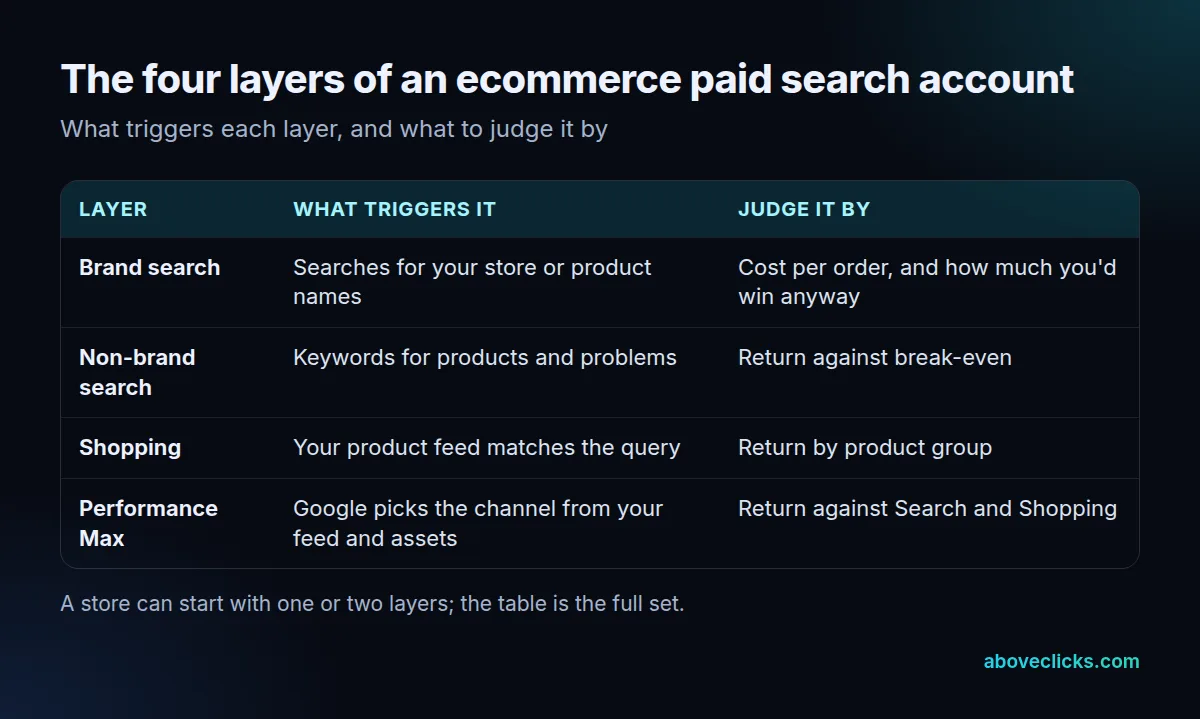
The layers in plain terms:
- Brand search catches people who type your store or product names. It is cheap and converts well, and it flatters the account because many of those buyers were already coming to you.
- Non-brand search bids on keywords for products and problems. It is where you meet shoppers who don’t know you yet, and it usually costs more per order.
- Shopping shows product photos, titles and prices. Google lists Shopping ads and Performance Max campaigns as the two ways a retailer runs them from a Merchant Center feed.
- Performance Max is one campaign that spreads your budget over many places. It can reach the Shopping tab, Search, Images, Display, YouTube, Gmail, Demand Gen and Maps, while a Shopping campaign reaches the Shopping tab, Search, Images and Search partners.
The overlap is the blind spot. With a feed, a Performance Max campaign can take traffic that your Search and Shopping layers would have won, and its report may show a good return partly because it picked up brand searches. Google lists brand exclusions among Performance Max’s safety settings, so check whether they fit your account before you read its numbers. Our comparison of Performance Max and Search campaigns goes through the mistakes in detail.
A small store rarely needs all four layers. A catalogue of 30 products and a thin budget can run brand search and Shopping first and add the rest later. The layers of ecommerce paid search are tools, not a checklist, and each one you add makes the account harder to read.
How should you split an ecommerce paid search budget?
By break-even, layer by layer. An ecommerce paid search budget is only as good as the margin figure behind it. Work out the return at which an order pays for its ad cost, then give budget to the layers that clear it with room to spare.
Break-even ROAS is 1 divided by your margin. At a 40% margin it is 1 ÷ 0.4 = 2.5, meaning each $1 of ad cost needs $2.50 of revenue just to cover the cost of the goods and the ad.
Here is a worked example with invented numbers: one store, one month, a 40% margin and $10,000 of ad cost in total.
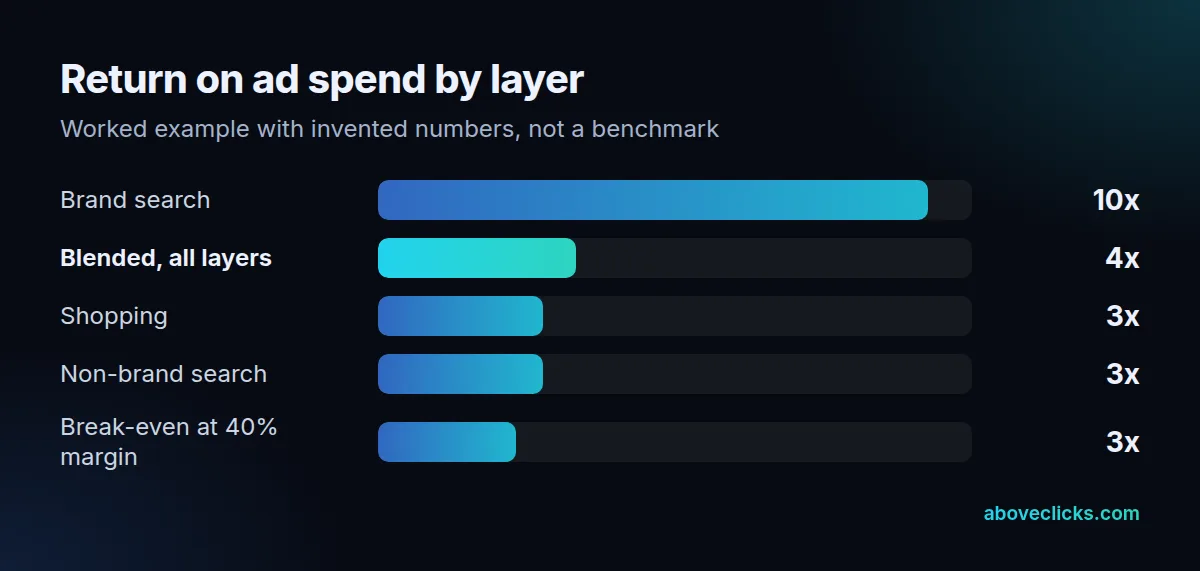
- Brand search: $800 of ad cost, $8,000 of revenue, a return of 10.
- Shopping: $7,000 of ad cost, $21,000 of revenue, a return of 3.0.
- Non-brand search: $2,200 of ad cost, $6,600 of revenue, a return of 3.0.
- All layers together: $10,000 of ad cost, $35,600 of revenue, a blended return of 3.6.
The blended 3.6 looks comfortably above the 2.5 break-even, and a report that stops there would call this ecommerce paid search account healthy. Without brand search the figure is $27,600 on $9,200, which is 3.0. That still clears break-even, but with much less room, and a small drop in Shopping would close it. When we review a store’s paid search, we separate brand from the rest before quoting any return for this reason.
The rule that follows: move budget toward the layer that clears break-even by the widest margin, and away from a layer that sits near it. In paid search ecommerce accounts, the layer with the best return is usually the smallest one, so a bigger budget there often lowers its return.
Two cautions about the example. Brand search returns are a floor check, not a goal, because some of those buyers would have found you anyway. And small layers need patience: for Smart Bidding, Google recommends measuring over a period with at least 30 conversions, and 50 for Target ROAS. A layer with 12 orders a month can’t be judged in 4 weeks. Our Target ROAS guide explains when that bid strategy is ready to use.
How is paid search different from organic search and paid social?
Paid search buys clicks from people searching now, organic search earns them without a per-click fee, and paid social reaches people who weren’t searching. Each has its own budget and its own measure.
Paid search doesn’t buy organic position. If a month brings 40 orders from organic search and 60 from paid search, for example, the two numbers belong in separate reports. Google says that advertising with it won’t have any effect on your site’s presence in its search results, and that it never accepts money to include or rank sites in them, while appearing in organic results costs nothing. So a store needs both an ad budget and sound pages, and one can’t stand in for the other.
Paid social is the other paid channel most stores run next to paid search for ecommerce. In our view it should be judged differently: its audience wasn’t looking, so first-click return will usually look weaker than search, while its job is to create demand that search later catches. Our guide to Meta ads for ecommerce covers that side.
When should you add the next layer?
When the layer before it has a clean read: enough conversions to judge it and a return that clears break-even. Adding two layers at once makes it impossible to tell which one helped.
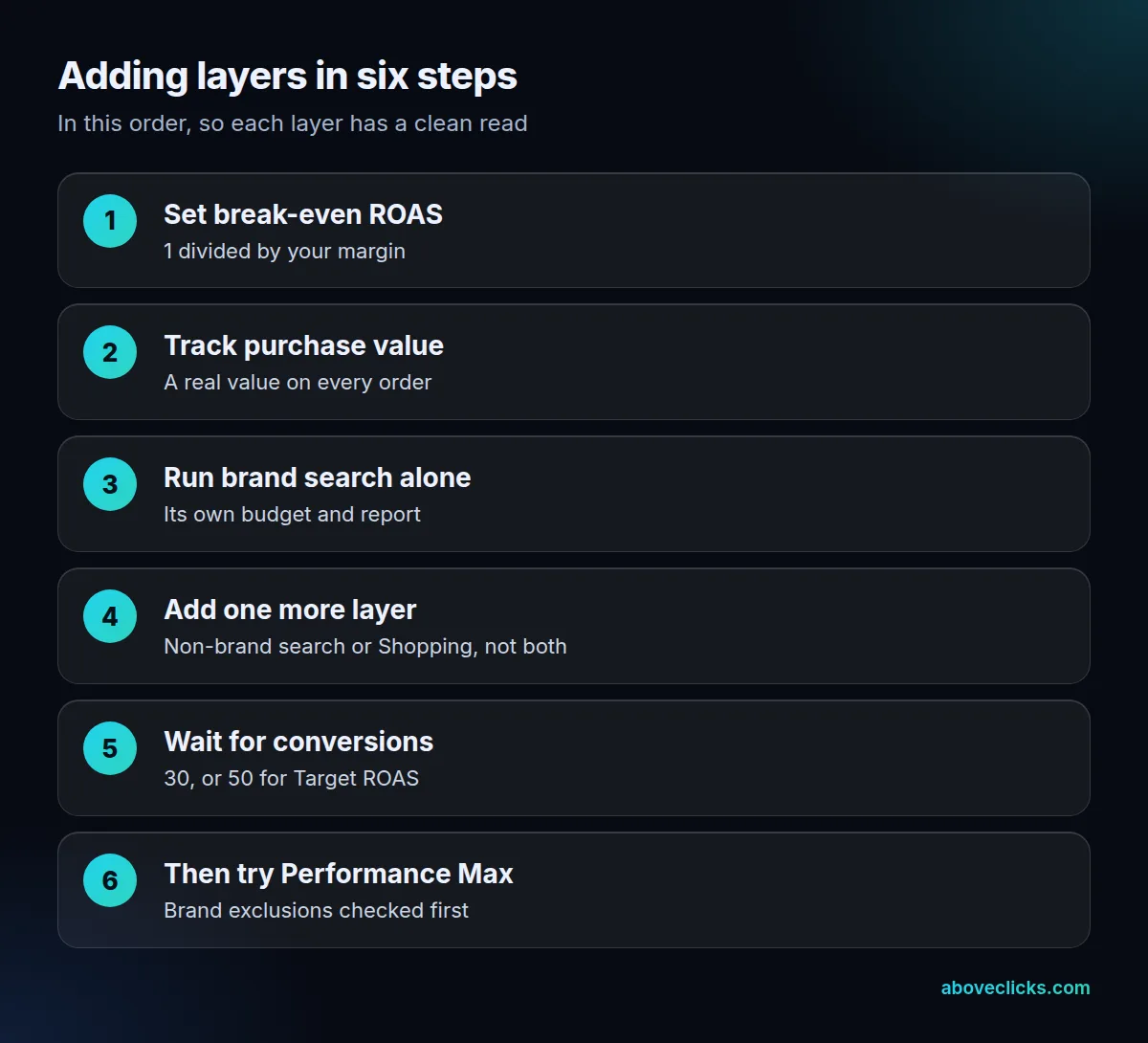
The order above is the one we use, 6 steps long. Break-even and purchase value come first because every later decision depends on them. Brand search runs alone next, so its figures stay separate and the rest of ecommerce paid search is measured without it. Then add non-brand search or Shopping, one at a time, and wait for the 30 conversions Google recommends (50 for Target ROAS) before you judge it. That wait is what stops ecommerce paid search from turning into guesswork.
Performance Max comes last in ecommerce paid search on purpose. It spreads budget across channels, so it is harder to read than the layers before it, and a store without clean purchase tracking has nothing for it to learn from.
If you’d like a second opinion on how your own layers are split, our Google Ads service starts with exactly that review, and the free audit is a quick way to ask. More guides are in Google Ads.