Performance Max vs Search campaign is a choice about control. Search campaigns let you pick the exact queries your ads show for, while Performance Max hands that choice to Google’s AI across 6 channels from a single campaign. Most stores get the best result from running both, with Search protected and Performance Max given a smaller, fenced budget.
This performance max vs search campaign guide covers what each type controls, when to run them side by side, a worked budget split, the 5 mistakes that waste the budget, and the October 2026 changes to check. For the wider Google Ads picture, see our Google Ads guide and the Google Ads topic hub.
What is the difference between a Performance Max and a Search campaign?
A Search campaign runs on keywords you choose, grouped into ad groups, with responsive search ads you write. You can enter up to 15 headlines and 4 descriptions for one responsive search ad, and Google tests the combinations against the query. When someone searches a term that matches your keyword, your ad enters the auction, and you can read the exact search terms that triggered it. Google scores each keyword on expected click-through rate, ad relevance and landing page experience, which is why tight keyword groups and matching landing pages matter so much in Search.
A Performance Max campaign runs on a goal instead of a keyword list. You supply the goal, text, images, videos, audience signals and, for a store, a product feed, and Google’s AI mixes those assets across Search, YouTube, Display, Discover, Gmail and Maps. Google describes it as a complement to keyword-based Search campaigns, not a replacement for them. That complement framing is the honest answer to the performance max vs search campaign question: neither type replaces the other.
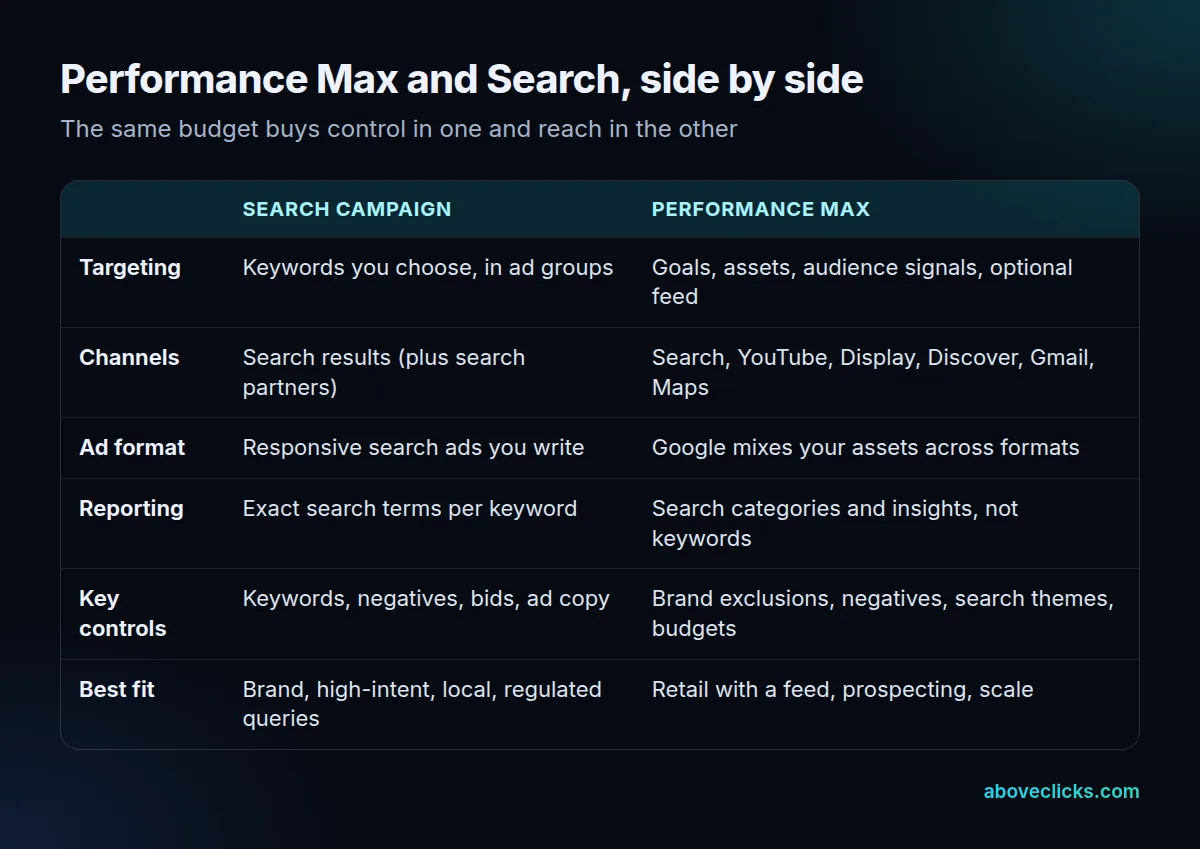
The reporting gap is the real difference in a performance max vs search campaign comparison. Search shows you the query, the keyword and the cost, so you can cut a bad term the same day. Performance Max shows search categories and insights rather than keyword-level terms, so you steer it with budgets, exclusions and themes instead of with keyword edits.
When should you run a Performance Max vs Search campaign side by side?
Run both when your conversion tracking is solid and you have something for Performance Max to work with: a product feed for a store, or strong text, image and video assets for a lead business. Searchers phrase the same choice as performance max vs search ads, and the answer is the same: it depends on what you need to control.
In a performance max vs search campaign split, Search stays in charge in 4 cases:
- Brand queries. Your own brand terms belong in Search, where exact match wording and ad copy stay under your control.
- High-intent, high-cost queries. Where each click is expensive, you want to pick the query, not let the system pick it for you.
- Local and regulated work. A local service area, or a legal, medical or financial offer, needs query-level control for compliance and geography.
- Small or new accounts. With little conversion data, a focused Search campaign gives you readable results faster than a broad automated one.
Performance Max earns its budget when the feed is clean, tracking is trusted, and Search already covers brand and best-converting queries. For example, a store with 100 products in a clean feed gives the system real material to test. If those 3 conditions are not met, fix them first; Performance Max will not fix them for you. Pass that test and the performance max vs search campaign split works; fail it and Search alone is the safer spend.
How should you split a Performance Max vs Search campaign budget?
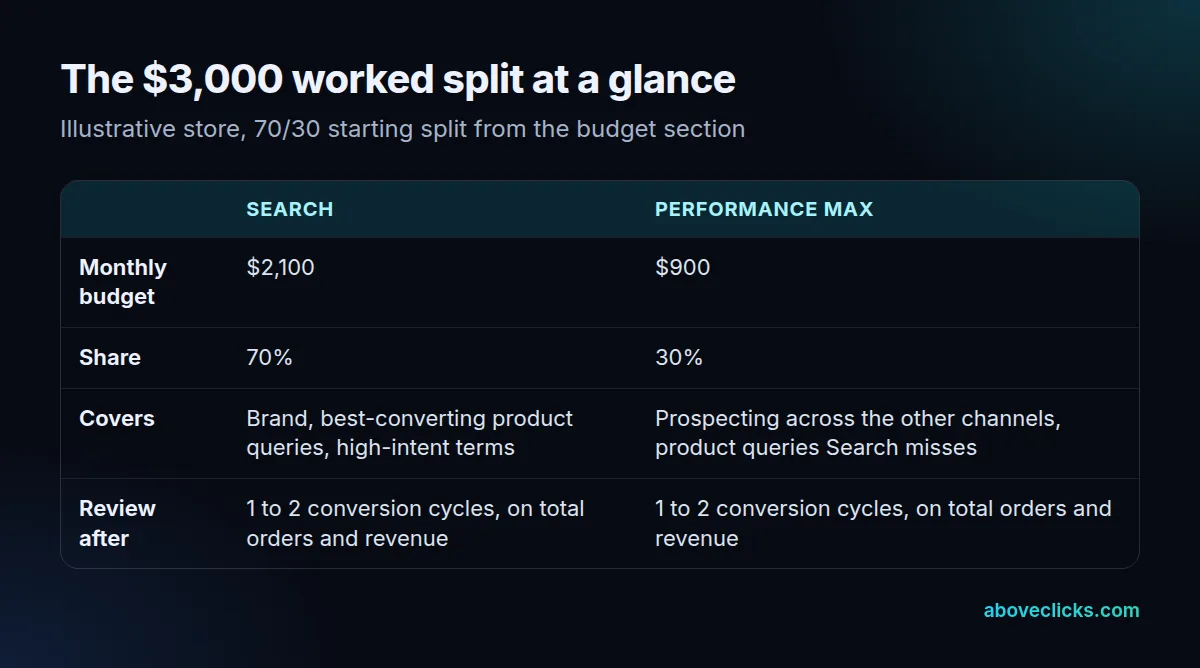
For a performance max vs search campaign budget, start with 70% in Search and 30% in Performance Max, then move money only on evidence. The split below uses an illustrative store, not a real account, so you can redo the math with your own numbers.
Example: a store spends $3,000 a month on Google Ads. Search gets $2,100 and Performance Max gets $900. Search covers brand, best-converting product queries and high-intent terms. Performance Max gets the smaller share to prospect across the other 5 channels and to catch product queries Search does not cover. This split is a worked example, not a real account, as of October 2026; the method follows Google’s Smart Bidding Exploration guide.
Set the target from your margin, not from a round number. If the average order is $80 and the margin is 40%, each order contributes $32, so break-even ROAS is $80 divided by $32, which is 2.5. A target of 300% sits above break-even with room to pay for the exploration below.
If you switch on Smart Bidding Exploration, the tolerance math matters. That is also when to use performance max for prospecting rather than for defending demand you already own. Google’s own example takes a 200% target at a 10% tolerance down to an effective target of 180%. On our 300% target, the same 10% tolerance gives an effective target of 270%. Google says to expect results within about 15% of that effective target over 1 to 2 conversion cycles, so judge the test over that window, not over a weekend.
Move budget only after 1 to 2 conversion cycles of clean data, and only toward the campaign type that brought in the better orders, not just the cheaper clicks. If setting this up or moving from Standard Shopping feels risky, our Google Shopping agency page covers setup and migration, and a free audit reads your current setup before you move anything.
Which 5 mistakes waste a Performance Max vs Search campaign budget?
These 5 show up again and again when a Performance Max vs Search campaign split goes wrong, and each one is avoidable before launch.
- Letting Performance Max swallow brand search. A Search campaign with an exact match keyword is prioritized over Performance Max, Google says, but that protection only works for queries you actually cover in Search. Add your brand terms and best converters to Search, then add brand exclusions to Performance Max so it cannot chase the same traffic.
- Starting Performance Max with broken tracking. Smart Bidding can only optimize toward the conversions it can see. If tracking double-counts, misses orders or counts soft actions as sales, Performance Max will scale the wrong thing.
- Running retail Performance Max without a clean feed. Titles, prices and availability in the Merchant Center feed are the ad for a store. A feed with wrong prices or out-of-stock items wastes the budget on clicks that cannot convert.
- Ignoring the October 2026 asset settings. Sourced videos can add, as of October 2026, up to 10 crawled videos to an asset group, against a manual upload limit of 5, and landing page images let Google pull photos from your site. Check both settings on every campaign, or Google may run creative you never reviewed.
- Judging Performance Max on last-click ROAS alone. Performance Max often assists sales that Search closes, and Search often closes demand Performance Max created. Judge the split on total orders and total revenue for the account, not on one campaign’s ROAS in isolation.
Avoiding these 5 is how a performance max vs search campaign split stays profitable.
What changed in October 2026 for Performance Max advertisers?
Two asset-sourcing settings and one bidding change arrived in October 2026, and all 3 affect a Performance Max vs Search campaign split.
Sourced videos. Google’s asset optimization settings now include Sourced videos, which uses Google AI to find relevant videos from sources you approve and add them to Performance Max campaigns. Sources can include social media, the campaign landing page and a linked YouTube channel, and Google can add up to 10 crawled videos to an asset group. Google’s help text says sourced videos are enabled by default for all new campaigns and may have been activated automatically on some existing campaigns, so check the setting rather than assuming it is off. Ads using these assets are labelled as created or edited with AI in the European Union, India and New York state.
Landing page images. The matching image setting lets Google use images from your website as creative assets. Trade reports add, as of October 2026, that from 4 December 2026, image extraction becomes the default for all newly created Performance Max campaigns, overriding the account-level setting, while existing campaigns are unaffected. For a performance max vs search campaign plan, the campaign-creation checklist is now the last place to catch it.
Smart Bidding Exploration. Google expanded Smart Bidding Exploration to Performance Max and Shopping campaigns, after Search-only use. For a performance max vs search campaign budget, the practical effect is that exploration is a Search-channel lever first, not a reason to move Search budget into Performance Max.
It lowers your Target ROAS by a tolerance you choose, between 5% and 30%, so the system can bid higher on high-potential queries you already qualify for but were losing. It does not widen your keywords or targeting. Two limits matter: campaigns must use Target ROAS bidding, they should not be budget-limited, and moving a retail campaign to a portfolio bid strategy switches exploration off automatically. Google has published no performance figures for Shopping or Performance Max, so treat the Search-only averages as background, not as a promise for your account.
How do you keep Search in control when Performance Max runs?
Four controls keep a Performance Max vs Search campaign split honest, and all 4 live in the campaign settings, not in the keyword list.
First, cover your most valuable queries with exact match keywords in Search, because Google prioritizes a Search campaign’s exact match keyword over Performance Max for the same query. Search themes carry the same priority as phrase and broad match keywords, so use them to point Performance Max at the intent you want, rather than leaving it to guess.
Second, add brand exclusions and campaign-level negative keywords to Performance Max. In a performance max vs search campaign account, brand exclusions stop it chasing your own brand traffic, and negative keywords block the queries you know never convert, such as job seekers or freebie hunters for your niche.
Third, decide on final URL expansion deliberately. With it on, Google may send a query to a more relevant landing page and write a matching headline for it, but you stay responsible for the landing page content and for every asset it generates. Turn it off if your pages vary in quality or if a wrong page could mislead a buyer.
Fourth, keep the budgets separate and fenced. A shared or uncapped Performance Max budget will drift toward the easiest conversions, which are usually the brand and repeat buyers Search would have won anyway. Review the performance max vs search campaign split after 1 to 2 conversion cycles, using total account revenue, not one campaign’s report.
When we run our own audit, we ask for read-only access plus a crawl, never passwords, and send a written PDF report within 2 workdays, with problems ranked by the number of pages they affect. That is the same check we suggest before any Performance Max vs Search campaign budget moves.
How do you decide in 10 minutes?
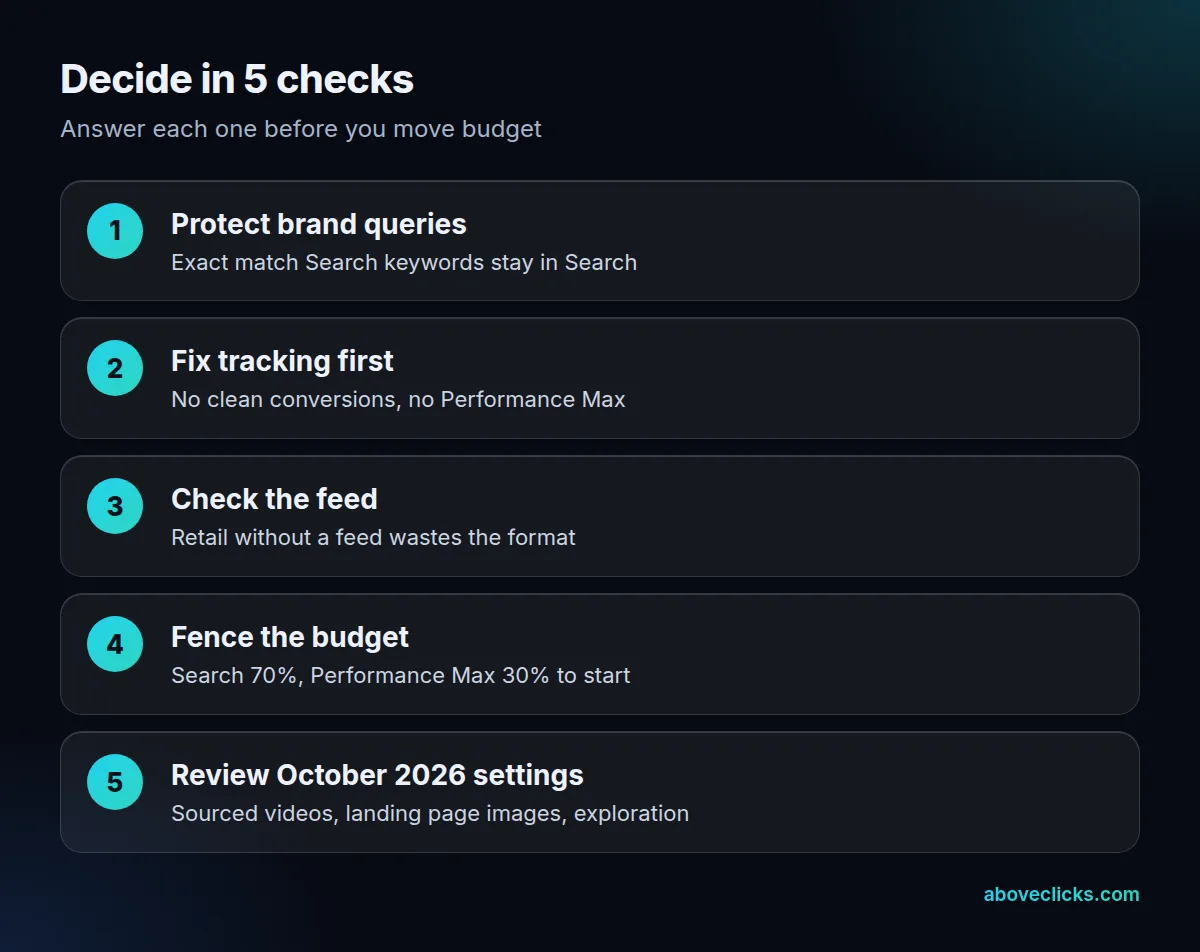
Answer these 5 questions with yes or no, and the split decides itself. The checklist answers the question advertisers type as “should i use performance max” — with a budget attached:
- Do you have brand and high-intent queries worth protecting in Search? If yes, Search keeps them.
- Is your conversion tracking trusted, with orders or qualified leads counted once? If no, fix tracking before Performance Max.
- Do you sell products with a clean Merchant Center feed? If yes, Performance Max has real material to work with.
- Do you have text, image and video assets Google can mix? If no, build at least 1 video and a set of images first.
- Can you check the October 2026 asset settings on every campaign? If no, pause new Performance Max launches until you can.
With 4 or 5 yes answers, run both in your performance max vs search campaign plan on the 70/30 split above. With 2 or 3, start with Search and add Performance Max for one product group only. With 0 or 1, fix tracking and the feed first; neither campaign type can save a broken setup. That is the whole performance max vs search campaign decision: protect what converts, fence what explores, and review on total revenue. To see how we’d read your site before you choose, start with the free audit.