Google Shopping ads cost whatever the clicks cost: Google charges per click, up to the budget you set. The number worth knowing is not a market average but your own break-even cost per click.
This guide shows how Google Shopping ads cost is billed, what is free, how to work out the most you can pay per click and how to turn a target number of orders into a Google Shopping ads budget.
How much do Google Shopping ads cost?
There is no fixed price. Google charges Shopping ads per click, so your Google Shopping ads cost is clicks multiplied by the cost per click, within the budget you choose.
Google’s Shopping ads guide says you pay only for the performance of your campaigns, for example clicks, and that Shopping ads are charged only when someone clicks through to your site. Showing an ad is free; a click is what you pay for. For example, 100 clicks at an average of $0.55 each cost $55.
The budget is a cap, not a fixed bill. Google’s page on average daily budgets says that on any day you can pay up to 2 times your average daily budget for most campaigns, and in any month no more than 30.4 times it, as of November 2026. Google’s own example turns $304 for a month into $10 a day, because 304 / 30.4 = 10.
Is Google Shopping free?
Showing products on Google can be free, but Shopping ads are paid. Free listings show products at no cost; ads charge per click and give you more reach as the budget grows. Your Google Shopping ads cost starts only when you turn on a paid campaign.
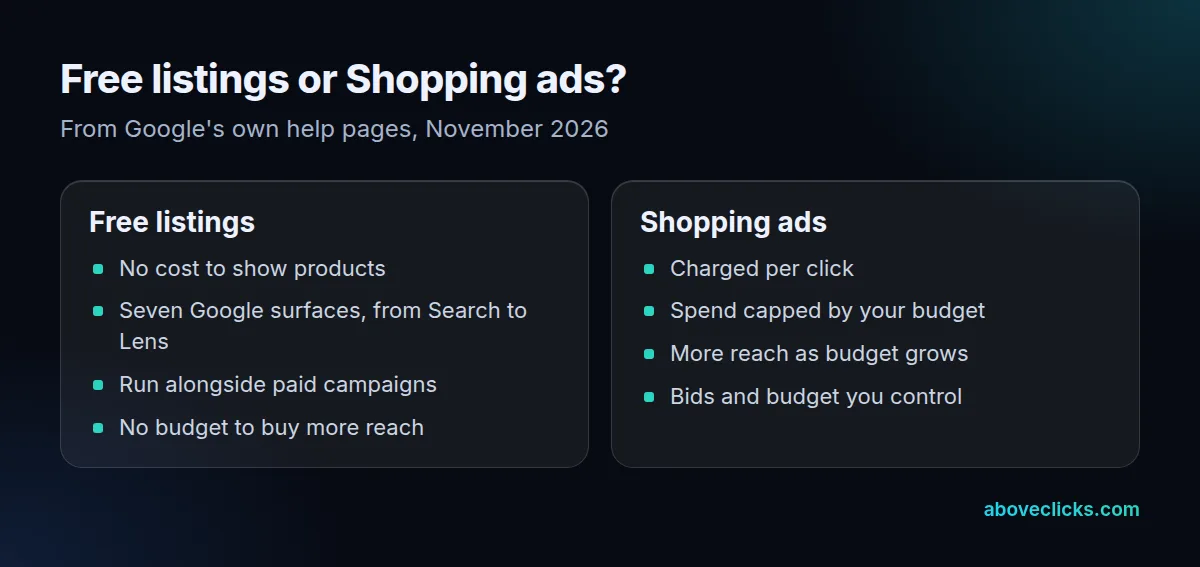
Per Google’s Merchant Center Help, a free listing can appear at no cost on 7 surfaces: Search, Maps, Gemini, YouTube, the Shopping tab, Images and Lens. Google describes free listings as working alongside any existing paid campaigns, so the choice is not either-or.
Example: a store with 120 products in its feed can list all 120 for free. Paid ads then push the 20 or 30 products with the best margin, which is where a budget earns the most.
Set up free listings first. They cost nothing, and the same product data later feeds your ads. A paid campaign is what you add when free reach is no longer enough to hit your order target.
What decides your Google Shopping ads cost?
Your product data, your bids and your budget decide your Google Shopping ads cost: how many clicks you get and what each one costs. Shopping ads use your Merchant Center data rather than keywords to decide where to show, according to Google’s Shopping ads guide.
That is why a weak feed raises the real cost of a sale: titles that don’t match searches bring fewer relevant clicks, and the account still spends. Three things move the cost most:
- The feed: titles, prices and identifiers that match what shoppers type and what your page shows.
- The split: one campaign for the whole catalog lets cheap best sellers take the spend, so high-margin products never get enough impressions. A catalog with items from $15 to $300 needs more than one target.
- The bid and budget: how much you are willing to pay per click, and the cap on a month.
This is what our free Shopping audit looks at. On our Google Shopping agency page, we say the PDF report arrives within 2 workdays (about 48 hours) and covers the feed, price mismatches and a campaign split by margin.
What is a good Google Shopping ads cost per click?
A good cost per click is any price below your break-even. Google doesn’t publish an average Shopping price, so work out the Google Shopping ads cost per click you can afford from your own numbers.
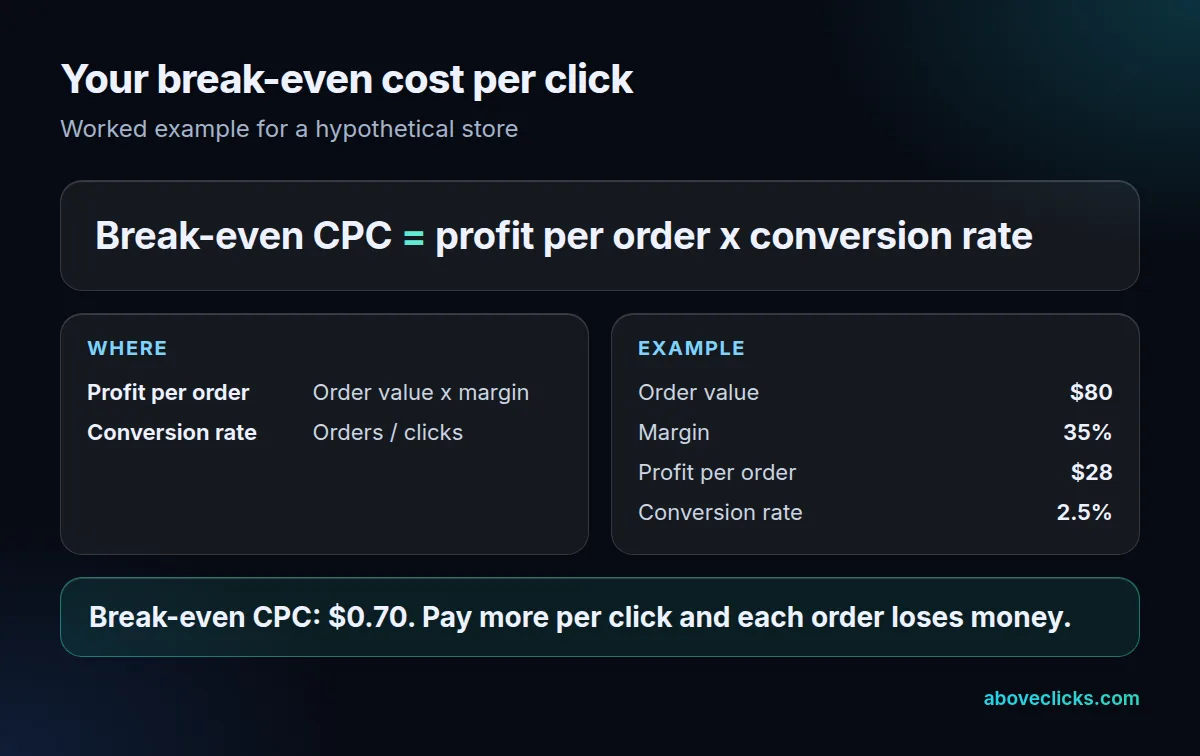
Break-even cost per click is the profit on one order multiplied by your conversion rate. Take 3 steps:
- Profit per order: order value times margin. Example: an $80 order at 35% margin leaves $28.
- Conversion rate: the share of clicks that become orders. Example: 2.5%, or 1 order per 40 clicks.
- Multiply: $28 x 2.5% = $0.70. That is the most you can pay per click and still break even before other costs.
The example store is hypothetical. Replace the three inputs with yours from your own orders and Google Ads reports. The margin changes the answer a lot. At the same 2.5% conversion rate:
- A 20% margin leaves $16 an order, so the ceiling is $0.40 a click.
- A 35% margin leaves $28, so the ceiling is $0.70.
- A 60% margin leaves $48, so the ceiling is $1.20.
Each row is a different Google Shopping ads cost per click ceiling, and that spread is why one average for the whole catalog misleads. The same logic gives a break-even return on ad spend: 1 / 0.35 = 2.86, or 286%, for the 35% margin. A Target ROAS set below that loses money on every sale.
How do you set a Google Shopping ads budget?
A Google Shopping ads budget should start from the orders you want, not from a round number. Work back through conversion rate and cost per click to clicks, monthly spend and a daily budget.
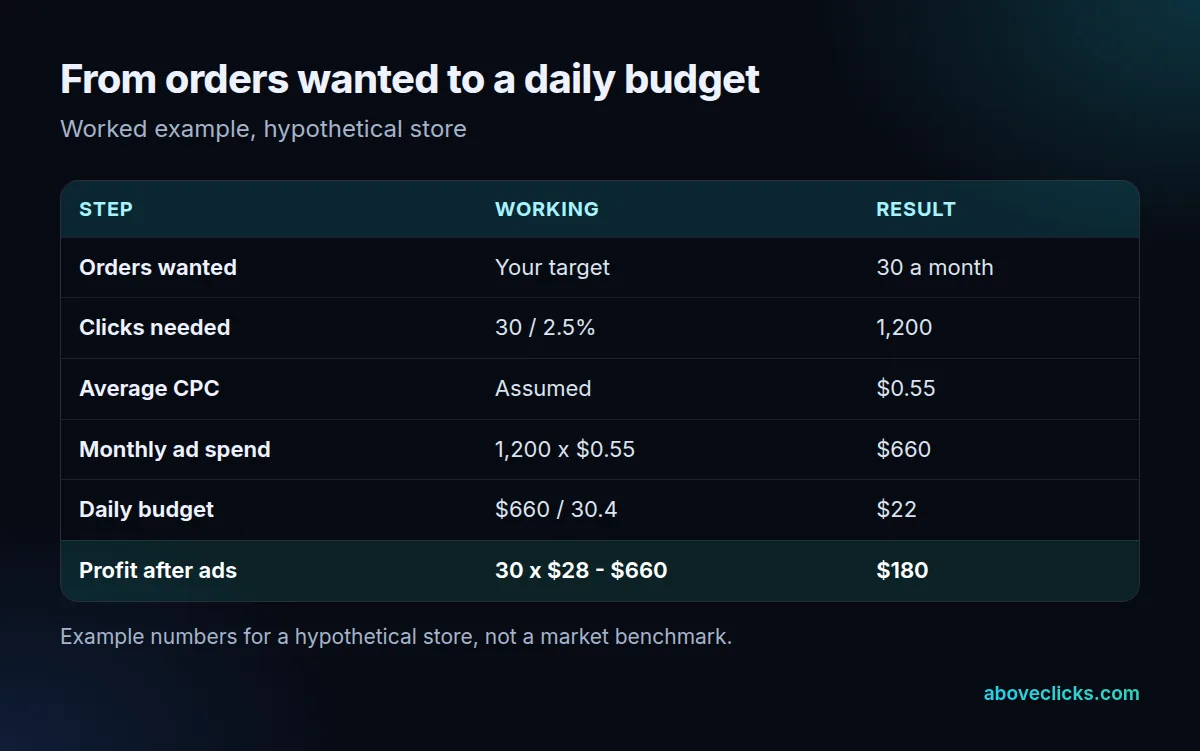
Here is the worksheet for the same hypothetical store. To get 30 orders at a 2.5% conversion rate you need 1,200 clicks. At an assumed $0.55 per click, that is $660 for the month. Divide by 30.4 and the daily budget is about $22.
On a good day Google may spend up to $44 (2 times $22), but over the month the account won’t be charged more than about $669 (30.4 times $22), per Google’s budget rules, as of November 2026. Check the result: 30 orders of $80 is $2,400 of revenue, a return of about 364% on the $660, and $180 of profit after ads.
You can also split the budget by margin. Example: give the 60% margin products, with a $1.20 ceiling, $14 a day, and the 20% margin products, with a $0.40 ceiling, $8 a day. That adds back to $22, and each campaign can bid against its own ceiling instead of the blended $0.70. It also stops cheap best sellers from taking the whole Google Shopping ads budget.
After the first 30 days, compare four numbers with the worksheet: the average cost per click you paid, the conversion rate, the spend against the cap and the profit after ads. If the click price is under your ceiling and conversion rate holds, raise the Google Shopping ads budget in small steps. If either slips, fix that before spending more.
Google’s Performance Max page adds a check. Its budget panel shows up to 3 daily suggestions, Low, Medium and High, based on your settings and account history. Treat them as a second opinion on your worksheet, not as the answer.
If several Shopping campaigns share a product, set campaign priority: the High campaign bids first, and when its budget runs out the next one takes over. Without it, budgets overlap and the worksheet stops describing what you actually spend.
What else adds to the cost besides clicks?
Management, tools and your own time. The click bill is only the part of your Google Shopping ads cost that Google charges; anything else you pay for sits on top of it.
Say a manager charges a hypothetical 15% of ad spend. On the $660 above, that is $99 for the month, which cuts the $180 of profit to $81. At small budgets, those charges take a large share of what the ads earn, so ask for the model in writing. Our guide to pay per click management fees shows how percentage, flat and hybrid fees scale.
Other costs to list before you commit:
- A feed tool or app, if your platform’s export is not enough.
- Product photos or video, if you want more than the basic listing.
- Tracking set up so orders and revenue are counted correctly.
The Google Ads for ecommerce guide covers the account setup, and Performance Max vs Standard Shopping helps you choose the campaign type before you set a budget.
When do Google Shopping ads cost too much?
When your Google Shopping ads cost per click is above your break-even, or when conversion rate falls without the price changing. The loss is usually in the conversion rate, not the click price.
Test it with the same store. If conversion rate drops from 2.5% to 1.5%, break-even cost per click falls to $0.42 ($28 x 1.5%). At the same $0.55 per click, $660 now buys 1,200 clicks that yield 18 orders. Gross profit is $504, and after $660 of ads the account loses $156 for the month.
A one-point fall in conversion rate turned a profit of $180 into a loss of $156. Review your Google Shopping ads cost every week for the first month, not once a quarter. Before cutting the budget, check what changed: price, stock, shipping cost, a broken checkout or a product that left the feed. If the numbers look wrong and you can’t tell why, our free audit checks the feed and campaign structure in writing. For more, see our Google Ads guides.