Amazon advertising automation means letting built-in settings, rules, bulk files or software handle repeatable ad work such as bids, budgets and reports. Automate the checks you repeat every week and keep decisions about margin, products and structure with a person.
This guide to Amazon advertising automation covers what Amazon already automates, what Amazon PPC automation adds on top, which jobs to keep manual, and the guardrails and test that stop a rule from overspending.
What is Amazon advertising automation?
It is any way of getting Amazon ad work done by a rule instead of by hand. That can be a setting inside Amazon Ads, a bulk spreadsheet, a script built on the API, or an Amazon ads automation tool you pay for.
The goal of Amazon advertising automation is fewer repeat tasks, not fewer decisions. Sponsored ads use cost-per-click pricing with no minimum spend, so an account can start with a $10 daily budget, and it is easy to let a rule spend money faster than you can read the results.
Amazon describes Sponsored Products as ads where you pick the products and either choose keywords or let Amazon target relevant keywords automatically. That second option is the oldest form of Amazon ads automation, and it is still the one most accounts start with.
Three levels are worth separating:
- Built-in: settings Amazon runs for you, such as dynamic bids and automatic targeting.
- Rules and bulk work: if-then changes and spreadsheet edits that you define.
- Software and agents: tools that read your reports and change bids or budgets, using Amazon’s API.
Amazon ads automation works best when each level has a clear owner and a written limit. Most sellers need level 1 from day 1, level 2 once they run 10 or more campaigns, and level 3 only when the account is big enough that weekly checks by hand take more than a day.
What does Amazon already automate in Sponsored Products?
For Amazon ads automation, two things: which searches and products your ad appears for, and, if you choose it, how much each click bid moves. Both are settings, not extra software.
Amazon’s Sponsored Products guide says automatic targeting lets Amazon match your ads to keywords and products, with 4 match types: close match, loose match, substitutes and complements. For bids, “dynamic bids – up and down” and “dynamic bids – down only” let Amazon adjust your bid using real-time signals, while “fixed bids” use the exact number you entered.
You also set placement adjustments, which the same guide says can go up to 900%. The adjusted bid is the most you will pay, and your final cost-per-click never exceeds it.
Budgets are a limit rather than a target. Amazon suggests starting at a daily budget of $10, and notes that a $100 daily budget can bring up to $3,000 of clicks in a 30-day month. That monthly math matters once a rule starts raising budgets on its own.
Learn how these costs add up in our guide to CPC on Amazon.
What does Amazon PPC automation add on top?
Speed, scale and rules you control. Built-in settings handle bid signals; Amazon PPC automation adds if-then actions, reporting on your schedule and edits across many campaigns at once.
Amazon’s own Sponsored Products guide points to bulk operations for this: they let you edit, optimize or create many campaigns at once. Beyond spreadsheets, the Amazon Ads API lets developers create and manage campaigns and pull performance data. As of November 2026, its guides describe asynchronous report requests and Amazon Marketing Stream for near real-time metrics.
In practice, that means Amazon PPC automation can check performance far more often than a person who opens the console once every 7 days. It also means a faulty rule can make hundreds of changes in a day, which is why the guardrails below come before any tool.
Amazon’s FAQ also says its ad console now sits inside Amazon Ads Agent, with an MCP Server for connecting your own AI agents. According to that page, connected agents can create, update and optimize campaigns and run reports. Because the details change, check Amazon’s page before you build on it.
For stores that already run other workflows, our business automations work shows the same pattern: automate the repeat step, keep a person on the decision.
Which Amazon ads automation should stay manual?
Anything that depends on margin, stock or a judgment call about the product. A rule can see clicks and sales, but it cannot see that a product is about to sell out or that a supplier raised costs.
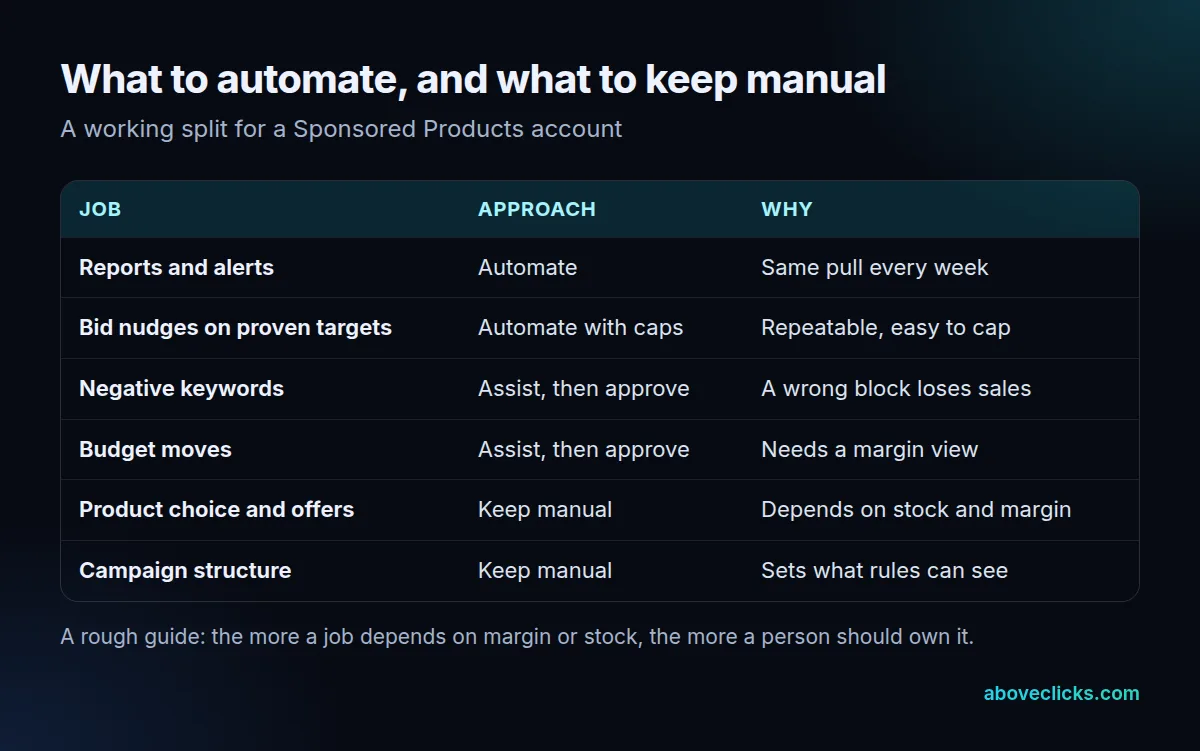
The map above is a working split, not a rule. Of the 6 jobs in it, only 2 are safe to hand over without a human approving each change. Reports and alerts are safe to automate because a wrong alert costs nothing. Small bid changes on proven targets can be automated if capped. Negative keywords and budget moves are better as suggestions you approve, because a wrong block quietly cuts sales and a wrong budget move spends money.
Product choice, offers and campaign structure stay manual. Structure matters more than it looks: Amazon’s guide recommends separate campaigns or ad groups for each product group, and a rule can only act on what the structure lets it see. A campaign that mixes a cheap item with a premium one makes every average misleading.
A useful test is the 5-minute rule: if you could not explain a change to a teammate in 5 minutes, a rule should not make it alone. The most common of the 5 costly mistakes is automating a decision that depends on margin before anyone has written the margin down. The next section fixes that.
How do you set guardrails for Amazon advertising automation?
Start from break-even ACOS and work back. Every limit a rule uses should come from a number you wrote down first, not from the tool’s defaults.
Amazon’s ACOS guide defines ACOS as ad spend divided by ad revenue, times 100, and ROAS as ad revenue divided by ad spend. It also says your ACOS needs to be lower than your profit margin, or you spend more on ads than you earn.
Worked example (an invented store, not a client): a store sells a $40 product with a 30% margin after product cost, shipping and fees. Break-even ACOS is 30%, so ad spend above $12 per $40 sale loses money. The owner sets an ACOS ceiling of 24%, which leaves a 6-point cushion, and a bid step of 10%. If a target spends $15 and sells $40 across 14 days, its ACOS is 37.5%, so the rule lowers the bid.
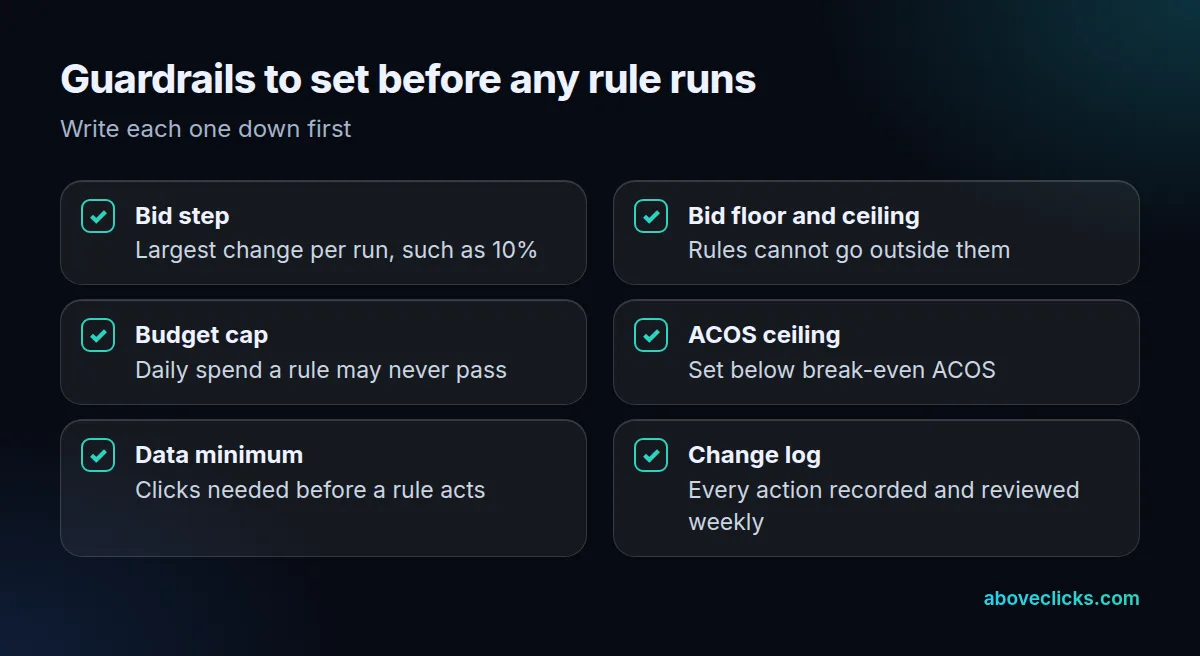
Add a data minimum too. A rule that acts after 2 clicks reacts to noise; one that waits for 20 clicks reacts to a pattern. These numbers are examples, so set your own from your conversion rate and click costs.
Our guide to Amazon PPC management cost shows what hands-on management adds beyond rules.
How do you roll out a rule safely?
On one campaign first, with a control beside it. A rule that works in your head can still misbehave on real data, which is the main risk of Amazon ads automation.
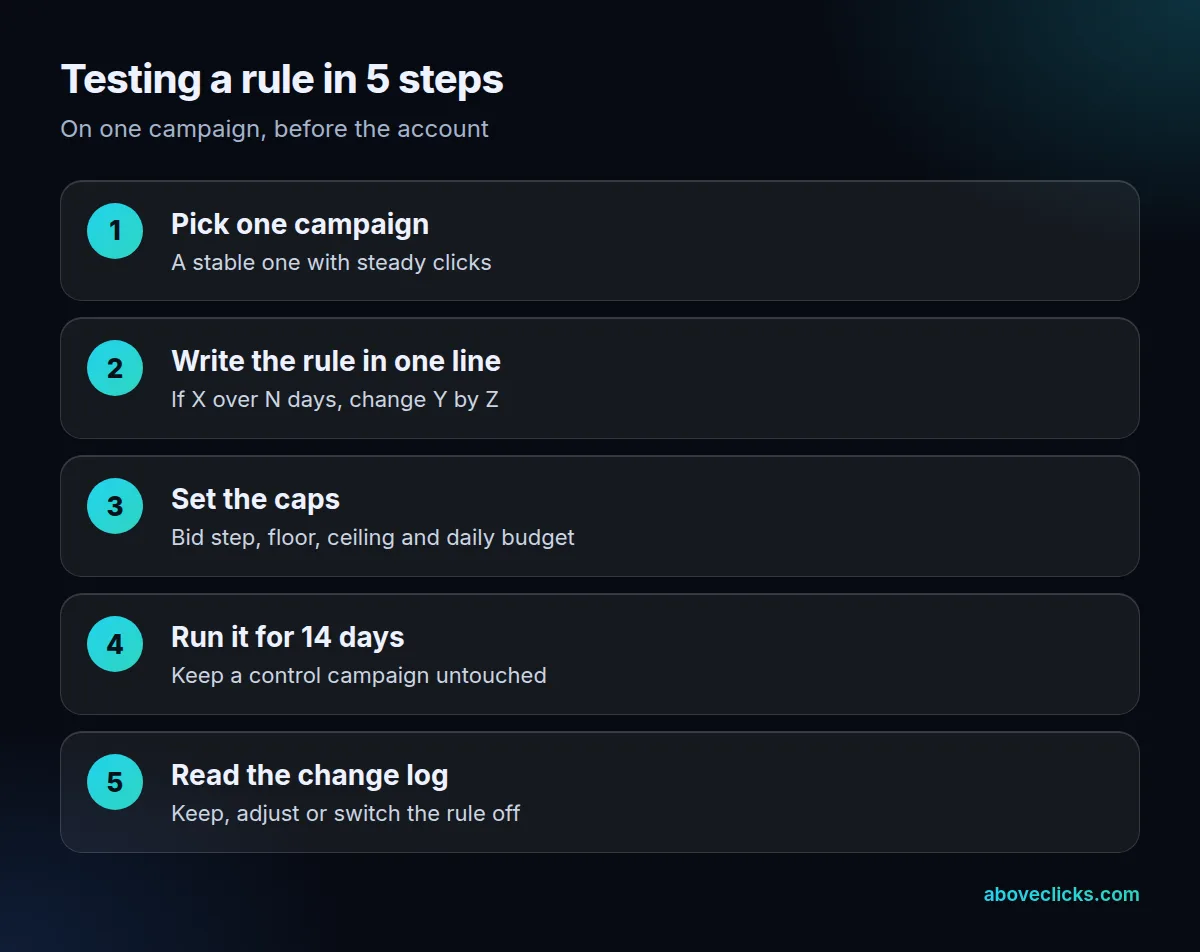
Write the rule in a single line, such as “if a target has 20 or more clicks and no sales in 14 days, lower its bid by 10%”. If you cannot say it that simply, it is too complicated to trust. Keep the caps from the checklist in place, and leave one similar campaign untouched so you can compare.
After 14 days, read the change log. Ask 3 questions:
- Did the rule fire as written, or more often than expected?
- Did ACOS fall for the campaign it touched compared with the control?
- Did sales on those targets fall faster than spend?
If sales dropped with spend, the rule cut too hard. Keep it, loosen it or switch it off, then change only one thing at a time. The same care applies to Amazon PPC automation run by an agent: ask it to propose changes first and apply them yourself until its record is good.
How do you choose an Amazon ads automation tool?
By what it does when it is wrong, since every Amazon ads automation tool is right most of the time. A good Amazon ads automation tool lets you cap changes, shows every action and lets you undo it. A feature list matters less.
We cannot verify any vendor’s features or fees from a primary source, so we do not compare tools here. Use these questions with every vendor instead, and ask for a 30-day trial or a suggest-only mode before you connect your account:
- Can I set a bid step, floor, ceiling and daily budget cap per rule?
- Is every change logged with the old value, the new value and the reason?
- Does it use Amazon’s official API, and who owns the account and data if I leave?
- Can it run in “suggest only” mode first?
- What does it cost per month, and does the fee rise with my ad spend?
Also check that a tool fits your stage, and weigh what it costs against the time it saves you each week. A store with a few campaigns may get what it needs from Amazon’s built-in settings and one weekly report, while a catalog with hundreds of targets gains more from rules. Product pages matter as well: ads send shoppers to your listing, so Amazon SEO work on titles and images can lift results more than another rule.
If you want a second opinion before buying a tool, our Amazon ads service starts with an account review, and our free audit is a no-cost first look. More guides are in buying guides.