AmazonPPC is pay-per-click advertising on Amazon: you bid on keywords or products and pay only when a shopper clicks your ad. Before you set any numbers, learn the four parts that make it work: the ad type, the targeting, the bid and the daily budget.
This guide explains AmazonPPC for a store owner who has not run it before. It covers how a click is billed, the three ad types, how to structure a first campaign, a 30-day routine and a break-even check you can do with your own numbers. It stays with how the system works; for prices, CPC levels and agency fees, we link to the guides that cover them.
What is amazonppc?
AmazonPPC, usually written Amazon PPC, is the common name for Amazon’s pay-per-click ads. Your ad appears in shopping results or on product pages, and you are charged only when someone clicks it.
Amazon describes its Sponsored Products as cost-per-click ads that promote individual product listings. Its page says these campaigns have no monthly or upfront fees. You pay for clicks, not for showing up.
Example: a listing that gets 100 clicks in a week is billed for 100 clicks, whether those clicks bring 0 orders or 10.
The Amazon PPC meaning is easy to get wrong in one way: a click is not a sale. You pay for the visit, and the listing still has to turn it into an order. That is why the price, reviews, images and content on the listing matter as much as the ad. Our Amazon SEO work covers that side.
The costs of Amazon PPC split into 2 parts. The first is what Amazon charges per click, set by your bid. The second is everything else a sale costs you: product, Amazon fees and shipping. AmazonPPC only makes sense when the first part fits inside the margin left by the second, and the break-even section below shows how to check that with 1 division.
It also helps to know what AmazonPPC is not. It is not a way to rank in organic results, because paid placements and organic results are separate. It does not replace a good listing, and it does not remove the need for reviews. It is a way to buy visits for the products you choose, on the searches you choose, with 2 controls you set yourself: the bid and the daily budget.
In short, Amazon PPC has 3 steps from your side. You pick the product, you pick how shoppers find it, and you cap the spend. Everything else in Amazon PPC, from reports to bid changes, is tuning those 3 choices.
How does amazonppc work?
You choose a product, tell Amazon which searches or products to target, set a bid and set a daily budget. When a shopper’s search matches, Amazon decides whether your ad is shown, and you pay if it is clicked.
Amazon explains that a bid is the maximum amount you are willing to pay when a customer clicks your ad. The more competitive your bid, the more likely your ad is to be displayed when it matches a shopper’s query. You can choose keywords yourself or let Amazon’s systems target relevant keywords automatically.
The budget is where beginners get caught. Amazon’s example: a daily budget of $100 means you may receive up to $3,100 worth of clicks in a 31-day month. It also says daily budgets are not paced through the day, so a small budget can be spent in a few minutes when many interested shoppers arrive.
So multiply every daily budget by 31 before you approve it. For what a click usually costs, see our guide to CPC on Amazon; for what the full bill contains, see Amazon advertising cost.
You will see Amazon PPC described as “Sponsored Ads” or “Amazon ads”. For a store owner they mean the same thing: paid placements that are billed per click and managed in the Amazon Ads console.
Which Amazon PPC ad types should you know?
Three: Sponsored Products for single listings, Sponsored Brands for your brand, and display ads for wider audiences. Most new sellers start with Sponsored Products because it has the lowest bar to enter.
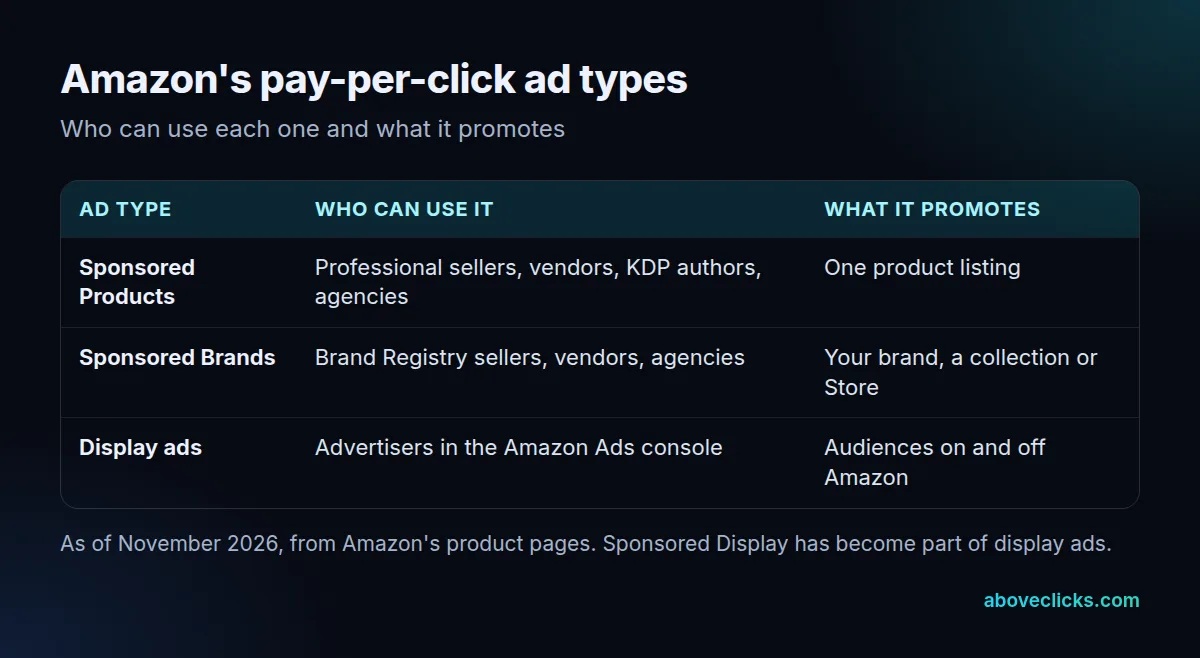
Of the 3 types, only 1 (Sponsored Brands) asks for Brand Registry, so 2 of 3 are open to a seller with no trademark yet. Of those, Sponsored Products is the usual first choice.
According to Amazon, Sponsored Products ads may be displayed at the top of, alongside or within shopping results, and on product pages. They are open to professional sellers, vendors, book vendors, Kindle Direct Publishing authors and agencies. Adult, used, refurbished and closed-category products are not eligible.
Sponsored Brands promote your brand with video, images or collections in places such as top of search. Amazon’s page cites a 142% year-over-year increase in clicks for Sponsored Brands video placements; that is Amazon’s own figure, not a forecast for your store. Amazon lists Brand Registry as a requirement for professional sellers, and says there is no minimum spend for cost-per-click campaigns. Its reserved top-of-search option does need a minimum spend commitment.
The third family has changed. Amazon says Sponsored Display is now known as display ads, and that existing Sponsored Display campaigns continue to run. New display campaigns are created under “Display, Video, and Audio” in its console. Check the console in front of you, because Amazon renames these tools often. Amazon’s ad specs page lists the display formats, sizes and policies each type must follow, so read it before you brief a designer.
Brand Registry is the gate for Sponsored Brands. Amazon says you need an active registered trademark, or a pending trademark application, for your brand name or logo, issued by the trademark office of a country with a matching Amazon store. If you do not have one yet, start with Sponsored Products and read Amazon’s Brand Registry page while the trademark is processed.
How should an Amazon PPC campaign be structured?
Keep one product group per campaign and give each campaign one job. Mixing unrelated products in one campaign makes the results impossible to read, because one budget and one set of bids cover them all.
This is our suggestion, not an Amazon rule. For each product group, a simple start is 2 campaigns:
- A discovery campaign: let Amazon target relevant keywords automatically, with a small daily budget, to learn which searches bring clicks.
- A control campaign: you choose the keywords or products yourself, using the searches that proved themselves in the first one.
That gives 2 campaigns per product group. A store with 5 product groups therefore runs 10 Amazon PPC campaigns, which is enough to manage by hand.
Name them so you can read a report at a glance, for example “Candles – discovery” and “Candles – control”. Do not change bids on both every day. Amazon’s own page notes you can refine campaigns using its campaign reporting, so make one change at a time and check the report.
If you would rather have someone else set up your amazonppc campaigns, our Amazon ads service does it, and the management cost guide explains how agencies charge.
What should the first 30 days of Amazon PPC look like?
Small and slow: one campaign, a modest budget and three checks. Amazon PPC needs a few weeks of clicks before the pattern is clear, so judging it after 2 days wastes the budget.
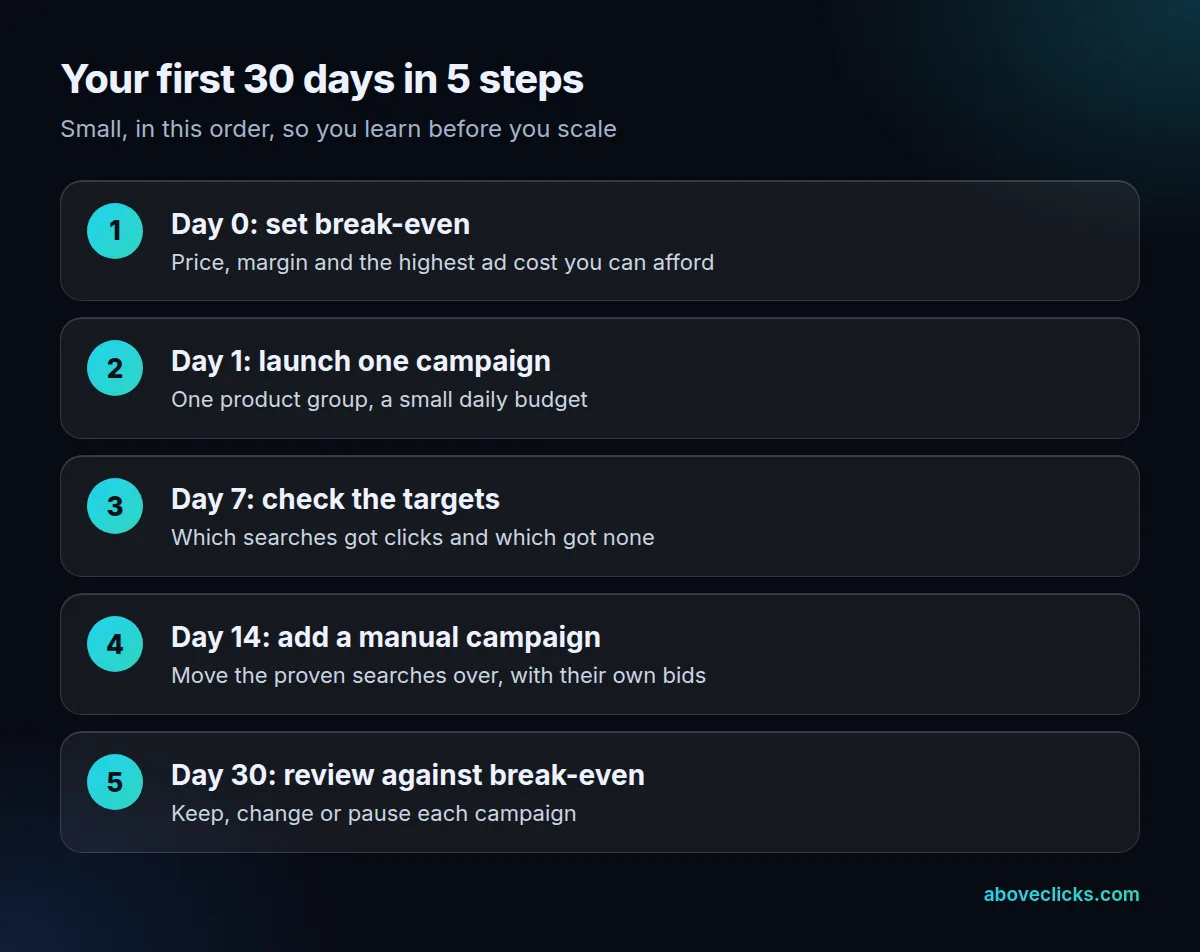
Here is the routine we suggest. It is our own, built to keep the first month cheap and readable:
- Day 0: work out your break-even number (see the next section) and the daily budget you can afford to lose while you learn.
- Day 1: launch one discovery campaign for one product group.
- Day 7: open the reporting and list which searches got clicks and which got none. Do not judge sales yet.
- Day 14: start a control campaign with the searches that proved themselves.
- Day 30: compare each campaign with break-even, then keep, change or pause it.
Three setup mistakes cost new AmazonPPC advertisers the most in that first month:
- Budgets set without multiplying: a $20 daily budget is up to $620 in a 31-day month.
- Too many products at once: 10 products on $20 a day gives each about $2 a day, too little to learn from.
- Changing everything weekly: with 4 changes in 7 days you cannot tell which one moved the result.
How long it takes to work depends on your traffic. A listing with few visits needs longer before 30 days says anything, and that is a reason to fix the listing first.
Is Amazon PPC worth it?
It is worth it when the ad cost per sale stays below what you earn per sale. That break-even number takes one line of arithmetic, and you should know it before you launch.
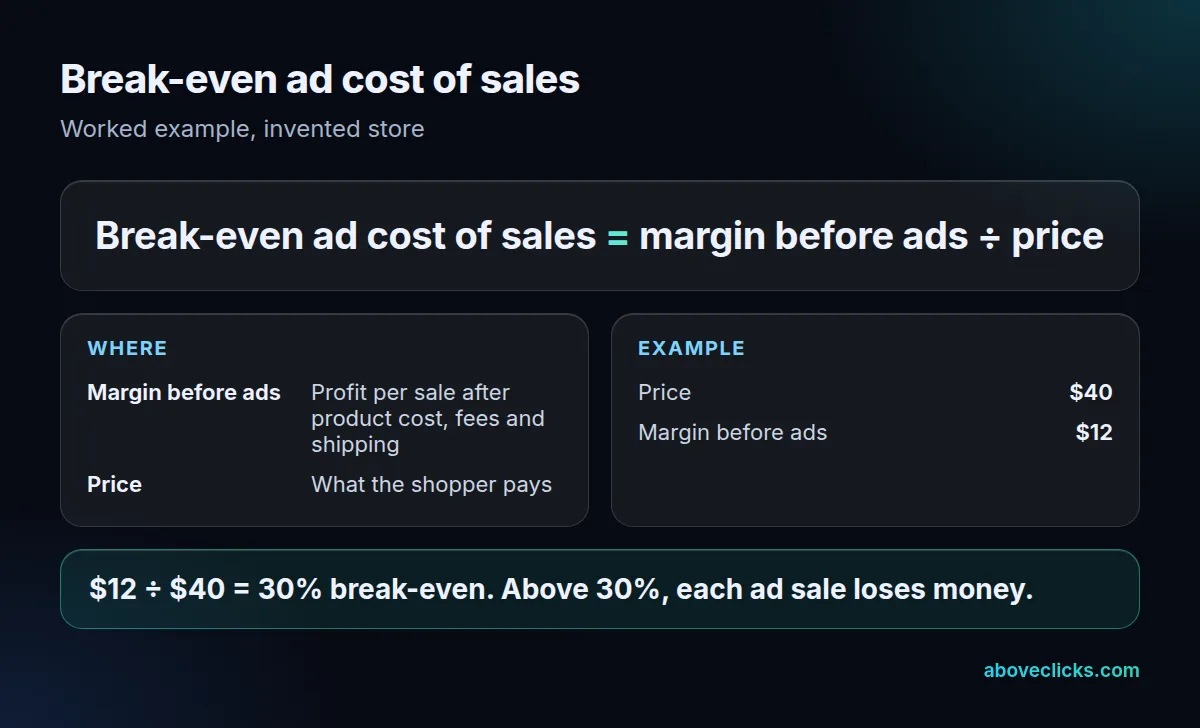
Example: an invented store sells a candle for $40 and keeps $12 after product cost, Amazon fees and shipping, before ads. The break-even ad cost of sales is $12 ÷ $40 = 30%. If ads cost more than 30 cents per dollar of ad sales, each ad sale loses money. Your own margin will differ, so use your own numbers.
Three more questions help decide:
- Does the listing have enough reviews and clear images to convert a paid click?
- Can you afford the whole month’s budget if it brings no profit?
- Is the product one you want to sell for years, so early learning pays off?
If two of the three answers are no, fix the listing first. For a view of your Amazon account, our free audit shows what is limiting it.
More explainers like this are in buying guides.