Google Tag Manager is a tag management system from Google that lets you add and manage tracking tags, such as GA4 and Google Ads conversion tags, without editing your site's code. You install 2 snippets once, then publish later tag changes from a web interface, grouped in a container.
Google Tag Manager is a tag management system from Google that lets you add and manage tracking tags, such as GA4 and Google Ads conversion tags, without editing your site’s code. You install 2 snippets once, then publish later changes from a web interface.
What is Google Tag Manager used for?
Adding, changing and removing tracking tags without a developer each time. Google’s introduction to Tag Manager says “you add 2 snippets of code to each page of your website”, and from then on you manage tags in its interface. Everything for one site lives in a container: “A collection of tags, triggers, variables, and related configurations installed on a given website or mobile app is called a container.”
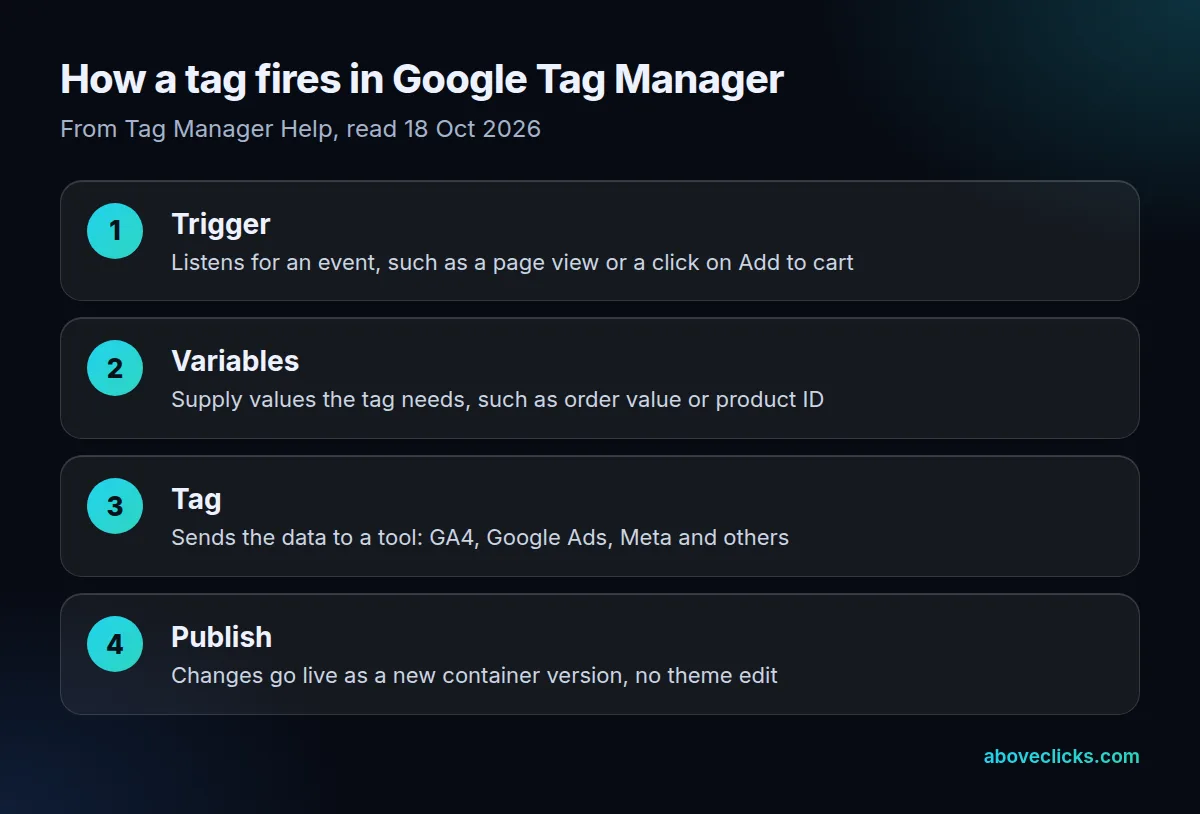
Example: a hypothetical candle store has 4 tags pasted into its theme: GA4, Google Ads, Meta and a review app. If each theme edit takes a developer 30 minutes, every round of tag changes costs 2 hours. Moved into 1 container, the next change is a new version published from Tag Manager, and the old version stays one click away if something breaks. Shopify stores add a caveat, because checkout pages don’t run theme code, so purchase tracking there goes through Shopify’s own pixel tools.
Is GTM the same as Google Analytics?
No. Tag Manager installs and fires tags; Google Analytics 4 is a reporting tool that receives data from one of those tags. GA4, per Google’s GA4 introduction, “collects event-based data from both websites and apps”, and a GA4 tag inside Tag Manager is one way to send it those events. You still read the numbers in GA4, never in Tag Manager. In our 18 October 2026 check, 14 of 17 store containers held at least 1 GA4 measurement ID, so for most stores GTM is the delivery route for GA4 data.
Should you use GTM or gtag.js?
Use Tag Manager if you run any non-Google tag; the Google tag alone is enough for a site that only needs Google tags. Google’s Tag Manager vs gtag.js comparison says gtag.js “can only send data to Google services”, while Tag Manager supports Google tags, third-party tags and custom tags.
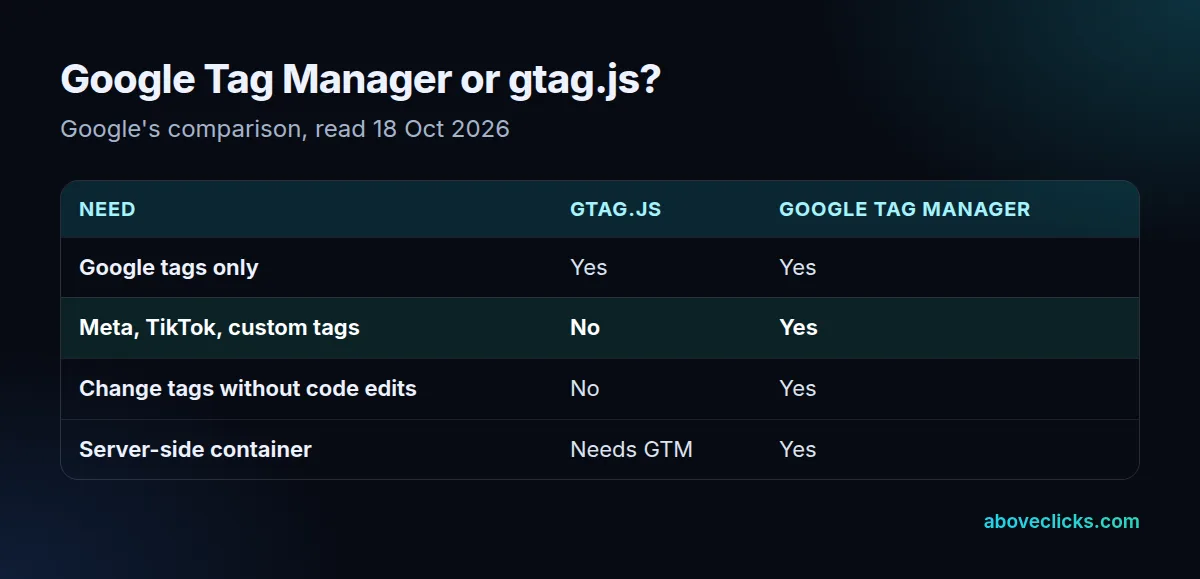
A store running Meta and TikTok ads alongside Google Ads needs Tag Manager or a separate snippet for each platform. That’s the usual case: in our check, 16 of 17 store containers ran custom HTML tags next to their Google tags. A server container also needs Tag Manager, even if the site itself uses the Google tag.
What is inside a real store’s GTM container?
A lot more than GA4. On 18 October 2026 we fetched the public gtm.js file for every container found on 30 store homepages: 17 containers. Compressed, each GTM container weighs 144,326 to 233,593 bytes, median 199,408, and every new visitor’s browser downloads that file before the tags inside can run.
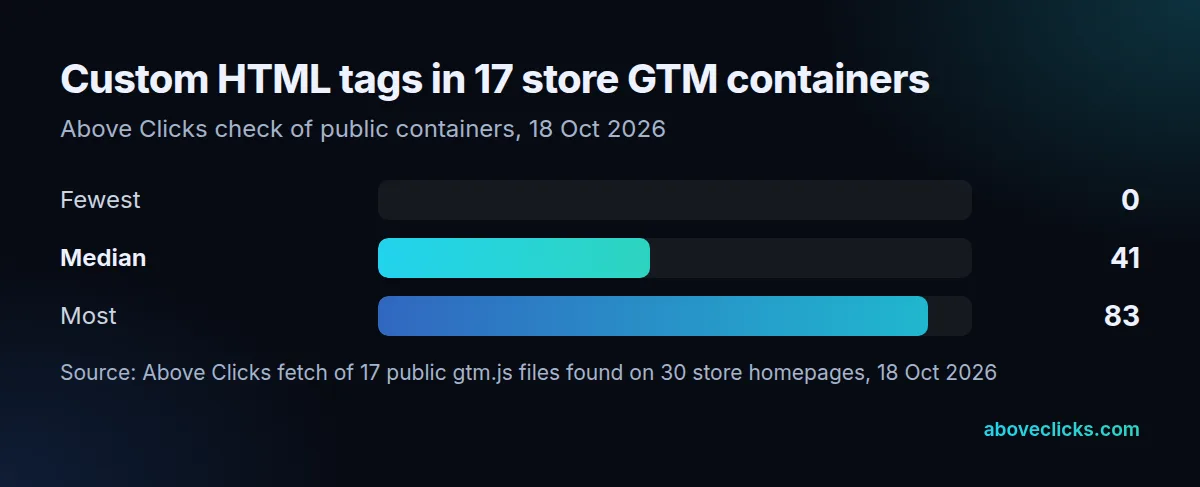
16 of 17 run custom HTML tags, from 4 to 83 each; that’s free-form code, the first place to look for slow or forgotten scripts. GA4 event tags range from 0 to 117 per container, and 10 of 17 send data to 2 or more GA4 measurement IDs. A tidy container is part of every GA4 audit we run; the tracking and analytics hub and the server-side tagging term cover the next step.