Shopify agentic storefronts let AI assistants show and sell your products inside a chat. The assistant reads structured product data, not your page design. That is the core idea behind Shopify agentic storefronts: the record is the storefront. Shopify’s agentic storefronts guide states the channel is active by default for eligible stores, and that orders from AI channels display in your admin with channel or referrer attribution.
This guide to Shopify agentic storefronts explains what they are, how they work, what Google changed in October 2026, and the 7 steps to get ready. If you sell on Shopify and want help with the setup, see our Shopify development services or start with a free audit; terms used here are defined in our glossary.
What are Shopify agentic storefronts?
Shopify agentic storefronts are the sales channel that makes eligible products discoverable inside AI chats. A shopper describes what they want to an assistant, the assistant finds matching products, and the purchase follows a checkout path depending on the channel.
Shopify agentic storefronts run on Shopify Catalog, the structured data layer sharing product information with connected AI platforms. Shopify’s Catalog and product discovery page states that eligible products are automatically discoverable by AI channels through Shopify Catalog, with no separate feed per agent or AI channel. Catalog uses product information already in Shopify, so this guide starts with product data for Shopify agentic storefronts, not a new app.
The channel covers 4 AI destinations: (1) ChatGPT, (2) Google AI Mode and Gemini, (3) Microsoft Copilot, and (4) Meta surfaces. You manage all 4 in 1 place: Sales channels > Agentic in your Shopify admin, where the admin shows the agents and AI channels connected to Catalog.
Scale check: Google’s Universal Cart, launched in the US on 15 October 2026, is built on over 60 billion continually refreshed Shopping Graph listings, as of October 2026, per Google’s launch post, and every Shopify store also serves 3 agent-discovery files (/agents.md, /llms.txt and /llms-full.txt) that tell agents how the store works, per Shopify’s Catalog and product discovery page.
Two distinctions matter. First, discovery is not checkout: a product can be shown inside a chat even where the shopper cannot pay in that chat. Second, Shopify agentic storefronts are not one surface: they are channels, each with its own controls in Sales channels > Agentic.
How do Shopify agentic storefronts work?
Shopify agentic storefronts work in 4 stages: Catalog shares structured data, an assistant matches it to a request, the shopper picks a product, and checkout follows the channel’s path. The merchant stays the seller, and orders land in the Shopify admin as usual.
What the assistant reads for Shopify agentic storefronts is the product record: title, description, options, images, price and availability, plus policies and mapped custom fields. A polished page can hide a thin record: a dimension only in a theme section, or a return window hidden in a modal, may never reach the assistant.
Eligibility also limits what appears. Shopify’s Help Center notes that products and merchants must meet eligibility requirements, which may include supported markets, product policy rules, a price above zero, and other quality or safety requirements. So first open Sales channels > Agentic and read your own store’s status, channel by channel.
Controls sit there too. Shopify’s Catalog post explains that, for Shopify agentic storefronts, you control where your Catalog data can appear in the Agentic section, which shows the agents and AI channels connected to Catalog. You can remove Catalog access for ChatGPT or Copilot, but Shopify warns products might still appear through web crawling, indexing, or feeds shared elsewhere. Turning a channel off in Catalog is not hiding a product from every AI surface.
On the Google side, checkout follows a 4-step flow in Google’s UCP native checkout guide: (1) build the checkout session, (2) hand off to a Google UI, (3) manual checkout in that UI, and (4) completion and return. Google targets 95% availability for checkout-session endpoints, with 1-second 50th-percentile and 4-second 95th-percentile targets for creating a session, and publishes 2 SDKs, for Python and JavaScript.
What changed in October 2026?
Google launched Universal Cart in the US on 15 October 2026, across 2 surfaces: Search and the Gemini app, according to Google’s announcement. One cart holds products from many stores, so a shopper can save items from different places and return later without starting over.
Google’s Universal Cart launch post describes 4 things the cart does: it organizes products from multiple retailers in one place, sends alerts when a saved item drops in price or returns to stock, surfaces relevant promo codes, and helps the shopper pick a payment method based on card perks. Checkout is powered by the Universal Commerce Protocol (UCP): at some stores the shopper pays with Google Pay inside the cart, at others the cart transfers items to the merchant’s cart to finish on the merchant’s site.
In its launch post, Google names 6 merchants with simplified in-cart checkout: Nike, Sephora, Target, Ulta Beauty, Walmart and Wayfair, plus many Shopify merchants.
The cart is built on Google’s Shopping Graph, which Google says held over 60 billion continually refreshed listings as of October 2026. That scale is the point for Shopify agentic storefronts: the cart can only surface what the graph can read, so feed quality, return policies and promotions decide whether an AI answer becomes a sale.
October 2026 also brought Google’s information agents into wider use. Announced at Google I/O 2026, information agents monitor the web after a shopper’s first question and return a synthesized update when conditions change, as reported in Semrush’s report on Google’s announcement. For Shopify agentic storefronts, a listing is no longer judged once: an agent can return, compare again, and drop it if price, stock or policy text has gone stale.
Shopify made its own change on 26 October 2026: the knowledge base of store facts for AI agents now sits in the admin at Sales channels > Agentic > Knowledge base, replacing the Knowledge Base app, which ends on 15 January 2027 (Shopify Changelog). As of October 2026, Shopify drafts facts from your published storefront pages, scanned facts stay unpublished until you publish them, and the limit is 1,000 facts (Shopify’s knowledge base guide). Check drafts first: a wrong returns window becomes an AI chat’s answer.
Admin-linked facts, such as store policies and contact details, publish when Shopify creates them, and the published knowledge base is public through the Storefront MCP. A missed storefront edit needs a rescan, which can take up to 48 hours (Shopify’s knowledge base guide).
Which AI channels sell through Shopify agentic storefronts?
Shopify agentic storefronts reach 4 AI channels, and checkout works differently in each. The table below is the short version; your admin shows which channels your store can actually use.
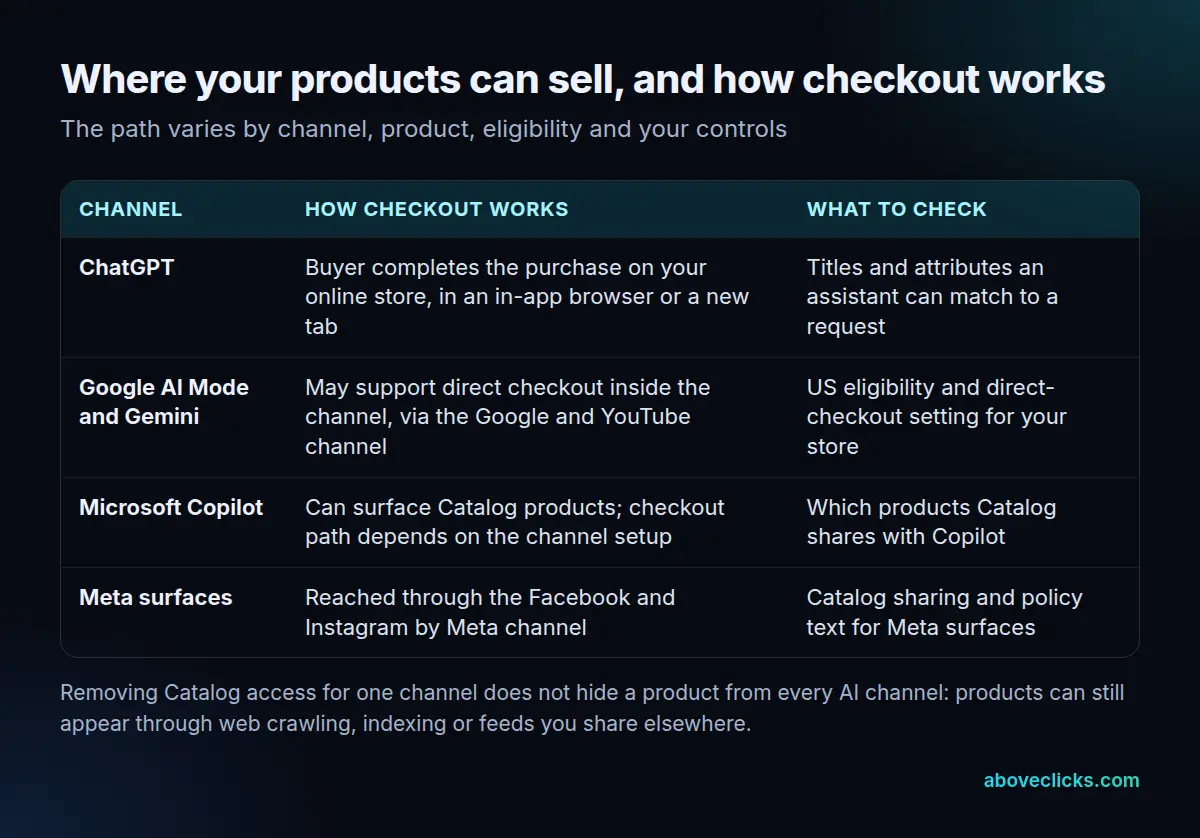
The 4 channels, in short: (1) ChatGPT, where the buyer finishes on your own store in an in-app browser or a new tab; (2) Google AI Mode and Gemini, where direct checkout inside the channel is available if you turn it on; (3) Microsoft Copilot, where direct checkout is available if you turn it on; and (4) Meta surfaces, reached through the Facebook and Instagram by Meta channel. On Agentic-plan stores, direct checkout is deactivated by default, so check the setting rather than assuming it is on.
Scale check: Google names 6 merchants with simplified in-cart checkout, and its UCP guide (version 2026-04-08) targets 95% availability, with complete-call latency of 6 seconds at the 50th percentile and 10 seconds at the 95th (Google’s UCP native checkout guide).
Two rules apply across all of them. First, the purchase path varies by channel, product, eligibility and controls, so never promise a shopper a single checkout journey. Second, products reach Google AI Mode and Gemini through the Google and YouTube channel, and Meta surfaces through the Facebook and Instagram by Meta channel, so those settings matter as much as the Agentic controls.
How do you get your store ready for Shopify agentic storefronts?
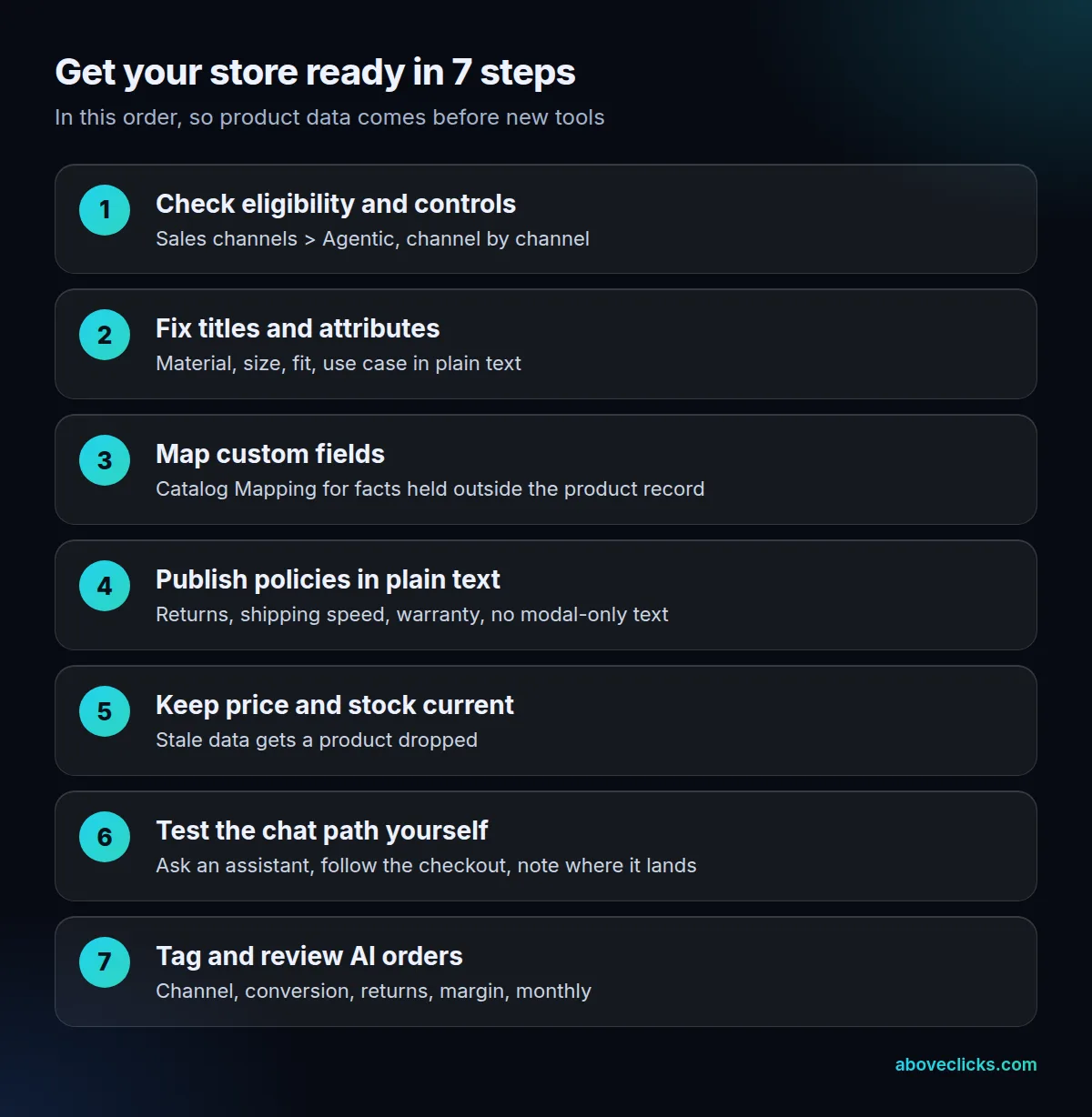
You get your store ready for Shopify agentic storefronts in 7 steps, in the figure’s order. Each step is small alone; together they decide whether an assistant can find, trust and sell your products.
- Check eligibility and controls. Open Sales channels > Agentic, read each channel’s status, and note which are on, off, or unavailable.
- Fix titles and attributes. Write titles stating the product, material, size or fit, and use case in plain text. An assistant matches words to a request, so a clever title hiding the facts loses to a plain title stating them.
- Map custom fields. Use Catalog Mapping for facts in custom fields, so a dimension, compatibility note or care instruction outside the product record still reaches the assistant.
- Publish policies in plain text. Put the return window, shipping speed and warranty in readable text on the product or policy page, not only in a modal or an image.
- Keep price and stock current. A stale price or an out-of-stock item still showing as available will get the product dropped, and repeated errors teach an assistant to skip your store.
- Test the chat path yourself. Ask an assistant for one of your own products, follow the result to checkout, and note where the shopper lands: your store, or inside the channel.
- Tag and review AI orders. Tag orders by channel, then review monthly for conversion rate, return rate and margin against site orders.
Work through the steps for your top 20 products first, not the whole catalog. An illustrative example shows why: a store with 200 products and 20 best sellers gets most AI traffic from those 20, so fixing them first covers the products an assistant is most likely to show; the rest can follow in batches of 20. That is the whole job for Shopify agentic storefronts: data, controls, and measurement, in that order.
Check 7 Catalog fields on each of those 20 products first: title, description, images, price, availability, variants and category. A product missing 2 or more of the 7 is the one to fix first, because an assistant needs those fields to compare it with other products.
What should you build first?
Build clean product data first, before any new app or integration. Shopify agentic storefronts reward the store whose record an assistant can read, not the store with the most tools.
The order is 4 parts for Shopify agentic storefronts, as of October 2026 (Shopify’s agentic storefronts guide): (1) product data, (2) channel controls, (3) measurement, then (4) tools. Product data means titles, attributes, mapped custom fields, policies in plain text, and current price and stock: the 7 Catalog fields checked above.
Channel controls mean the switches in Sales channels > Agentic, plus the Google and YouTube and Facebook and Instagram settings feeding AI Mode, Gemini and Meta. Measurement means order tagging and a monthly review, 12 times a year. Only after those 3 foundations does a new app earn its keep for Shopify agentic storefronts, and then only if it fixes a gap found in the audit above.
What not to build first: a second storefront for AI traffic, a separate feed for each assistant, or a chatbot duplicating what the assistant already does. Shopify Catalog already shares one structured record with connected channels for Shopify agentic storefronts, and a second feed only creates a second place where price or stock can go stale.
If you need help getting Shopify agentic storefronts ready, our Shopify development services cover catalog and channel work. For the next update on agentic commerce as it changes, sign up for our newsletter from the signup form in the site footer.
How do you measure sales from AI channels?
You measure sales from Shopify agentic storefronts by tagging every AI order by channel and comparing it with site orders. Shopify’s own guide confirms the starting point: orders from AI channels display in your admin with channel or referrer attribution, so no separate report is needed to split them out.
Track 4 numbers per channel for Shopify agentic storefronts, monthly: (1) orders, (2) conversion rate against channel-reported sessions or referrals, (3) return rate, and (4) margin after fulfilment and support costs. Compare each with your site orders. A channel can look strong on orders while losing money on returns, and only the split shows it.
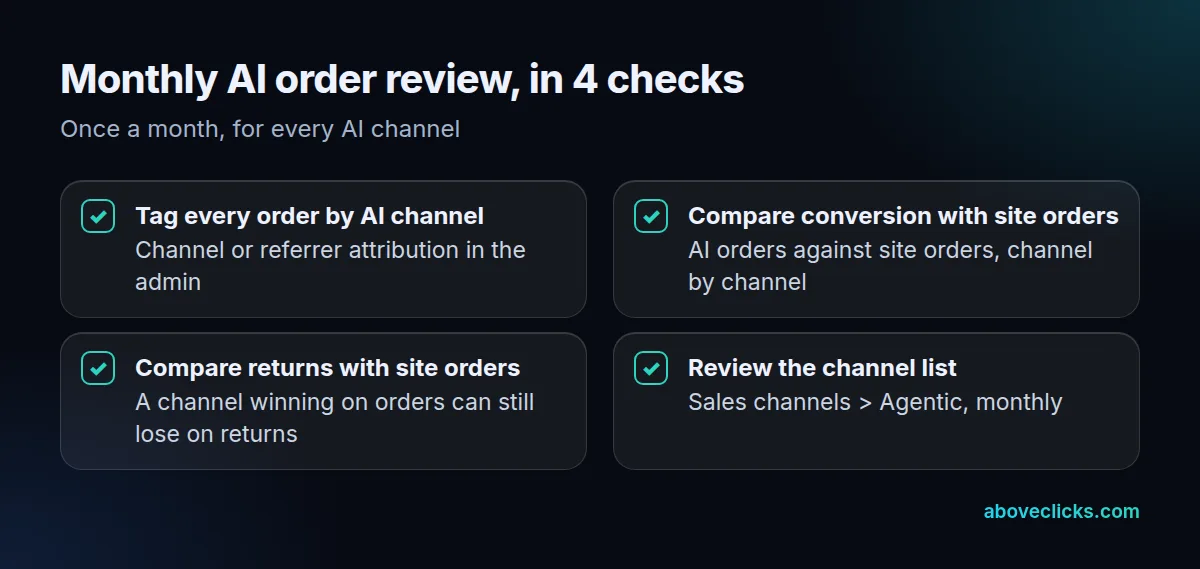
Do the review 12 times a year, once a month, across all 4 channels, so 1 review covers 4 channel rows and 16 metric cells (4 metrics x 4 channels). Score each channel on 2 comparisons with site orders: conversion and returns. A channel beating site orders on both earns more top-20 effort; one trailing on returns gets its product data and policy text fixed before it gets more traffic.
Review the channel list in Sales channels > Agentic at the same time. Channels change: new ones appear, eligibility changes, and a channel you switched off may be worth switching on once product data improves.