Quick answer
Neither wins for every seller. Klaviyo suits stores whose emails run on orders, browsing and checkouts. ConvertKit, now Kit, suits creators selling newsletters, courses and digital products to a large list. Count your contacts against both free plans before you compare paid prices.
| Klaviyo | ConvertKit (Kit) | |
|---|---|---|
| Built for | Online stores selling products | Creators selling newsletters, courses and digital products |
| Free plan (as of Nov 2026) | 250 active profiles, 500 email sends a month | Up to 10,000 subscribers, no sending limits |
| What counts toward your plan | Active profiles: any profile that can be emailed, opted in or not | Email subscribers, in tiers |
| Shopify | Pre-built integration brings customer and order data into profiles | Connects through the Kit App Store; abandoned checkout needs Creator or Pro |
| Segmenting | On orders, browsing and consent | On tags, grouped into segments |
| Moving in | CSV import; suppressions loaded before any send | Free migration into Kit on Creator and Pro plans |
Klaviyo
- Built for
- Online stores selling products
- Free plan (as of Nov 2026)
- 250 active profiles, 500 email sends a month
- What counts toward your plan
- Active profiles: any profile that can be emailed, opted in or not
- Shopify
- Pre-built integration brings customer and order data into profiles
- Segmenting
- On orders, browsing and consent
- Moving in
- CSV import; suppressions loaded before any send
ConvertKit (Kit)
- Built for
- Creators selling newsletters, courses and digital products
- Free plan (as of Nov 2026)
- Up to 10,000 subscribers, no sending limits
- What counts toward your plan
- Email subscribers, in tiers
- Shopify
- Connects through the Kit App Store; abandoned checkout needs Creator or Pro
- Segmenting
- On tags, grouped into segments
- Moving in
- Free migration into Kit on Creator and Pro plans
Choose Klaviyo if…
- Most of your revenue comes from physical-product orders
- You want segments built on what shoppers bought and viewed
- Your list is mostly customers, not newsletter readers
Choose ConvertKit (Kit) if…
- You sell ebooks, courses, memberships or a paid newsletter
- Your list is large and mostly readers
- You want selling and email in one tool, with its own checkout
Klaviyo vs ConvertKit comes down to what you sell: Klaviyo is built around store orders and browsing, while ConvertKit, now called Kit, is built around creators selling newsletters and digital products. Decide by checking which customer data your emails need.
A note before we start: we set up and migrate Klaviyo accounts for online stores, so we know that platform best. This comparison draws only on each vendor’s own pricing and help pages, dates every plan detail in its section, and says plainly where Kit is the better fit.
Klaviyo vs ConvertKit: what’s the real difference?
Who each tool is built for, and what data drives the emails. Klaviyo starts from a store’s customers and orders; Kit starts from an audience and the things a creator sells to it.
Both send campaigns and automated sequences, and both have sign-up forms and reports. The differences that change your workload and your bill sit lower down:
- Audience: Kit calls itself “the email-first operating system for creators”; Klaviyo’s Shopify connection brings in customer profiles and order data.
- Free plan: 250 active profiles on Klaviyo, up to 10,000 subscribers on Kit, as of November 2026.
- Billing unit: active profiles on Klaviyo, subscriber tiers on Kit.
- Selling: Kit sells digital products and subscriptions itself; Klaviyo sends the emails for a store that sells elsewhere.
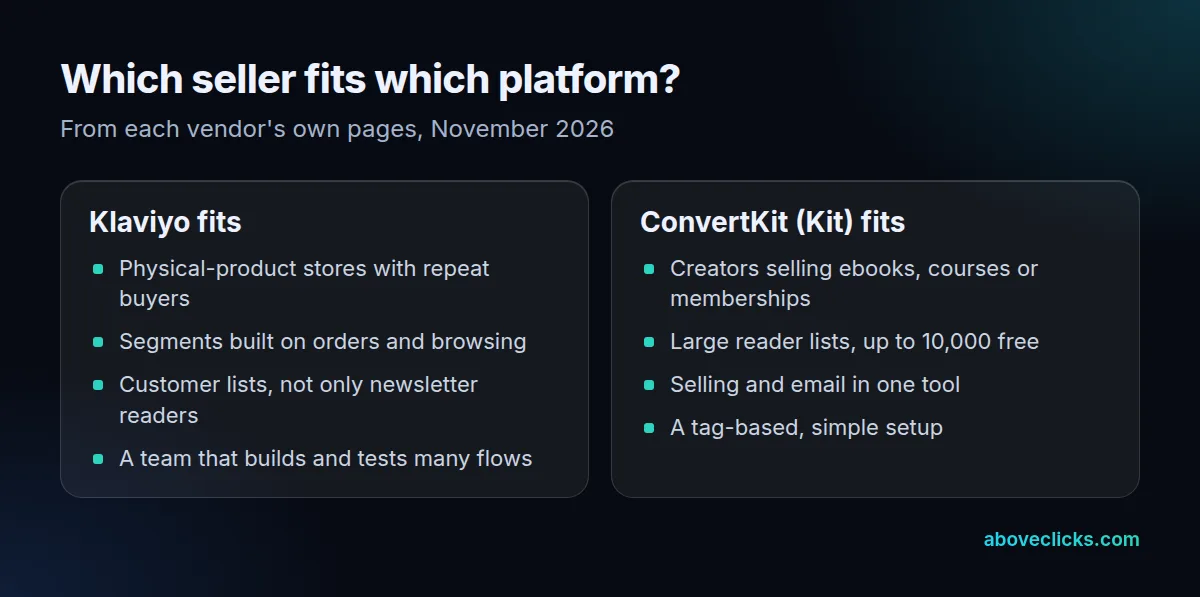
Start from your own business rather than a feature grid. Write down what you sell, how many contacts you have and who builds the emails. Those 3 answers settle most of the Klaviyo vs ConvertKit decision before you open a pricing page.
The feature lists in a ConvertKit vs Klaviyo search look alike, which is why reviews often call it a tie. It isn’t: the two tools hold different things on a customer record. A Klaviyo profile fills up with orders, product views and checkouts. A Kit subscriber record is mostly an email address plus the tags and sequences you apply, and that gap is the whole Klaviyo vs ConvertKit story.
Is ConvertKit now called Kit?
Yes. Kit’s own pages say “Kit, formerly ConvertKit” and carry a footer link reading “ConvertKit is now Kit”, so reviews that use either name describe the same company.
Search for both names when you read a ConvertKit vs Klaviyo comparison, and check the date. Kit’s pricing page describes the company as trusted by 550,000+ creator business owners, which is the vendor’s own claim. Plans and features change, so an older review may quote limits that no longer exist. Everything below is read from the vendors’ pages in November 2026.
Is ConvertKit free, and what does Klaviyo’s free plan include?
Both have a free plan, but in Klaviyo vs ConvertKit the limits differ by 40 times. As of November 2026, Kit’s covers up to 10,000 subscribers; Klaviyo’s covers 250 active profiles and 500 email sends a month.
| Free plan, as of November 2026 | Klaviyo | ConvertKit (Kit) |
|---|---|---|
| Contacts | 250 active profiles | Up to 10,000 subscribers |
| Email sends | 500 a month | No sending limits on any plan |
| Forms and landing pages | Web forms | Unlimited landing pages and forms |
| Automations | Flows included | Visual Automations and sequences sit on the Creator plan |
| Selling products | Not a selling tool | Digital products and subscriptions |
The sources are Klaviyo’s pricing page and Kit’s pricing page. Kit’s page puts abandoned checkout recovery for Shopify, Fourthwall and Wix on the Creator and Pro plans, not the free one. A store that wants cart recovery from day 1 therefore starts on a paid Kit plan, while Klaviyo’s free plan already lets you build automations.
Paid prices on both depend on list size, so we don’t quote them here. Run your own contact count through each vendor’s calculator. For a Klaviyo vs ConvertKit price check, compare the same list on both, not the entry plans.
How does each platform count what you pay for?
In Klaviyo vs ConvertKit, the billing units differ. Klaviyo counts active profiles, meaning any profile it can email, opted in or not. Kit’s pricing page prices by email subscribers in tiers.
Klaviyo’s billing guide says a profile counts as active whatever its consent status, including shoppers who shared their email at checkout without opting in. Your plan must cover that count at the end of each billing cycle, or you are moved up automatically. Suppressed email profiles don’t count, according to Klaviyo’s active profile guide, so cleaning inactive profiles can lower the tier.
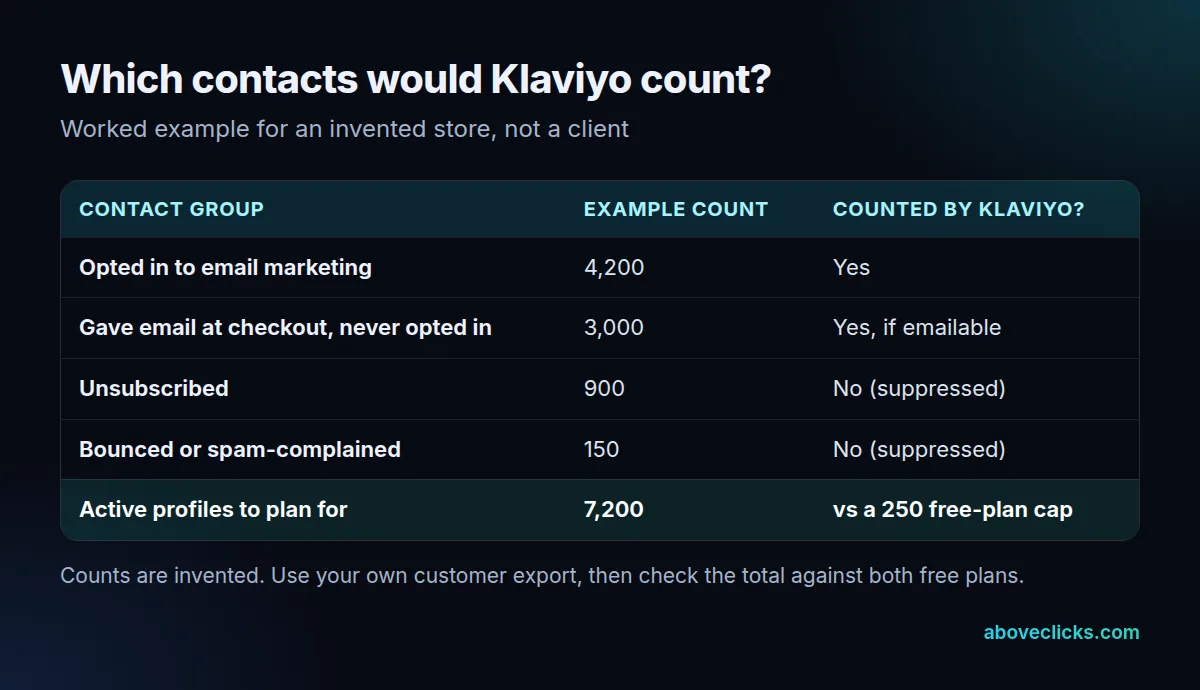
In this invented store, 4,200 opted-in subscribers and 3,000 checkout-only shoppers make 7,200 active profiles to plan for. That fits Kit’s 10,000-subscriber free plan but far exceeds Klaviyo’s 250. We couldn’t confirm from Kit’s pages how it counts a shopper who never subscribed, so ask before you rely on the free plan.
Does ConvertKit work with Shopify?
Yes, through the Kit App Store, though the Shopify side of ConvertKit vs Klaviyo is where they differ most. Kit says purchase data syncs automatically and tags buyers, but its pages don’t list which Shopify fields come across.
Kit’s commerce page says it integrates with Shopify, Wix, Fourthwall and WooCommerce, and that its own digital-product checkout charges 0.6% plus card processing fees. That checkout is for digital goods sold through Kit, not for your Shopify orders.
Klaviyo’s Shopify guide says the connection brings customer profile and order data into Klaviyo, and can sync Shopify email subscribers into a list you choose. Its integration guide names the events a store sends: Viewed Product, Added to Cart, Started Checkout and Placed Order. Those events are what let a segment say “bought twice, not in the last 90 days”.
So before you commit to Kit for a physical-product store, test one thing on its free trial: build a segment from a real Shopify order and see whether the field you need is there.
A fair Klaviyo vs ConvertKit trial uses the same 3 tests on both:
- Connect the store and place one test order; check what appears on the customer record.
- Build a segment of buyers of one product; see whether it takes 1 step or a workaround.
- Build a cart reminder and check which plan it needs; on Kit’s pricing page, that is Creator or higher.
Two hours on those tests will tell you more than any review of Klaviyo vs ConvertKit, including this one.
Which should you choose: ConvertKit vs Klaviyo?
Pick by where your revenue comes from. In ConvertKit vs Klaviyo, orders of physical products point to Klaviyo; digital products and a paid newsletter point to Kit.
| Your situation | Better starting point | Why |
|---|---|---|
| Physical products, repeat buyers | Klaviyo | Segments and flows run on orders and browsing |
| Ebooks, courses or a paid newsletter | Kit | Selling and email in one tool |
| Large reader list, few orders | Kit | Free up to 10,000 subscribers |
| Fewer than 250 contacts, learning | Either | Both have a free plan |
| Creator with a small merch line | Kit, then test | Check Shopify data before adding Klaviyo |
Our rule of thumb for the mixed seller in Klaviyo vs ConvertKit: if more than half your revenue comes from physical orders, lean Klaviyo. That is our own heuristic, not a vendor rule. In a ConvertKit vs Klaviyo choice, the cost of being wrong is moving later, which is manageable; the Klaviyo vs ConvertKit decision is rarely permanent. For other creator-style tools, see Flodesk vs Klaviyo and MailerLite vs Klaviyo.
How do you move from ConvertKit to Klaviyo?
From ConvertKit to Klaviyo, by CSV, in a fixed order: export with consent status, disconnect the old app from Shopify, connect Klaviyo, import subscribers, then load unsubscribes before any send.
Klaviyo’s migration guide lists built-in list importers for Mailchimp, Campaign Monitor and Salesforce Marketing Cloud. Kit isn’t on that list, so you use the CSV route. Keep unsubscribed and bounced addresses out of the subscriber file, and import them as suppressions before sending. Kit’s export screens aren’t covered here; check Kit’s help center for the current steps.
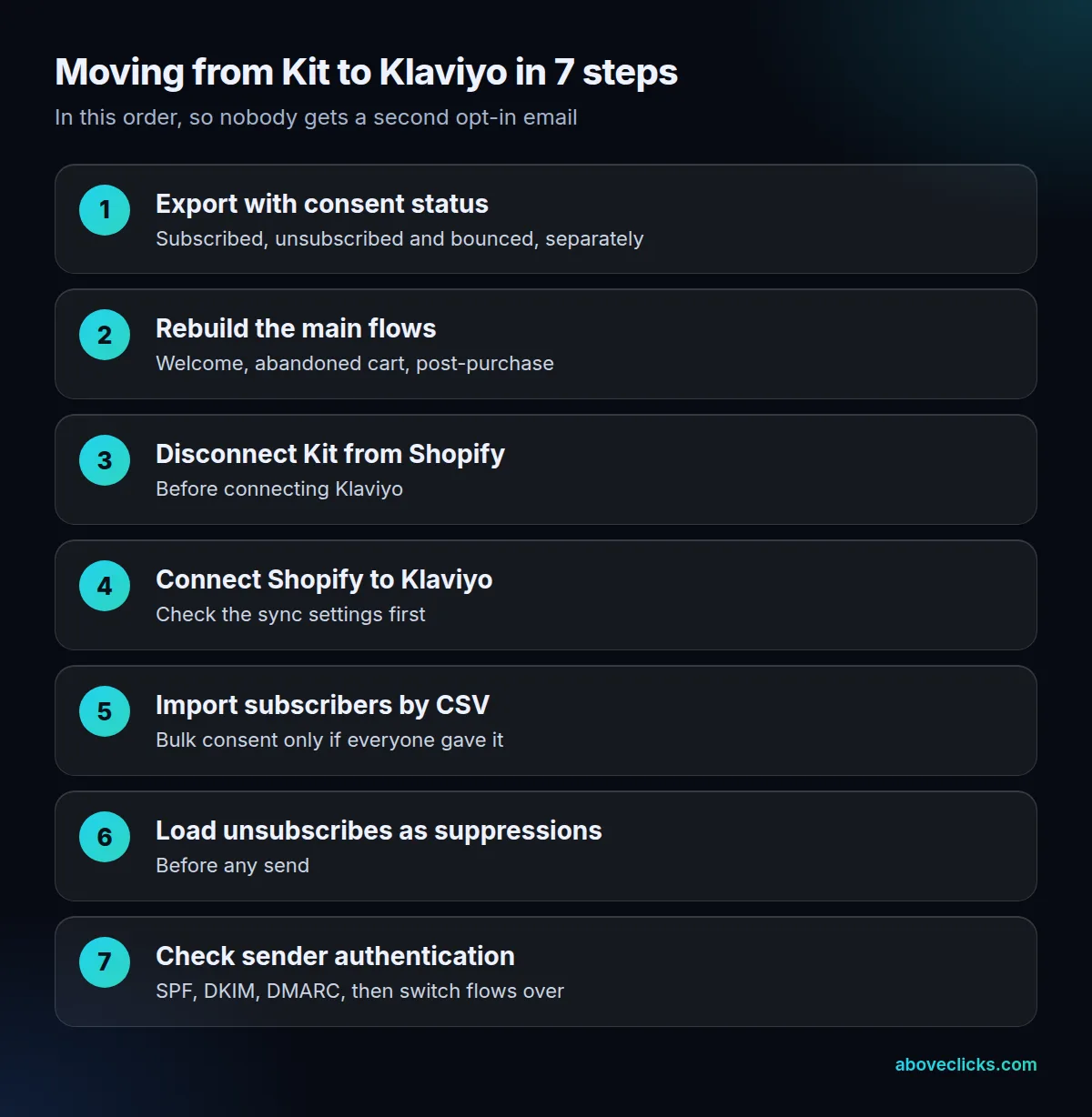
Three details from Klaviyo’s guides save trouble:
- Apply bulk consent only if everyone in the file explicitly agreed to marketing email.
- Via the API, set
historical_importto true and give each profile aconsented_attime at least 5 minutes in the past, to skip double opt-in messages. - Disconnect your prior email app from Shopify first. Klaviyo warns that leaving it connected could send double opt-in emails to your existing list.
Then check your sending domain. Gmail’s sender guidelines ask all senders for SPF or DKIM, and bulk senders of more than 5,000 messages a day also need DMARC and one-click unsubscribe. Our email deliverability service checks those settings on either platform.
When we move a store between email platforms, we follow this order and switch the old flows off only after the new ones are live, so no customer misses a cart reminder. Keep the Kit account readable for a few weeks afterward in case a customer asks about consent.
If the Klaviyo vs ConvertKit answer for you is Klaviyo, our Klaviyo migration service maps what has to move before anything is switched. If you’re already on Klaviyo and unsure it’s paying its way, our Klaviyo email marketing team can review the account, or start with the free audit. More comparisons are in buying guides.