Monthly social media packages are a fixed monthly scope of posts, replies and reporting for one fee. Compare them by the cost of each finished post and by what sits outside the fee, not by the headline number.
This guide shows how to turn two quotes into one number, lists the costs a monthly social media package usually leaves out, explains who answers for creator posts and music, and sets out how to keep your own results if you leave. For market fee ranges and a week-by-week plan, see our guides to social media packages and monthly social media marketing packages.
What are monthly social media packages?
An ongoing agreement where a provider makes and publishes social content for you every month and charges one fee. The agreement lists a count of posts, a reply service and a report, and the monthly social media package renews until you end it.
The phrase has a second meaning in search: mobile phone companies sell monthly data bundles under the same words. Here it means agency or freelancer work on your brand’s accounts.
In practice the month is written as a count, such as 20 posts made up of 8 images, 6 short videos, 4 carousels and 2 story sets. A social media package is different from a project, which ends when a defined set of assets is delivered. Monthly social media packages suit brands that need steady posting and quick replies. They suit brands that post twice a quarter much less, and for those a plan and an audit are usually enough.
How do you compare the cost of monthly social media packages?
Divide the fee by the number of finished new posts, not by the number the quote lists. Two monthly social media packages with the same fee can differ a lot once reposts and stock graphics are taken out of the count.
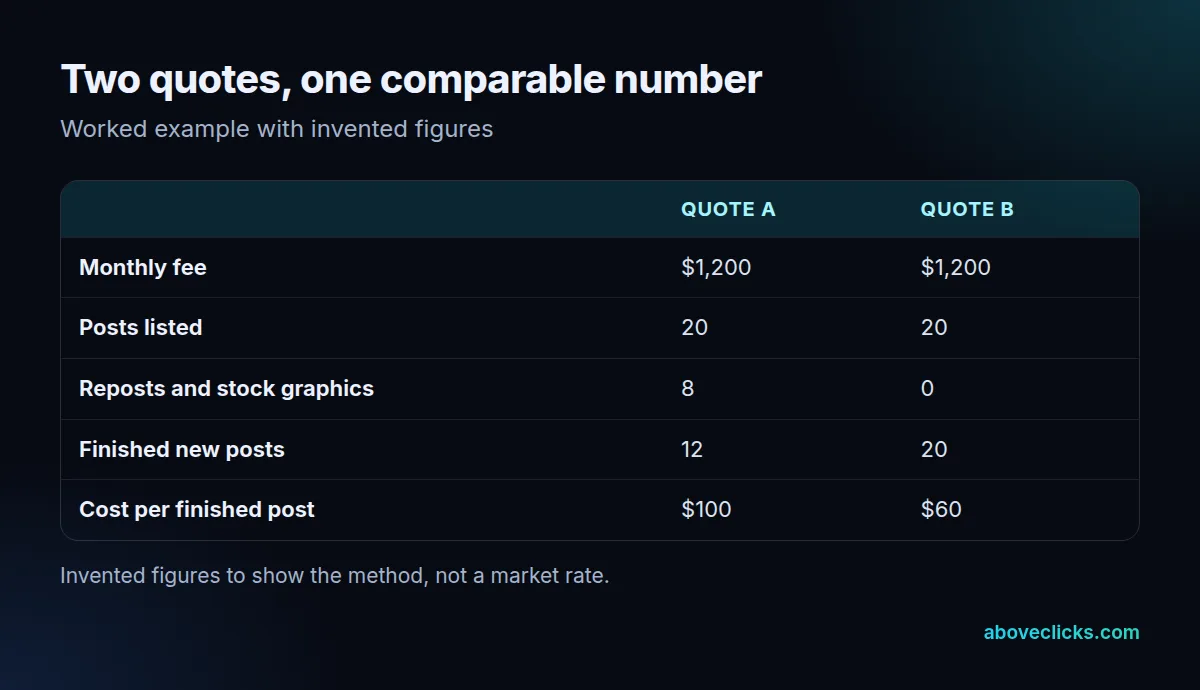
The example above is invented to show the method. Both quotes cost $1,200 and list 20 posts. Quote A counts 8 reposts and stock graphics, so it delivers 12 finished posts, or $100 each. Quote B delivers all 20 as new work, or $60 each. The cheaper-looking quote is the more expensive one per post.
Use the same steps on any quote:
- Write down the fee for one month, with any one-off setup fee shown separately.
- Count only new posts made for your brand, by format.
- Subtract reposts, reshared creator posts and templates with only the text changed.
- Divide the fee by what is left.
- Compare the results across at least 3 months, because the first month often carries setup work.
Be careful with the third step. Providers often count a reshared customer photo or a repost of an old caption as a post, and some quotes count every story frame separately. Neither is wrong if it is useful, but neither costs the same to make as a new video, so the count should say which is which.
Format matters too. A short video needs a script, filming or sourcing, editing and captions, while a single image takes far less time. Ask for the count by format, such as 6 videos and 8 images, rather than a bare “20 posts”. That one change makes monthly social media packages from different providers comparable.
What do monthly social media packages usually leave out?
Paid ads, creator fees, filming days, stock licences, tool seats and extra platforms. These are often priced separately, so monthly social media packages that look complete can still cost more than the fee. A monthly social media package that looks complete can still cost more than its fee.
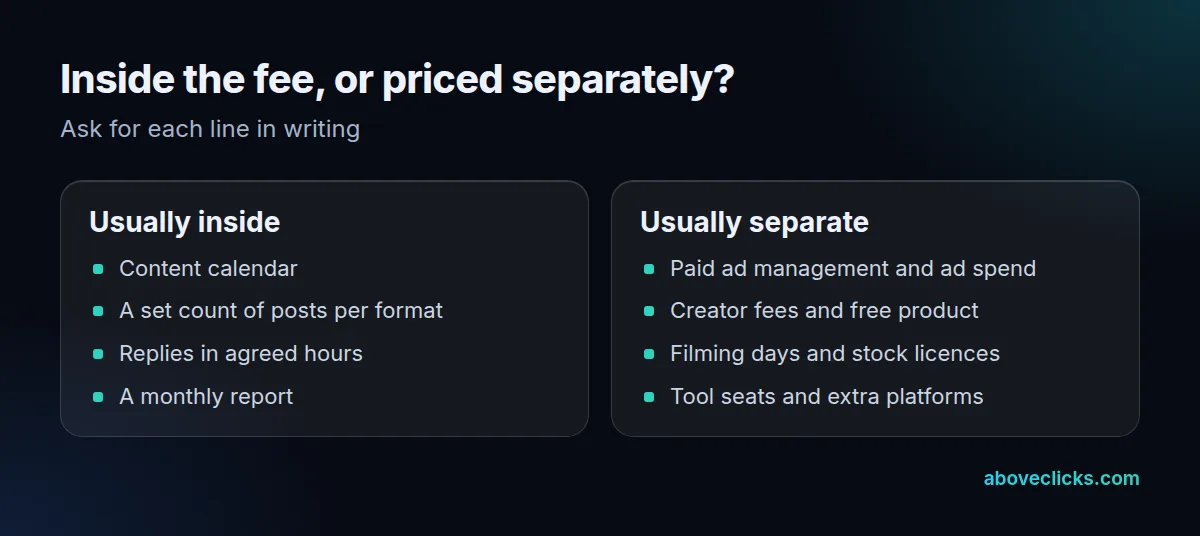
Ask the provider to mark each line as inside or outside the fee, and to write the answer in the quote rather than on a call. The ones that surprise buyers most:
- Ad spend and ad management: the platform charges for the ads, and managing them is normally a different scope from posting organically.
- Creator fees and free product: a creator post has its own cost, and so does the product you send.
- Filming and licences: a filming day, stock footage and fonts or images used commercially.
- Tools and seats: scheduling and reporting software, which some providers pass on.
- Extra platforms: adding one often means a second set of posts at its own fee.
As an invented example, adding one platform with 10 posts at $500 would move a $1,200 month to $1,700, so ask for that total up front. A fair quote for monthly social media packages names the monthly total including the lines you want, so you are not comparing a base fee against someone else’s full fee.
Who is responsible for creator posts in a package?
You and your provider, not only the creator. The FTC says the final responsibility for disclosing a material connection rests with the influencer and the brand, not the platform, so ask who checks every creator post before it goes live.
The FTC’s influencer guide says to disclose any financial, employment, personal or family relationship with a brand, and that financial relationships are not limited to money: free product counts. Its Endorsement Guides FAQ adds that if enforcement becomes necessary, the focus usually will be on advertisers or their ad agencies and public relations firms, and that advertisers need reasonable programs to train and monitor members of their network.
For a package that includes creators, that turns into three contract lines:
- Who briefs the creator on the disclosure wording?
- Who checks each post before and after it is published?
- What happens when a post is missing a disclosure: a fix within 1 to 2 days, or a removal?
Buyers of monthly social media packages also tend to assume the creator handled the disclosure because the creator posted it. The FTC guidance reads the other way for the brand and its provider, so the check belongs in the package itself, not in an email thread after the post is live.
Music is the other quiet risk. TikTok’s Commercial Music Library is a pre-cleared library of 1 million songs that businesses can use free of charge, as of November 2026, so a provider has no need to use music that a business account may not be cleared to use. Ask which music source the provider uses for each platform, and put it in the monthly social media package terms. If creators are part of the plan, our creator collaborations page shows how we scope them.
How do you keep your results if you leave a package?
Set it up in month 1 of any monthly social media package: own the accounts, save the numbers every month and tag every link. Instagram only shows insights for a period within the past 90 days, so a package that never exports its numbers leaves you with a short memory.
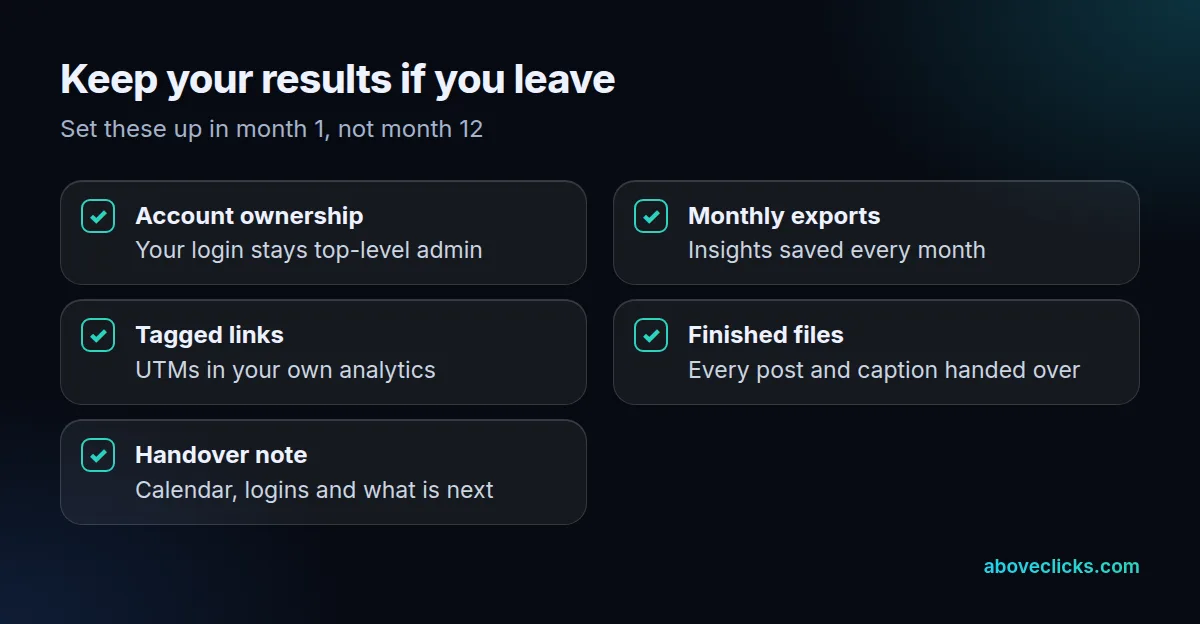
Instagram’s insights help page says insights can be viewed for any time period within the past 90 days. A report written in month 12 therefore cannot reach back to month 1 unless someone saved the numbers earlier. Ask for a monthly export, kept in a folder you own.
Tagged links solve the other half. Google Analytics UTM parameters such as utm_source, utm_medium and utm_campaign identify where a visit came from, so clicks and orders from social posts stay in your own analytics even if you change provider. Agree the naming in month 1 and use it on every link.
A monthly report is the third piece. It should show posts delivered against the plan, clicks and orders from tagged links, and what will change next month, in the same format each time. Our guide to monthly social media marketing packages lists what that report should contain.
Then keep control of the accounts themselves: your login stays the top-level admin and the provider is added as a user. When the package ends you remove one user instead of chasing a password. Our social media management service is set up this way.
How long should you commit to a package?
Long enough to judge, short enough to leave. For monthly social media packages, a trial of about 3 months, then monthly renewal, lets you test the cost per finished post and the reports without a long lock-in.
The reason to avoid a long lock-in with monthly social media packages is simple: the first month rarely shows the real pace of the work. Plans, approvals and the first batch of content take time, and a long contract signed before you have seen two reports gives you little room to correct a poor fit.
Three months is long enough for the provider to learn your brand, publish a full set of posts and send at least two reports. It is not so long that a poor fit costs a year.
Check these terms in writing before you sign:
- The minimum term and the notice period, and whether the last month is billed in full.
- Whether unused posts roll over or expire at month end.
- Whether you can move up or down a tier after the trial.
- That all finished files belong to you if you leave in month 2.
If you would like a second pair of eyes on a quote, our free audit reads your accounts and your plan with read-only access. More guides are in buying guides.