Amazon PPC automation means using rules, bulk files or software to do repeat ad jobs for you, such as search term review, negative keywords, bids and budgets. Five weekly jobs fit rules well, and each one needs limits you set first.
This guide to Amazon PPC automation lists those five jobs with a one-line rule for each, shows how to work out how many clicks a rule should wait for, covers what rules cannot see, and ends with a 4-week test.
What is Amazon PPC automation?
It is any way of getting Sponsored Products work done by a rule instead of by hand. The rule can be an Amazon setting, a bulk spreadsheet, a script on the API or a paid tool.
Amazon describes Sponsored Products as ads where you select products and choose keywords, or let Amazon’s systems target relevant keywords automatically. That second option is the oldest form of Amazon PPC automation, and it only covers where your ads appear. The jobs after launch stay manual unless you automate them: reading what happened, blocking waste, moving bids and budgets.
Amazon’s FAQ says the minimum daily budget for Sponsored Products is $1.00, so even a small account can run for months. That is why it is worth planning Amazon PPC automation early: a rule that is wrong costs little on day 1 and a lot after a year.
If you are still working out what the clicks themselves cost, start with our guide to CPC on Amazon, then come back here.
Which Amazon PPC jobs can you automate?
Amazon PPC automation fits five repeat jobs: search term review, negative keywords, bid nudges, budget moves and reporting. Automate the reporting fully, cap the bid nudges, and keep a person approving the rest.
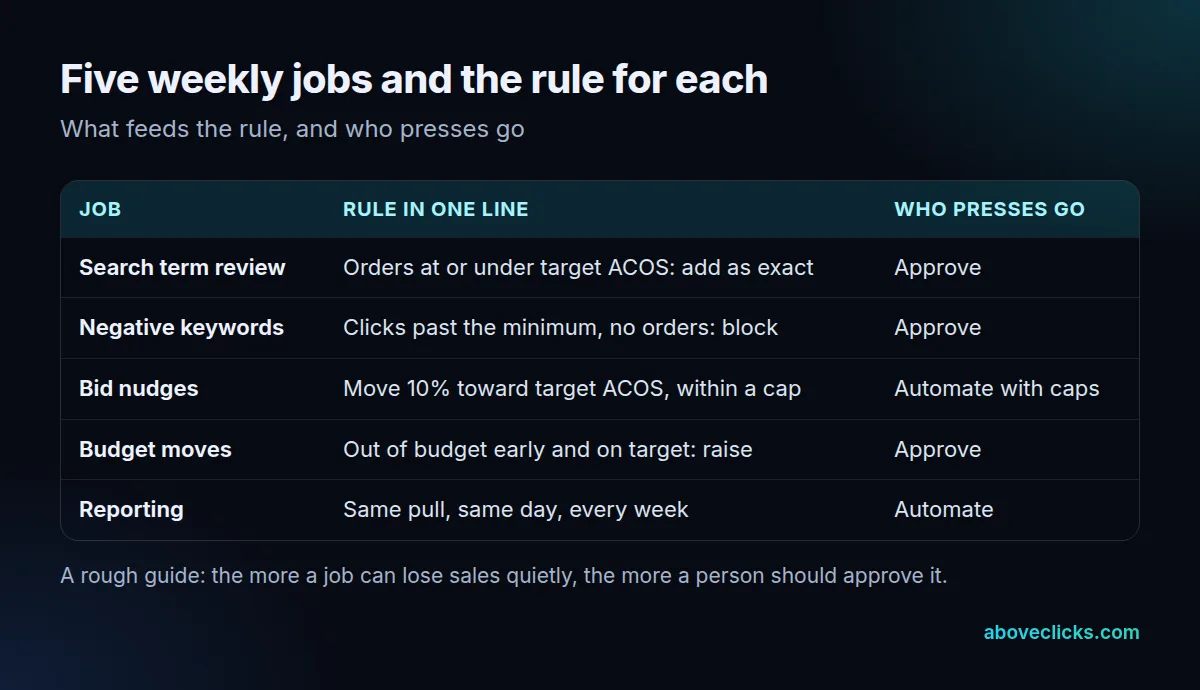
Each row of Amazon PPC automation has an Amazon report behind it. Amazon’s Sponsored Products guide says the search term report lists the shopping terms that got at least one click, and the targeting report covers keywords and products with at least one impression. It also suggests downloading the search term report to find your best performing products and target them in a manual campaign, and to create manual campaigns that supplement your automated one.
What each rule looks like in practice:
- Search term review: a term with enough orders at or under your target ACOS becomes an exact-match keyword in a manual campaign. A person approves, because a term can convert for reasons the rule cannot see, such as a one-off promotion.
- Negative keywords: a term past the click minimum (next section) with no orders becomes a negative suggestion. Amazon’s guide says negative targeting stops your ads showing on results that do not meet your goals, which is also why a wrong block costs sales.
- Bid nudges: move a bid 10% toward your target ACOS, never past a floor and a ceiling. These repeat often and are easy to cap, so they suit full automation. Placement adjustments can go up to 900%, so set your own lower limit.
- Budget moves: raise a daily budget only for a campaign that runs out early and is on target. Approve each move, because a budget rule that fires every day compounds.
- Reporting: the same pull on the same day each week. A wrong report costs nothing, so automate it.
Bulk operations help with the edits. The same guide says they let you edit, optimize and create many campaigns at once.
How many clicks should a rule wait for?
Enough that a term with no orders is probably not just unlucky. A simple rule: wait until the chance of no order by luck falls to about 5%, which depends on your conversion rate.
The maths is basic probability, not an Amazon figure. If a term converts at 10%, each click has a 90% chance of ending without an order, and 29 clicks in a row without one happens by chance about 5% of the time. At 5% conversion you need 59 clicks for the same confidence; at 20%, only 14.
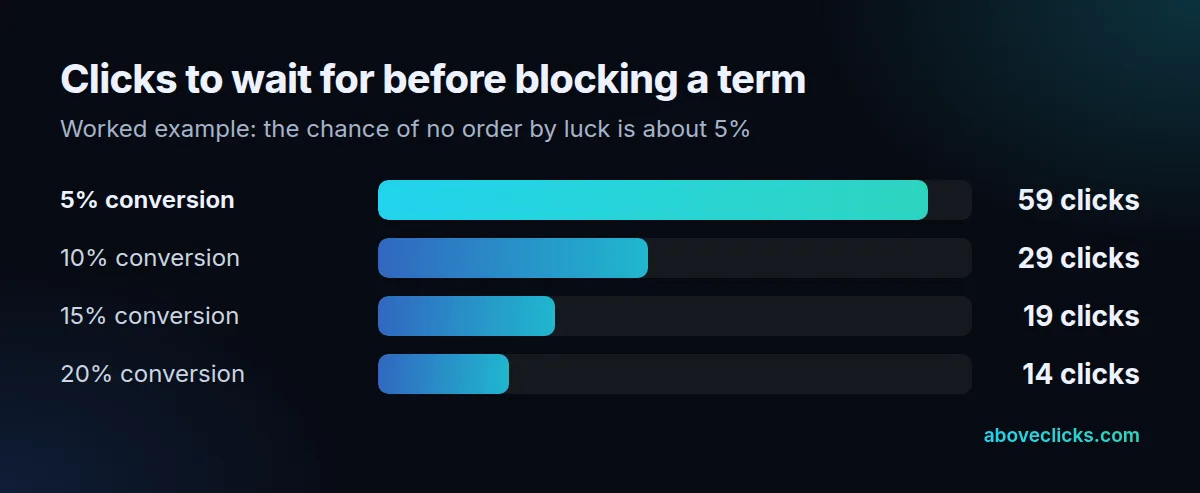
Use your own conversion rate from the advertised product report when you set up Amazon PPC automation, not the numbers above. They are an example with assumed rates. A rule that blocks after 5 clicks at 10% conversion would block roughly 59 out of every 100 terms that would have sold, because five clicks with no order happens that often by luck.
Worked example (an invented store, not a client): a store sells a $50 product at a 35% margin after product cost and fees. Break-even ACOS is 35%, so the owner sets a target of 28%. Conversion is about 10%, so the negative rule waits for 29 clicks. A term with 31 clicks and no orders goes to the approval list; a term with 12 clicks and no orders is left alone, as the rule has too little data to act.
What can Amazon PPC automation not see?
Margin, stock and the reason behind a sale. Amazon PPC automation reads clicks, spend and sales, so it cannot tell that a supplier raised costs or that a product is about to sell out.
Amazon’s ACOS guide defines ACOS as ad spend divided by ad revenue, times 100, and says that to keep a profit, your ACOS needs to be lower than your profit margin. Rules know the target you typed, not whether that margin is still true. Update the target whenever costs change, and review it every month.
Three traps cost the most money:
- A stale target: margin shrinks, the rule keeps bidding to the old ACOS and every sale loses money.
- No data minimum: the rule acts on 3 clicks and cuts bids on terms that were about to convert.
- No log: nobody can say what the rule did last Tuesday, so nobody can fix it.
A fourth is structure. Amazon’s guide recommends separate campaigns or ad groups for each product group. A rule averages whatever it sees, so a campaign that mixes a cheap item and a premium one makes every average misleading.
Do you need Amazon PPC automation tools?
Not always. Amazon’s own settings and a weekly check cover a small account; Amazon PPC automation tools earn their place when the same weekly jobs take more than an hour or you skip them.
There are three routes. The first is built in: dynamic bids, automatic targeting and bulk operations, which Amazon’s guide describes and which carry no separate fee. The second is your own scripts on the Amazon Ads API, which its developer guides say supports asynchronous report requests, with Amazon Marketing Stream giving near real-time metrics, as of November 2026. The third is a paid Amazon PPC automation tool.
Amazon’s FAQ also says its Ads Agent platform has an MCP Server that lets you connect your own AI agents, which can then create, update and optimize campaigns and run reports, as of November 2026. Details like that change, so read Amazon’s page before you build on it.
We cannot check any vendor’s features or fees from a primary source, so we do not compare tools. Ask each one the same questions, and ask for a trial of at least 30 days before you connect a live account:
- Can I cap the bid step, floor, ceiling and daily budget per rule?
- Does it log every change with the old value, new value and reason?
- Does it have a suggest-only mode, and a trial?
- Who owns the account access and the data if I leave?
Product pages matter as much as any rule. Ads send shoppers to your listing, so Amazon SEO work on titles and images can lift results more than another tool.
Is Amazon PPC automation worth it?
Amazon PPC automation is worth it when it saves more time than it costs to supervise, and when the saved time goes to the decisions rules cannot make. Test that with a time count, not a feature list.
Worked example (an invented store): the owner spends 20 minutes each on search term review, negatives, bids and budgets, plus the report, about 80 minutes a week for the four jobs. Rules take over the report and the bid nudges, and turn the other two into approval lists that take 10 minutes each. Savings are about 40 minutes a week, as long as the owner spends 15 of them reading the change log. The net gain is around 25 minutes, so for this store, a monthly tool fee needs to cost less than the value of about 100 minutes.
Compare that with the cost side in our guides to Amazon PPC management cost and Amazon advertising cost. For a handful of campaigns, the honest answer is often “not yet”. The saving only grows with the number of campaigns and the number of terms.
How do you test a rule for 4 weeks?
Run Amazon PPC automation on one campaign for 4 weeks, with a similar campaign left alone. Start in suggest-only mode so you see what the rule would do before it does it.
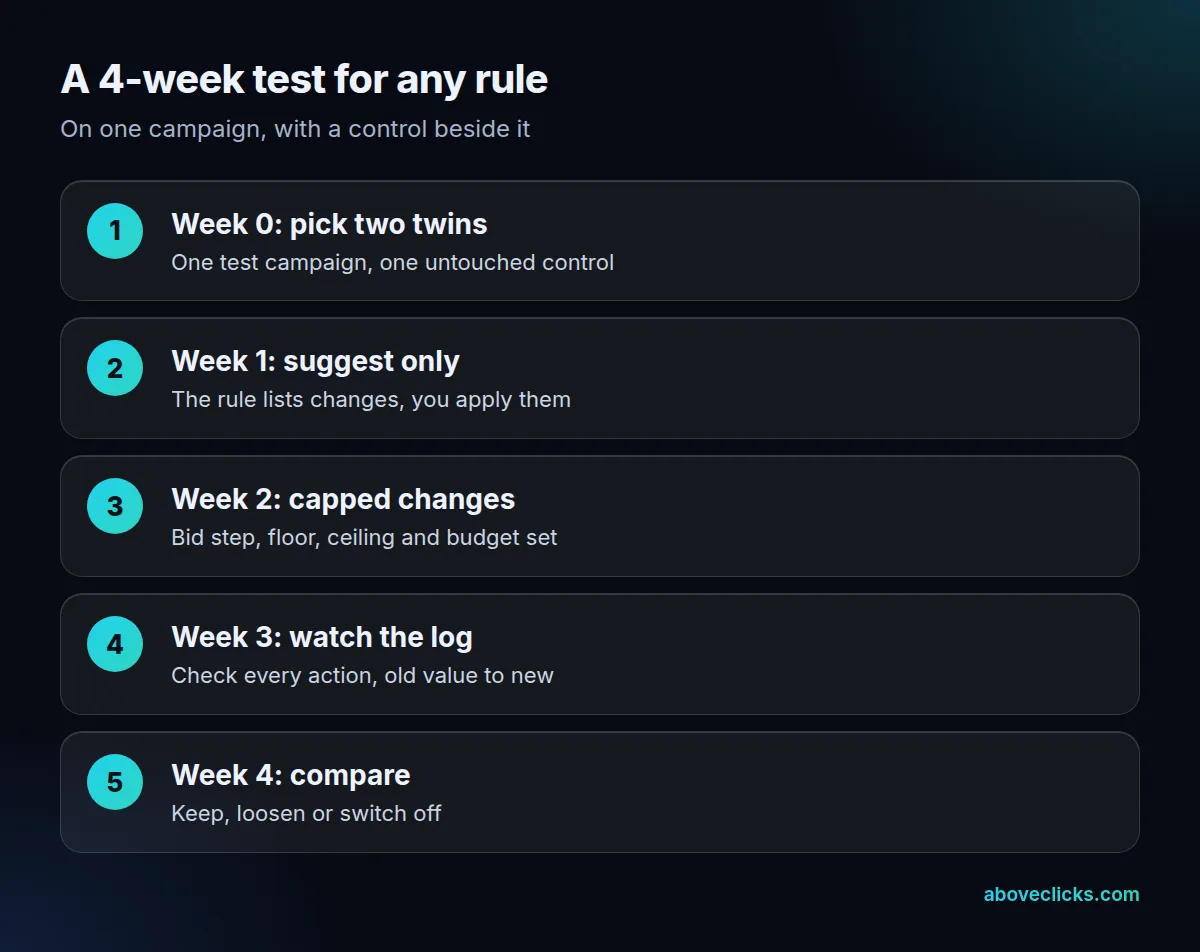
Write each Amazon PPC automation rule in one line, such as “if a term has 29 clicks and no orders, suggest blocking it”. If you cannot say it that simply, it is too complicated to trust. Amazon’s guide suggests monitoring a new campaign at least twice a week in the first week; do the same for the first week of any rule.
At the end of week 4, ask:
- Did the rule fire as written, or more often than expected?
- Did ACOS move toward the target compared with the control?
- Did sales fall faster than spend?
If sales fell with spend, the rule cut too hard: loosen the click minimum or the bid step and run another 2 weeks. If you would like a second pair of eyes on the rules before they touch real budget, our Amazon ads service starts with an account review, and our free audit is a no-cost first look. More guides are in buying guides.