How to increase conversion rate Shopify stores can measure comes down to three steps: read the four-step funnel in your reports, find the leakiest stage and fix the cheapest one first. The same percentage gain is worth the same at any stage, so effort decides the order.
Most advice on how to increase conversion rate Shopify stores need is a list of tips with no way to choose between them. This guide shows how Shopify defines the rate, a worked funnel that ranks the stages, a table that links each reason for leaving to a place to check, a fair way to judge a provider’s charge and a 30-day routine.
What is a good conversion rate on Shopify?
There is no single good figure; the useful comparison is your own rate in earlier months, split by device and traffic source. Price, product type and what you count as a visit change the rate far more than the platform does.
Shopify’s own help page uses a store at 5% as a worked example, meaning 5% of people who visited that month bought. That is an illustration, not a benchmark, and we quote no market averages here because they mix very different stores.
So any plan for how to increase conversion rate Shopify stores can trust starts with a baseline. Write down last month’s rate, last year’s same month and the rate for phones and desktops. A store selling $15 items to repeat buyers should not expect the same number as one selling $900 items to first-time visitors. Compare like with like before you decide how to improve conversion rate Shopify results by channel.
How do you read your Shopify conversion rate?
Open Analytics, then Reports, and use two reports on the Behavior card. Shopify defines conversion rate as the percentage of sessions that resulted in a purchase, and the Conversion rate breakdown report splits it into steps.
In Shopify’s example, a 5% rate means 5 of every 100 sessions ended in a purchase. The funnel has four steps: all sessions, sessions with cart additions, sessions that reached checkout and sessions that completed checkout. Each step’s rate is its sessions divided by total sessions, so the last step equals your conversion rate.
Two details trip people up. First, Shopify counts a session as reaching checkout when there was user input there, such as a key press or a click, so that step is an early one. Second, the report can show an open funnel, where visitors may skip steps, or a closed funnel, where they must pass every step in order. Pick one and keep it the same each month, or the numbers will not compare. That report is the base for every answer to how to increase conversion rate Shopify owners ask about.
How to increase conversion rate Shopify: which stage should you fix first?
The one that is cheapest to improve, because a given relative gain is worth the same number of orders at any stage. Orders are sessions times the cart rate times the checkout rate times the completion rate, so a 10% better stage gives 10% more orders.
Here is an invented store with 30,000 sessions a month and an average order value of $75. The figures follow Shopify’s step definitions, but they are not a benchmark.
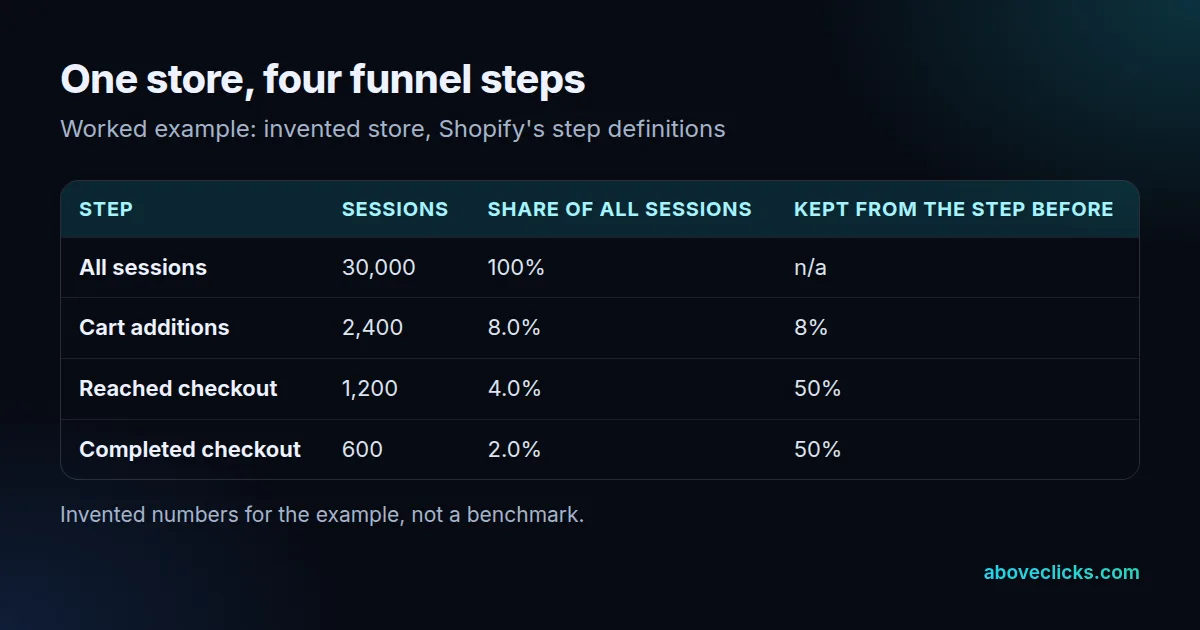
The store makes 600 orders, or $45,000 of revenue, at a 2.0% rate. Lift cart additions from 8.0% to 8.8% and you get 660 orders. Lift checkout completion from 50% to 55% and you also get 660 orders. Either way that is 60 more orders, $4,500 of extra revenue a month and, at an assumed 40% margin, $1,800 of profit.
So the question is not which stage looks worst, but which gain costs least. Moving a delivery date next to the price takes a day; rebuilding a product template takes weeks. Both are valid answers to how to increase conversion rate Shopify stores ask about, but only one is cheap. That is how to increase conversion rate Shopify stores with a limited budget can do it: list the fixes for each stage, estimate the days, and start with the stage where the same gain costs the fewest days.
Change one thing at a time where you can. If you ship five changes in one week, you cannot say which one moved the number, and a rate that looks better can be a busy week. Compare full weeks before and after, and keep a log.
Why is my Shopify conversion rate low?
Usually because of a few fixable problems, not a mystery. Baymard’s average of 50 studies puts documented cart abandonment at 70.22%, and 42% of US shoppers said they had left a cart because they were just browsing. That group you cannot fix; the rest you can.
Ignoring the browsers, Baymard’s shares for the remaining reasons are below, as of November 2026. The right-hand column is where to check each one in Shopify.
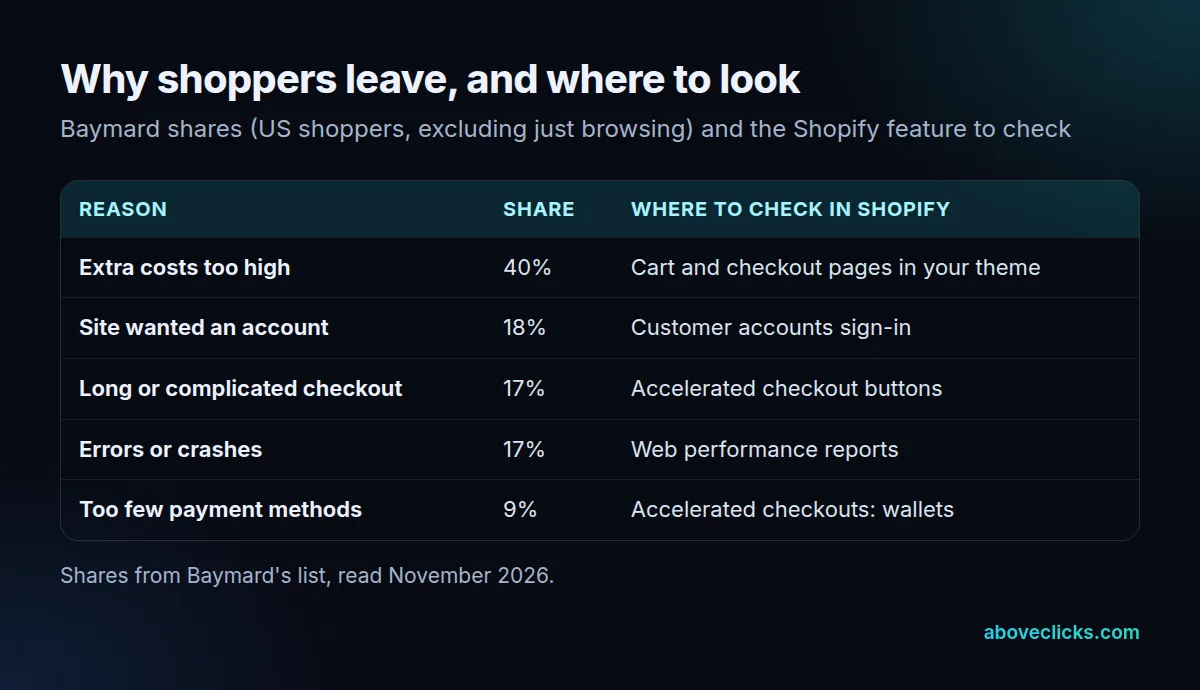
For anyone working out how to increase conversion rate on Shopify, extra costs lead at 40%, ahead of a forced account at 18% and a long checkout at 17%. A further 12% could not see the total order cost up front, and 13% said the returns policy was not satisfactory. Anyone asking how to increase conversion rate Shopify stores should avoid these five costly mistakes the numbers point to:
- Reading the wrong rate. Mixing sessions from phones and desktops, or open and closed funnels, hides the real leak.
- Fixing the popular stage, not the cheap one. A home page redesign feels important, but it rarely beats a delivery date next to the price.
- Forcing an account. It sent 18% of those shoppers away.
- Hiding costs until the end. Shipping and tax surprises are the top reason at 40%.
- Leaving slow or broken templates alone. Errors or crashes accounted for 17%.
If you want the wider version of this order of work for any kind of website, our guide on how to improve conversion rate covers tracking checks, funnels and tests.
Do faster checkouts help Shopify conversion?
Often, because they remove typing and sign-in steps, which makes them an early answer to how to increase conversion rate Shopify checkouts need. Measure it on your own orders. Shopify says its accelerated checkouts save payment and shipping details so returning customers pay faster, and that buttons for Shop Pay, Apple Pay, Google Pay, Amazon Pay and PayPal appear first, ordered to show the fastest method for each customer.
Shop Pay’s claim of higher conversion is Shopify’s own, with no number on its help page, and it needs an email address at checkout to save a customer’s details. So test it: compare orders from full weeks before and after you turn a wallet on.
For the forced-account problem, Shopify’s customer accounts can sign in without a password, using a one-time 6-digit code sent by email. Sign-in sessions last up to 365 days as of November 2026, and saved details fill in at checkout. Check the setting in your own store and test guest and signed-in checkout on a phone.
Then check speed, the last piece of how to improve conversion rate Shopify checkouts depend on. Shopify says better web performance can increase conversion rates and offers reports for each Core Web Vital by page type. Web.dev sets good thresholds of 2.5 seconds for Largest Contentful Paint, 200 milliseconds for Interaction to Next Paint and 0.1 for Cumulative Layout Shift, measured at the 75th percentile. Look at the product template first, because it carries the most buying sessions.
What does Shopify conversion rate optimization cost?
It costs the days of work plus any fee, and you should judge it against profit, not revenue. A fee is worth paying if the lift it buys is larger than the fee after margin.
On the example store, 60 extra orders add $4,500 of revenue a month, or $1,800 of profit at a 40% margin. A provider charging more than $1,800 in a month would not pay back on that lift alone. Repeat the sum with your own margin before you pay anyone to show you how to increase conversion rate Shopify stores can use.
We quote no prices in this guide. Our Shopify CRO work starts with a free audit: 20 checks on your store, a PDF report within 2 workdays and fixes ranked by the orders they touch. Fixes ship in your theme, and bigger changes go into an A/B test only when traffic can finish one. The price cards on that page show what the work costs, and our conversion rate optimization program covers stores on other platforms.
When you compare quotes for how to increase conversion rate Shopify work, ask any provider for three things: a ranked list, the assumed lift for each fix and how they will measure orders before and after. The free audit gives you that list to keep, whoever builds the fixes, and our buying guides cover how to judge providers.
How to improve conversion rate Shopify stores can see in 30 days?
Spend week one reading the funnel, week two on known leaks, week three on speed and week four comparing. Then re-rank and repeat. That cycle is how to increase conversion rate on Shopify one measured step at a time: long enough to cover full weeks, short enough to keep the work honest.
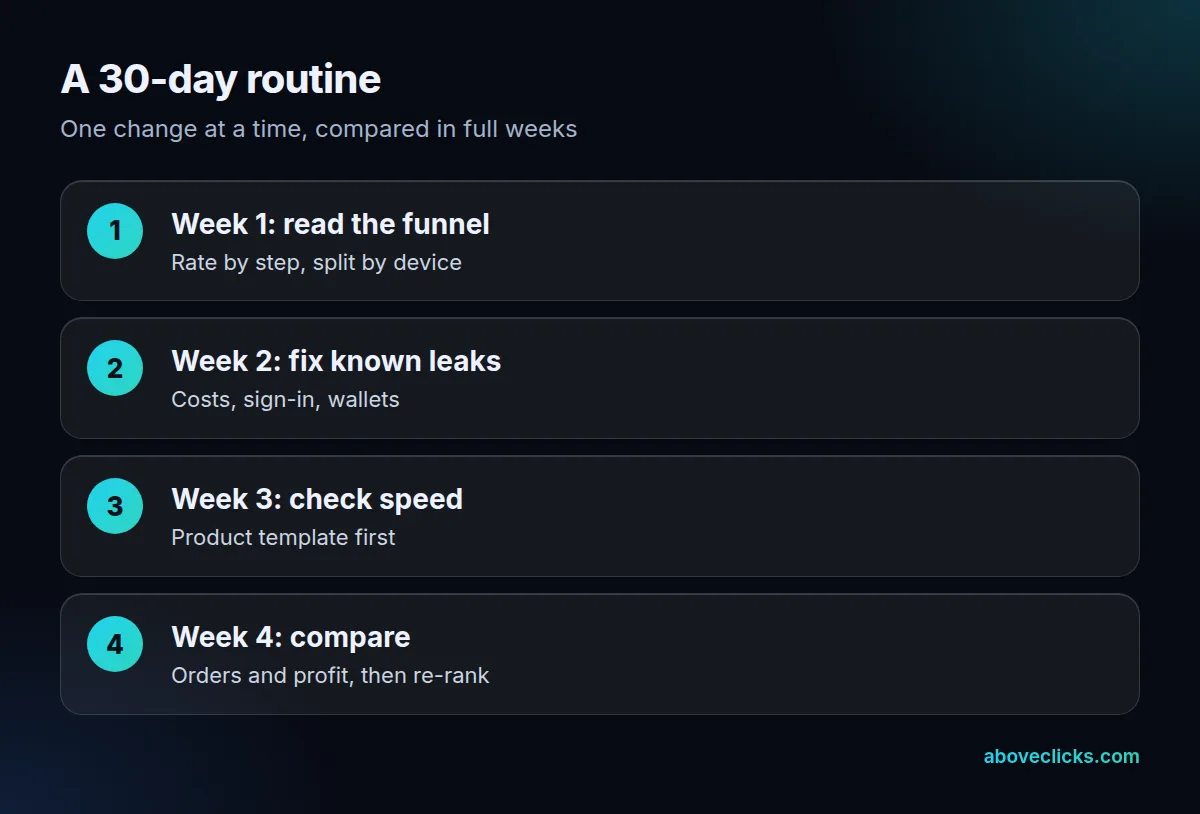
Across 4 full weeks (28 days), you get 4 comparisons of orders, so a single odd week stands out. In week one, pull the Conversion rate breakdown by device, write down each step and pick the stage with the cheapest fix. In week two, fix what Baymard’s shoppers named: show costs early, offer passwordless or guest sign-in and turn on the wallets your buyers use. In week three, open the web performance reports and fix the slowest product template. In week four, compare orders and profit with your week-one baseline.
The routine tells you whether the work is moving your numbers or just keeping you busy, and leaves a log of what changed. Treat how to improve conversion rate Shopify stores need as a habit, not a project, because how to increase conversion rate Shopify results hold only when you keep measuring. If you want a second opinion on where your own funnel leaks, start with the free audit.