In Klaviyo vs tinyEmail, Klaviyo bills active profiles, while tinyEmail is free for Shopify stores and bills everyone else per email sent. Which costs less depends on how many emails you send to each profile in a month, so count that first.
A note before we start: we set up and migrate Klaviyo accounts for online stores, so that is the platform we know best. This guide draws on each vendor’s own pages, dates every plan detail and says plainly where tinyEmail is the better fit.
Klaviyo vs tinyEmail: what is the real difference?
Klaviyo vs tinyEmail is a choice between two billing units. Klaviyo charges for the audience you can reach; tinyEmail charges for the emails you send. Three differences change the bill, and each can turn into a costly trap:
- Billing unit: Klaviyo bills active profiles, with unsubscribed and suppressed contacts left out, according to Klaviyo’s pricing guide. tinyEmail bills emails sent and stores unlimited contacts, as of November 2026, per its pricing page.
- Free plan: tinyEmail’s free plan is for Shopify stores only. Klaviyo’s free plan covers any platform but stops at 250 active profiles and 500 email sends a month.
- Text messages: Klaviyo sells texting on a separate plan. The tinyEmail pages we read list email features only.
Start the Klaviyo vs tinyEmail decision from your own store, not a feature grid. Write down your active profiles, the emails you send in a normal month, whether you sit on Shopify, and whether you plan to text customers within 12 months. Those four answers settle most of the choice.
What does tinyEmail pricing look like next to Klaviyo’s?
tinyEmail pricing has two modes, as of November 2026: free for Shopify stores and a per-email tier for everyone else. Klaviyo’s free plan is small, and its paid tiers follow your profile count, according to Klaviyo’s pricing page.
As of November 2026, tinyEmail’s pricing page says Shopify stores pay nothing for up to 1,000,000 emails a month, with unlimited contacts. Other senders get a 7-day free trial, then pay from $65 a month for 15,000 emails. Annual billing takes 20% off, so that tier is $624 a year instead of $780. Add-ons for list cleaning and visitor identification are sold separately.
As of November 2026, Klaviyo’s pricing page lists a free plan with up to 250 active profiles, 500 email sends a month and $5 of mobile messages a month. Paid plans scale with active profiles. Klaviyo says send capacity comes with each tier, and texting runs on a separate committed spend, per its billing guide.
Neither page tells you the final bill for a mid-sized list without a quote or calculator, so use the break-even test below and then check Klaviyo’s own plan builder. Reading tinyEmail vs Klaviyo as free against paid misses the point: both are paid once you leave the free tiers.
How many emails per profile make tinyEmail cheaper?
Off Shopify, tinyEmail’s per-email bill is cheaper while you send fewer than about 5 emails per profile a month. Past that, Klaviyo’s per-profile bill wins, because it doesn’t grow with each extra send.
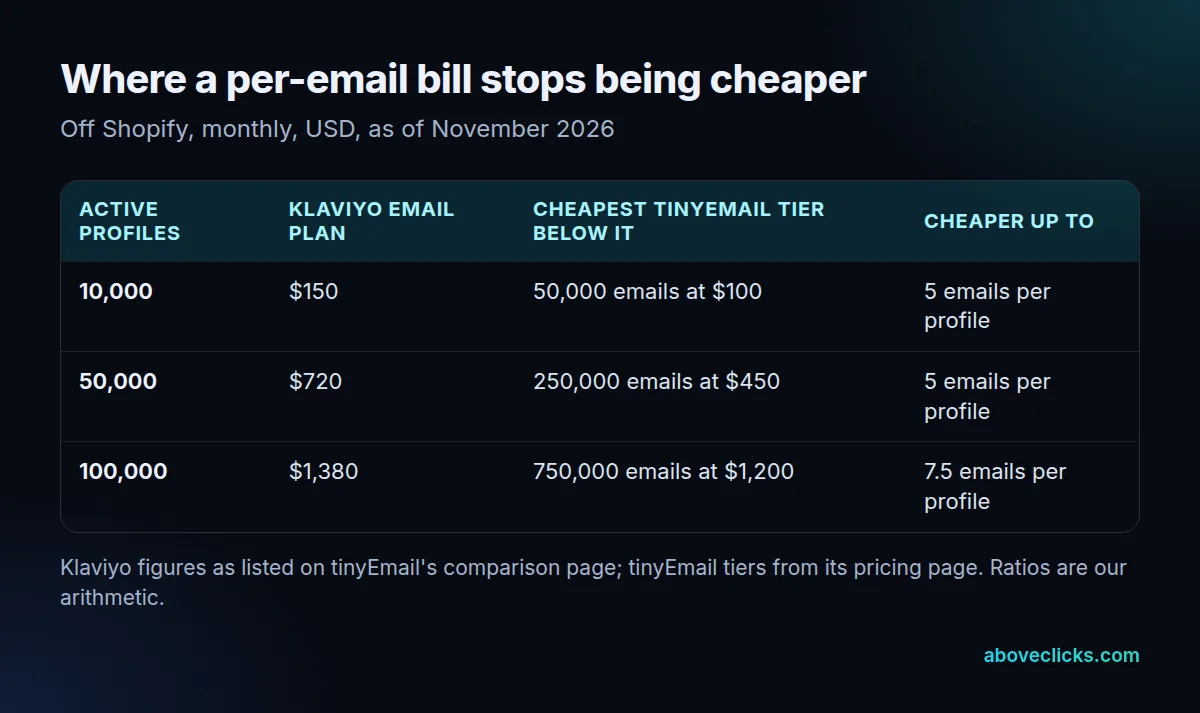
The table uses the Klaviyo Email plan figures that tinyEmail lists on its comparison page for 10,000, 50,000 and 100,000 active profiles, as of November 2026, set against the tiers on its pricing page. Those Klaviyo numbers are a rival’s listing, not Klaviyo’s quote, so confirm yours in Klaviyo before deciding. The ratios are our own arithmetic.
Worked example (illustrative, not a client), with tiers as of November 2026 from tinyEmail’s pricing page: a store has 10,000 active profiles and sends 4 campaigns a month to all of them, which is 40,000 emails. Its welcome and cart flows add about 8,000 more, so 48,000 emails fit the 50,000-email tier at $100 a month, against $150 for 10,000 Klaviyo profiles. Now the store moves to daily sends: 300,000 emails a month land in tinyEmail’s 500,000 tier at $900, six times the Klaviyo figure. Same list, opposite answer, which is why the Klaviyo vs tinyEmail cost verdict flips with send frequency.
Contacts also differ in kind. Klaviyo counts people it can reach; tinyEmail counts nothing about the list. Cleaning out long-unengaged contacts lowers a Klaviyo bill and does nothing to a tinyEmail bill, so clean the list before you run the numbers.
Which one fits a Shopify store?
For a Shopify store, tinyEmail vs Klaviyo starts as a cost question: tinyEmail is the cheaper starting point and Klaviyo is the deeper one. A free plan with unlimited contacts is hard to beat until you need texts or heavier segmentation.
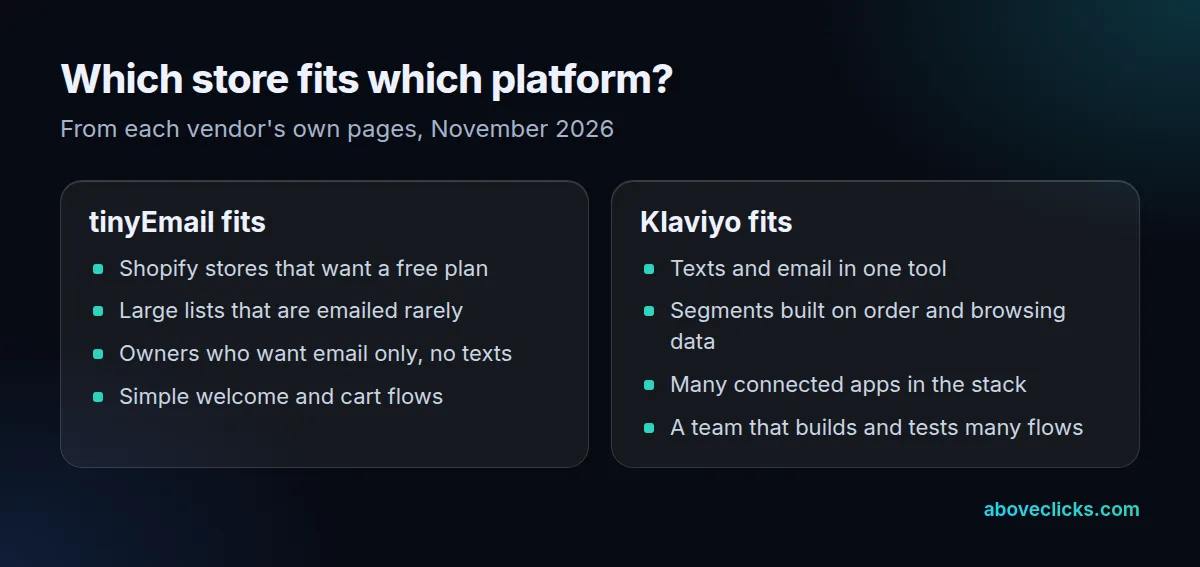
On Shopify, the tinyEmail pricing question is mostly settled: free up to 1,000,000 emails a month, as of November 2026, according to its pricing page. The test is whether its tools cover what you send. The page lists a drag-and-drop editor, forms, pre-built welcome, abandoned cart, post-purchase and win-back workflows, and A/B testing.
Klaviyo’s side is a bigger ecosystem. Its Help Center explains how to connect Shopify, and it pre-populates default flows such as a welcome series for new accounts. Shopify’s own marketing help also notes that Support can’t help set up third-party marketing services, so plan on each vendor’s support for the setup.
Before you pick, run four checks on a real week of your sending:
- How many distinct people received at least one email, and how many emails did each get on average?
- How many of your campaigns depend on a segment built from order history, such as customers who bought twice?
- Do you send, or plan to send, texts?
- Which flows earn most of your email revenue, and can the other platform rebuild each one with its own triggers?
The first answer feeds the break-even table, and the Klaviyo vs tinyEmail result follows from it; the other three decide whether the cheaper bill is also the workable one. A flow you can’t rebuild is a hidden cost of switching, however small the monthly figure looks.
Stores that text customers, or build segments from order history, usually stay on Klaviyo. Stores that send a few well-made campaigns to a big list usually lean to tinyEmail. Our Klaviyo email marketing service covers the Klaviyo side of that choice.
Does the choice change your deliverability?
Not by itself. Inbox placement depends on your sending domain, list quality and complaint rate, which both platforms need you to manage.
Google’s sender guidelines say anyone sending more than 5,000 messages a day to Gmail must authenticate with SPF, DKIM and DMARC, support one-click unsubscribe and keep reported spam rates below 0.3%. Yahoo’s sender best practices ask for SPF and DKIM, a valid DMARC policy of at least p=none and a spam rate below 0.3%. Both rules apply whichever platform sends the mail.
So in Klaviyo vs tinyEmail, deliverability is a tie you win by setup. Check three things on either platform: the sending domain is authenticated, unsubscribe is one click, and unengaged contacts stop receiving mail after a set time. A per-email bill also pushes you toward sending less to cold contacts, which helps your complaint rate as a side effect.
Is tinyEmail a good Klaviyo alternative?
For a Shopify store that wants email only, yes. As a Klaviyo alternative, tinyEmail is weaker where you need texting, a large app ecosystem or a long track record. Check those three before you commit.
As of November 2026, the plans, tiers and feature lists above come from tinyEmail’s own pages, such as the 7-day free trial and the 15,000-email tier at $65 a month on its pricing page. We have not run its deliverability, and its claims about inbox placement are the vendor’s. Its comparison page itself says Klaviyo is the stronger pick for advanced predictive analytics. For other options, see our guide to Klaviyo alternatives, or Brevo vs Klaviyo if volume-based billing appeals to you.
Weigh tinyEmail vs Klaviyo on these three questions before you move. Ask tinyEmail: whether it lists texting on your plan, how it handles consent status when it imports contacts, and what its support covers when a flow misfires.
How do you switch without losing subscribers?
Export your contacts with their consent status, rebuild the main flows, then disconnect the old app from Shopify before you connect the new one. That order protects subscribers from duplicate opt-in emails, whichever way a Klaviyo vs tinyEmail move runs.
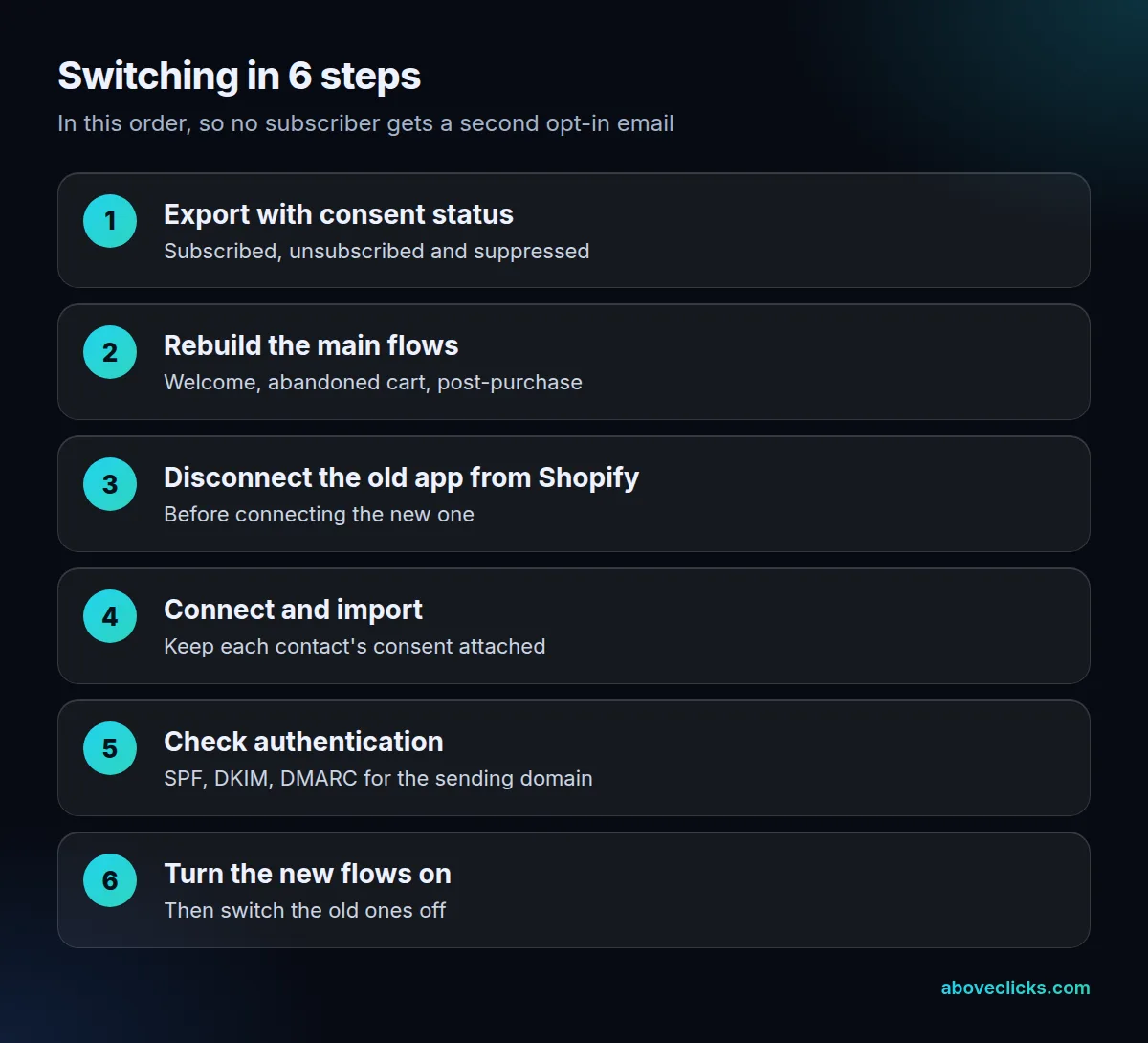
Klaviyo’s Help Center warns that if you are migrating from another platform integrated with your Shopify store, you must disconnect it first, or existing subscribers could receive double opt-in emails. The same rule works in reverse when you leave Klaviyo. Keep the old flows running until the new ones are live, then switch them off one by one.
Moving between the two takes more than a CSV. Consent status, tags, suppression lists and the flow logic all have to arrive intact, and a sending domain that was warm on one platform needs checking on the next. After the move, watch the spam rate in Google’s Postmaster tools: Gmail’s guideline is to stay below 0.3%, and a new platform sending a cold list is how stores cross it. Our Klaviyo migration team moves stores onto Klaviyo this way, and a free audit will tell you whether your current setup is worth moving at all. More comparisons sit in buying guides.