Facebook ads for realtors are paid ads that put your listings or services in front of local buyers and sellers. In the US, most of them run under Meta’s housing Special Ad Category, so settle the category and the budget before you build any creative.
This guide to Facebook ads for realtors covers what the ads are, whether they work, which ads count as housing ads, five setup steps, how targeting changes, how to size a weekly budget and when to stop. Every platform rule is linked to Meta’s own page.
What are Facebook ads for realtors?
Paid ads, shown on Facebook and Instagram, that promote a listing, a service or an enquiry form to people in the area you serve. Unlike a post on your Page, they reach people who don’t follow you, and Meta counts a new ad’s results over the 7 days after its last significant edit.
They are bought in Meta’s Ads Manager, where you choose a goal, an audience, a budget and an ad. Facebook advertising for realtors usually has one of three goals:
- Show a listing to people in the area.
- Get an enquiry from a buyer or seller.
- Invite people to a viewing or a valuation.
Each goal needs a different ad and a different way of counting success. The main difference from other trades is the rules: Meta’s housing category covers 8 kinds of offer, from listings to financing, and that changes which audience tools you can use. The next sections show how, starting with the question most agents ask first.
Do Facebook ads work for realtors?
Facebook ads for realtors can work, if the ad leads to an enquiry you answer fast and you count appointments rather than clicks. Whether Facebook ads for realtors pay back depends on your area, your offer and your follow-up, so no general answer holds.
What you can do is test Facebook ads for realtors cheaply and honestly. With any Facebook ads for realtors, pick one result to count, such as a form lead or a message, and one number to judge it by: the cost per booked appointment, which is ad spend divided by appointments. Clicks and reach look good and prove little.
We publish the order in which we check a Meta ad account on our Meta ads service page: five checks before any budget changes, including whether the budget is spread too thin for an ad set to reach about 50 events in 7 days. The page is written for e-commerce stores, so its purchase examples don’t apply to a realtor, but the logic does: measure first, then spend. The audit comes back within 2 workdays. For a realtor’s whole marketing mix, see our real estate marketing service.
Which realtor ads count as housing ads?
Ads that promote or directly link to a housing opportunity or a related service. Meta’s examples include listings, financing and real estate or house-hunting services, so most Facebook ads for realtors and real estate agents are covered.
Meta’s help page on ads for housing, employment or financial products and services lists what it counts and what it doesn’t. We sorted common realtor ads against that list:
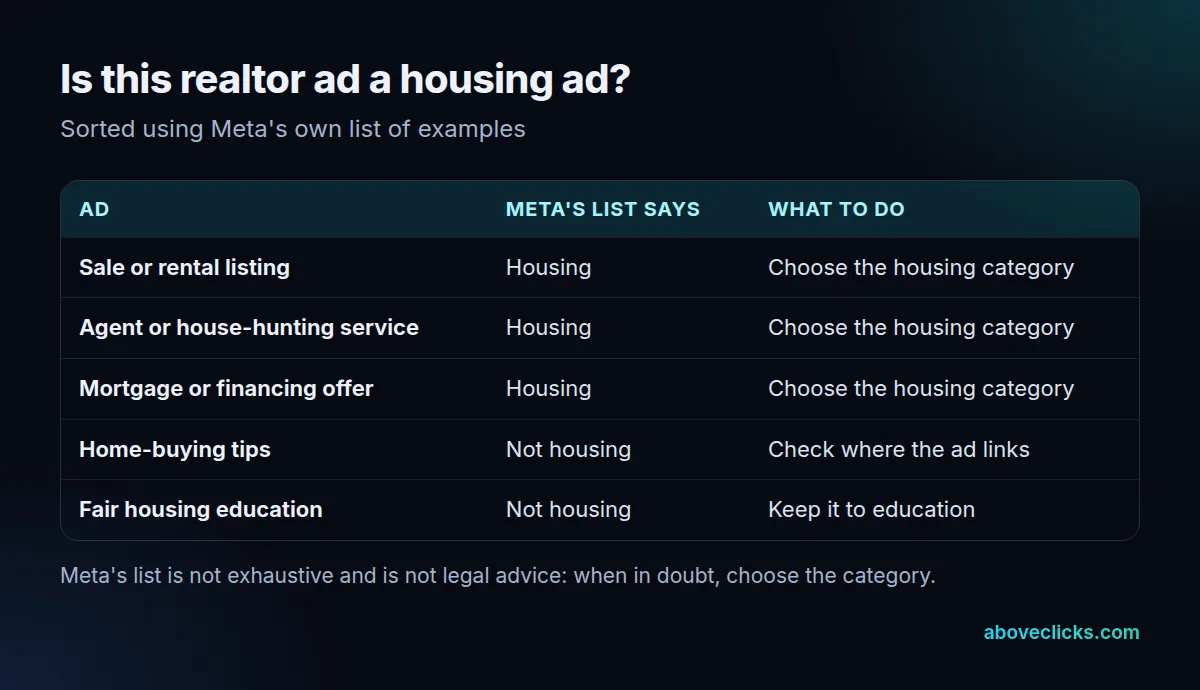
Two rows matter most. An ad for your services as an agent is on Meta’s housing list as a real estate service, and a home-buying tips ad is on its “not housing” list. We haven’t verified how Meta classifies an ad that offers a free guide but links to your listings, so treat that as housing, or read Meta’s page before you decide.
The classification matters because Meta’s Advertising Standards require US advertisers running housing ads to self-identify with the Special Ad Category and forbid using audience tools to wrongfully target or exclude groups. Behind it sits 24 CFR 100.75, which makes it unlawful to publish a dwelling advertisement showing a preference or limitation based on race, color, religion, sex, handicap, familial status or national origin. The full text also names the choice of media or locations that deny some groups information about housing. Your brokerage and local MLS may add rules of their own.
How do you set up Facebook ads for real estate agents?
In five steps: a complete Page and ad account, the right category, one countable goal, a broad audience with a worked-out budget, and a single ad you can trace.
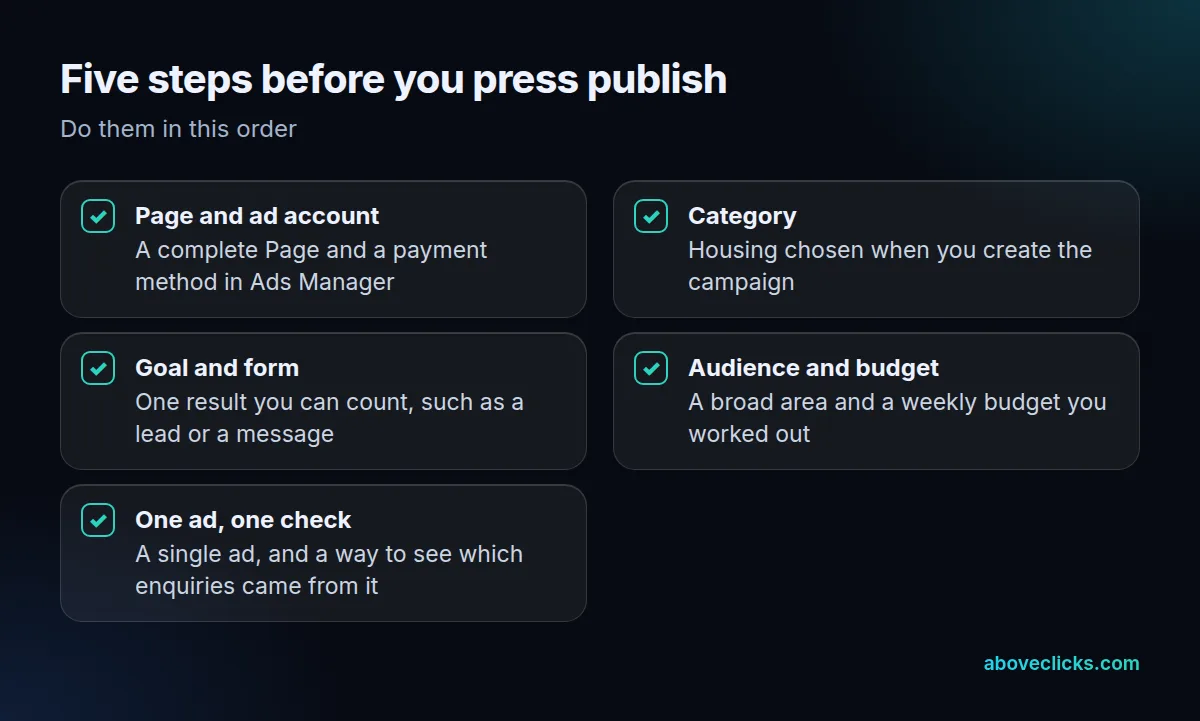
Take the steps for Facebook ads for real estate agents in order, because later ones depend on earlier ones:
- Page and ad account. Ads run from a business Page. Add a payment method in Ads Manager before you build anything.
- Category. When you create the campaign, choose Special Ad Categories and pick housing, as Meta’s category guide describes. Doing it after a rejection costs days.
- Goal and form. Choose a result you can count, such as a lead or a message, and keep any form short. Every extra field loses some people.
- Audience and budget. Choose the area you serve and let Meta find the people in it. Work out the weekly budget with the formula below, not by feel.
- One ad, one check. Run a single ad first, then check that each enquiry can be traced to it. A spreadsheet with the date, source and outcome is enough. Then leave the ad alone for 7 days, the window Meta uses to count results after an edit.
When the first ad has run for a while, test one change at a time. Our creative testing framework shows how to size and read a test, and the lessons carry over to lead ads.
How can realtors target Facebook ads?
By place and by broad interests, not by personal attributes. Under the housing category, Meta limits or removes 6 audience options for US advertisers and says it encourages broadening, not restricting, the audience.
According to Meta’s Special Ad Category page, these are the 6:
- Age
- Gender
- ZIP code or postal code
- Exclusion targeting
- Lookalike audiences
- Saved audiences
The same page says city and pin-drop audiences get an expanded radius, and that some interests are unavailable. In practice, you can name a city, but you can’t narrow it to a few ZIP codes or exclude neighborhoods. Any plan for Facebook advertising for realtors that depends on ZIP-level targeting needs a different channel, such as direct mail or search ads.
What carries the targeting instead is the ad itself. A listing ad for a two-bedroom flat near a station attracts different people from a family-home ad, with no audience tool involved. Say who the ad is for in the headline, in plain words about the home or the service, never in words about the people.
Keep the creative of your Facebook ads for realtors honest and free of language that suggests a preference. If an ad is rejected, read the reason in Ads Manager and fix that, rather than reposting the same ad.
How much should a realtor spend on Facebook ads?
Enough for each ad set to get about 50 results in a week. Meta says an ad set usually leaves the learning phase after about 50 results in the week after its last significant edit, and that ad sets cost more per result while they are still learning.
So the budget for Facebook ads for realtors is a multiplication: your cost per result times 50. We don’t quote market costs for Facebook ads for realtors, because they vary by area and change often; use your own first week’s number.
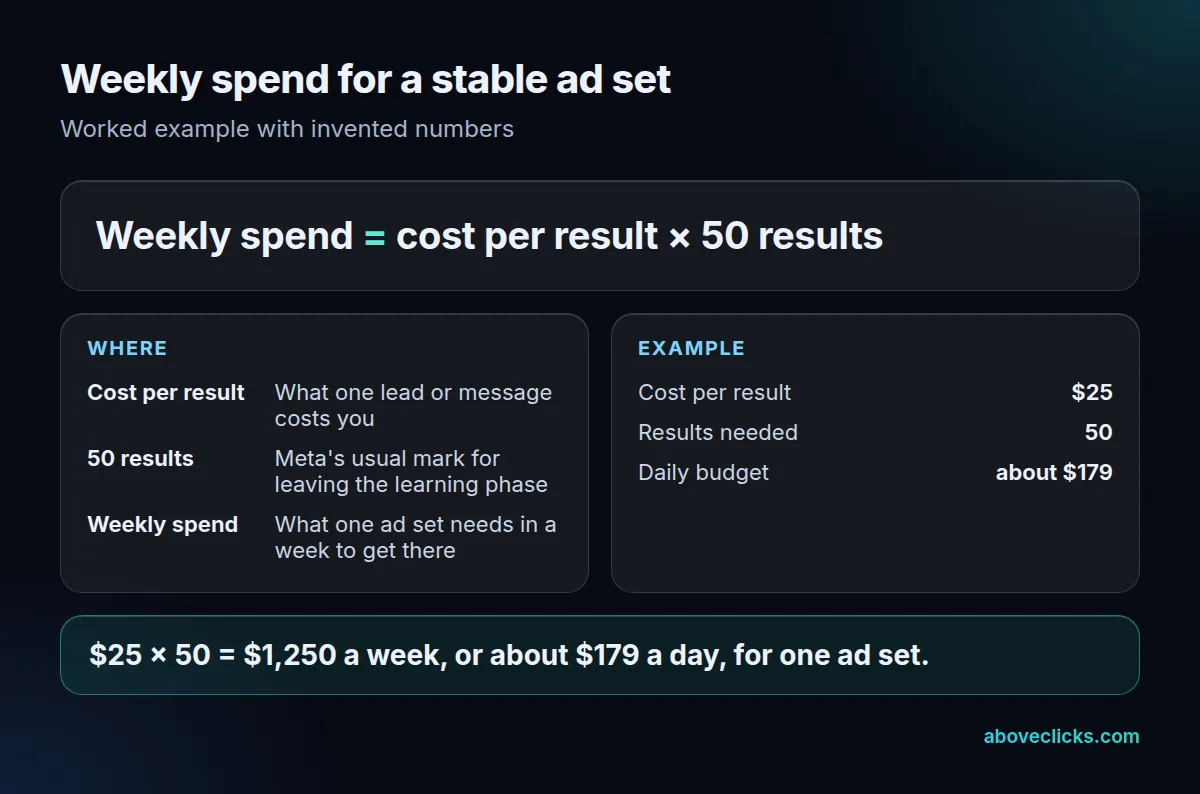
The example uses an invented $25 per lead. At that cost one ad set needs $1,250 a week to reach 50 results, about $179 a day. If you can afford $20 a day, that ad set will probably stay in the learning phase, and its results will move around.
Three ways to respond when the maths doesn’t fit:
- Run one ad set, not four. Every extra one splits the same money.
- Count a more frequent result, such as a message instead of a booked viewing, but only if you then track which messages become appointments.
- Edit less. A significant edit can restart learning, so change one thing at a time.
Daily budgets also flex. According to Meta’s budget guide, Meta may spend up to 75% over your daily budget on a day with better opportunities, but a week never goes beyond 7 times the daily budget. Pausing an ad stops new charges.
When should you stop or change your Facebook ads?
After 30 days, if the count of booked appointments doesn’t justify the spend. That is long enough for the learning phase to finish and for enquiries to turn into appointments.
A quick month-end test for your Facebook ads for real estate agents:
- Did you answer every enquiry within a day? If not, fix that before judging the ad.
- Divide spend by booked appointments. If the number is steady or falling, keep going and change one thing at a time.
- If enquiries came but no appointments, change the offer or the form, not the budget.
- If almost nothing came and the ad set never left the learning phase, cut the number of ad sets or raise the budget, not both.
- If the figure is too high to sustain even after those changes, stop the Facebook ads for realtors you are running and put the money into a channel you can already count.
Read results the way you would any ad report: our guide to the Facebook ads conversion rate explains why Meta’s numbers and your own records differ. If you’d like a second opinion on an account that is already running, our free audit is a written review. More Meta guides are in Meta ads.