Basic SEO packages are entry-level scopes of work that fix the foundations of a site: tracking, titles, indexing, speed, one ranked fix list and a report. Judge a basic SEO package by the lines you can check yourself, because the tier name tells you nothing.
This guide lists the six lines a basic SEO package should hold, shows how to check each in Google’s free tools, explains where basic stops, and gives a test for deciding whether to stay or move up.
What is a basic SEO package?
The entry tier an agency sells, built to fix what stops pages being found or understood. It is a starting scope, not a ranking plan, and it usually runs as a one-off project or a short monthly term.
Basic work comes first for a reason. Google’s guide to helpful content says some changes take effect in a few days, while it could take several months for its systems to confirm that a site is helpful. A basic SEO package clears the technical ground in that window; it does not shorten the wait, so plan its first review at 3 months, not 3 weeks. Basic SEO packages that promise quick rankings are selling the wrong thing.
Most basic SEO packages share the same short list of work, which makes them easy to compare once you know the lines. For a wider view of which parts suit which business, see our guide to SEO packages for small business. This piece covers the entry tier only.
What do basic SEO packages include?
Six lines: tracking, titles and snippets, indexing, speed, a ranked fix list and a report. If one of the basic SEO packages on your table leaves a line out, ask why; if it adds a seventh, ask what it costs.
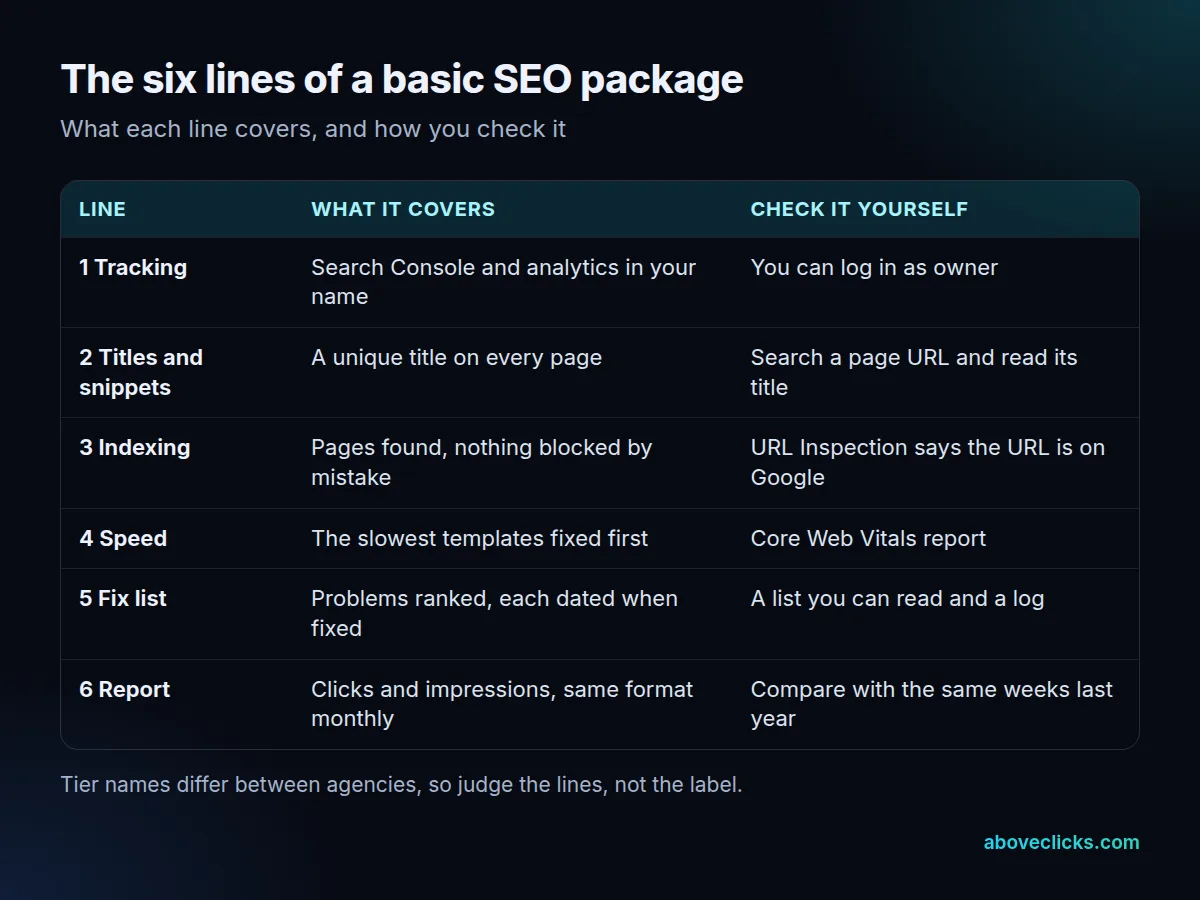
Two lines deserve a closer look because they are often padded:
- Titles and snippets: Google asks that every page has a title that is unique, descriptive and concise, and warns against keyword stuffing. For meta descriptions, Google’s snippet guide says it may use them when they describe the page better than the page text. Write them for the key pages, not all 400.
- Indexing: a sitemap is not always needed. Google says a site of about 500 pages or fewer that is linked together well might not need one, so a basic SEO package for a 30-page site should check the sitemap your CMS already makes, not sell you a new one.
The last line, the report, should be in the same format every month, so the second report can be set beside the first.
It helps to picture the first week of a basic SEO package. Access is confirmed on day 1, a crawl and a Search Console review follow, and the ranked fix list arrives within days. Fixes then start with the problems that block the most pages, such as a template that gives every product the same title, rather than with the easiest ones. If the first week is spent on keyword research or new articles, the work belongs to the next tier, and the scope table above shows which line it replaced.
How can you check each line yourself?
With three free tools in Search Console, plus a look at the page. You do not need to trust a basic SEO package on its word; each line has a pass test you can run in minutes.
- Tracking: log in to Search Console and analytics. If you can only see them through the agency, you are a guest. Fix that first.
- Titles: search for a page’s URL and read the title shown. Two pages with the same title fail the test. Google’s own example of a bad title is naming every page on a store “Cheap products for sale”.
- Indexing: open the URL Inspection tool and press Test live URL to see the page as Google sees it now. Note that “URL is on Google” does not promise the page will appear in results. Also remember that robots.txt is not a way to keep a page out of Google, so a fix that relies on it alone is incomplete.
- Speed: open the Core Web Vitals report. Google’s targets are LCP within 2.5 seconds, INP below 200 milliseconds and CLS below 0.1. Ask which templates were fixed, and re-read the report after the next crawl.
- Fix list: ask for it as a ranked list with a date next to each fix. A list with no dates cannot be checked.
- Report: set the Performance report to the last 16 months, as Google’s traffic drop guide advises, so a yearly seasonal dip is not blamed on the package.
Keep a short note of each result with its date. Three months later, that note is the evidence for the stay-or-move-up decision below, and it stops the debate about what was done and when.
None of this needs technical skill, only access, which is why line 1 comes first. Run the six tests on any basic SEO package before the first invoice is due, and again after the work is done.
What is the difference between basic SEO and advanced SEO?
Basic SEO fixes what is already on your site; advanced SEO adds what the site lacks, such as new pages, rewritten pages and earned links. Basic makes pages eligible to rank; advanced gives them a reason to.
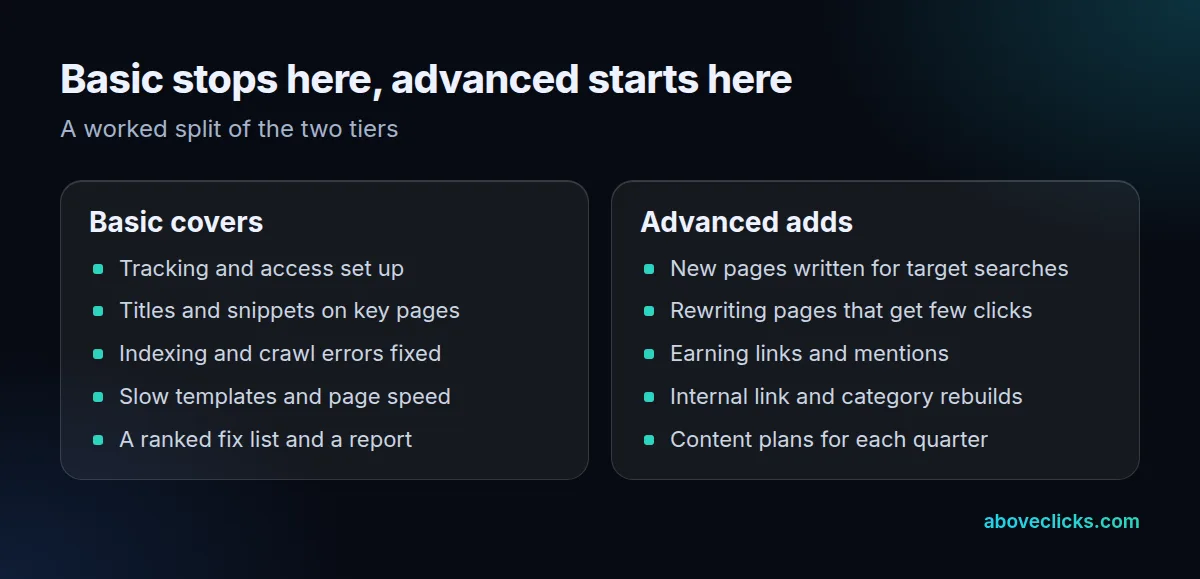
The split matters because the work of a basic SEO package can be done well and still move rankings little. A store with 12 thin category pages and no guide content will have clean foundations and little to rank for. Advanced work builds on that base, which is why we run ecommerce SEO in that order: audit, fixes, then page work.
Our timing shows the same order. The audit comes within 2 workdays, the plan and first fixes in about a week, page work from week 2 and the first monthly report after 30 days. If a quote starts with new content before the fix list exists, it is skipping the basic work.
Ongoing work is covered in the monthly SEO package guide, and a defined project in the one-time SEO package guide.
How much does basic SEO cost?
It depends on the number of pages touched and the number of problems found, far more than on the tier name. We do not publish market ranges here because they move too fast to stay true.
Instead, divide any quote for basic SEO packages by what it delivers. A worked example with invented quotes shows why:
- Quote A: covers 40 pages, with titles for all of them, a fix list and 3 monthly reports.
- Quote B: covers 12 pages, with titles for the key pages, a fix list and 3 monthly reports.
If Quote B is only slightly cheaper, it costs more for each page covered. If most of your traffic sits on 12 pages, B may still be the better buy. The point is to compare per page and per fix, not per tier.
Three things raise the fee within a basic tier: a site with serious crawl errors, a platform that restricts template changes, and many near-duplicate pages. Ask the agency which applies to you, and what the basic SEO package fee would be without it, and see the free audit to have your own site read before you decide.
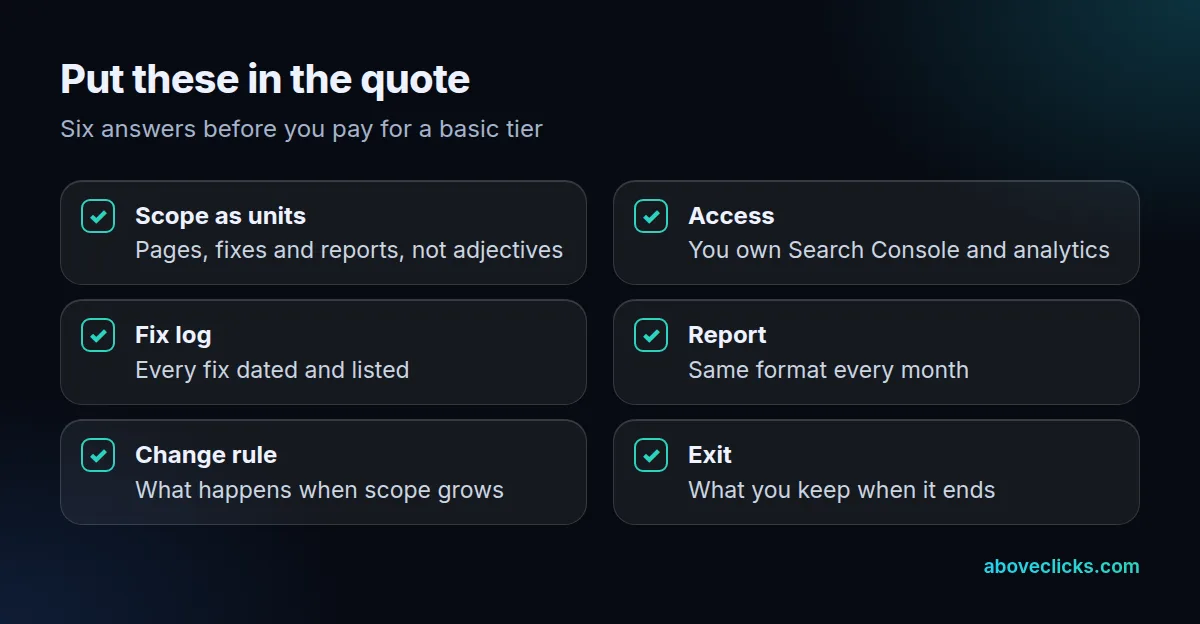
A basic SEO package should also state what it leaves out, so nobody assumes more is included. Ask for three exclusions in writing: whether new pages are written, whether links are built, and whether changes to the site itself are made by the agency or handed to your developer. Each answer shifts the real cost, because a fix list that your developer must carry out is only finished when the developer finishes it.
Check the timing as well. A fair basic tier states when the audit arrives, when the first fixes land and when the first report is due, so you can see whether the first month’s invoice matches the first month’s work.
When are basic SEO packages enough?
When the audit finds a defined list of foundation problems, the pages that matter already have content, and the site is under about 500 pages. A site that adds products every week usually needs more than a basic SEO package after the first few months.
Use a month-3 test:
- Is every line in the scope table done, with a dated fix log? If not, stay basic and ask why.
- Do the fixed pages get more impressions than the same weeks last year? If yes, the foundations worked.
- Are the best pages still stuck with few clicks? Then the content, not the foundation, is the limit, and it is time to move up.
Here is how the three answers combine. All three clear means the basic SEO package did its job and the next step is content. A failed first answer means the agency owes you work, not an upgrade. A failed second answer with a clean first one usually points at the site’s own limits, such as thin pages, which basic work cannot fix.
Read the second answer with care. Crawling and assessing a site takes time, so a fix logged late in month 3 will not yet show in that month’s numbers. Keep the fix log and check again in month 4 or 5.
Also keep control of your accounts throughout. If the agency set up Search Console, you should still be the owner; ending a basic SEO package then means removing one user.
If you are weighing a tier right now, our sample report shows what a clear monthly report looks like, and more guides sit in buying guides.