Amazon pay per click search marketing is advertising where you bid on shopper searches or products inside Amazon and pay only when someone clicks your ad. You control the bid, the budget and the targeting; Amazon controls where the ad appears.
This guide explains how Amazon pay per click billing works, the 3 ad types, who can run them, how it differs from Google Ads, and what to decide before you spend anything. Costs and optimization have their own guides, linked below, so this one stays on the basics of Amazon pay per click search marketing.
What is Amazon pay per click search marketing?
Amazon pay per click search marketing is paid placement in Amazon’s shopping results and on product pages, billed per click. Sellers usually call it Amazon PPC, and Amazon calls the main formats sponsored ads.
The shopper types a search, and ads appear next to the normal results. Amazon’s Sponsored Products page says ads may be displayed at the top of, alongside, or within shopping results, and on product pages. A click takes the shopper straight to the product detail page, where Amazon says they can browse or buy in 1 to 2 clicks.
That makes Amazon pay per click search marketing different from a general search engine. People on Amazon are usually close to buying, so the click goes to a page built to convert. It also means your listing carries a lot of weight: weak images, thin copy or poor reviews waste every paid click. Every ad type you run sends shoppers to listings like this, so one listing fix helps all of them. Our Amazon SEO service covers the listing side, and the ads side is on the Amazon Ads page.
How does Amazon pay per click work?
You set a bid, the most you will pay for one click, and a daily budget. Amazon charges only when a shopper clicks, so ads that get seen but not clicked cost nothing on that ad type.
Amazon says Sponsored Products campaigns have no monthly or upfront fees, and that a bid is the maximum amount you are willing to pay when a customer clicks. The more competitive your bid, the more likely your ad is to show when it matches a shopping query.
The budget works as a cap. Amazon’s own example: set a daily budget of $100 and you may receive up to $3,100 worth of clicks in a 31-day calendar month. The final cost never passes the amount you set for the campaign’s duration, and you can raise or lower the daily budget while ads are live.
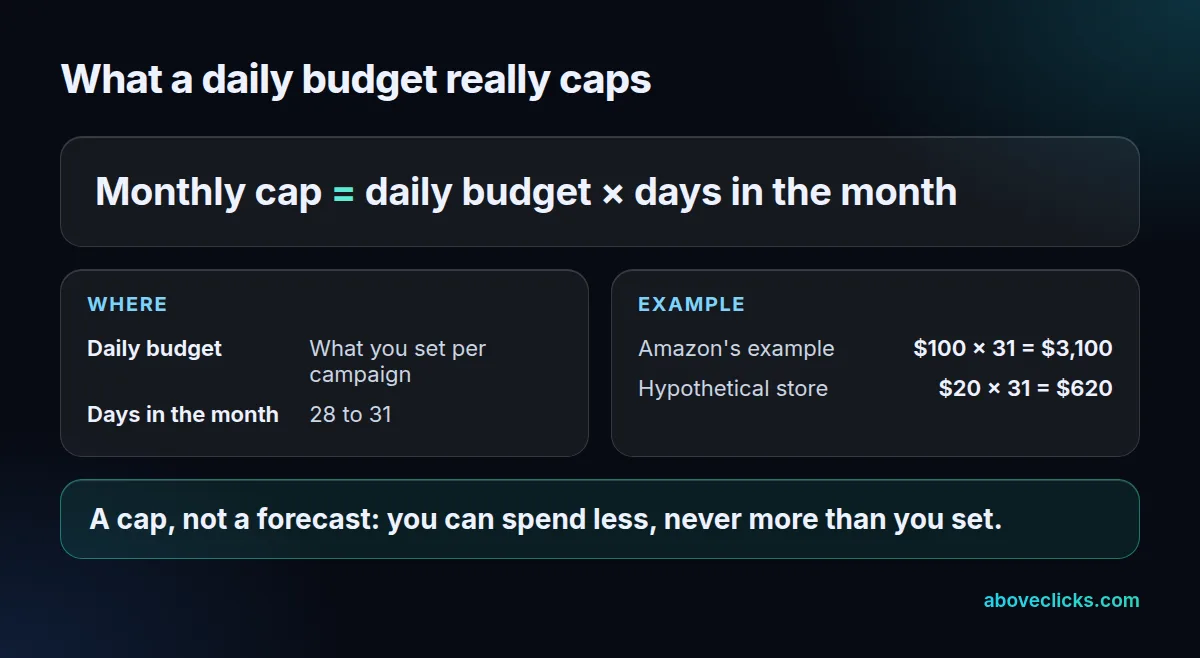
Example: a hypothetical store sets $20 a day. Across a 31-day month that campaign can spend up to $620, and a 28-day month caps it at $560. Plan the month’s total from the daily number, not the other way round.
Two limits are worth remembering in any Amazon pay per click search marketing plan. A bid is a ceiling, not a promise that you will win every auction. A budget is a ceiling, not a target, so a campaign can end the month under it.
Which Amazon ad types can you use?
Three: Sponsored Products promote one listing, Sponsored Brands promote your brand with video, image or collections, and display ads reach audiences more widely. Start with Sponsored Products unless you have a registered brand.
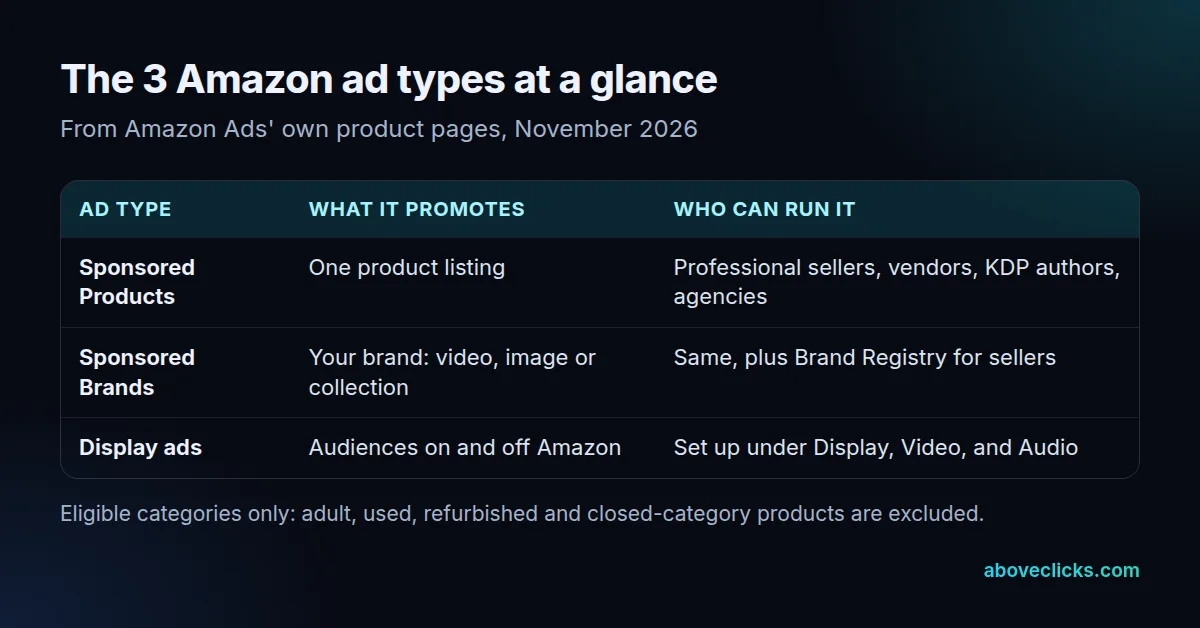
Sponsored Products are the entry point to Amazon pay per click search marketing. You pick products to advertise, then choose keywords to target or let Amazon’s systems target relevant keywords automatically.
Sponsored Brands put your brand forward. Amazon says ads appear in prominent placements such as the top of search results and product pages, and can send shoppers to a Brand Store or product pages. A video ad can show up to 3 products. According to the Sponsored Brands page, there is no minimum spend for CPC campaigns, although the reserve share of voice option does need a minimum commitment.
Display ads are the newest name. Amazon’s Sponsored Display page says the alternative to Sponsored Display is now display ads, created by clicking Campaigns, then Create Campaign, then Display under Display, Video, and Audio. If an older guide tells you to look for Sponsored Display, this is where it moved.
Who can run Amazon sponsored ads?
Professional sellers, vendors, book vendors, Kindle Direct Publishing authors and agencies can run Sponsored Products. Sponsored Brands adds a requirement: sellers must be enrolled in Brand Registry.
Amazon lists those account types on its Sponsored Products page, and adds that products must be in an eligible category and eligible for the Featured Offer. Adult, used, refurbished and closed-category products are not eligible.
For brands, Amazon Brand Registry is described as a free program that helps you protect and grow your brand. Check it before you plan a brand campaign for your Amazon sponsored ads, because enrollment depends on your trademark and can take time. Individual sellers without a registered brand can still start with Sponsored Products.
Amazon also runs a new-seller offer: sellers on the Professional selling plan who listed their first buyable ASIN within the last 90 days can earn up to $1000 in ad credits when they spend on Sponsored Products within 30 days of launching their first campaign. Terms apply and it is limited to select marketplaces, so read the conditions on the Sponsored Products page before counting on it.
How is Amazon search marketing different from Google Ads?
Both bill per click, but the control differs. On Google, bid and the quality of your ad and landing page decide ad order; on Amazon, the page is your own product listing, so the listing is the landing page.
Google’s auction guide lists 6 main factors in its ad auction, and it runs a separate auction for each of the 2 kinds of ad location it names, top ads and the rest, including your bid, the quality of your ads and landing page, and the expected impact of your ad assets. Your bid there is the maximum you are willing to pay for a click, and what you pay is often less.
Amazon’s pages describe a simpler set of levers: choose products, choose keyword or product targeting, set bids and a daily budget. They do not publish a full ranking formula, so we do not claim one here.
Example: a hypothetical $1.50 bid on Google can cost less per click, because Google says what you pay is often less than your bid.
The practical difference between Amazon pay per click search marketing and Google is where the sale happens. A Google click lands on your own website, where you control the page and the checkout. An Amazon click lands on an Amazon listing, where Amazon controls the layout and shoppers see competing products beside yours. Cost per click on each platform is covered in our guide to Amazon and Google search ad costs.
How do you set up your first Amazon PPC campaign?
Sign in, click Create campaign, choose Sponsored Products, set targeting, keywords and bidding, then name the campaign, set dates and a daily budget. Decide the details first, so the form takes minutes.
Amazon’s steps in four parts:
- Sign in to your account, click Create campaign and choose Sponsored Products.
- Define your targeting, keyword and bidding strategies.
- Give the campaign a name and set start and end dates.
- Enter the daily budget.
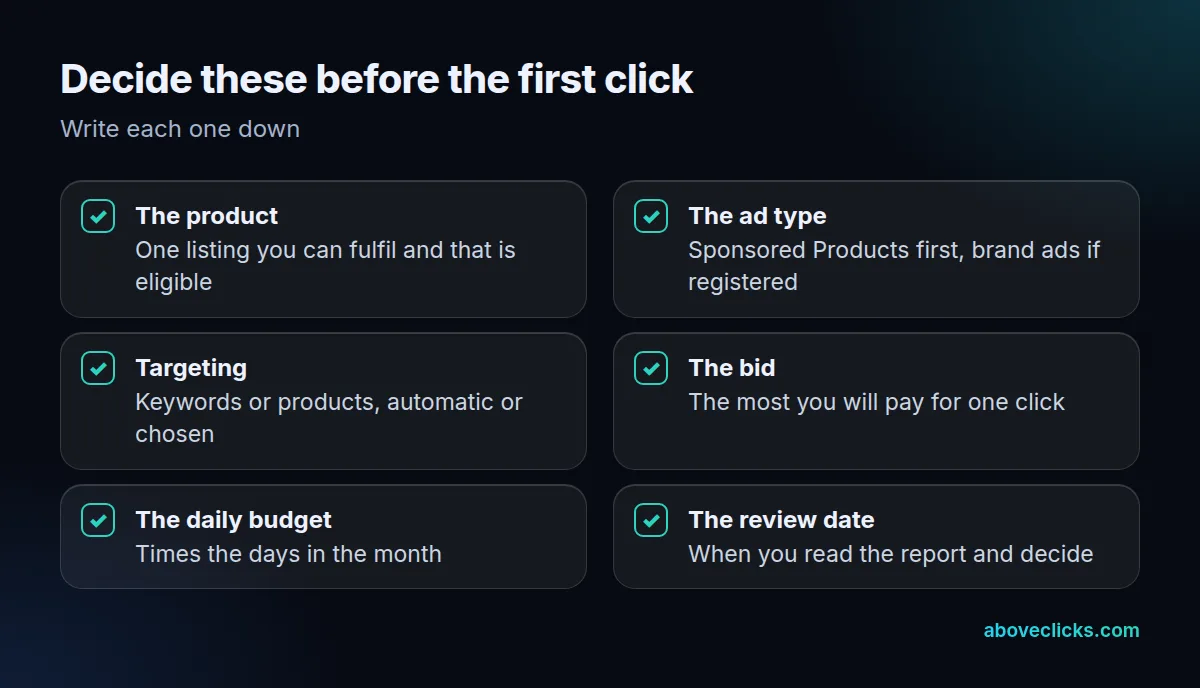
Before you click, answer the checklist above in writing. The most common beginner problem is launching without a review date, so nobody looks at the report until the money is gone. Put a date in the calendar and compare what the report shows with your own margin on that product, which our guide to optimizing Amazon PPC campaigns walks through step by step.
Keep your first Amazon pay per click search marketing test small and on a single listing you know converts. Example: a hypothetical store tests 1 product with a $15 daily budget for 14 days, which caps the test at $210 before it reads the report. A campaign built on a weak listing tells you about the listing, not the ad, and it is the most common way Amazon PPC money is wasted in the first month.
Is Amazon PPC worth it?
It depends on your margin per sale and on how well the listing converts. Paid clicks pay back only when the profit on an order covers what the clicks cost, so work that out before you start.
There is no honest single answer, because margins, categories and competition differ. Do the sum with your own numbers: take the profit on one order before ad spend, then see how many clicks you can afford per order. Example: a hypothetical product earns $12 profit per order before ads and converts 1 click in 10. Ten clicks must then cost under $12 in total, so the break-even bid is $1.20 per click. Our buying guides cover the money side in more depth, and the guides on Amazon advertising cost and on cost per click show how to read your own account.
If the numbers work for your Amazon pay per click search marketing, scale slowly, raising the daily budget in small steps and reading the report after each change. If they do not, fix the listing, the price or the product before adding budget. We can look at an account with you: our free audit reads it with read-only access and tells you what we would change first.