The Meta Pixel is a snippet of JavaScript on your website that records what visitors do, such as viewing a product, adding to cart or buying, and sends those events to Meta. Meta uses them to measure ads, build audiences, run catalog ads and optimize delivery.
The Meta Pixel is a snippet of JavaScript on your website that records what visitors do, such as viewing a product, adding to cart or buying, and sends those events to Meta. Meta uses them to measure your ads, build audiences, run catalog ads and optimize delivery toward the actions you choose.
You’ll still see it called the Facebook pixel in older guides and some apps. It’s the same tool.
How the Meta Pixel works
The pixel loads a small library in the visitor’s browser. Each time a shopper does something you track, it fires an event. According to Meta’s Pixel documentation, it can collect HTTP header data, the pixel ID and Meta’s cookie, button clicks, optional values you add (such as order value) and form field names. It doesn’t capture what people type into fields unless you send that data through advanced matching.
Tracked events then show up in Ads Manager, where Meta uses them for reporting, custom audiences and Advantage+ catalog ads. Because the pixel collects personal data, check your consent setup with whoever handles privacy for your store. This isn’t legal advice.
Meta pixel events a store needs
Meta defines a list of standard events. Four of them cover most online stores:
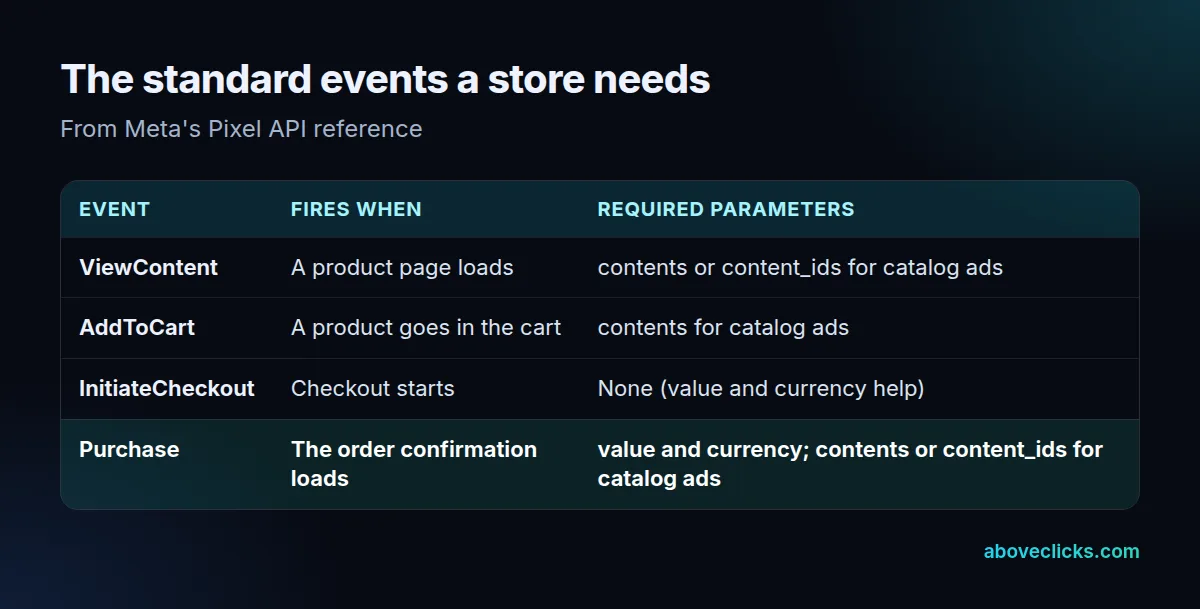
The detail that matters most is the Purchase event. Meta’s Pixel API reference lists value and currency as required. Without them, Meta counts purchases but can’t report revenue or optimize toward order value. If you run catalog ads, ViewContent, AddToCart and Purchase also need product IDs that match your catalog.
Worked example: does the pixel see every order?
Example: a hypothetical skincare store pulls one week of events from Events Manager and lines them up against the orders in Shopify.

The pixel recorded 118 purchases. Shopify shows 140 orders. Coverage is 118 ÷ 140 = 84%, so the Meta Pixel missed 22 orders. Common causes are a confirmation page that closed before the code ran, or a script that was blocked.
Now flip it. Suppose the pixel had shown 165 purchases for the same 140 orders. That points to duplicates, usually the same pixel installed twice, for example through a Shopify app and in the theme code. Both errors distort return on ad spend, in opposite directions.
5 checks before you trust your Meta Pixel data
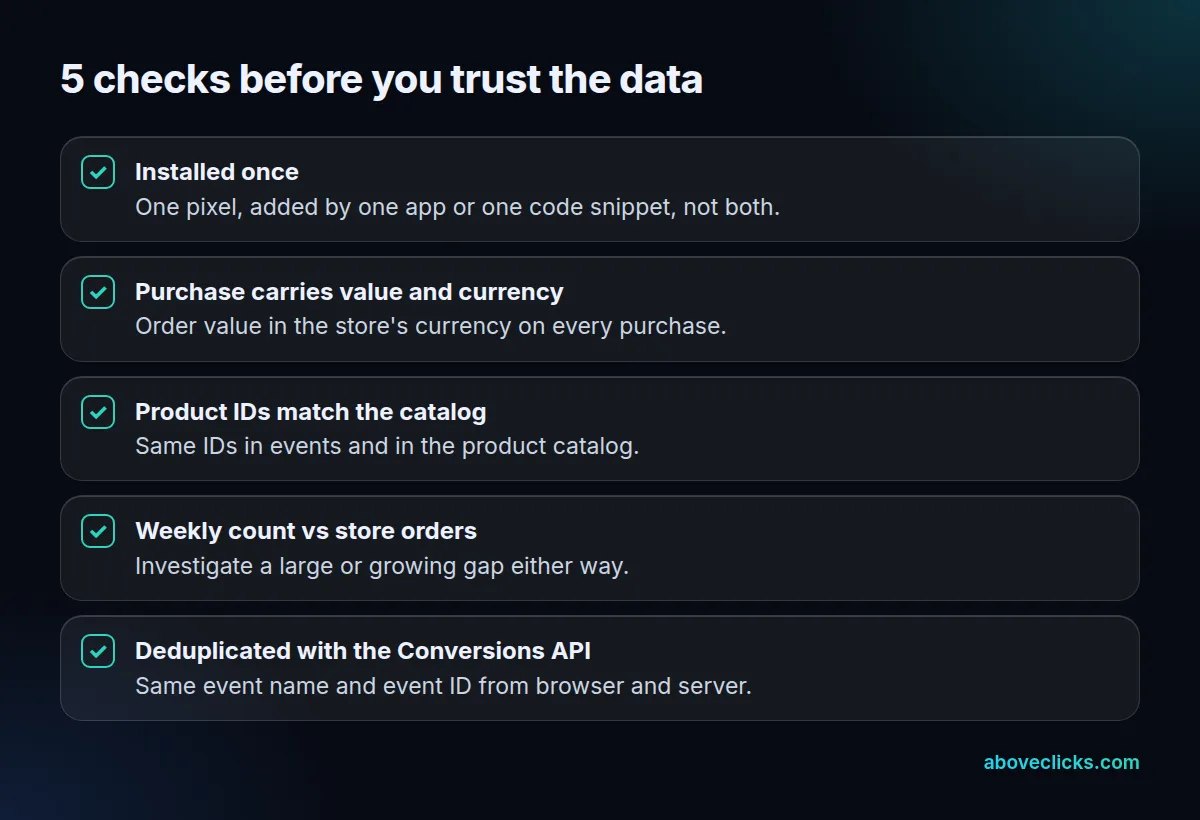
- Installed once. One Meta Pixel per store, added by one method.
- Purchase carries value and currency on every order.
- Product IDs match the catalog, if you run catalog ads.
- Weekly purchases vs store orders. Look into any large or growing gap. In our client work, this is the first check we run when a store’s Meta numbers look off, because it shows straight away whether the Meta Pixel is missing orders or counting some twice.
- Paired with the Conversions API. Meta recommends sending events from your server as well. To stop double counting, the browser event and the server event need the same event name and event ID. Meta then discards the later copy if both arrive within 48 hours (Meta’s deduplication guide).
Why it matters for e-commerce
Meta’s delivery system learns from the events it receives. Missing Meta Pixel purchases make good ads look weak. Duplicates make weak ads look strong. Either way, budget follows the wrong signal.
Our guide to setting up the Meta Conversions API on Shopify covers the server side. Read about the Conversions API and event match quality next, score your setup against these checks with our free tracking health check, or see the full Meta ads for e-commerce guide. If your pixel counts don’t match your orders, our Meta ads service starts with a tracking check.