JSON-LD (JavaScript Object Notation for Linked Data) is a format for writing structured data as a block of JSON inside a script tag, separate from the visible HTML. It's the format Google recommends for schema.org markup, because one block can describe a whole product without touching the page layout.
JSON-LD (JavaScript Object Notation for Linked Data, often typed as JSON LD) is a format for writing structured data as a block of JSON inside a script tag, separate from the visible HTML. It’s the format Google recommends for schema.org markup.
What does JSON-LD mean?
A way to write facts about a page as data. The W3C JSON-LD 1.1 Recommendation, published 16 July 2020, calls it “a lightweight syntax to serialize Linked Data in JSON”. In plain terms: ordinary JSON plus a few keywords, such as @context and @type, that tie each value to a shared vocabulary, usually schema.org, so any search engine reads “price” the same way.
What does a JSON-LD example look like?
A script block with key-value pairs. The script tag has the type application/ld+json, and inside it a product might be described like this:
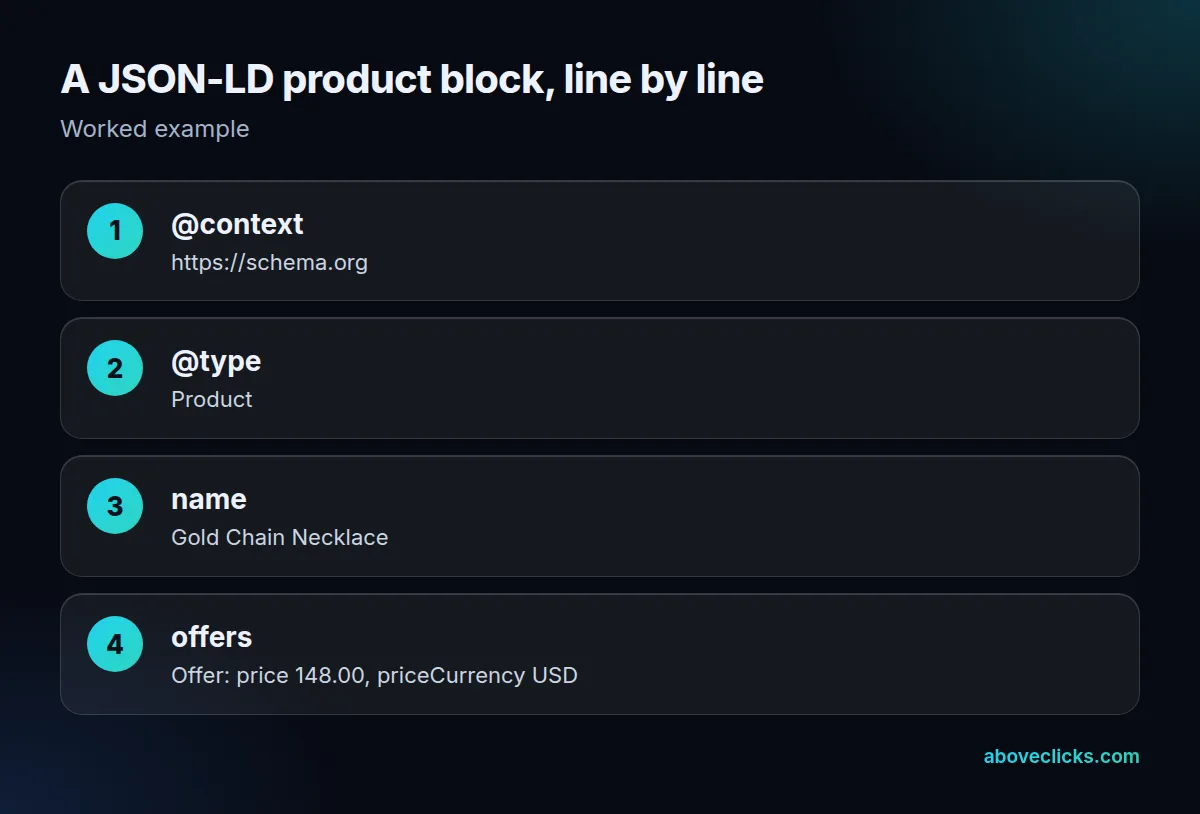
The @context line names the vocabulary, @type says what the thing is, and the rest are its properties. Values are written for machines: 148.00 with a separate USD currency code, not $148, and dates as 2026-10-18. Because the block sits apart from the layout, a developer can add a GTIN, a brand or a return policy without touching the visible template, which is why one product page can carry 3 or 4 separate blocks.
How is it different from plain JSON and microdata?
Plain JSON has no shared meaning; this format adds it. A “price” key in an app’s JSON means whatever that app decides. Here the @context maps it to schema.org’s definition, which turns it into linked data any crawler understands. Version 1.1 replaced the 1.0 Recommendation of 16 January 2014 and describes a superset of its features.
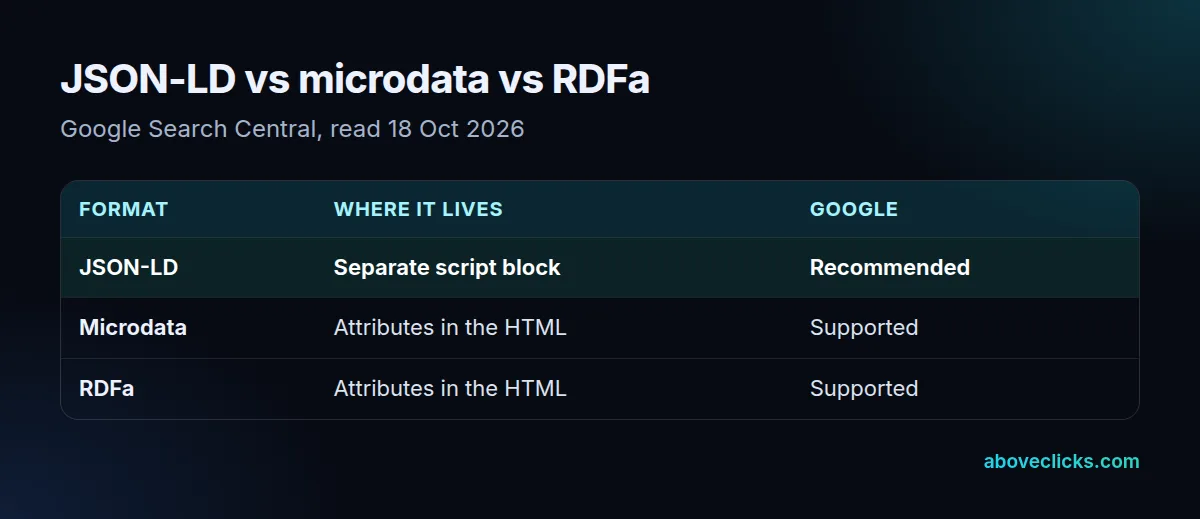
The alternatives describe the same things with attributes woven into the visible HTML, which ties markup changes to layout changes. In our check, 2 of 15 store pages carried both kinds. Google’s structured data introduction says all 3 formats are “equally fine for Google” when valid, but recommends JSON-LD as the easiest to maintain at scale.
Google can also read blocks that JavaScript adds after the page loads, with a catch for stores. Its JavaScript guide warns that “dynamically-generated markup can make Shopping crawls less frequent and less reliable”, a problem for prices and stock that change often.
Which format do real stores use?
JSON-LD, almost always. On 18 October 2026 we fetched 1 product page on each of 15 Shopify stores: 13 of 15 had JSON-LD, with 1 to 4 blocks per page.
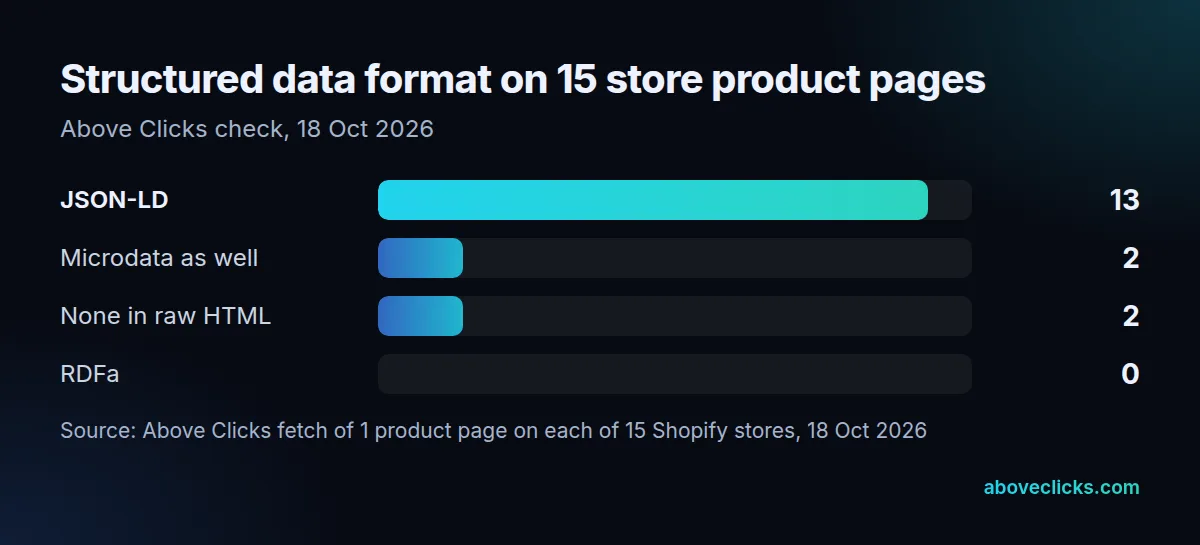
2 pages mixed in microdata: Glossier for its product and offer, and Rothy’s for its breadcrumbs. None used RDFa, and none relied on the attribute formats alone, although Shopify’s help still describes theme markup as microdata. Brooklinen and Stone and Strand showed no markup in the raw HTML; if theirs is added by JavaScript, Google’s Shopping warning applies. The practical rule for a store: 1 block per thing, built from the same product data the page displays, so the price, stock status and currency in the markup can never disagree with what the shopper sees.
Our technical SEO service moves markup into the server HTML, our structured data entry explains what to mark up, the product schema markup guide lists the properties Google wants, and the e-commerce SEO guide shows where markup fits in a full audit.