Real estate video marketing means using short videos of listings, neighborhoods and your own expertise to get found, win listings and follow up with leads. Plan each video around one job and one home, and the rest is routine.
This guide to real estate video marketing covers six video types, the length each place allows, the drone and fair housing rules to check, how Google finds a video, and a 30-day test for whether it works.
What is real estate video marketing?
It is the planned use of video across your website, listings, profiles and ads, with each video built to get found, win a listing or nurture a lead. Posting clips with no job is not a plan.
A useful test is the 30-second rule: if you can’t say in one sentence what a video should do for a buyer or seller, don’t shoot it yet. Most agents have 3 to 5 listings or leads to serve at any time, so a small set of jobs done well beats 20 clips with no purpose.
Video marketing in real estate has three jobs. Get found: a short teaser on your Google Business Profile or a neighborhood tour on YouTube reaches people who haven’t met you. Win listings: a market update or an agent introduction shows a seller how you work. Follow up: a short answer to a common buyer question sits in an email or reply.
Video marketing for real estate also works best as part of a wider plan. Our real estate marketing plan guide shows where video fits next to email, ads and referrals, and the real estate marketing service page lists what we set up. Real estate video marketing is one channel in that mix, not a replacement for it.
Which real estate marketing videos are worth making?
Six types cover most agents: a listing walkthrough, a short listing teaser, a neighborhood tour, a market update, an agent introduction and a buyer or seller FAQ. Make a type only if you can name its job, because real estate video marketing without jobs turns into busywork.
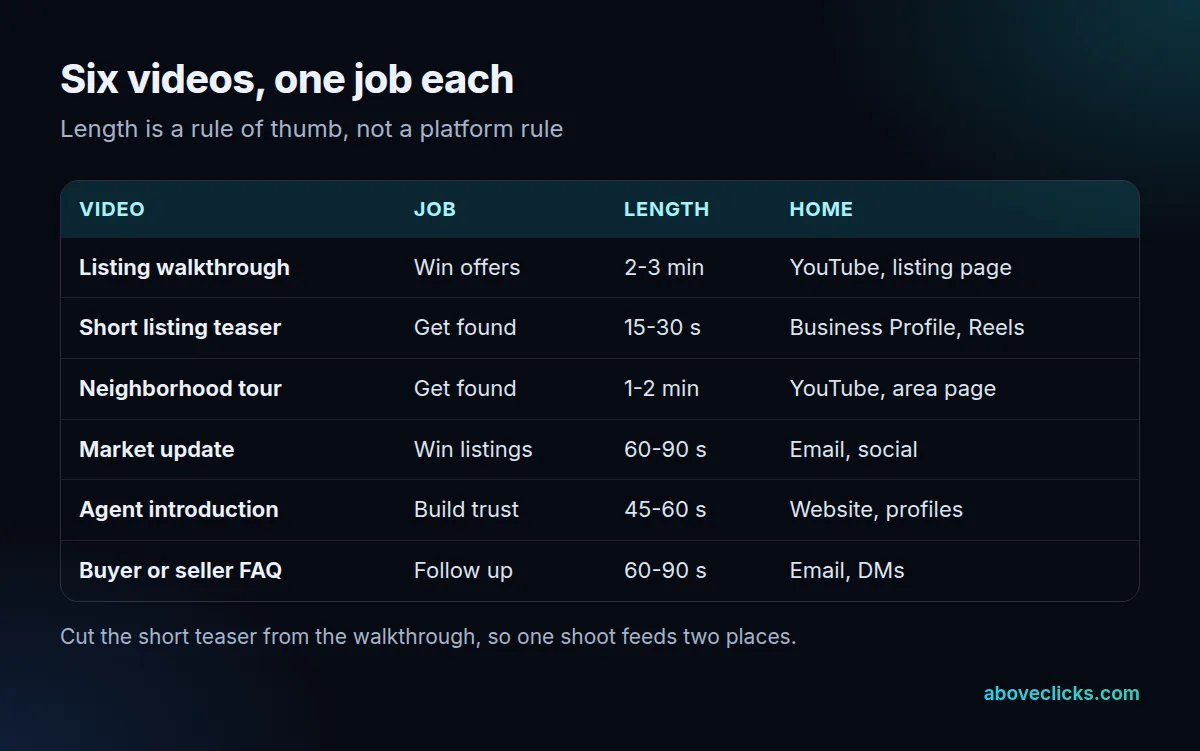
The table gives each of the six real estate marketing videos one job and one home. The lengths are a rule of thumb from experience, not a platform rule, so adjust them to your market. A walkthrough of 2 to 3 minutes, a teaser of 15 to 30 seconds and a market update of 60 to 90 seconds are enough to start, and a first month with 3 videos is realistic.
Skip the types that have no job. For real estate marketing videos, fewer and better is the rule. A video of a sunset over your office doesn’t win a listing, and a generic “five tips” clip that any agent could post doesn’t earn trust. Real estate videos for marketing work when they show something only you can: a street you know, a home you’ve walked through or a question clients ask you every week.
Testimonials need care. Use only a client’s real words, with written permission, and never imply a result they didn’t get.
How long should a real estate video be?
As long as its job needs and no longer, and short enough for the place it lives. Google Business Profile caps a video at 30 seconds, so every long video needs a short cut.
Google’s Business Profile guidelines say a video can be up to 30 seconds long and up to 75 MB, at 720p or higher. A walkthrough of 2 to 3 minutes won’t fit, so cut a teaser from its best 30 seconds and upload that.
On YouTube, long videos benefit from chapters. YouTube’s chapter rules ask for at least three timestamps in ascending order, the first at 00:00, and each chapter at least 10 seconds long. A walkthrough split into entry, kitchen, bedrooms and garden gives viewers a way to jump to the room they care about.
A simple length plan:
- Walkthrough: 2 to 3 minutes, with chapters on YouTube.
- Teaser: 15 to 30 seconds, for the Business Profile and vertical feeds.
- Neighborhood tour: 1 to 2 minutes, one area per video.
- Market update and FAQ answers: 60 to 90 seconds, one question each.
Add captions to every cut of your real estate marketing videos, because many people watch with the sound off. For real estate videos for marketing, keep the first 5 seconds on the home or the street, not on a logo.
What rules apply to real estate videos, from drones to fair housing?
Two sets of rules matter most: the FAA’s Part 107 rules for commercial drone footage and the fair housing rules for what your words and pictures imply. Check both before publishing.
Drones. The FAA’s Part 107 summary covers drones under 55 pounds flown for work. You fly in daylight or twilight with anti-collision lighting, keep the drone within sight, and stay at or below 400 feet with weather visibility of at least 3 miles. The pilot needs a remote pilot certificate and must be at least 16 years old. Each drone is registered for $5, and the FAA says registration is valid for 3 years. If you hire a videographer for aerial shots, ask to see their certificate.
Fair housing. The Fair Housing Act protects 7 classes: race, color, national origin, religion, sex, familial status and disability. Under 24 CFR 100.75, a housing advertisement may not indicate a preference or limitation based on those classes, and the rule counts words, photographs, illustrations and symbols. In a video, that covers the voice-over, on-screen text, captions and who appears in the shots. Describe the home and the location, not the kind of person who would fit there. A phrase such as “perfect for young families” in a voice-over or caption can read as a preference, so describe the 3 bedrooms and the fenced yard instead.
This is general information, not legal advice. Your broker or local board can confirm what applies in your state.
How do real estate videos get found on Google and YouTube?
For real estate video marketing, that means a page Google can index, a thumbnail at a stable URL and clear metadata. A video on a listing page can still be found, but it won’t get the same treatment as a video with its own page.
Google’s video SEO guide says that to be eligible for video features, a video needs a valid thumbnail available at a stable URL, and recommends a dedicated watch page for each video where that makes sense. It names a product page with a 360 video as a page that is not a watch page, because the video is complementary to the rest of the content. A listing page with an embedded walkthrough is in the same position.
So for a video you want found in its own right, such as a neighborhood tour, give it its own page with the video as the main element, a title and a short description. For listing videos, keep the video on the listing page for buyers and upload the same file to YouTube, where it can be found separately.
Add structured data too. Google’s VideoObject guide lists 3 required properties: name, thumbnailUrl and uploadDate. Give each video a unique name, and don’t change the thumbnail address after publishing. Google says it may take several days after publishing a page for it to be found and crawled, so judge the effect after at least 7 days, not on day 1.
Our video marketing service page covers production and our real estate digital marketing page covers the wider setup.
How do you tell if video marketing for real estate is working?
For real estate video marketing, count enquiries from each video’s own tracked link over 30 days, and read views as a supporting signal only. A view doesn’t pay a commission; a call or a form does.
Give every video one link in its description or caption, with its own source tag, and send that link to a page with a form or phone number. Then compare videos by what they produce.
| Question | Measure | Where to read it |
|---|---|---|
| Is it found? | Impressions and views | YouTube, Search Console Videos filter |
| Is it watched? | Average view duration | YouTube, social insights |
| Does it bring enquiries? | Form fills and calls per link | Analytics, your inbox |
| Does it bring the right people? | Share of enquiries in your area | Your CRM notes |
Google’s guide suggests the Performance report’s Videos search appearance filter for video results, so use it for videos on your own pages.
Worked example (invented): an agent with 4 listings tags one link per video for 30 days. The walkthroughs get the most views, but the short teasers bring the calls. The agent cuts a teaser from every future walkthrough. Your numbers will differ; the method is the point.
How do you run real estate video marketing every month?
Batch the work: one planning step, one shoot per listing, one editing block and one review. A fixed routine beats occasional bursts of effort, and it keeps real estate video marketing from stalling after the first listing.
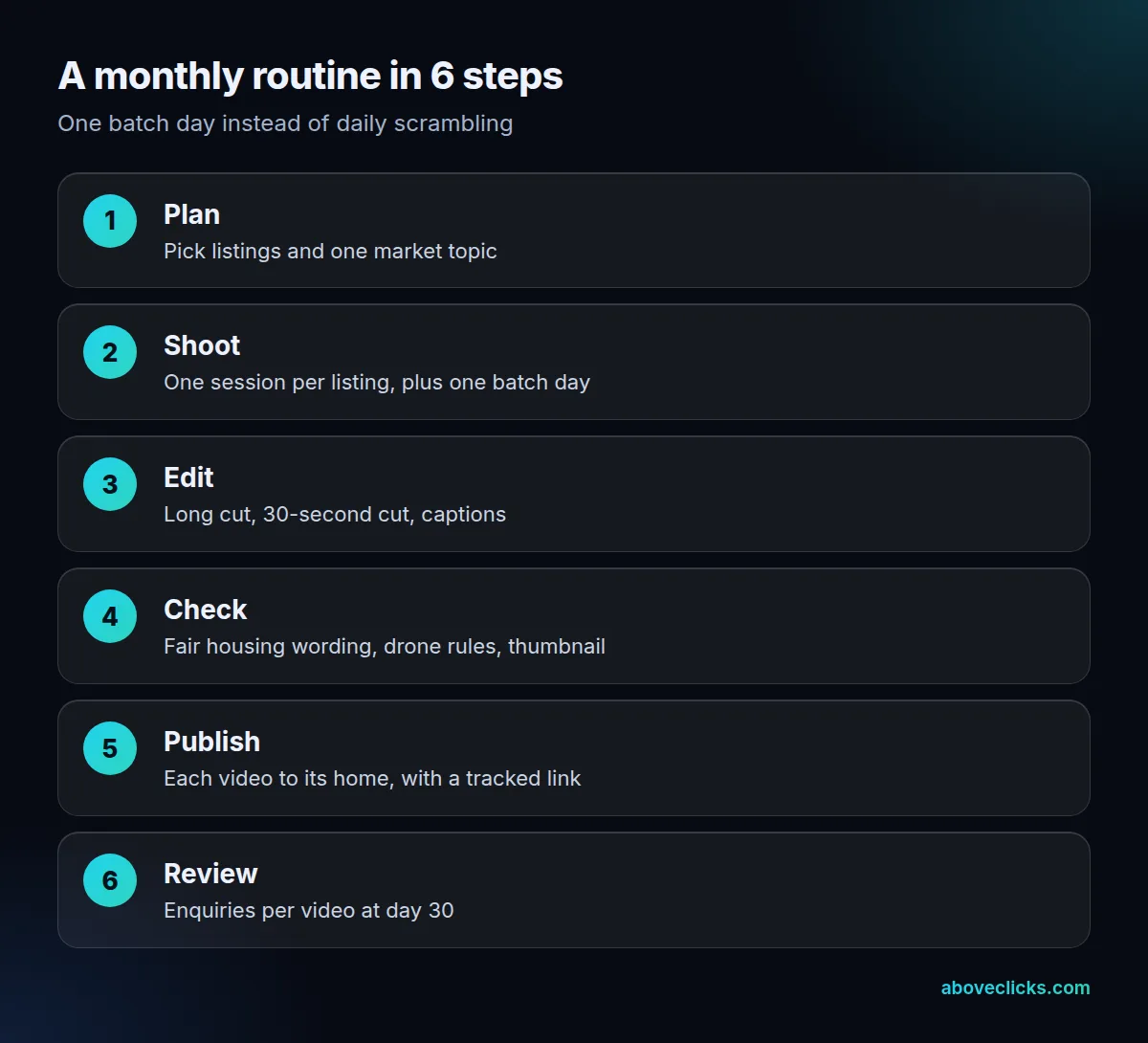
Real estate video marketing needs this rhythm because most of the work is repeatable. The same walkthrough feeds a YouTube upload, a 30-second teaser, a vertical clip and an email link, so one shoot becomes 4 pieces of video marketing in real estate that serve different jobs. Skipping the editing block is where most plans stall: footage sits on a phone for 3 weeks and the listing sells before it is used.
Example for an agent with 4 listings: a 45-minute shoot at each home, one batch day to edit and caption the long and 30-second cuts, then a publishing pass. Add one market update per month.
Run the checklist before anything goes live.
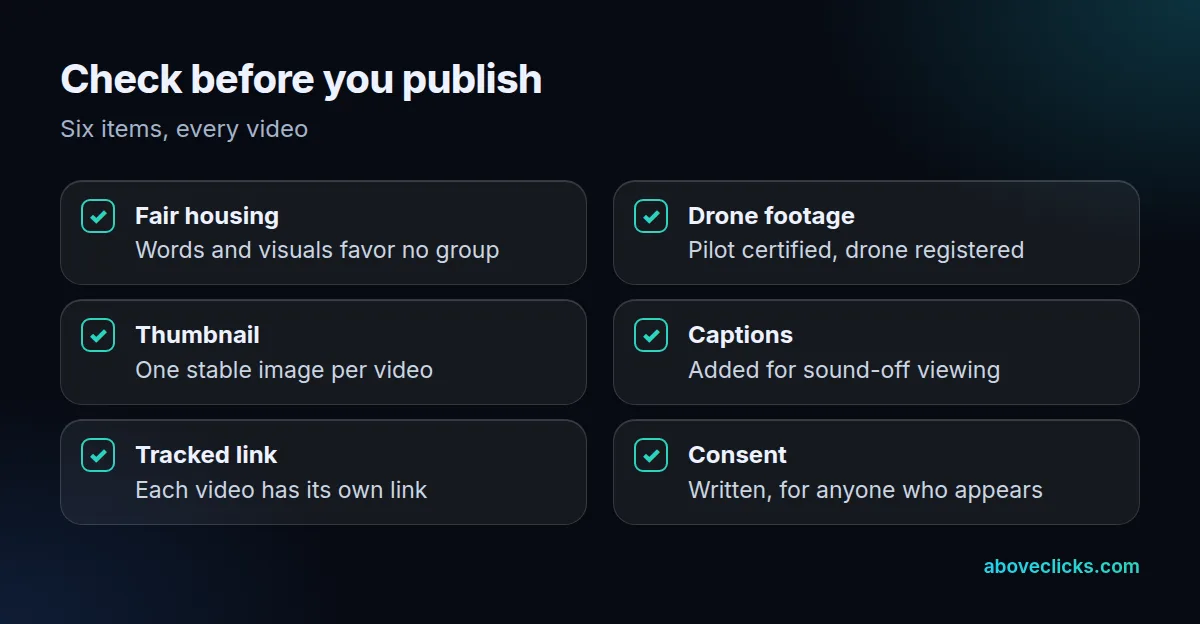
Four mistakes cost the most: videos with no job, no short cut for the profile, wording or drone footage nobody checked, and no tracked link. If you want a second pair of eyes on the setup, our free audit reviews your site and profiles, and our guide to PPC for real estate shows how to put paid reach behind the best video. More industry guides are in industries.