Real estate marketing automation is software that reacts to a lead’s actions with a message, a task or a status change, so nobody types each step by hand. It works when every rule has a trigger, an action and a stop rule.
This guide to real estate marketing automation shows what to build first, the six rules most teams need, a 4-week build order, the email, text and ad limits to respect, and the three numbers that show whether it works. It’s the cross-channel view; for email flows alone, see our real estate email marketing guide.
What is real estate marketing automation?
A set of rules that handle the repeat work between a lead appearing and a person speaking to them. Each rule has 4 parts: a trigger, an action, a stop rule and an owner.
Most of what gets sold as marketing automation for real estate is only the action part, such as an email sequence. The trigger decides who gets it, the stop rule decides when it ends, and the owner is the person who reads the results. Without those 3, an automation keeps sending after a lead has booked, replied or left.
The same idea applies whatever you run. Marketing automation real estate teams use ranges from a form and a spreadsheet to a full CRM. The tool changes; the 4 parts don’t.
The parts, in plain words:
- Trigger: the event that starts the rule, such as a new enquiry or a booked viewing.
- Action: what happens, such as a message, a task for an agent or a status change.
- Stop rule: what ends it, such as a reply, a booking or an opt-out.
- Owner: the person who reads the results every month.
A good test for any real estate marketing automation is whether you can say all 4 in one sentence. The goal for the first rule is simple: a reply inside 5 minutes during working hours.
What should real estate marketing automation do first?
Get every lead into one record, assign it to a person and send a first reply within minutes. Nurture comes later, because a late first reply loses the lead before any sequence starts.
On our own real estate marketing work, the order is the same. Every lead reaches the CRM within seconds, whatever the source. The CRM assigns it by project or area and alerts the salesperson, so the first call happens in minutes. For leads who opted in, a WhatsApp welcome with the brochure and location goes out within 5 minutes, as described on our industry page.
Why the first reply matters in real estate marketing automation: buyers often enquire about several properties at once, so the first agent to answer usually gets the viewing. An automatic message outside working hours holds the lead until someone can call.
Keep the first message short. Confirm you received the enquiry, say who will call and when, and add a booking link. That’s 3 jobs in under 40 words.
Which real estate marketing automation rules should you build?
Six rules cover most teams: routing, first reply, viewing reminder, after-viewing check-in, a capped nurture and a 90-day re-engagement. Each one below has its own stop rule.
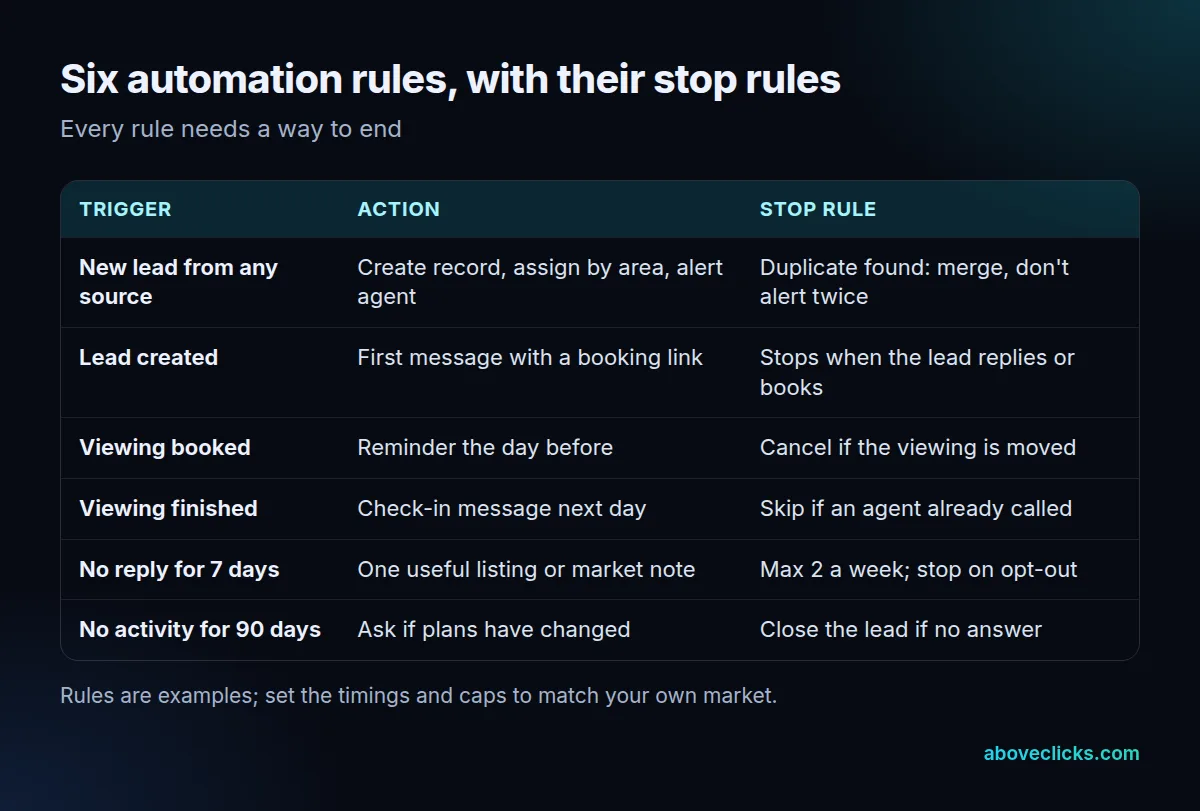
The stop rule is the part teams skip. A reminder that fires after the viewing was moved confuses the buyer, and a nurture message sent to someone who already booked wastes goodwill. Write the stop rule first, then the action.
Two limits keep the table honest. Cap messages per contact across all channels, for example 2 a week in total, because separate tools each think they are the only sender. And log every automated message on the lead’s record, so a salesperson who calls can see what the lead has already been told.
Think of the table as a starting set for real estate marketing automation, not a target. A solo agent using marketing automation real estate teams rely on may run only the first 3 rules for the first 30 days, and that is a sound start. A team with several sources can add the rest once routing is stable. Each added rule is one more thing that can fire at the wrong time, so add one at a time and check it for 2 weeks.
A longer sequence still has a place for buyers who take 3 to 6 months to decide. The real estate marketing plan guide covers how those months fit the wider plan and budget.
How do you set up marketing automation for real estate in 4 weeks?
Build in speed order: capture and routing in week 1, the first reply in week 2, reminders and capped nurture in week 3, and reports plus a review in week 4.
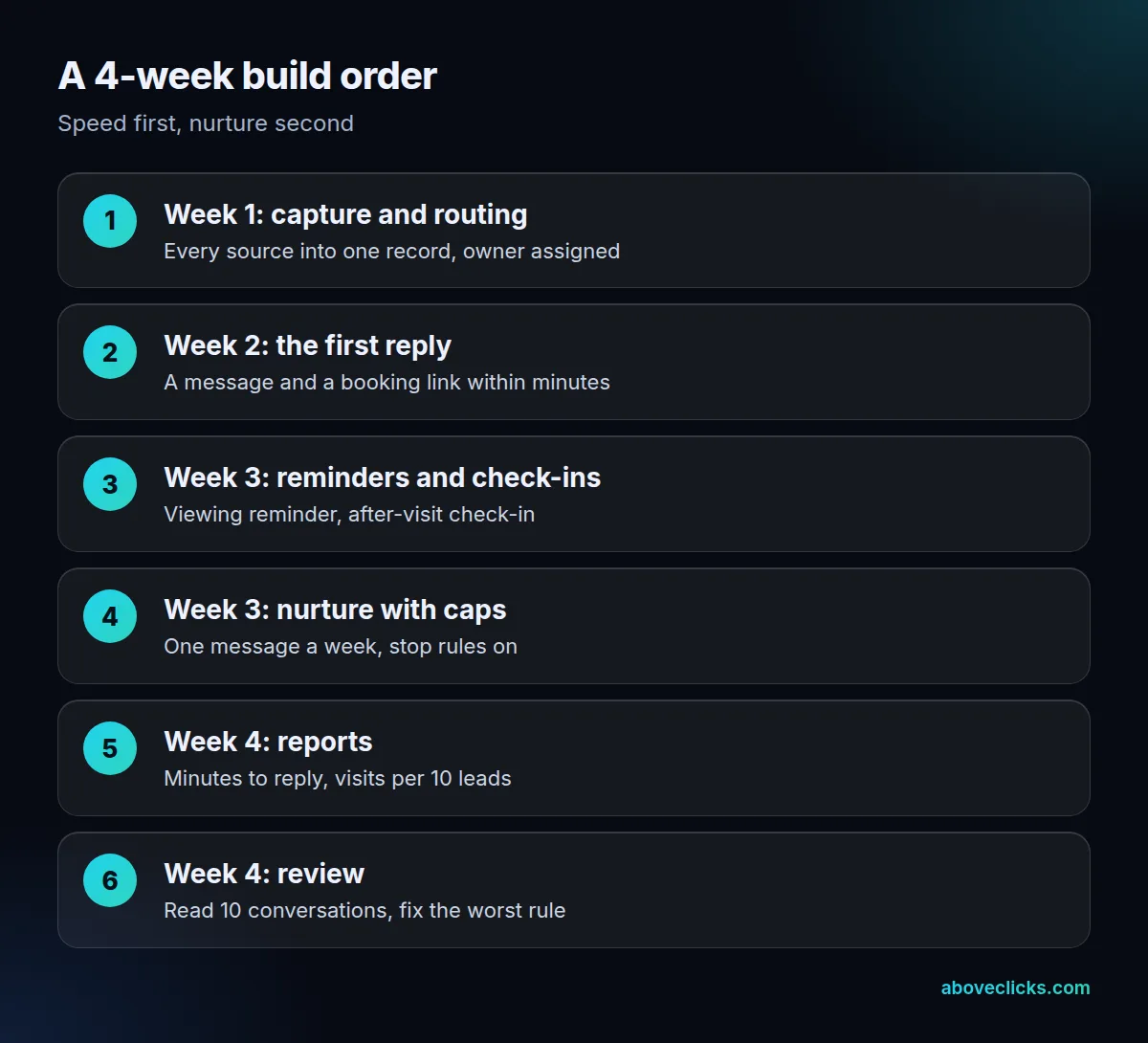
Marketing automation for real estate should start with one lead source, not all of them. Pick the one that sends the most enquiries, get it to arrive in the CRM with its source tag, and test it with 5 fake leads before adding the next. A routing mistake that sends 40 leads a month to the wrong person is easy to miss and costly.
In week 2 of the real estate marketing automation build, write the first reply in plain words and test it on your own phone. In week 3, add the viewing reminder and the check-in, then the nurture with its cap. In week 4, read 10 real conversations from start to finish. You’ll find one rule that fires at the wrong time, and fixing it is worth more than adding an eighth rule.
For outside help with the build, our business automation and WhatsApp automation pages describe what we set up.
Which consent and ad rules limit real estate automation?
Email, texts and ads each have their own limits. Email follows CAN-SPAM, commercial texts need written consent, and property ads on Meta fall under its housing category.
For email, each separate message that breaks the CAN-SPAM Act can cost up to $53,088, according to the FTC’s compliance guide as of November 2026. The same guide says you must honor an opt-out within 10 business days and include a valid physical postal address. Real estate marketing automation makes this easier to get wrong, because a sequence keeps sending unless a stop rule ends it on opt-out.
For texts, the FCC’s consumer guide says commercial texts need written consent, and autodialed texts to a mobile phone need prior consent. It adds that people may opt out at any time in any reasonable manner, so a reply of “stop” has to end the sequence. Record where and when each person agreed.
For ads, Meta’s Special Ad Category rules for housing remove age, gender, ZIP code, exclusion targeting and lookalike audiences for US advertisers (read November 2026). This isn’t legal advice; check your state’s rules too.
Which tools does real estate marketing automation software need?
A place that holds every lead, a way to send email and text from it, and a connection from each lead source. The brand matters less than whether the pieces share one record.
Check how leads leave each ad platform. Google’s lead forms can send leads to a CRM by webhook, but the Google Ads Help page says CSV download covers only the last 30 days and Google Ads stores leads for 60 days. Meta offers a lead webhook that sends real-time updates, and reading the lead needs the leads_retrieval permission, per Meta’s developer docs.
This matters for real estate marketing automation because a lead that sits in an ad account is invisible to your follow-up rules. If the connector fails on a Friday and nobody notices until Monday, the first reply is late by 3 days. Add an alert for a lead that has no owner after 15 minutes, so a broken connector shows up the same day.
So treat platform storage as a buffer, not a database. Put a webhook or connector in place on day 1, and export manually as a backup until you trust it.
Questions to ask before you pick real estate marketing automation software for a team:
- Does it merge duplicates, so one person has one thread?
- Can a rule stop when the lead replies or books?
- Does it log the consent source and date?
- Can it assign leads by area or project?
- Can you export everything if you leave?
How do you know the automation is working?
Track 3 numbers: minutes to first reply, the share of leads contacted within 5 minutes, and visits booked per 10 leads. Message counts and opens say little.
A worked example, invented: a small team gets 40 leads in a month. Before the build, a first-reply log shows a median of 190 minutes and 6 leads out of 40 contacted within 5 minutes. After routing and the first reply are live, the log is read again. If the median drops to 6 minutes and 31 of 40 are contacted within 5 minutes, the speed rule works. Visits booked per 10 leads then show whether speed turned into viewings.
Read the log by source as well as in total. Marketing automation for real estate often works well for one source and badly for another, for example a portal that sends leads without a phone number. A split by source shows which rule or form to fix first.
Review monthly. The numbers come from the CRM, not from the ad platform. Our free audit checks lead quality, routing and follow-up for a real estate business and sends a written PDF within 2 workdays.
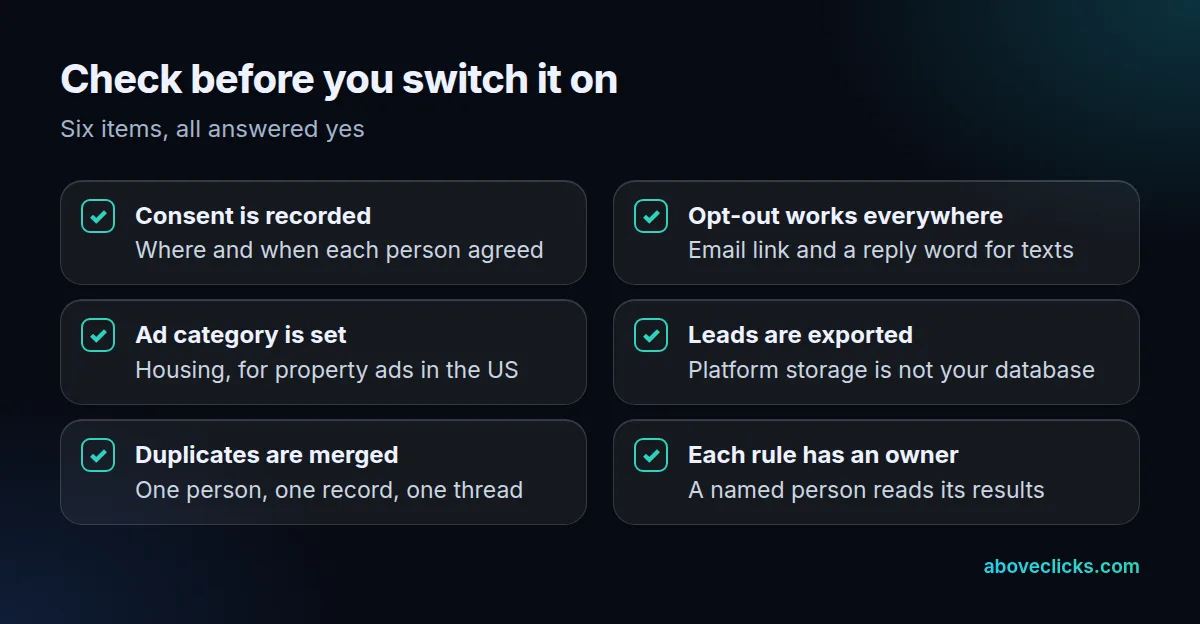
Run the checklist above before switching anything on, and again whenever you add a source. More guides on property marketing are in our industries section. Most of the six costly mistakes in real estate marketing automation are on it: no first reply, no stop rules, no consent record, the wrong ad category, leads left in platform storage and no owner for the results.