AI Max vs PMax comes down to one distinction: AI Max is a feature layer inside Search campaigns, while PMax is a separate campaign type across Google’s channels. The pick depends on your control over queries, copy and landing pages, not on which name sounds newer.
AI Max vs PMax: what is each one, exactly?
AI Max is a set of features inside a Search campaign. Google’s setup page states: AI Max is not a new campaign type but an optimization layer within existing Search campaigns. New Search campaigns have the AI Max feature turned on by default, so many advertisers already have it without choosing it.
AI Max bundles three features. Search term matching uses broad match, asset-based and landing-page-based technology to reach relevant searches beyond your keyword list, and you control it at ad-group level. Text customization, formerly automatically created assets, uses your ads, landing-page copy and assets, plus generative AI, to write copy matched to each search; it is a campaign-level control. Final URL expansion sends traffic to the most relevant URLs on your site when that performs better, but only to query-relevant URLs themed to the ad group, and it needs text customization on.
Around those features sit controls. Brand inclusions name the brands your ads may appear alongside; brand exclusions keep your ads away from brands you name. URL inclusions add pages final URL expansion missed, and URL exclusions remove pages from serving as landing pages. Locations of interest reach people based on their geographical intent even in keywordless matches.
By the numbers, this ai max vs pmax split is sharp: AI Max has 2 main feature groups — search term matching and asset optimization (Google’s AI Max how-it-works page) — while PMax runs 6 channels from 1 campaign (Google’s About Performance Max page). New Search campaigns also start with AI Max switched on by default (Google’s AI Max setup page).
PMax is a different kind of object. Google describes Performance Max as a goal-based campaign type that lets you access all Google Ads inventory, including YouTube, Display, Search, Discover, Gmail and Maps, from a single campaign. You supply the goal, budget, assets, audience signals and, for retailers, a product feed. Google positions PMax as a complement to keyword-based Search campaigns, not as their replacement.
AI Max deepens Search, while PMax widens reach: the AI Max side of ai max vs pmax only serves on Search, while a PMax campaign can serve anywhere — but you hand Google the placement choice.
AI Max vs PMax: what actually differs?
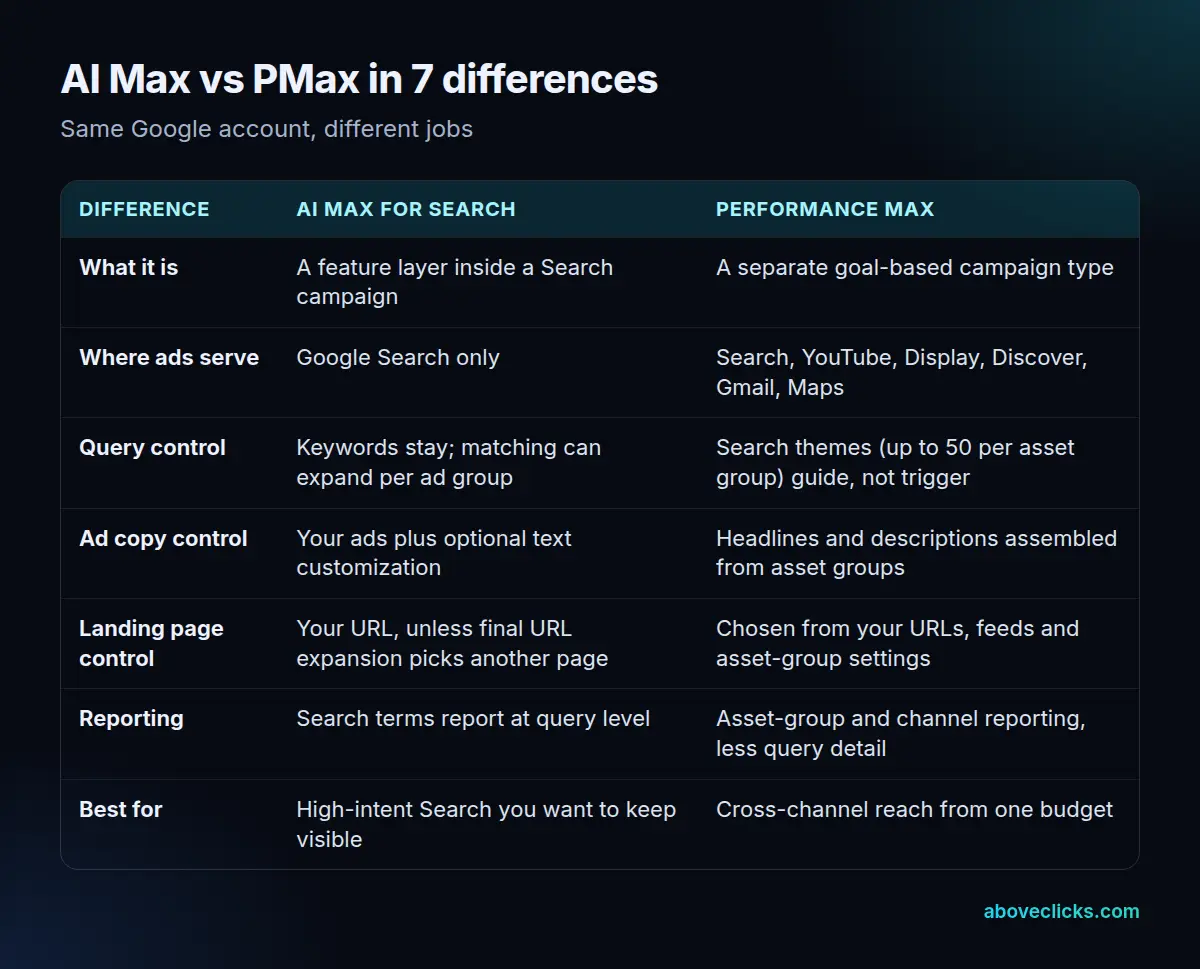
Seven differences decide most real choices. The table below puts the ai max vs pmax choice in 7 rows; the two that surprise advertisers most are reporting and landing-page control.
| Difference | AI Max for Search | Performance Max |
|---|---|---|
| What it is | A feature layer inside a Search campaign | A separate goal-based campaign type |
| Where ads serve | Google Search only (1 channel) | Search, YouTube, Display, Discover, Gmail, Maps (6 channels) |
| Query control | Keywords stay; matching can expand per ad group | Search themes (up to 50 per asset group) guide, not trigger |
| Ad copy control | Your ads plus optional text customization | Headlines and descriptions assembled from asset groups |
| Landing page control | Your URL, unless final URL expansion picks another page | Chosen from your URLs, feeds and asset-group settings |
| Reporting | Search terms report at query level | Asset-group and channel reporting, less query detail |
| Best for | High-intent Search you want to keep visible | Cross-channel reach from one budget |
In numbers, this ai max vs pmax gap is plain: AI Max serves 1 channel against PMax’s 6, PMax allows up to 50 search themes per asset group (Google’s search themes page), and PMax offers 4 named objectives — Sales, Leads, Website traffic, and Local store visits and promotions — plus a no-goal option (Google’s About Performance Max page).
On reporting, the AI Max side of ai max vs pmax still gives you a query-by-query search terms report, so you can see which searches your money went to and add negatives for unwanted ones. PMax reports at asset-group and channel level, with far less query detail.
On landing pages, AI Max keeps your chosen URL unless you switch on final URL expansion, when Google may pick a better-fitting page on your site. When final URL expansion picks another page, pinned assets are not used, since they may not match it. PMax makes the same choice across more pages and feeds, so every page it can choose from must be fit for paid traffic.
AI Max keeps your ad groups, keywords and budget structure and adds AI features inside them. PMax replaces that structure with asset groups, audience signals and search themes, and optimizes toward your goal across channels.
When should you choose AI Max over PMax?
In ai max vs performance max, choose AI Max when Search is where your buyers are and you need to see exactly which searches you paid for. That covers lead generation, service businesses and any advertiser whose sales start with a typed question. If a wrong query costs real money — a job seeker clicking a hiring-intent ad, for example — query-level reporting and the per-ad-group matching switch are worth more than extra reach.
Choose AI Max when your creative is mostly text and landing pages. You do not need images, video or a product feed to use it, because it works from the assets a Search campaign already has: keywords, ads and pages. A business with strong service pages and no video library can start here this week, while PMax would first need creative it does not have.
Choose AI Max when copy control is a hard requirement. Text customization can be switched off at campaign level, and search term matching can be switched off for individual ad groups, so an ad group with regulated or legally checked wording stays as written. That control floor is the test: list the queries, copy and pages that must never change, and check ai max vs pmax against that line.
Put a number on that ai max vs pmax control floor before you choose: 3 switches you can flip — search term matching off per ad group, text customization off per campaign, and final URL expansion off per campaign (Google’s AI Max how-it-works page). The search terms report then shows an “AI Max” match type plus a source column naming 2 match sources: broad-match expansion and keywordless matching.
AI Max also fits a staged move. If your Search campaigns already convert, switching AI Max on for one or two campaigns with steady history is a smaller ai max vs pmax change than building a PMax campaign. Review the search terms report weekly for the first month and judge the test on qualified outcomes, not click volume.
When does PMax beat a Search campaign with AI Max?
PMax wins when your buyers are not only searching: if video, display or Discover can create demand Search never sees, AI Max cannot reach those people. A retailer with a product feed, a brand with strong video, or a business in a new market where nobody searches its name yet will get more from PMax than from deeper Search coverage.
PMax also wins when one budget must cover many formats. You supply asset groups and let Google assemble combinations across channels. Google’s own asset guidance shows the scale of that supply job: up to 20 images in an asset group, as of October 2026 (Google’s PMax ad-strength checklist), and a recommendation to upload at least one video yourself rather than letting Google generate every video from your other assets.
Search themes are PMax’s closest thing to keyword control. Search themes let you add the words and phrases your customers use, up to 50 per asset group (Google’s search themes page), and they are optional and additive to what PMax already predicts from your assets, feeds and landing pages.
They carry the same priority as phrase and broad-match keywords in Search, and exclusions and negative keywords still apply. They guide PMax; they do not trigger ads the way keywords do in Search. That ai max vs pmax guidance gap is why scoring control as a tie is misleading: one side keeps keyword control, the other replaces it with signals.
PMax needs enough conversion volume to learn from; with thin data, its cross-channel guesses stay guesses longer, and its reporting gives fewer levers to fix them. If volume is thin, fix tracking and volume in Search first, then add PMax once each conversion action has a history worth learning from.
Can you run AI Max and PMax at the same time?
Yes, and many mature accounts do. It works when each campaign has a distinct job: AI Max owns high-intent Search demand you can read query by query, while PMax adds conversions Search never touches. The risk is overlap: PMax bidding on searches Search should own, then claiming credit for demand you already had.
Three guards keep ai max vs pmax honest.
- Tighten Search before adding PMax: exact match on your most valuable terms and a clean negative list, so the Search side has a clear territory.
- Set brand exclusions on the PMax side before launch, so it does not spend on branded searches your Search campaigns would win anyway.
- Judge ai max vs pmax on what happens after the click — qualified leads, orders, revenue — in your records, rather than on the conversion counts each campaign reports for itself.
One more guard comes from Google itself: Search campaigns holding an exact-match keyword are prioritized over PMax when a query hits that exact-match keyword (Google’s About Performance Max page). That priority rule is why guard 1 works: exact match is your fence, not just a preference. That after-click rule is the only honest scoreboard in ai max vs pmax.
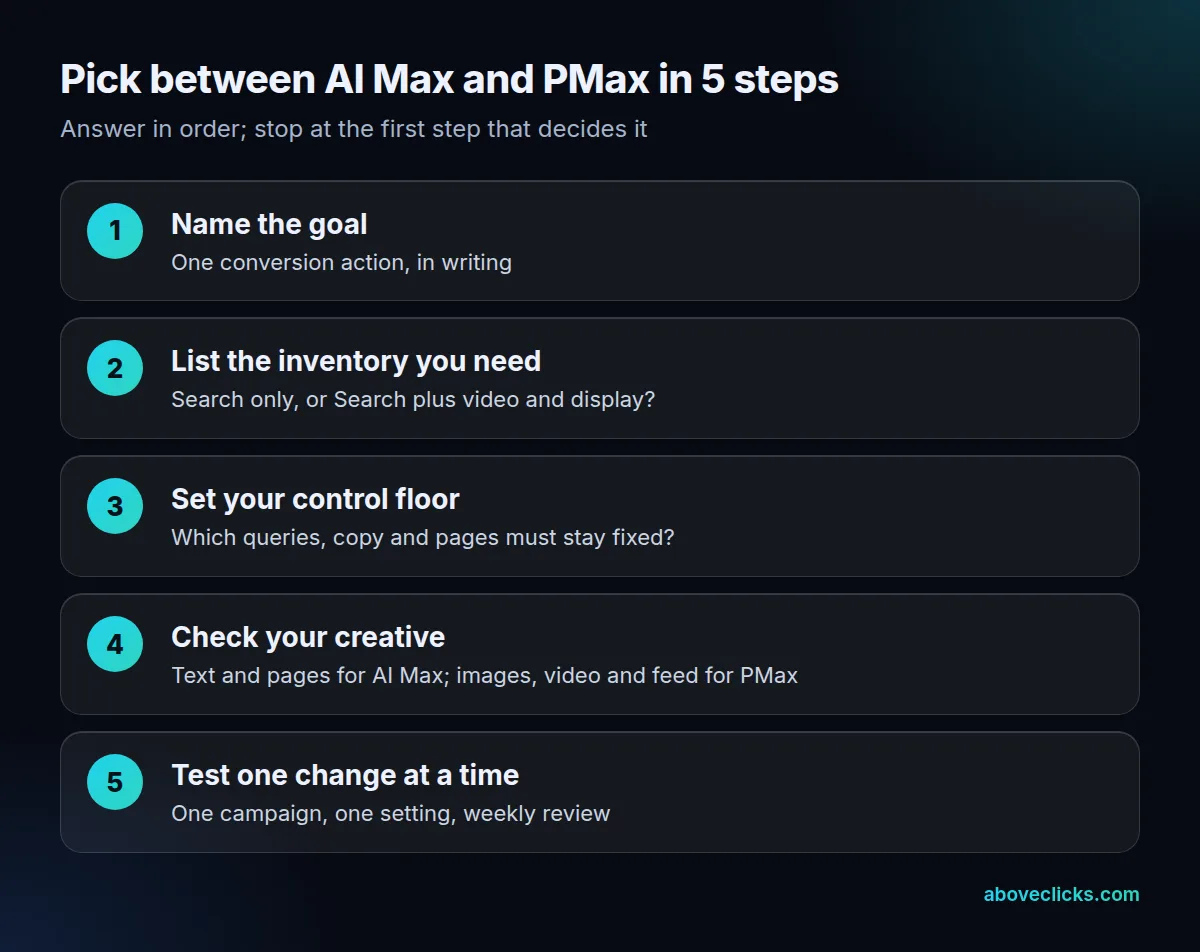
That figure sums up ai max vs pmax: one goal, the inventory you need, a control floor, checked creative, then one change at a time.
AI Max vs PMax: what does each one cost to run well?
Neither ai max vs pmax setup has a fixed price: both charge per click and impression inside auctions you do not control. AI Max costs management time: weekly search-terms review, negative lists, URL exclusions and copy checks. PMax costs creative production and learning time: images, video, feed quality and enough conversions for the model to learn from.
A worked example makes the split concrete, and the split itself is an ai max vs pmax test design, not a permanent budget. Take an illustrative advertiser with a $3,000 monthly Google Ads budget and no other paid channels. Splitting it 70/30 between Search with AI Max and PMax gives $2,100 to Search and $900 to PMax (70% of $3,000 is $2,100; 30% is $900).
That ai max vs pmax split is a starting point for a test, not a recommendation: Search gets the larger share because its queries are visible and its guardrails stronger, while the smaller PMax share is large enough to learn from without unreviewed creative dominating spend. After one month, move budget toward better qualified outcomes, not more reported conversions.
Budget for the management job, not just the clicks. The expensive mistake in ai max vs pmax is not picking the wrong setup; it is running ai max vs pmax unreviewed. An unread AI Max campaign will pay for unwanted searches; an unaudited PMax campaign will serve unapproved creative. Both are preventable, and cheaper to prevent than to discover in an invoice.
How do you set up the winner without losing control?
Work through ai max vs pmax setup in this order. First, write down one conversion action and the control floor: the queries, copy and pages that must never change. Second, set exclusions before launch: brand exclusions, URL exclusions for pages that must never receive paid traffic, and negatives for unwanted queries. Third, approve the creative supply: your images and at least one video you uploaded yourself for PMax, and checked landing pages for AI Max.
Fourth, audit the October 2026 sourcing change if you run PMax. Google added two asset-optimization options to Performance Max: landing page images, which lets Google use images from your website as creative, and sourced videos, which lets Google use videos from other channels. As reported, sources include social media, campaign landing pages and linked YouTube channels, and Google can add up to 10 sourced videos to an asset group, against a 5-video manual upload limit (Search Engine Land, 22 Oct 2026).
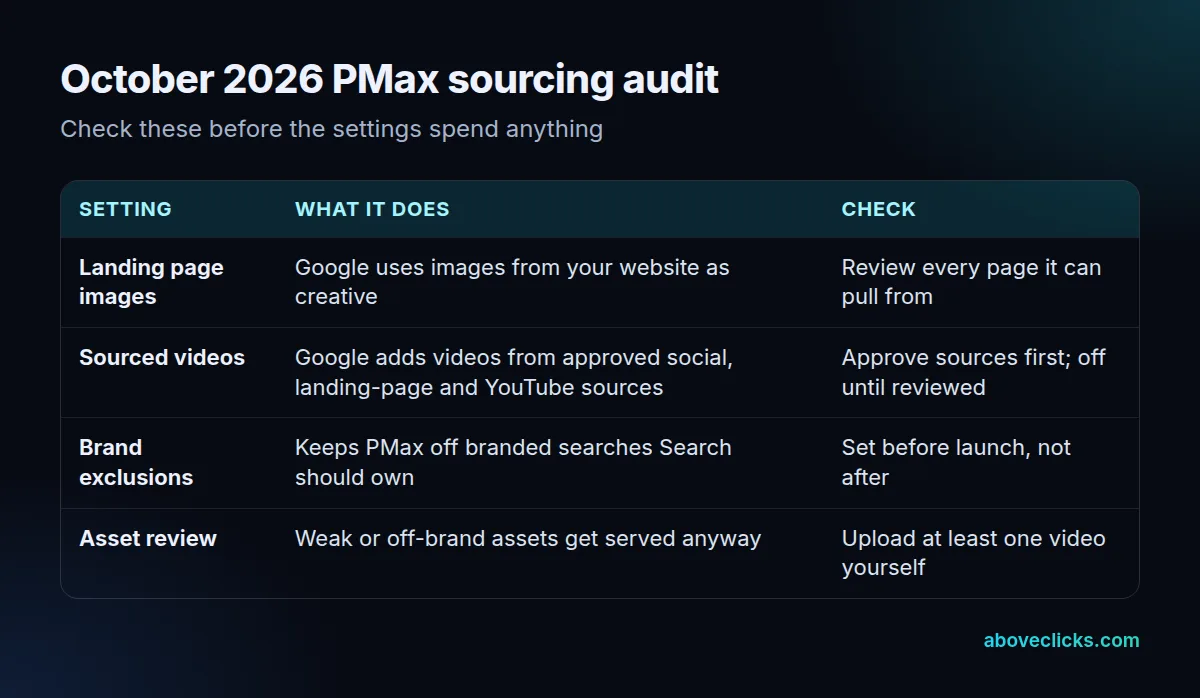
Sourced videos is on by default for new campaigns and, according to Google’s own help text as reported in October 2026, may have been switched on automatically for some existing campaigns during a platform update (Search Engine Roundtable, 23 Oct 2026). It is a campaign-level setting, and you must approve the sources it may pull from.
If your social or YouTube history holds clips never meant as ads, turn sourced videos off until every source is reviewed. The same rule applies to landing page images: any image on a pullable page is now a candidate ad creative, so pages with placeholder, supplier or staff imagery need review before the setting stays on.
Fifth, review weekly for the first month, then monthly: search terms on the AI Max side, asset and channel performance on the PMax side, after-click outcomes across ai max vs pmax. When a setting stops earning its keep, switch that one setting off — search term matching per ad group, text customization per campaign, or sourced videos per campaign — rather than abandoning the setup. That one-switch-at-a-time rule is how ai max vs pmax stays manageable in a live account.
If you want that review done on your account, start with the free audit. Our Google Shopping agency page covers the feed-led side, and our Google Ads services page covers Search setup. Our Google Ads guides round up the rest of the series. The right answer to performance max vs ai max is the one your numbers support after a month of reviewed running.