How to index backlinks comes down to one rule from Google: you can’t ask it to index pages you don’t manage. What you control is whether the linking page can be found and crawled, and whether the link is a normal HTML link.
This guide shows how to index backlinks by splitting the job by who controls the linking page, lists the six checks that explain most missing links, and says which shortcuts Google calls link spam. It’s written for store owners who built links and can’t see them in a link tool. If you’re still earning links, start with the ecommerce SEO guides.
How to index backlinks in Google?
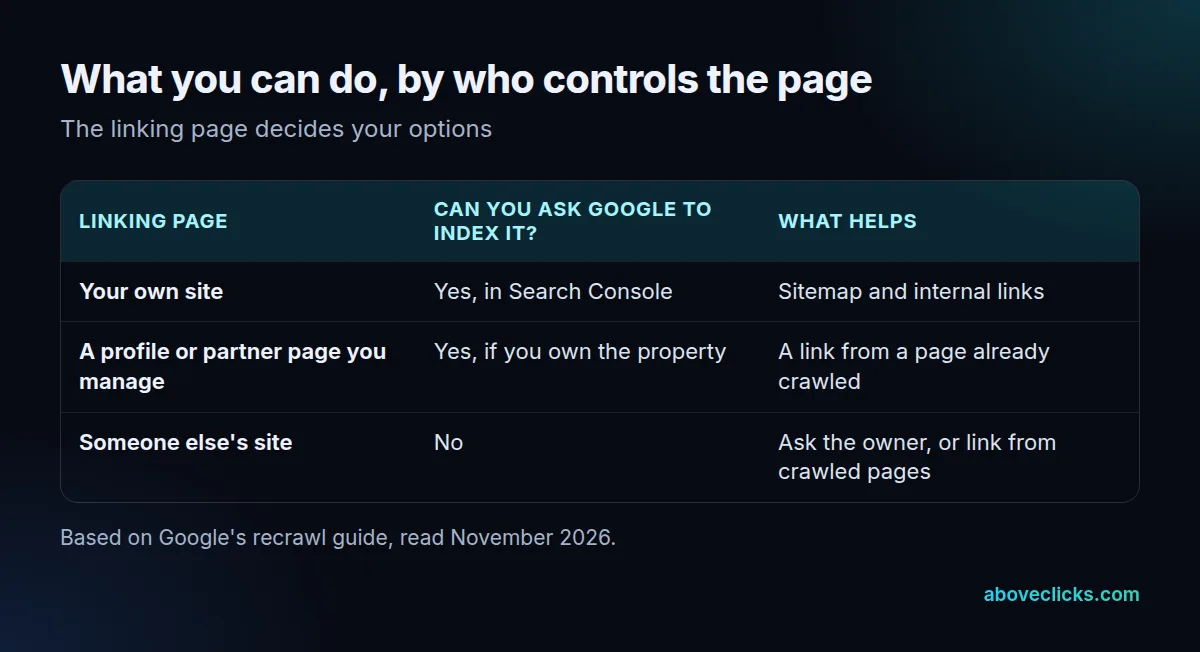
Make sure Google can crawl the page that holds the link, then wait. Google’s recrawl guide says you can’t request indexing for URLs you don’t manage, so your options depend on who controls the page.
How to index backlinks on pages you control
If the link sits on your own site, a partner page you manage or a profile you own, how to index backlinks is a normal indexing job. Add the page to your sitemap, link to it from a crawled page, and request indexing for it if you own the property. Google’s sitemap overview adds that pages linked from your navigation or other pages are usually discovered anyway.
How to index backlinks on pages you don’t control
On someone else’s site you can’t submit the page. How to index backlinks there means making the page easy to find: a link from a page Google already crawls, a mention on a newer page that links to it, or a polite request that the owner checks their own indexing.
The five steps
Five steps cover most cases:
- Find the linking page’s URL, not just your own, and open it in a browser. If it doesn’t load, the link is gone.
- Check that the link is a real link. Google can only crawl a link that is an anchor element with an href attribute; most other formats are not parsed.
- Make sure the page isn’t blocked. A noindex tag or a robots.txt block on the linking page explains most links that never appear.
- Help Google find the page. On your own site, list it in an XML sitemap and link to it from pages that are already crawled.
- Wait, then re-check. This is the slow part of how to index backlinks, and no tool shortens it. Ask the site owner to submit the page if it still isn’t found after the time Google lists below.
Google’s guide describes 2 routes for pages you do own: the URL Inspection tool for a few URLs, and a sitemap for many at once. Both need you to be an owner or full user of the Search Console property. Give each new link 30 days before you judge it, because acting on day 3 usually means chasing a page Google hasn’t reached yet.
What works over time is the same for every store: earned links from real pages that Google already visits. Our ecommerce link building work starts there, and a store’s technical SEO decides how easily its own pages get crawled.
How long do backlinks take to get indexed?
From a few days to a few weeks. Google’s recrawl guide says crawling can take anywhere from a few days to a few weeks, and that a crawl request gives no promise the page is included.
That range is for a page Google has been asked about. A page on a small, rarely updated site may wait longer, and nothing in Google’s documentation lists a faster route for pages you don’t own. Requesting a recrawl several times for the same URL won’t get it crawled any faster, according to the same guide.
If you’re asking how to index backlinks in Google for a launch, plan the schedule around that range. A link placed on the 1st of the month may not be found until the 20th, and a monthly report that counts it on the 5th will show it as missing.
Plan with 30 days in mind. If a link has not shown up after 30 days, move from waiting to checking.
How to check if backlinks are indexed?
To work out how to index backlinks that look missing, check the linking page first, then the link. A backlink can only be found if Google has crawled the page it sits on, so the page’s status matters more than the link tool’s report.
Use a simple 30-day routine for every new link, whether you place 5 links a month or 50:
- Record the linking URL, the date and the anchor text the day the link goes live.
- At day 30, open the page and confirm the link is still there and is a normal link.
- Look at the page’s source for a noindex tag, and at the site’s robots.txt for a block.
- Mark each link as found, waiting or blocked, and note the reason.
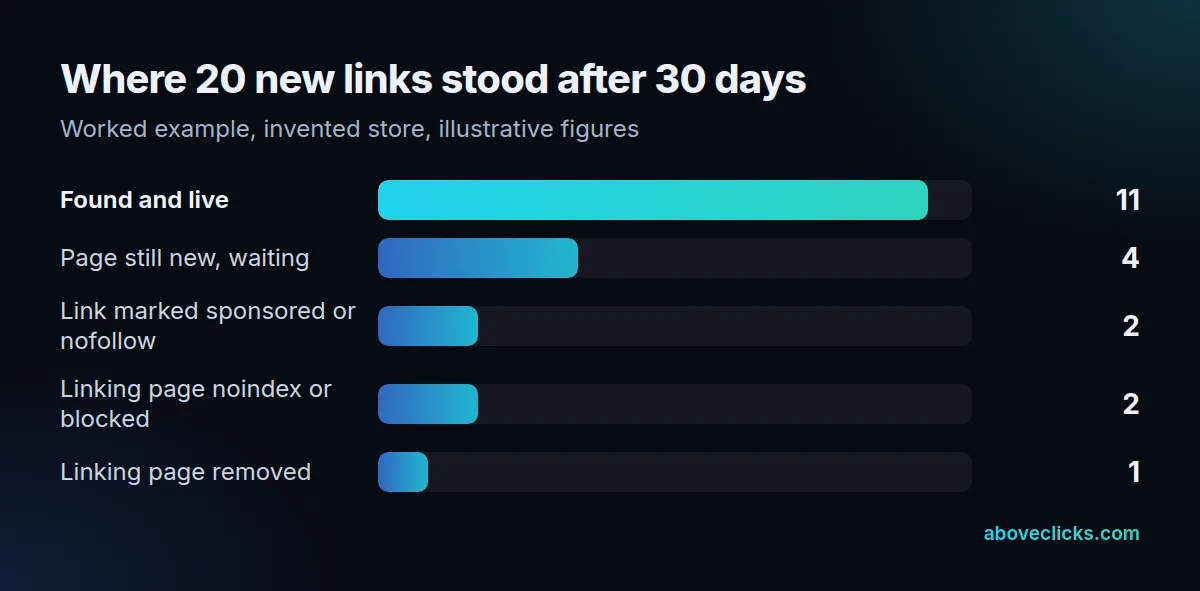
In that example, each group needs a different response: the 4 waiting links get 14 more days, the 2 nofollow or sponsored links are left alone because the link type is right, the 2 blocked pages go back to the site owner, and the 1 removed page is dropped from the plan.
That is how to index backlinks in a way you can audit: each link has a status and a reason. The tracker above is a worked example with invented figures for an illustrative store, not a client result. Of 20 new links, 11 are live and found at day 30, 4 sit on pages that are still new, and 5 have a cause worth fixing or accepting. We apply the same discipline in prospecting: on our link building page we describe fetching and checking every prospect URL before any email goes out.
Why are my backlinks not indexed?
Usually because of something on the linking page, which is why how to index backlinks starts with diagnosis. Six checks explain most cases, and the first four take about 2 minutes each.
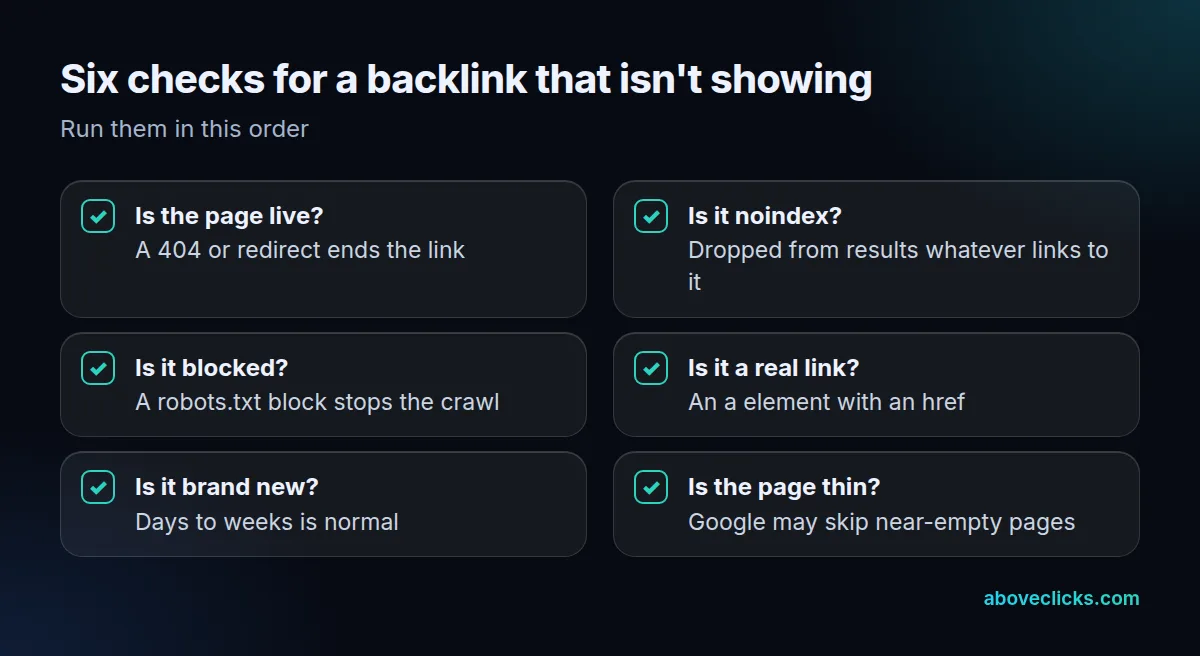
Google’s noindex documentation says a page with a noindex rule is dropped from results regardless of whether other sites link to it. It also says the page must not be blocked by robots.txt for the rule to work, which is why a page can be both blocked and stuck.
Fixing these is the practical answer to how to index backlinks that stalled. Two more causes are less obvious. Links marked sponsored, ugc or nofollow tell Google how to treat the link; Google asks for sponsored on paid links and says nofollow is still acceptable. And a very thin page may be crawled but not kept, so a link on a near-empty page is a weak bet.
How to index backlinks fast?
You can’t force it, but how to index backlinks fast is mostly about removing delays on the pages you control. Speed comes from a link on a page Google already visits often, not from a tool. For how to index backlinks fast on a new store, earn your first links from established sites rather than from new pages that nothing else links to.
Re-check every 14 days rather than every day. Google’s guide says requesting a recrawl several times for the same URL won’t speed it up, so repeated checks only add noise to your tracker.
What helps, in order:
- Get the link on a page that’s already crawled. A mention on an established page is found faster than a new page nobody links to.
- Link to the linking page from your own site where it makes sense, such as a press page or a partners list.
- Submit a sitemap for pages you own. Google’s sitemap overview says a sitemap helps discovery but doesn’t promise every URL is crawled or indexed.
- Ask the site owner to submit the page through their own Search Console if they have one.
People who search for how to index backlinks fast usually find tools that promise a quicker route. A tool that promises indexing within 24 hours has no basis in Google’s documentation, which says crawling takes a few days to a few weeks. The next section shows why that route carries risk.
Should you use a backlink indexing service?
No. When you read how to index backlinks advice that sells a service, remember that Google lists using automated programs or services to create links to your site as link spam, and a service that pings or builds links to force a crawl sits close to that line.
The spam policies name two examples worth knowing: buying or selling links for ranking, and using automated programs or services to create links to your site. A tool that sprays links at your new backlinks adds a third layer of links you didn’t earn. Even if a page gets crawled sooner, a pattern of 50 or 100 junk links pointing at a linking page is the sort of thing a link audit flags later.
The Indexing API is not a workaround either. Google says it can only be used for pages with 2 types of markup, JobPosting or BroadcastEvent embedded in a VideoObject, so it doesn’t cover store, blog or profile pages.
If you inherited a history of bought links, don’t pile more on top, and don’t treat how to index backlinks as a reason to buy more. Our backlink cleanup page explains when a disavow file helps and when it doesn’t, and a free audit shows the risky links already pointing at a store.