The best Shopify designers build stores that load fast, pass basic accessibility checks and can be edited by the owner without them. No list can rank them for your store, so this guide gives you a five-test scorecard instead.
You will see where to find a Shopify designer, how to read a portfolio, when you need a developer as well, and how to compare quotes. We name no designers and quote no market prices.
Who are the best Shopify designers?
The ones whose past stores pass five tests that matter for a store like yours. A ranking nobody can reproduce isn’t evidence, so rate each candidate yourself.
The five tests:
- Speed: their live stores load fast on a phone.
- Editing: your team can change pages without calling them.
- Accessibility: the stores work with a keyboard and pass basic checks.
- Fit: they have designed for a catalog like yours.
- Handover: you get documentation, files and a bug-fix window.
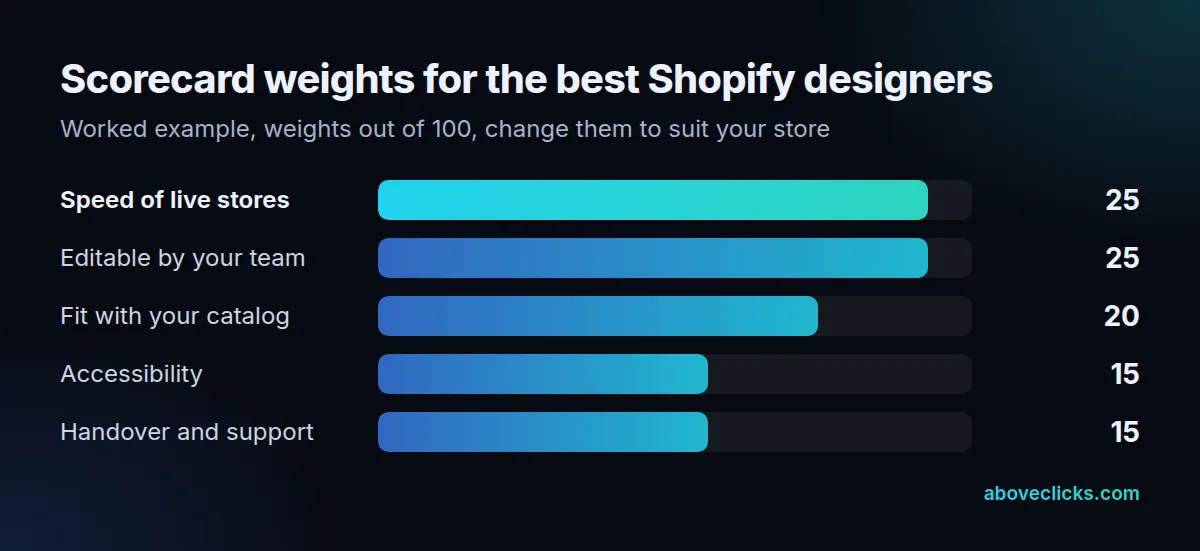
The weights above are a worked example. A store that lives on paid traffic might raise speed to 30, while a store with a small team might raise editing. Whatever you choose, make the weights add up to 100 before you meet anyone, so a charming call doesn’t change the scoring afterwards.
Here’s a worked example with two invented designers. Designer A scores 20 of 25 on speed, 15 on editing, 15 on fit, 10 on accessibility and 12 on handover, which is 72. Designer B scores 10, 25, 18, 12 and 15, which is 80. Designer B wins even though A’s portfolio looks flashier, because the owner can edit B’s work.
Where do you find a Shopify designer?
In Shopify’s Partner Directory, through people you know, or in a search for freelancers, a Shopify design agency or a small studio. The source matters less than the proof you ask for.
As of November 2026, Shopify’s Partner Directory lists more than 30 services and lets you narrow the search by price, location and service. Its own steps are browse, evaluate and contact: the evaluate step shows reviews, work samples and certifications. It also says the partners listed work independently, so Shopify isn’t vouching for any one of them.
Treat a directory profile as a lead, not a verdict. Ask every candidate, wherever you found them, for the same things:
- Three links to live stores, not screenshots.
- What they designed on each, and what someone else built.
- One client you can contact, or a written reference.
- A written scope for the same three templates, so you can compare quotes.
If you know Shopify designers near you, ask them too. A local designer helps with meetings, but a remote designer with strong live stores beats a weak one in your town.
Do you need a Shopify designer or a developer?
Often both, but not always from different people. A designer decides how the store looks and flows; a developer builds what the theme can’t do on its own.
On Shopify’s current themes, the line has moved. Shopify’s theme architecture says JSON templates act only as a wrapper for sections, and sections are reusable modules that you can add to those templates. Blocks sit inside the sections. So a designer who works with sections and blocks gives you a store you can rearrange in the theme editor, while a designer who edits theme code directly leaves you waiting for them.
Shopify’s Help Center describes the same split: use the theme editor for settings and content, and edit code only when the theme has no setting for the change.
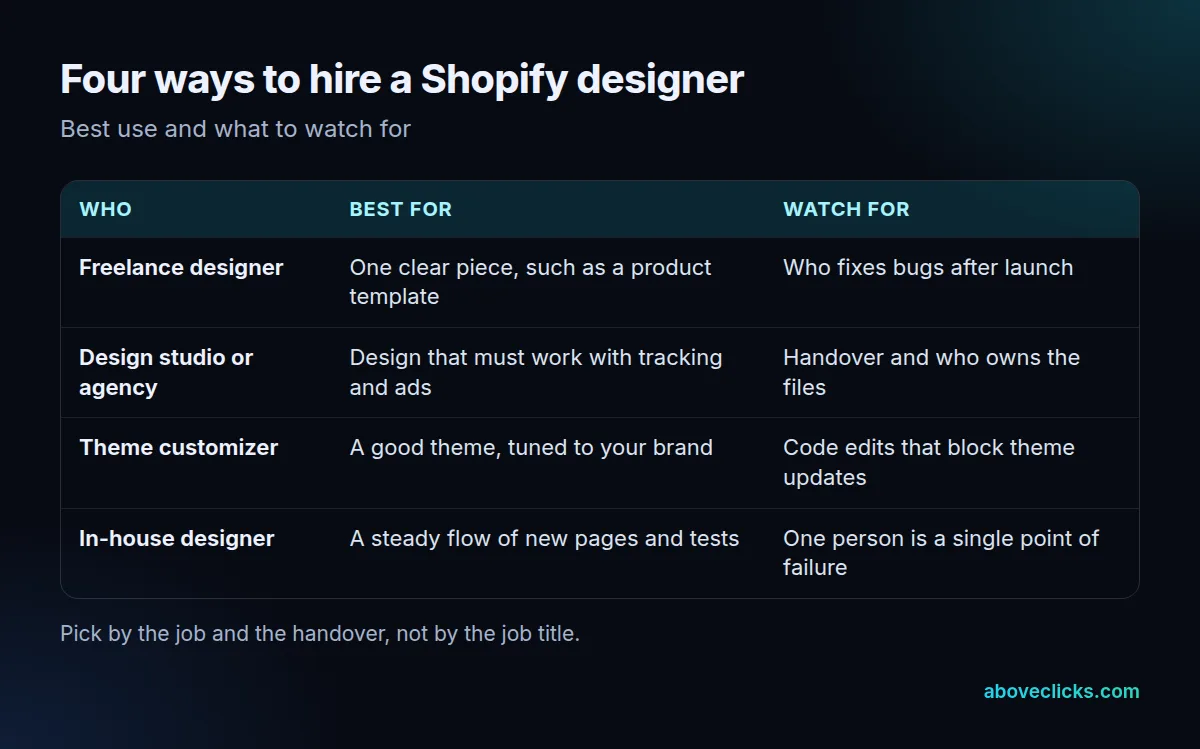
In our own Shopify development work, we build changes on a duplicate of the live theme, keep edits in sections and blocks rather than theme files, and write down what we built and how to edit it. Our scope comes within 2 workdays and a build takes 2 to 4 weeks depending on size. Ask any Shopify designer how they work on those three points.
What should a Shopify designer’s portfolio show?
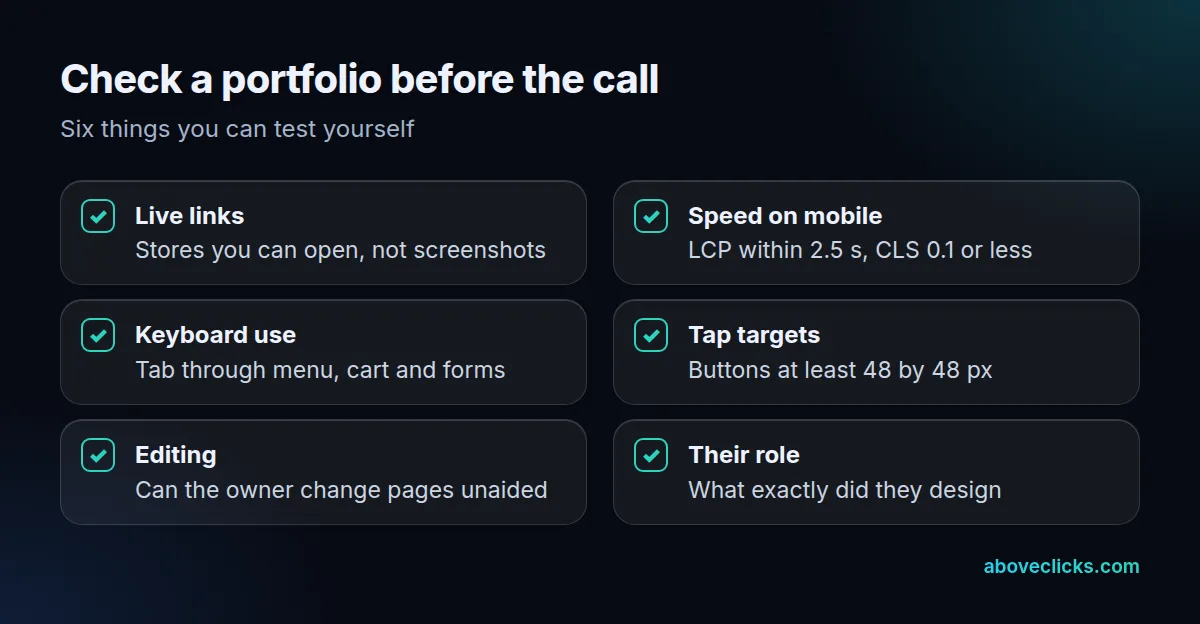
Live stores that are fast on a phone, usable with a keyboard and clear about who did what. Screenshots prove nothing about speed.
Open each store on your phone and run it through PageSpeed Insights. Google’s Web Vitals guide says a good experience means Largest Contentful Paint within 2.5 seconds, Interaction to Next Paint of 200 milliseconds or less and Cumulative Layout Shift of 0.1 or less. One store missing the mark can be the client’s apps. A pattern across three stores is the designer.
Two more checks come from Shopify’s own guides, last read in November 2026:
- Performance guide: never lazy-load the LCP image, and make interactive elements at least 48 by 48 px on mobile.
- Accessibility guide: every link, button, dropdown menu and form control must work with a keyboard, with a visible focus indicator.
Shopify also sets a floor for the themes it sells. Its Theme Store requirements ask for a minimum average Lighthouse score of 60 for performance and 90 for accessibility across the home, collection and product pages, on desktop and mobile. A designer who can’t reach that on their own sites has a gap worth asking about.
How do you compare Shopify designers side by side?
Give all your Shopify designers the same brief, score each against the same five tests, and compare the totals and the quotes together. A cheap quote with a weak handover isn’t cheap.
Use the same three templates in every brief, for example the home page, a collection page and a product page. Ask each candidate to list what is included for each: mobile layout, a revision round, accessibility checks and the handover document.
Then score every Shopify designer with the weights you set. Anyone under 60 out of 100 is out. If the top two are within 5 points, let the handover decide, because that is what you live with after launch.
After the scoring, check the gap between the stores they show you and the store you would get. The best Shopify designers can explain what they would change on your current theme, in plain words, within a week of seeing it. Ask each of your shortlisted Shopify designers for a 1-page note on your home page, your collection template and your product page. A designer who can’t say anything specific about your store after 7 days will not say it after launch either.
Our questions to ask a marketing agency guide has a longer list for the call; most of it applies to a Shopify design agency as well.
Which traps cost the most when you hire a Shopify designer?
Handing over design with no way to edit it, paying for looks that slow the store, and signing without a bug-fix window. Each of these shows up after launch, when changing course is dearest.
The five we would check first:
- A beautiful hero that is slow. Fade-in and reveal animations delay the LCP event even after the image has downloaded, according to Shopify’s performance guide. Ask to see the hero on a phone.
- Code edits in the theme files. Every future theme update then becomes a manual merge. Ask where each custom change lives.
- No keyboard or tap test. A menu that opens only on hover locks some visitors out, and buttons smaller than 48 by 48 px cause mis-taps on a phone. Tab through the cart on a candidate’s live store before you call.
- App-heavy answers. If a designer reaches for an app for every feature, ask what each one loads on every page. Removing unused apps is often the quickest speed win we see.
- A vague scope. “Redesign” without a template list lets the quote grow. Count the templates, name them and fix the revision rounds.
A Shopify designer who welcomes these checks is usually a good sign. One who dodges them tells you something too, and it costs you nothing to find out before the deposit. The best Shopify designers show you their weakest live store as readily as their best one, and the best Shopify designers also tell you what they would not do.
What does it cost to hire a Shopify designer?
It depends on the scope, the number of templates and whether the quote is fixed or hourly. We don’t give market ranges here, because they move and no primary source publishes one.
Compare quotes by dividing each by the templates delivered. Here is a worked example with invented numbers. Quote A is a fixed $2,400 for 3 templates with one revision round, which is $800 a template. Quote B is $55 an hour for an estimated 40 hours, or $2,200. But B leaves out the mobile pass, and adding 12 hours makes it 52 hours and $2,860, or about $953 a template.
B looked $200 cheaper and ended up $460 dearer. Always ask what is missing from an hourly estimate.
For real price ranges by build level, read our guides on how much a Shopify website costs and Shopify store development cost. Before you sign, make sure the contract covers four things:
- A build on a duplicate theme, so the live store never breaks mid-edit.
- Files and fonts handed over in your name.
- A bug-fix window of 30 days or more after launch.
- A written note of every code edit made outside sections and blocks.
If you want a second opinion on your current theme before hiring anyone, our free audit reviews the theme, apps and setup and sends a PDF report. More hiring guides are in buying guides.