Abandoned cart email examples are sample messages sent to shoppers who started checkout and did not pay. Below are three you can copy for your own store, with the timing, subject lines, margin check and rules that decide whether each one should go out.
All three examples are written for a hypothetical store that sells leather bags. They are our own wording, not copies of any brand’s emails, so adapt the details to your products and tone. Treat them as abandoned cart email templates to edit, not text to paste unchanged.
What is an abandoned cart email?
An automated email that reaches a shopper who gave their email address, put items in the cart and left without paying. It carries a link back to that cart.
Most carts are never paid for. Baymard Institute puts the average documented abandonment rate at 70.22% across the studies it collected (page updated September 22, 2025), so even a small recovery rate matters. Abandoned cart email examples only help if the flow behind them is set up well.
On Shopify, a checkout counts as abandoned when it stays incomplete for more than ten minutes after the customer has entered their email. Without an email address there is nobody to write to.
What do good abandoned cart email examples look like?
Good ones do one job each: remind, answer a doubt, then make a limited offer. Here are three abandoned cart email templates that follow that order.
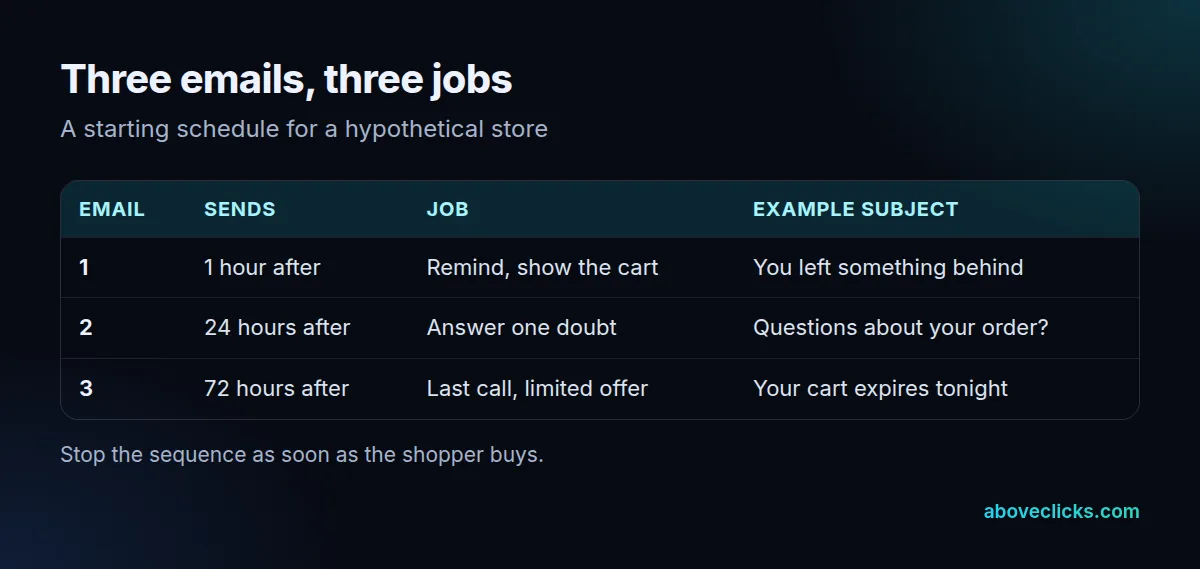
Email 1: the reminder (about 1 hour after). Subject: “You left something behind”. Preview: “Your cart is saved for you”. Body: “Hi Sam, you left the Harbor Tote in your cart. It’s still saved. Pick up where you stopped.” Then the product image, the name, the size and the color, and one button: “Return to my cart”. No discount, no pressure.
Email 2: the doubt (about 24 hours after). Subject: “Questions about your order?”. Body: “Still deciding? Here is what people ask before they buy: free returns within 30 days, delivery in 3 to 5 days, and the leather is full grain. Reply to this email and we’ll answer within one workday.” Use only terms your store really offers. The aim is to remove the doubt, not to add urgency. Of the three abandoned cart email templates, this one is the easiest to get wrong, because a vague answer looks like a sales line.
Email 3: the last call (about 72 hours after). Subject: “Your cart expires tonight”. Body: “Your Harbor Tote is still in your cart, but we can’t hold the stock any longer. Use code BACK10 for 10% off, valid for 48 hours.” Only say the cart expires if it really does, and only add the code when the margin check below allows it.
Those abandoned cart email flow examples are deliberately plain. The first email has 0 offers, the second has 0 offers and only the third has 1. They work because the shopper sees the exact product left behind, so the email feels like a service and not a campaign.
How many abandoned cart emails should you send?
Three at most. The first reminds, the second answers a doubt and the third is the last call. More than that reads as pressure, and each extra email adds more unsubscribes than orders.
This is also the limit on our abandoned cart recovery setups: a shopper receives no more than three messages, and a purchase stops the rest of the sequence. If you add SMS or WhatsApp, count it inside the same three.
Not every shopper needs the same path. A first-time visitor with a $60 cart and a returning customer with a $300 cart have different doubts, so a store with enough volume can split the flow by cart value or customer history. Start with one path and split it once it runs cleanly. Your abandoned cart email templates then grow from 3 emails to 3 emails per path, which is why we keep the first version small.
When should you send abandoned cart emails?
Early for the first one, then with a growing wait. Most abandoned cart email flow examples use a starting schedule of 1 hour, 24 hours and 72 hours after the checkout stopped. Treat it as a starting point and test it against your own abandoned cart email examples.
In Klaviyo the flow is triggered by a metric such as Started Checkout or Added to Cart, and the cart details come in as event variables. Time delays decide the spacing: components placed back to back with no delay all happen at the same moment, so add a wait between every email.
Shopify’s own automation lets you pick which visitors receive the email and how long to wait first. Keep the first wait short, because the shopper still remembers the cart. If you sell high-value items with a long decision time, move the second and third emails later, for example 48 and 96 hours.
Which subject lines work for abandoned cart emails?
Short, plain ones that name the cart or ask a question. Aim for under 50 characters so the full line shows on a phone, and write the preview text as the second half of the sentence.
Here are abandoned cart email subject lines for each of the three emails:
- Email 1: “You left something behind”, “Your cart is saved”, “Still thinking about the Harbor Tote?”
- Email 2: “Questions about your order?”, “Free returns on your cart”, “Need help choosing a size?”
- Email 3: “Your cart expires tonight”, “Last call for your Harbor Tote”, “10% off, for 48 hours”
Test one change at a time on your abandoned cart email subject lines, and give each version enough sends to compare. With a few hundred checkouts a month, a subject test needs weeks to show a real difference, so do not declare a winner after two days.
Strong abandoned cart email subject lines stay under 50 characters and say what is in the cart. Avoid all capitals, several exclamation marks and a fake “Re:” prefix. They look like spam and they mislead, which the FTC rules below treat as a problem.
How do you send abandoned cart emails in Shopify or Klaviyo?
Turn on Shopify’s automatic abandoned checkout email, or build a three-step flow in Klaviyo. Shopify is quicker to set up; Klaviyo gives more control over wording, timing and who gets which path.
In Shopify, choose who receives the email, how long to wait and customize the template. Shopify won’t send a recovery email if the customer completes a sale first, if the payment failed with a processing error, or if the checkout was blocked as high risk. It also deletes abandoned checkouts older than 3 months from the admin, so copy any you need within 3 months.
In Klaviyo, you can start from a ready-made abandoned cart email template or flow, set the trigger, then add the three emails with a delay before each one. Use the event variables to show the product name, image and cart link in the first email. If you need help with the build, see our Klaviyo email marketing service, or read how email marketing is priced before you choose a tool.
Do abandoned cart email templates work, and how do you measure them?
They can, but only a test shows how much. Compare orders from shoppers who got the sequence with orders from a small group who did not. A holdout of 10% of eligible carts shows how many buyers would have returned on their own.
Report three numbers for each full month: checkouts that received an email, orders placed after a click, and revenue from those orders. Read them as flow-level results. With 1,000 contacted checkouts a month, a change of 5 orders is within normal swings, so wait for 3 or more full months before you decide that one set of abandoned cart email examples beat another.
Keep notes on what changed and when, for each of your abandoned cart email templates. If you edit the subject line, the delay and the offer in the same week, you cannot tell which one moved the result. Change one thing, wait for at least 4 weeks of sends, then change the next.
What rules apply before you send?
Treat every recovery email as marketing email. The FTC’s CAN-SPAM guide requires a valid physical postal address, a clear way to opt out and prompt handling of opt-outs.
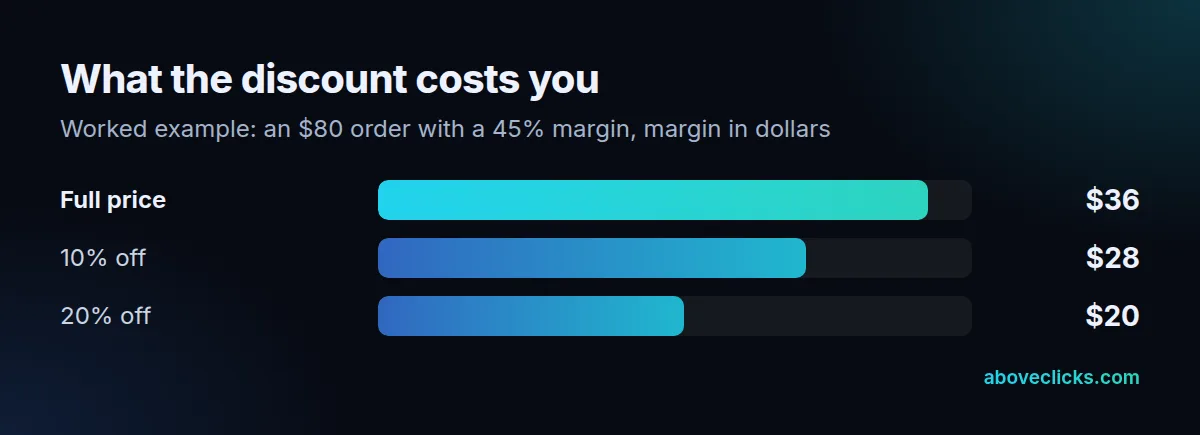
The discount in email 3 needs a margin check first. Example: an $80 order at a 45% margin earns $36. At 10% off it earns $28, and at 20% off it earns $20, so the deeper offer cuts the margin by more than 40%. If the shopper would have bought anyway, you gave that margin away. This is why we keep offers for the last email, and only for carts where the numbers work.
The FTC says an opt-out mechanism must keep working for at least 30 days after you send, and you must honor a request within 10 business days. We are not lawyers: use this as a checklist and ask counsel for your own case.
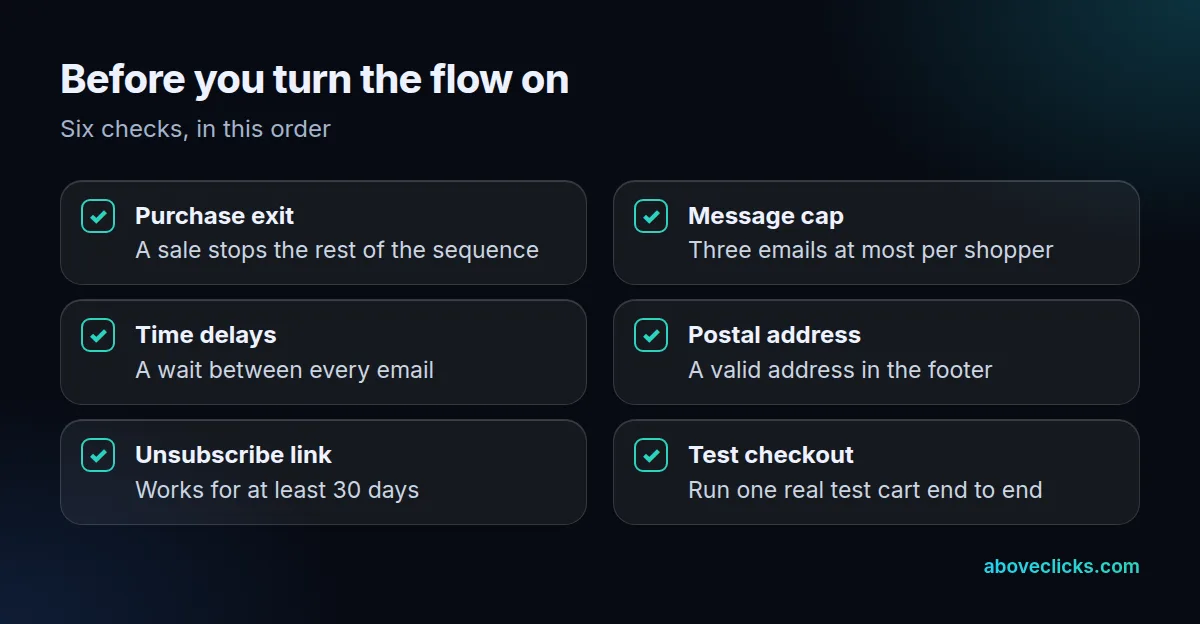
Run one real test checkout before launch. Put an item in a cart with a test address, wait for each email and click every link. Check that the cart restores, the product shows and the unsubscribe link works. More guides are in the e-commerce SEO and email topic hub. For a second opinion on a live flow, our free audit reviews cart and checkout emails and sends a PDF report.