The Measurement Protocol is a Google Analytics 4 API that lets a server send events straight to GA4 over HTTP, such as refunds, subscription renewals or in-store sales. Google built it to supplement the tags on a website or app, not to replace them.
The Measurement Protocol is a Google Analytics 4 API that lets a server send events straight to GA4 over HTTP, such as refunds, subscription renewals or in-store sales. Google built it to supplement the tags on a website or app, not to replace them.
What is the GA4 Measurement Protocol used for?
Events that happen away from the browser. Google’s Measurement Protocol overview names server-to-server and offline interactions, and events outside normal user interaction, such as offline conversions.

For a store, the classic case is a refund issued in the admin 9 days after the order: no browser is open, so only a server can tell GA4. Each event carries the visitor’s client_id, which GA4 uses to join it to the device, location and ad click data its tag already collected. To tie an event to a specific session’s data instead of the latest, include session_id and send within 24 hours of the session start. Google stresses the point: “The intent of the Measurement Protocol is to augment automatic collection through gtag, Tag Manager, and Google Analytics for Firebase, not to replace it.”
What does a Measurement Protocol request need?
A measurement ID and api_secret in the URL, a client_id, and up to 25 events in a JSON body under 130kB. Google’s sending events guide adds that events can be backdated up to 72 hours.
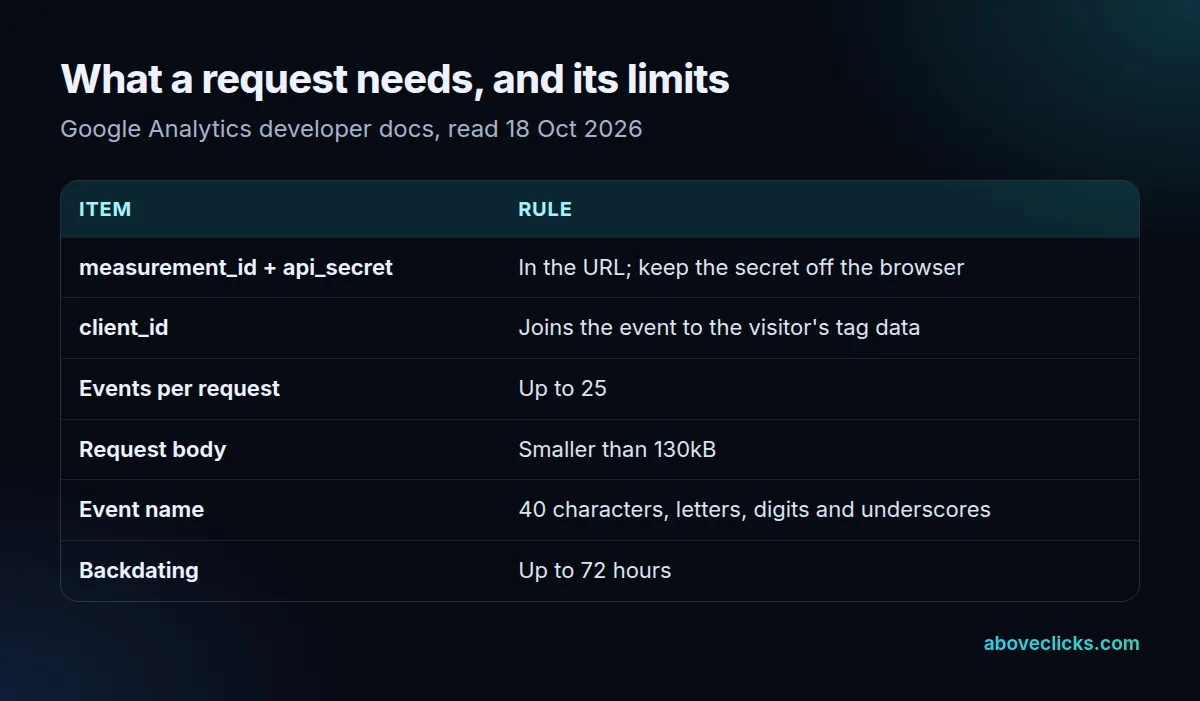
The api_secret is private: Google warns not to expose it in website code, because anyone holding it can send spam events into your property. Event names follow the same rule as tags, 40 characters at most per Google’s event limits, letters, digits and underscores only.
Does the validation server catch every mistake?
No. Google offers a debug endpoint that checks payloads without recording them, and on 18 October 2026 we sent it 8 test payloads with dummy credentials.
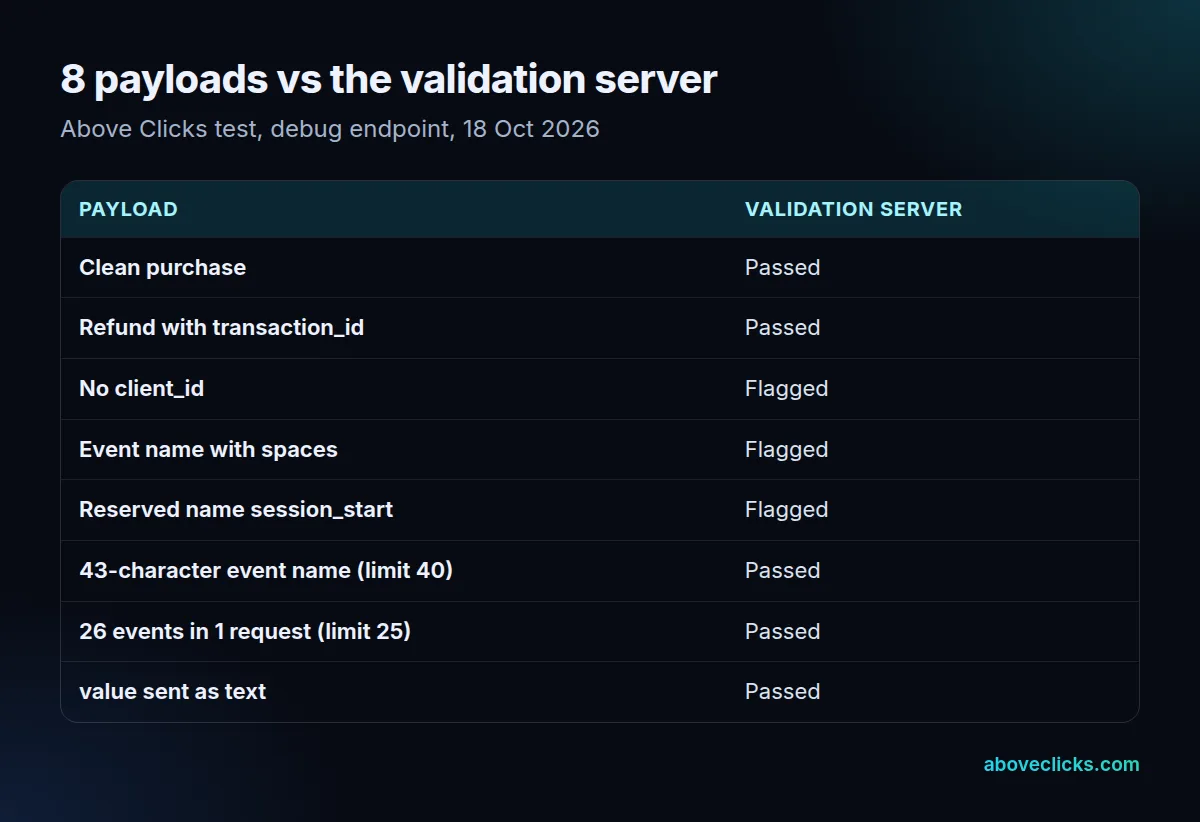
It flagged 3: a missing client_id, an event name with spaces (add to cart), and the reserved name session_start. It passed a clean purchase and a refund, as it should, but it also passed 3 payloads that break Google’s documented limits: a 43-character event name, 26 events in 1 request and a purchase value sent as the text 48 USD. An empty result only means none of the checked rules was broken, not that GA4 will process the event, so enforce lengths, counts and number types in your own code.
Before you build one
Google says the Measurement Protocol is mature, with no plans for deprecation, but recommends the Data Manager API for new server-to-server integrations. Either way, send the same transaction_id your GA4 ecommerce events use, so a refund cancels the right purchase: a $48 refund sent with transaction_id T_1001 reduces the revenue of order T_1001, not a new, orphaned order.
Test against the validation endpoint first, then with a real event in GA4’s DebugView, and log every request your server sends for at least 72 hours, the backdating limit, so a failed batch can be resent in time. If you need server-side events for ad platforms too, server-side tagging may fit better. Our server-side tracking service builds and tests both, and the tracking and analytics hub covers the rest.